CHRISTMAS DEAL: Get 6 months free on all Yearly Plans (50% off).

0

Days

12

Hours

30

Mins

52

Secs

Real Estate Listing Generator

Craft an alluring property listing utilizing the given details for optimal appeal in the real estate market.

Real Estate Listing

Learn how toprovide details about the property, including location, features, and any unique selling points

Optional

ocean view
modern
open floor plan
master suite
balcony
Pacific Heights
Login to generate for free

With the Real Estate Listing template, you can quickly put together property listings that actually convert, without spending hours stuck writing and rewriting.

How It Works

The template basically walks you through all the important parts of a strong listing, like:

  1. Headline
  2. Attention-grabbing hook
  3. Main highlights of the property
  4. Attractive features of the neighborhood
  5. Clear calls to action

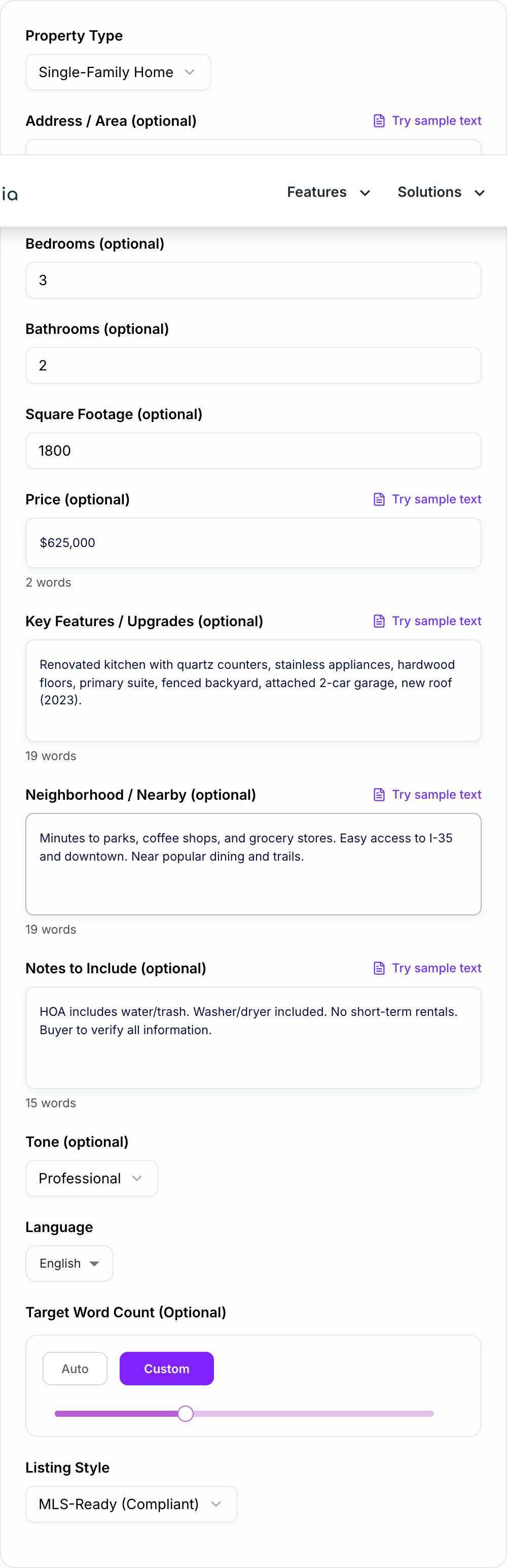
You just plug in a few details, things like:

  • Property type
  • Location
  • Key features
  • Pricing information
  • Desired tone

Once you’ve filled everything in, Junia AI turns it into a clean, polished listing that’s ready to publish pretty much anywhere.

Versatile Applications

You can use it for listings on websites, popular property portals like Zillow, Realtor.com, Rightmove, or other platforms, plus email campaigns, social media posts, and even print flyers if you want. The template keeps your messaging consistent, helps with search visibility, and makes it easier to attract more leads.

What Is a Real Estate Listing Generator?

A Real Estate Listing Generator is an AI-powered tool that writes full, ready-to-use property descriptions and marketing copy for you, using just a few simple inputs. Instead of staring at a blank screen, you just enter info like:

  • Property type (single-family home, condo, townhouse, luxury villa, apartment, commercial space, land, etc.)
  • Location (city, neighborhood, community, nearby landmarks)
  • Key features (bed/bath count, square footage, lot size, upgrades, amenities)
  • Target audience (first-time buyers, investors, downsizers, luxury buyers, renters)
  • Pricing details and offer terms
  • Brand voice and tone (professional, friendly, luxury, urgent, casual)

The Real Estate Listing Generator inside Junia AI uses what you give it to create optimized, persuasive listing descriptions that fit different platforms and formats. It’s made for real estate agents, brokers, property managers, realtors, and investors who need solid real estate listing descriptions quickly and on a regular basis.

Because it is an AI real estate listing writer, it can create:

  • Long-form property descriptions for MLS and listing portals
  • Short, punchy blurbs for social media and ads
  • SEO-friendly website copy for listing pages and landing pages
  • Email subject lines and body copy for new listing announcements
  • Flyer and brochure copy for open houses and print marketing

Why Use a Real Estate Listing Generator?

Using a Real Estate Listing Generator like the one in Junia AI helps you save time, look more professional, and pull in more qualified buyers and renters. Instead of burning an hour or more on one description, you can generate multiple polished versions in minutes and spend your energy on showings, negotiations, and closing deals.

Key reasons to use an AI real estate listing generator:

1. Speed and efficiency

  • Create a full listing description in minutes instead of an hour or more
  • Produce multiple variations for A/B testing on portals or ads
  • Quickly update listings when price, features, or status change

2. Consistent branding and tone

  • Keep your voice, style, and messaging aligned across all your listings
  • Maintain a professional, polished tone that builds trust with buyers and sellers
  • Use different tones (luxury, family-friendly, investor-focused) depending on the property type

3. Higher-quality copy that converts

  • Built-in structure for compelling real estate headlines and hooks
  • Highlights benefits, not just features, so you get more inquiries and showing requests
  • Strong calls to action that nudge buyers to book a tour or contact you

4. SEO-optimized real estate listings

  • Naturally works in real estate SEO keywords like “homes for sale in [city]”, “waterfront property,” or “luxury condo”
  • Helps your property listing descriptions rank better on your own website and blog
  • Can create variations that target long-tail phrases people really search for, like “3 bedroom house with backyard in [neighborhood]”

5. Perfect for multiple platforms

  • Tailors content for Zillow listings, Realtor.com listings, Rightmove properties, and other portals
  • Adjusts length and format for Facebook, Instagram, TikTok, LinkedIn, and Google Ads
  • Generates short listing copy for MLS entries and more detailed versions for your own site

Using a real estate description generator wipes out writer’s block, keeps your marketing consistent, and helps you create listing copy that feels like it came from an experienced real estate copywriter, even if you’re rushing between appointments.

What Are Good Real Estate Listings?

Good real estate listings don’t just list out a property’s specs. They sell the lifestyle, answer buyer questions, and make it super easy for someone to take the next step. A strong listing is persuasive and clear, and it’s also optimized for both people and search engines.

Core elements of a good real estate listing:

  1. Compelling headline
  2. Hooking opening sentence
  3. Clear property details
  4. Lifestyle and benefits, not just features
  5. Well-structured and easy to skim
  6. Honest, accurate information
  7. Strong call to action
  8. SEO-friendly phrasing

The Real Estate Listing Generator inside Junia AI is built specifically to make sure you hit all of these points, so every listing you create is complete, persuasive, and ready to bring in more views and leads.

How to Write a Good Real Estate Listing

Whether you’re using an AI listing generator or doing it from scratch, writing a high-converting real estate listing description usually follows the same kind of structure. The template in Junia AI is based on this best-practice flow.

1. Start with a powerful, keyword-rich headline

  • Include the property type: house, condo, townhouse, duplex, apartment, loft, commercial space
  • Use at least one main selling point: pool, views, renovated kitchen, large lot, garage
  • Mention the location or neighborhood: “Home for sale in [Neighborhood/City]”

Example:

“Updated 3-Bedroom Family Home with Large Backyard in Sought-After [Neighborhood]”

This helps boost clicks and real estate SEO, since a lot of buyers search using property type plus city or neighborhood.

2. Hook the reader with the first 1–2 sentences

Use your opening lines to paint a quick picture or share the biggest benefit:

  • “Step into this sun-filled corner condo with skyline views and modern finishes…”
  • “Tucked away on a quiet cul-de-sac, this move-in-ready home offers space, privacy, and convenience…”

The Real Estate Listing Generator uses the details you put in to build a strong opening hook that stands out on crowded listing portals.

3. Highlight key property features in a logical order

Move from the most important basics to the extra details:

  • Basics: beds, baths, size, layout
  • Interior: kitchen, living areas, flooring, lighting, storage, home office options
  • Exterior: yard, patio, balcony, garage, parking, curb appeal
  • Systems and upgrades: HVAC, roof, windows, insulation, smart home features

Use bullet points so it’s easier to skim, especially on Zillow, Realtor.com, Rightmove, and MLS listings where people scroll fast.

4. Highlight the neighborhood and lifestyle

Buyers care about more than just the house. They want the location and the lifestyle too. Here’s how you can sell that part:

1. Talk about nearby attractions

Mention schools, universities, parks, trails, beaches, or lakes close to the property. That helps buyers picture what’s actually around them.

2. Discuss transportation options

Let buyers know how they can commute. Talk about public transit routes, major highways, and bike paths that make getting around easier.

3. Showcase local businesses and entertainment

Point out restaurants, cafes, gyms, shopping centers, and entertainment spots nearby. It gives buyers a feel for how active or convenient the area is.

4. Describe the atmosphere of the neighborhood

Share if the neighborhood is quiet and residential, trendy and walkable, family-oriented, or more urban and energetic. That helps people imagine their daily life there.

Using specific phrases like “home for sale in [Neighborhood]”, “walkable to [Landmark]”, or “minutes from [Transit/Highway]” in your listings can also boost your local SEO (Search Engine Optimization).

5. Address your target buyer or renter directly

Make it clear who the property is best for:

  • First-time buyers
  • Growing families
  • Downsizers or empty nesters
  • Investors (short-term rental, long-term rental, multi-unit)
  • Professionals needing a home office or easy commute

The Real Estate Listing template in Junia AI can tweak tone and content for each type of audience, whether it’s a luxury real estate listing, an investment property listing, or a rental listing description.

6. Use clear, persuasive, yet natural language

  • Try not to lean on clichés like “won’t last long” over and over
  • Focus on real, concrete selling points instead of vague hype
  • Use positive, descriptive adjectives (bright, airy, spacious, cozy, modern, well-maintained)
  • Keep sentences readable and avoid giant walls of text

The AI real estate listing generator helps you stay professional and clear without sounding robotic or super repetitive.

7. Add a strong call to action

Wrap up with a direct next step:

  • “Schedule your private showing today.”
  • “Contact us for more details or to arrange a tour.”
  • “Reach out to learn more about this rare opportunity in [Neighborhood].”

These calls to action push people from just looking at the listing to actually reaching out, which is really the whole point of an optimized property description.

Use Cases

Discover how this tool can be used in various scenarios

  • Residential Property Listings

    Generate polished descriptions for houses, apartments, condos, and townhomes, emphasizing layout, upgrades, outdoor space, schools, and neighborhood lifestyle.

  • Rental & Lease Listings

    Create clear, attractive listings for rentals that include rent, deposits, lease terms, utilities, pet policies, and nearby conveniences to attract quality tenants quickly.

  • Luxury & High-End Properties

    Produce sophisticated, aspirational copy for luxury homes, penthouses, or villas that highlight exclusivity, premium finishes, and high-end community amenities.

  • Commercial & Office Spaces

    Write focused descriptions for offices, retail units, warehouses, and mixed-use spaces that emphasize square footage, zoning, accessibility, and business potential.

  • Short-Term & Vacation Rentals

    Craft engaging descriptions for Airbnb, Vrbo, or holiday rentals that showcase unique features, local attractions, and guest experiences to increase bookings.

  • New Developments & Off-Plan Projects

    Describe new-build projects and units with consistent, professional copy that covers floor plans, amenities, investor benefits, and phased completion details.

  • Social Media Property Posts

    Turn a full listing into concise, scroll-stopping posts for Facebook, Instagram, LinkedIn, or TikTok with attention-grabbing hooks and clear calls-to-action.

  • Email & Newsletter Campaigns

    Generate listing summaries for email blasts or newsletters that quickly convey key selling points and drive traffic to full listings or landing pages.

Benefits

  • Save time on every listing
    Turn your basic property info into a polished listing in just a few clicks, so you can spend more time on showings and actually closing deals instead of sitting there writing.

  • Consistent, professional tone
    Make sure every property description sounds like your brand. You can keep it more formal, or friendly, or kind of luxury and high-end, whatever your style is, and it stays the same across all your listings.

  • Highlight what matters most
    The template reminds you to pull out the big selling points like the location, the amenities, any upgrades, and nearby places people care about, so you do not forget anything important.

  • SEO-friendly copy
    Write descriptions that use the right keywords for your market, so your listings are easier to find in search engines and on all the listing sites people scroll through.

  • Adaptable for multiple channels
    Start with a full detailed listing, then quickly tweak it for social media, email, printed brochures or even a short SMS, without having to rewrite everything from zero.

  • More engaging, persuasive content
    Use benefit focused language and simple clear calls to action that nudge buyers and renters to reach out, ask questions, or set up a showing.

Who's this tool for?

Real Estate Agents & Brokers

Professionals who need to write multiple property listings every week and want to maintain a consistent, persuasive style across MLS, portals, and their own websites.

Property Managers

Managers handling multiple rental units who want fast, standardized descriptions that highlight amenities, policies, and neighborhood benefits for prospective tenants.

Real Estate Agencies & Teams

Brokerages and teams that want unified, brand-aligned listing copy across all agents and marketing channels without heavy manual editing.

Landlords & Property Owners

Individual owners listing their homes, apartments, or investment properties who need professional-quality descriptions without hiring a copywriter.

Real Estate Marketers

Marketing professionals creating campaigns, ads, and landing pages for properties who need clear, engaging, and conversion-focused listing content.

Developers & New-Build Sellers

Builders and developers promoting new constructions or off-plan projects who need multiple listings that clearly communicate layouts, features, and lifestyle appeal.

Why Choose Our Real Estate Listing Generator?

Junia AI made the Real Estate Listing template to take away the most boring and repetitive part of property marketing, which is writing and rewriting all those descriptions over and over.

So instead of staring at a blank page every time you have a new listing, you just put in your property details and pretty much right away you get a polished draft. It’s already shaped to fit your target audience, your area, and whatever platform you’re using. The template is meant to:

  • Standardize quality for different agents, properties, and all your channels.
  • Reduce editing time by giving you clean text that is almost ready to use from the start.
  • Support SEO and visibility with a structure and wording that keep keywords in mind.
  • Scale your listings as your portfolio gets bigger, without needing more copywriting help.

So yeah, whether you handle just one property or like hundreds of them, this template helps you market them better, bring in more serious leads, and keep your brand looking professional pretty much everywhere you post your listings.

Frequently asked questions
  • The Real Estate Listing Generator is a template powered by Junia AI that helps real estate agents, property managers, landlords, marketers, developers, and agencies quickly come up with engaging and keyword rich property listings. It basically makes the whole process of writing professional descriptions easier and faster, and it can be adjusted for different kinds of properties and a bunch of marketing channels too.
  • When you take all the basic property info and run it through the generator, it quickly turns it into clean listing text that is pretty much ready to publish in just a few clicks. So you don’t have to spend hours writing it all by hand anymore. It also reminds you to add important stuff like a headline, the best features, what’s good about the neighborhood, and a call to action, so yeah, your content stays pretty consistent and efficient across different platforms.
  • Yes, the template makes descriptions that are packed with good keywords for your market, so it can help your place show up better in search engines. It also tweaks and adjusts the content for different places like MLS portals (Zillow, Realtor.com), social media posts, email campaigns, brochures, and regular print flyers too, and it keeps the message pretty consistent and focused on getting more leads.
  • You can make really appealing listings for all kinds of places like regular homes, rentals, fancy luxury properties, business or commercial spaces, short vacation rentals, new developments and even off-plan projects too. The tool also works with different types of formats, like longer website listings, short and snappy social media posts, email newsletters and also things you want to print out for marketing and stuff.
  • The template lets people choose the kind of tone they want to use, like if they want it to sound more formal, or friendly, or maybe sort of fancy and luxury focused. Then it uses that same style for all the content it makes. This way the writing stays on brand and usually only needs a little bit of editing, even when lots of different agents or team members are working on the listings.
  • Junia AI’s template keeps your listings at a steady quality level and cuts down a lot on editing time, because it gives you clean, ready to use text right from the start. It also follows SEO best practices to help your stuff show up better online and it can easily keep up as your portfolio gets bigger, all without needing extra copywriters or anything, so you can bring in more good leads in a pretty efficient way.