
Free Icebreaker Questions Generator
Generate thoughtful icebreaker questions for team meetings, classrooms, workshops, networking events, remote calls, parties, and social gatherings. Choose the group type, tone, sensitivity level, question style, topics to avoid, and count to get prompts that feel natural instead of awkward.
Icebreaker Questions
Your icebreaker questions will appear here...
How the AI Icebreaker Questions Generator Works
Get results in seconds with a simple workflow.
Pick the Setting and Group Type
Choose where you’ll use the icebreakers (work, networking, classroom, party) so the questions match the context and feel appropriate.
Choose Style, Tone, and Sensitivity
Select a question style (mixed, would-you-rather, this-or-that), set the tone, and choose a sensitivity level to avoid awkward or overly personal prompts.
Generate and Use Immediately
Get a clean list of icebreaker questions ready to paste into your agenda, slides, or chat. Regenerate for more variations until you find the perfect set.
See It in Action
Example of generating icebreaker questions tailored to a remote team meeting with safe, inclusive prompts.
Need some icebreakers for a Zoom team meeting. Make them not awkward.
- What’s one small win you had last week (work or personal)?
- If you could instantly become great at one skill, what would you pick?
- What’s a book, show, or podcast you’ve enjoyed recently?
- This or That: coffee or tea?
- What’s a tool or shortcut that saves you time at work?
- Would you rather have an extra hour of focus time daily or an extra day off monthly?
- What’s one thing you’re looking forward to this week?
- If your week had a theme song, what would it be (and why)?
- What’s a simple habit that makes your day better?
- What’s one thing you learned recently that surprised you?
Why Use Our AI Icebreaker Questions Generator?
Powered by the latest AI to deliver fast, accurate results.
Tailored Icebreaker Questions for Any Setting
Generate icebreaker questions for team meetings, team building, workshops, classrooms, networking events, parties, and community groups—customized to the occasion and audience.
Work-Appropriate, Inclusive, and Low-Awkwardness
Creates conversation starters that are friendly and inclusive, avoiding uncomfortable topics by default—ideal for professional icebreakers and mixed groups.
Multiple Question Styles (This-or-That, Would You Rather, Prompts)
Choose the format that fits your vibe: quick one-liners for fast rounds, either/or choices for energy, or meaningful prompts for connection and team culture.
Sensitivity Controls + Custom Avoid List
Set a sensitivity level and optionally list topics to avoid (politics, religion, salary, health, etc.) to keep questions safe for HR-friendly and classroom-friendly use.
Fast Output for Facilitators and Hosts
Get a ready-to-use list you can copy into an agenda, slide deck, Zoom chat, or workshop run-of-show—perfect for facilitators, teachers, managers, and event hosts.
Pro Tips for Better Results
Get the most out of the AI Icebreaker Questions Generator with these expert tips.
Match the question type to the time you have
Use quick one-liners for short meetings, and meaningful prompts for workshops or team building where you have time for follow-ups and discussion.
Use a “safe” warm-up before deeper questions
Start with light questions to build comfort, then move to thoughtful prompts once the room has warmed up—especially with new teams or mixed seniority.
Make it inclusive for global and diverse groups
Avoid culture-specific references, insider jokes, and assumptions. Add an avoid list for sensitive topics to keep the icebreakers universally friendly.
Facilitator trick: offer an easy pass option
Let participants answer briefly or pass. This reduces pressure and keeps the energy positive—especially in workplaces and classrooms.
Turn one question into a mini-connection moment
Ask a short follow-up like “Why?” or “Tell us more” for 1–2 people. It creates connection without derailing the schedule.
Who Is This For?
Trusted by millions of students, writers, and professionals worldwide.
Generate Icebreaker Questions That Fit the Room
The icebreaker questions generator helps you create prompts for meetings, classrooms, workshops, networking events, remote calls, parties, and community groups without defaulting to awkward small talk.
The key is fit. A good icebreaker for a remote team kickoff is not the same as a good icebreaker for a classroom, founder meetup, onboarding session, or family gathering. The generator lets you set the occasion, group type, audience, tone, sensitivity level, question style, topics to avoid, count, and language so the output matches the room.
Use it when you need a quick warm-up, a team-building prompt, a workshop opener, a networking question, or a list of safe options to choose from.
What to Enter Into the Generator
The occasion field is where you give the tool context.
Weak input:
Team meeting
Better input:
Remote team meeting kickoff on Zoom for new hires and managers meeting for the first time. Keep it safe, friendly, and easy to answer in chat.
That input tells the generator the format, relationship, comfort level, and channel. The questions will be much more usable.
Helpful details include:
- meeting, class, event, or activity type
- group size or relationship level
- age group or seniority level
- whether people already know each other
- remote, in-person, or hybrid format
- preferred tone
- topics to avoid
- how many questions you need
- whether answers should be quick, playful, meaningful, or chat-friendly
If you are planning a professional setting, add any boundaries directly. "Avoid politics, religion, salary, health, and family status" is a useful instruction.
How to Choose Question Style and Sensitivity
Use Quick & Easy when the group has limited time or low familiarity. These prompts should be answerable in one sentence.
Use Fun & Playful when the group already has enough comfort for light humor. This works for parties, recurring team meetings, and casual events. A clean, topical joke can open the session too, but keep it short and skip anything that singles someone out.
Use Meaningful when you want connection without pushing people into private territory. This is best for smaller groups or sessions with more time.
Use Team Building for work-friendly prompts about habits, collaboration, preferences, wins, tools, and shared context. If you have more than ten minutes, a question alone is rarely enough. Plan a short team building activity that gets people working together on something small.
Use Networking when people need to introduce themselves without feeling like they are in an interview.
Use Remote Meetings when prompts should work in Zoom, Teams, or chat.
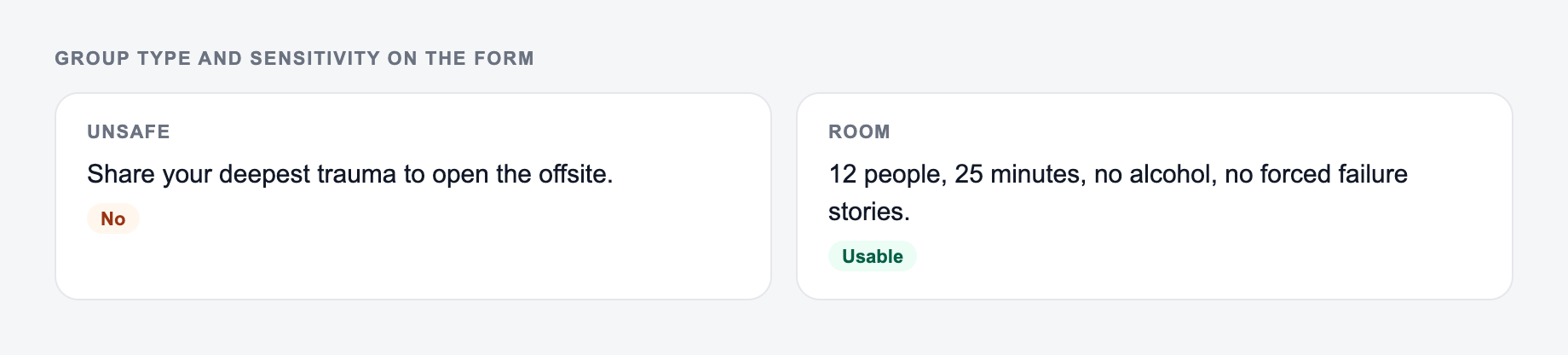
For sensitivity, choose Safe when the group is new, professional, mixed, classroom-based, or HR-adjacent. Choose Balanced for teams or groups with some trust. Choose Open only when the group opted into deeper conversation.
Example Input and Generated Questions
Input:
Say what kind of group it is and how sensitive the setting is, so the questions work in that room.
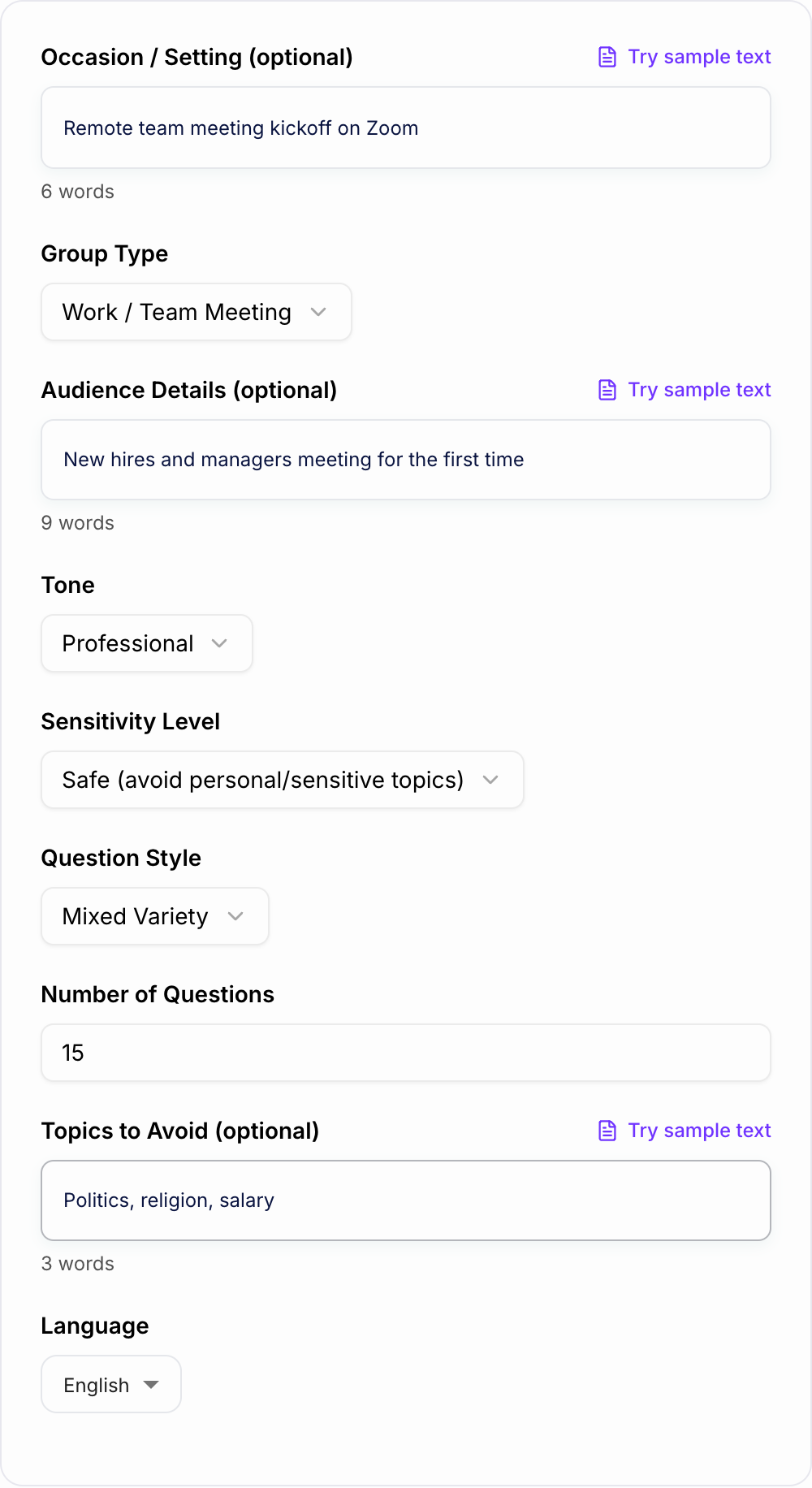
Remote team meeting kickoff on Zoom. New hires and managers are meeting for the first time. Keep it safe, inclusive, and easy to answer quickly.
Settings:
- Group type: Work / Team Meeting
- Question style: Mixed Variety
- Sensitivity: Safe
- Count: 10
- Avoid topics: politics, religion, salary, health
Possible output:
- What is one small win from this week?
- What tool, shortcut, or habit saves you time at work?
- What is one thing you are looking forward to this week?
- This or that: deep-focus morning or quiet afternoon?
- What is a low-stakes recommendation you have: book, show, recipe, podcast, or app?
- What is something you learned recently that surprised you?
- What helps you reset during a busy day?
- What is one work preference that helps teammates collaborate with you?
- What is your favorite way to start a Monday?
- What is one question you wish people asked more often in meetings?
Review the list before sharing it. Keep the best prompts and remove anything that does not fit the group.
How Many Icebreaker Questions to Use
Most sessions need fewer questions than people think.
Use one question for a standup, weekly meeting, or quick kickoff.
Use one or two questions for a 30-minute team meeting.
Use two to four questions for a workshop warm-up.
Use five to ten questions only when the activity itself is built around discussion.
If you generate 15 or 20 questions, treat the output as a menu. You are choosing the strongest two or three, not using the whole list.
How to Facilitate Without Making It Awkward
The best generated question can still feel forced if the setup is too intense.
Use a short, low-pressure introduction:
Quick warm-up. One sentence is perfect, and passing is fine.
That line does a lot of work. It tells people the answer can be short, the activity is not a performance, and nobody is trapped.
For remote meetings, choose questions that work in chat. For workshops, tie the first question lightly to the session topic. For classrooms, keep prompts age-appropriate and avoid anything that could embarrass a student.
Common Icebreaker Generator Mistakes
The first mistake is using a question because it is funny, not because it fits the room. Funny can work, but safety and relevance come first.
The second mistake is skipping the avoid-topics field. If a topic would be uncomfortable in the group, name it before generating.
The third mistake is choosing Open sensitivity for people who do not know each other. Start safer and build from there.
The fourth mistake is asking too many questions. One strong prompt is better than a long round that drains the meeting.
The fifth mistake is not curating the output. The generator gives options. The facilitator decides what belongs in the room.
Final Checklist Before You Use the Questions
Before adding generated icebreakers to an agenda, slide deck, chat, or run-of-show, check that:
- the question fits the setting
- the answer can be short
- the prompt is inclusive
- sensitive topics are avoided
- the tone matches the group
- remote questions work in chat
- people can pass without pressure
- you are using the right number of prompts
If you lead meetings, workshops, classes, or events regularly, save the settings that work. You can use Junia AI to generate, refine, and reuse prompts for team communication and facilitation instead of starting from scratch every time.
Frequently Asked Questions
Are these icebreaker questions appropriate for work?+
Yes. Choose “Work / Team Meeting” and keep sensitivity on “Safe” to generate professional, inclusive icebreaker questions that avoid overly personal topics.
Can I generate icebreakers for remote meetings (Zoom/Teams)?+
Yes. Use the “Remote Meetings” mode and select a quick question style for prompts that work well in chat or fast round-robin intros.
How many icebreaker questions should I use in a meeting?+
For a 15–30 minute meeting, 1–3 questions is usually enough. For workshops or team building sessions, 5–10 questions can work well depending on group size and time.
How do I avoid awkward or sensitive topics?+
Set sensitivity to “Safe” and add an avoid list (e.g., politics, religion, salary, health, dating). The generator will steer clear of those areas and keep questions inclusive.
Can I tailor questions to a specific audience (students, new hires, executives)?+
Yes. Add audience details (e.g., “new hires,” “cross-functional team,” “8th graders,” “founders”) so the questions match context, language level, and comfort.
Can I generate icebreaker questions in different languages?+
Yes. Select your preferred output language to generate localized icebreaker questions for international teams, multilingual classrooms, and global events.