LoginGet Started

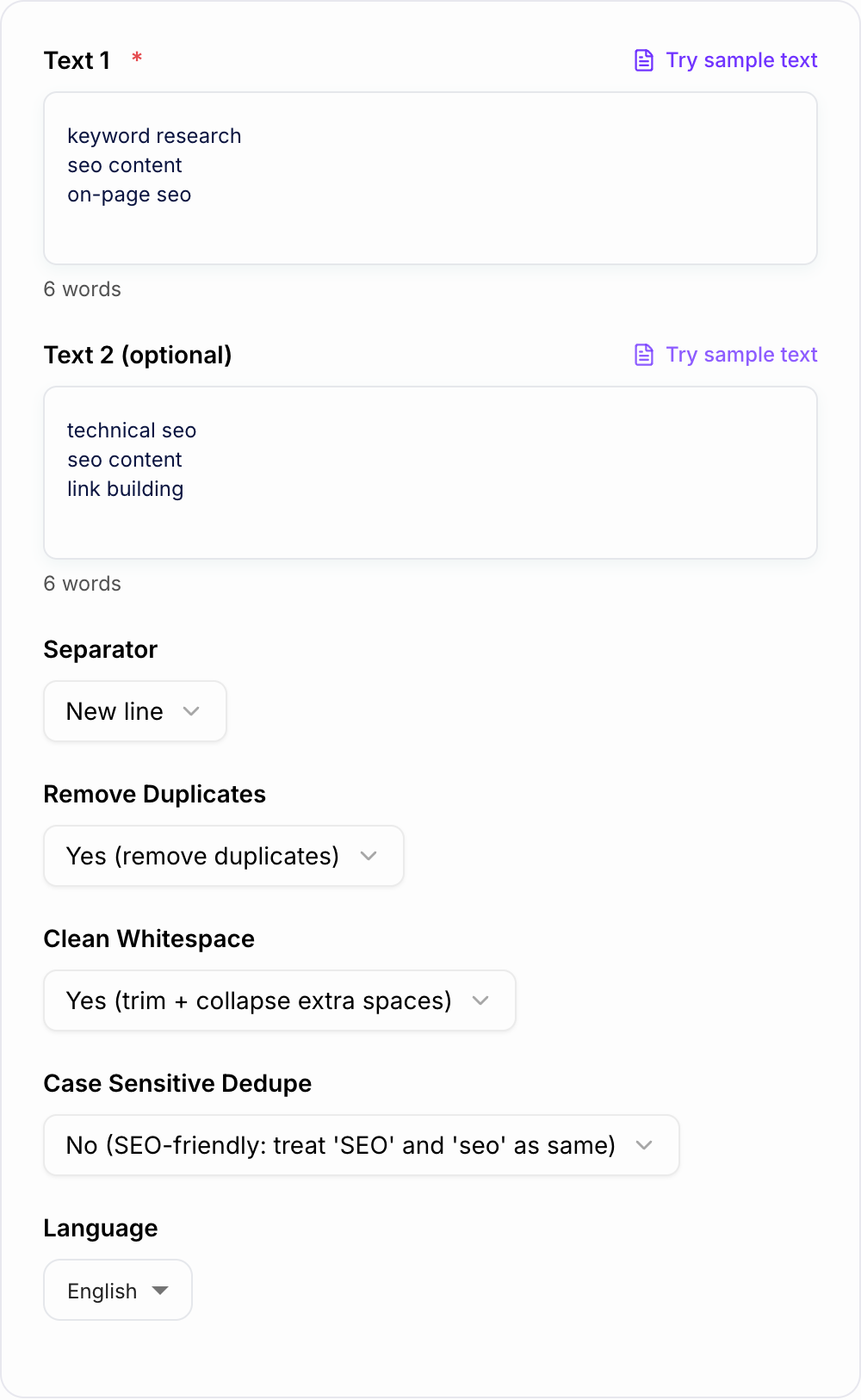
Merge Texts

Merge multiple texts into coherent content.

0/700 words

Optional

Results

Cat sitting on a rocket

Your Merged Text Will Appear Here...

Merge Texts by Junia AI is a free online AI tool that takes a bunch of different pieces of content and blends them into one clear, organized, easy‑to‑read document.

So instead of you manually stitching together emails, chat logs, Google Docs, Word files, spreadsheets, meeting notes, and all those random text sources, you just paste or upload everything and let the AI merge it for you. Pretty hands off.

How Merge Texts Works

The Merge Texts tool looks at the context across all the different snippets, removes obvious repeats, lines up the tone and style, keeps the important information, and holds onto the original structure where it actually makes sense. It’s made to give you one solid, polished output that feels like it was written as a single document from the beginning, not glued together later.

Why Choose Merge Texts?

  • No Technical Skills Required: It all runs in your browser with a clean, simple interface. You don’t need tech skills or some complicated setup.
  • Fast and Efficient: Just gather your content, drop it into Merge Texts by Junia AI, and get a refined, unified version in seconds.
  • Versatile Output: The merged document is ready to use for reports, publishing, or more editing if you want.

With Merge Texts by Junia AI, merging your content honestly has never been easier!

What Is “Merge Texts”?

“Merge Texts” basically means taking a bunch of text sources and combining them into one unified document while still keeping the meaning, structure, and readability. In real life, it usually looks like:

  • Collecting content from different channels (email threads, Slack or Teams chats, support tickets, docs, PDFs, spreadsheets, notes, etc.)
  • Fixing overlaps, duplicates, and inconsistencies
  • Ordering and restructuring content in a logical way
  • Standardizing tone, style, and terminology
  • Ending up with one clean, final text you can share, publish, or analyze

The Merge Texts by Junia AI tool automates this whole “text merging” workflow using artificial intelligence. Instead of just sticking text blocks together, it actually understands what the content says, finds links between different parts, then rewrites or reorganizes everything into a cohesive story or structured document.

People often search for this kind of thing using terms like:

  • “merge text with AI”
  • “combine multiple texts into one document”
  • “AI text merger”
  • “merge emails and chats into a report”
  • “AI tool to merge documents”
  • “merge text online free”

Junia AI’s Merge Texts feature is built specifically to handle those use cases quickly and reliably.

Why Use Merge Texts?

Using an AI text merging tool like Merge Texts by Junia AI saves time, cuts down mistakes, and gives you cleaner, more professional output than doing everything with copy and paste. Some common reasons to use it are:

1. Consolidating Scattered Information

Information usually ends up scattered all over the place:

  • Long email chains with attachments
  • Chat history from Slack, Discord, Microsoft Teams, or WhatsApp
  • Meeting notes in Notion, Evernote, or Google Keep
  • Drafts and versions of documents in Google Docs or Word
  • Structured data and comments in spreadsheets

Merge Texts lets you pull all this into one place, then automatically merge and organize it into a single, unified document. This is super helpful for:

  • Project summaries and status updates
  • Client account overviews
  • Support case histories
  • Incident and post‑mortem reports

2. Reducing Manual Copy‑Paste Work

Manual merging usually means:

  • Copying text from multiple sources
  • Pasting into one file
  • Reordering sections
  • Deleting duplicates and repeated details
  • Fixing formatting and headings
  • Normalizing tone and voice

With Merge Texts, AI does most of that automatically. You still control the final output, but you skip a lot of the boring repetitive work. This is ideal when you’re combining long chat conversations, multiple document drafts, or a bunch of field notes into one clear file.

3. Creating Cohesive, Readable Documents

When lots of people contribute to the same project, the final content can feel broken up and inconsistent. Merge Texts helps:

  • Unify voice and tone across sections
  • Smooth out transitions between different parts
  • Remove contradictions or repeated points
  • Put information into a logical, reader‑friendly order

So the merged text ends up reading like one well‑edited piece, not a random patchwork of different styles and voices.

4. Preparing Data for Reports and Analysis

Before you can use content for reports, analytics, or publishing, it usually needs to be:

  • Cleaned and de‑duplicated
  • Grouped by topic or category
  • Converted into a consistent format

Using an AI text merging tool is a quick way to prep raw content for:

  • Weekly/monthly reports
  • Case studies and summaries
  • Knowledge base articles
  • Content repurposing (e.g., combining blog drafts, notes, and research)

5. Working Faster Without Technical Overhead

Merge Texts by Junia AI is:

  • Browser‑based (no installation needed)
  • Simple to use (paste or upload, then click)
  • Free to start and play around with

You don’t have to learn scripting, mess with complex “mail merge” tools, or set up automation workflows. The AI does everything behind the scenes and gives you a clean, merged document with almost no setup.

What Makes a Good Merged Text?

A “good” merged text isn’t just a pile of chunks thrown together. It should feel like one single, cohesive, well‑structured piece of writing. When you use an AI text combiner or text merger tool like Merge Texts, high‑quality merged texts usually have these traits:

1. Clear, Logical Structure

  • Information is grouped by theme, topic, or timeline
  • Headings and subheadings make it easy to skim
  • Sections follow a logical order (like context → details → outcomes)
  • Lists and bullet points are used when they make things clearer

2. Consistent Tone and Style

  • Voice and tone feel consistent, even if lots of authors were involved
  • The formality level matches the audience (like internal report vs. public post)
  • Repeated phrases and redundancies are cut down

3. Complete but Not Overloaded

  • All key details from the source texts are still there
  • Random digressions, filler, and obvious duplicates are removed
  • The merged document is concise enough to be useful, but not so short that you lose context

4. Correct Formatting and Readability

  • Paragraphs aren’t huge walls of text
  • Lists, tables, and code blocks (if any) are formatted properly
  • Dates, names, and figures are styled consistently
  • The merged text is easy to skim and understand

5. Traceable Back to Sources (When Needed)

For work and documentation stuff, a good merged text often:

  • Keeps references to original sources (like “from Client A email, 12 Jan”)
  • Separates facts, opinions, and decisions
  • Makes it easy to cross‑check or go back to specific parts of the original content

Merge Texts by Junia AI is optimized to create this kind of high‑quality merged document automatically, so you spend less time cleaning and more time actually using it.

How to Write (or Create) a Good Merged Text with AI

Even with a powerful AI text merging tool, a bit of prep and clear direction can make the results way better. Here are some simple steps for creating strong merged texts using tools like Merge Texts by Junia AI:

1. Gather and Organize Your Inputs

Before you merge:

  • Collect all the relevant sources (emails, chats, docs, notes, spreadsheets)
  • Remove stuff that’s obviously unrelated or outdated
  • If you can, group similar content (by topic, project, date, or client)

Better organized inputs usually mean a cleaner, more accurate merged output.

2. Decide the Purpose and Audience

Figure out why you’re merging and who’s going to read it:

  • Is it a project recap for internal stakeholders?
  • A customer‑facing report or summary?
  • A research synthesis or knowledge base article?

Once you know that, you can:

  • Decide what details to keep or drop
  • Pick the right level of formality
  • Focus the merged text on what actually matters to readers

When you paste your content into Merge Texts, you can also add a short note or prompt like:
“Combine these messages into a concise project status report for management” or
“Merge these emails into a clear customer issue summary with timeline and resolution.”

3. Provide Clear Instructions to the AI

AI text merger tools do better when you give them specific instructions. Along with your content, add guidance like:

  • “Merge these into a chronological summary.”
  • “Combine and remove duplicates; keep all dates and key decisions.”
  • “Unify the tone to be professional but friendly.”
  • “Produce a final document with headings for Background, Discussion, and Next Steps.”

The clearer you are, the closer the merged output will match what you had in mind.

4. Preserve Important Details and Structure

If there are parts you absolutely need to keep:

  • Highlight or mark them before merging (for example: “IMPORTANT:” or “DO NOT REMOVE”)
  • Say that certain fields (like names, dates, and numbers) must stay accurate
  • Ask the AI to preserve sections like tables or bullet lists when they help clarity

Merge Texts by Junia AI usually keeps critical info intact, but giving clear signals helps make sure nothing essential gets dropped.

5. Review, Edit, and Refine

AI text merging gets you most of the way, but a quick human review really helps:

  • Check for missing context or weird misinterpretations
  • Tighten up sentences that feel too long or repetitive
  • Adjust headings so the document is easy to navigate
  • Confirm that names, figures, and dates are correct

If you want, you can run the merged output back through the tool with updated prompts like:

  • “Shorten this to one page while keeping all key outcomes.”
  • “Reorganize this by topic instead of by date.”
  • “Simplify the language for a non‑technical audience.”

6. Standardize Across Multiple Merged Documents

If you often create similar merged texts (like weekly updates, client reports, incident reviews), you can:

  • Decide on a standard structure (e.g., Overview, Timeline, Key Issues, Resolutions, Next Steps)
  • Use similar prompts and instructions each time with Merge Texts
  • Apply the same formatting and templates regularly

Over time, this turns into a repeatable, efficient workflow for creating high‑quality merged documents with AI.

Common Use Cases for AI‑Powered Text Merging

People look for “merge texts with AI” tools for all kinds of real‑world situations. Merge Texts by Junia AI is especially handy for:

  • Merging long chat conversations into a single summary or transcript
  • Combining multiple document versions into one final draft
  • Consolidating email threads for client accounts, support cases, or project updates
  • Merging notes and meeting minutes from different contributors
  • Pulling scattered data fields from spreadsheets and notes into one coherent narrative
  • Creating unified reports from mixed inputs (research notes, stakeholder feedback, analytics summaries)

Instead of wasting hours copying, pasting, and reformatting, Merge Texts lets you do all this in a few minutes, using AI to handle the heavy lifting of understanding context, structuring, and polishing.

Using a dedicated AI text merger like Merge Texts by Junia AI turns the boring, repetitive job of combining documents into one quick, streamlined step in your workflow. With the right inputs and clear instructions, you can consistently create strong, well‑organized merged texts that are ready for reporting, publishing, or more editing if you need it.

Use Cases

Discover how this tool can be used in various scenarios

  • Merging long chat and email conversations

    Turn scattered chat logs or long email chains into a single, well-structured narrative that’s easier to review, archive, or share with stakeholders.

  • Combining multiple document versions

    Paste different draft versions or contributions from multiple authors and let the AI merge them into one coherent document while minimizing duplication.

  • Consolidating research and notes

    Gather quotes, snippets, bullet points, and highlights from different sources into one unified research doc ready for outlining or writing.

  • Creating clean customer case summaries

    Merge support tickets, CRM notes, and internal comments into a comprehensive case summary for escalations, QBRs, or training material.

  • Unifying data exports and text fields

    When you export data from CRMs, spreadsheets, or BI tools, combine descriptive text fields into a single, readable explanation or report section.

  • Preparing content for SEO optimization

    Merge fragmented outlines, keyword lists, and draft sections into one base document, then send it to Junia AI’s SEO writer to optimize and expand.

  • Summarizing project communications

    Combine Slack threads, meeting notes, and email decisions into a single project log or recap document for teams and stakeholders.

  • Cleaning up copy for publication

    Merge scattered copy pieces—headlines, product descriptions, FAQs, disclaimers—into a final, publication-ready page or document.

Benefits

  • Save hours of manual copy paste work
    Quickly pull together a bunch of snippets, documents, or long threads into one organized piece of text in just a few seconds, instead of doing it all by hand.

  • Keep context and meaning intact
    The AI actually looks at the surrounding context, so the combined result flows in a logical way and does not just feel like a messy copy paste.

  • Cleaner, more consistent formatting
    It brings all the headings, lists, paragraphs, and spacing into one clear style so your final document ends up looking neat and kind of professional.

  • Reduce errors and omissions
    Helps you avoid common human mistakes like repeating sections, leaving out important bits, or ending up with weird broken sentences when you try to merge stuff manually.

  • Handle messy, unstructured inputs
    Works fine with things like chat logs, email chains, random notes, and mixed formats that are usually annoying and hard to stick together by yourself.

  • Preserve tone and style
    Keeps the original voice and attitude of your content, while still turning everything into one readable and fairly smooth result.

  • Ready for SEO and content expansion
    You can easily send the merged text into Junia AI’s SEO writer to make it longer, better for search, and more polished without starting over.

  • Free and browser-based
    No need to install anything or enter a credit card or deal with some long signup. You just open the tool, paste your text, and hit merge.

Who's this tool for?

Content creators & bloggers

Combine research notes, outlines, quotes, and drafts into one cohesive article or script that’s ready for editing and SEO optimization.

Marketing teams

Merge copy from different stakeholders, campaign briefs, and feedback threads into a single, clear master document for campaigns and launches.

Business analysts & operations teams

Unify text fields from reports, CRM notes, and data exports into consolidated narratives that are easier to interpret and present.

Customer support & success teams

Combine long email chains, support tickets, and chat transcripts into one clean summary for handovers, escalations, or documentation.

Product managers

Merge user feedback from surveys, support logs, and internal discussions into a structured document for roadmap planning and prioritization.

Researchers & students

Bring together excerpts from papers, study notes, and interview transcripts into a single organized document for analysis or writing.

HR & recruiters

Combine candidate notes, email threads, and interview feedback into one summary document for hiring decisions and internal sharing.

Freelancers & agencies

Merge client briefs, message threads, and revision comments into a single source of truth before starting creative or technical work.

Why Choose Our Merge Texts?

Junia AI made the Merge Texts tool to get rid of one of the most common and honestly pretty annoying content tasks, which is putting together text from way too many different places.

A lot of people still merge text by copying and pasting between a bunch of apps, then fixing the formatting by hand and dealing with duplicates and weird broken sentences. It’s slow, it leads to mistakes, and it kind of pulls your attention away from the real work of thinking and analyzing and actually creating stuff.

Merge Texts uses AI to:

  • Understand the context behind each piece of text
  • Smoothly connect the fragments while keeping the meaning clear
  • Clean up inconsistent formatting and structure
  • Try to keep your tone and style as much as it can

Since it’s part of the whole Junia AI ecosystem, you can do more than just merge things. You can send your combined text straight into one of the top AI writers for SEO and content creation. So with that you can:

  • Turn your merged notes into finished articles and landing pages
  • Create plagiarism free, search optimized content
  • Make content that can rank on Google and is even solid enough to be cited by LLMs like ChatGPT

We built this tool so anyone, like creators, analysts, marketers, whole teams and whoever else, can go from messy scattered text to clean and usable content in just one step. No extra friction, no extra cost, and not a lot of complexity getting in the way.

Frequently asked questions
  • Merge Texts by Junia AI is a free tool that uses AI to help you put a bunch of different texts together into one clear document. Instead of wasting time copying and pasting little pieces from emails, chats, documents and random notes, it kind of figures out the context for you and tries to make the transitions smoother. It keeps the important details, tries to make everything match in style, and also keeps the formatting pretty consistent too.
  • AI makes putting pieces of text together a lot smarter, kinda by looking at the meaning and context of each part instead of just doing a basic copy and paste. It keeps the same tone and style, and it also tries to keep things like headings and lists looking the same. It cuts down on mistakes like repeating the same thing twice or forgetting something important, and it can deal with messy or not very organized text pretty well, which ends up saving time and usually makes everything more accurate.
  • The Merge Texts tool is really useful for a whole bunch of people like content creators, bloggers, marketing teams, business analysts, customer support workers, product managers, researchers, HR people, freelancers, and also agencies. It basically helps them pull together a lot of scattered stuff like chat logs, reports, feedback threads, survey answers, and client briefs, and then it puts everything into more organized documents that are ready to edit or use in a presentation.
  • Yes, it can. The AI behind Merge Texts can handle really messy stuff like super long chat conversations, email chains that go back and forth forever, mixed up notes in different formats, and even random data exports. It pulls all of these different things together and kind of merges them into one structured, clear document, while still keeping the important info in there and mostly keeping the formatting consistent too.
  • Yeah, sure. Merge Texts works right in your web browser and it’s pretty easy to figure out, you don’t have to install anything or mess with a bunch of technical stuff. You just paste or upload your texts into the tool, kind of drop them in there, and then the AI basically does all the hard work for you. It puts everything together into one combined document, and it does it pretty fast and, like, in a way you can actually rely on.
  • After you’ve merged all your texts together so they kind of flow with the same tone and style, you can then send that whole document over to Junia AI’s SEO writer. With this setup, it lets you expand the content, tweak it, and basically clean it up and optimize it so it does better in search engines, while still staying plagiarism free. And it can even be used as stuff that large language models like ChatGPT can cite, which is pretty useful actually.