
Free News Article Generator
Generate structured news-style drafts from facts, notes, announcements, and press releases. Add the topic, key facts, sources, quote details, location, angle, audience, tone, and length to create a headline, lede, context, quote section, and what-next ending you can fact-check and edit.
News Article
Your news article will appear here...
How the AI News Article Generator Works
Get results in seconds with a simple workflow.
Enter the Topic and Key Facts
Add a clear news topic. Optionally paste confirmed details (who/what/when/where), quotes, and links so the draft stays accurate and specific.
Choose Mode, Length, Tone, and Language
Pick a news format (straight, local, business, tech), set word count, and select tone and language to match your newsroom style guide.
Generate, Then Verify and Publish
Review for accuracy, add verified sources, refine the headline, and include internal/external links. Publish a clean, readable story optimized for both readers and search.
See It in Action
Turn a few bullet points into a complete news-style article with a strong headline, lede, quotes, and context.
Acme launched Assist AI today. It helps with tickets and supports multiple languages.
Headline: Acme Launches ‘Assist AI’ to Automate Helpdesk Ticket Triage
Lede: Acme Inc. on Tuesday introduced Assist AI, a new feature designed to help support teams route and prioritize customer tickets more quickly, the company said.
H2: What’s new Acme said Assist AI can automatically categorize incoming requests, suggest responses, and support multiple languages for global support operations.
H2: Why it matters Customer support teams often face growing ticket volumes and limited staffing. Tools that reduce manual triage can shorten response times and improve customer experience.
Quote: “This reduces response time for teams,” said Jane Doe, Acme’s VP of Product.
H2: What’s next Acme said the feature is rolling out globally starting today, with additional analytics features planned for later this year.
Why Use Our AI News Article Generator?
Powered by the latest AI to deliver fast, accurate results.
Journalistic Structure (Headline, Lede, Nut Graf)
Generates a news-style structure with a strong headline, lede, and early context so readers immediately understand what happened and why it matters.
Inverted Pyramid for Clarity and SEO
Puts the most important facts first, followed by details and background—improving readability, snippet potential, and search-friendly formatting.
Quote + Attribution Support
Incorporates provided quotes and attributions cleanly. If none are provided, it can include clearly labeled placeholder quote slots you can replace with verified statements.
Neutral, Fact-First Language
Reduces hype and promotional phrasing to produce credible, publication-ready copy that reads like real news rather than marketing content.
Flexible News Formats (Local, Business, Tech, Press Release)
Choose a mode to match the story type—local coverage, business news, tech updates, or converting a press release into a more balanced news article.
Pro Tips for Better Results
Get the most out of the AI News Article Generator with these expert tips.
Lead with confirmed facts (and label uncertainty)
If a detail isn’t verified, don’t state it as fact. Provide what’s confirmed and add placeholders like “the company said” or “details were not immediately available” only when appropriate.
Add one strong angle to improve uniqueness
A simple angle—impact on customers, local community implications, or industry context—makes the story more differentiated and improves topical relevance for SEO.
Include a location for local SEO queries
If the story has a geographic component, add the city/region so the article can match location-based searches and appear in local discovery.
Use real sources and link to primary documents
Whenever possible, cite and link to the press release, official statement, filing, or report. Primary sources improve credibility and help readers verify claims.
Rewrite the headline after generation
Try a headline that matches the likely query: include the entity name + the action + the key outcome (and location when relevant) for better CTR.
Who Is This For?
Trusted by millions of students, writers, and professionals worldwide.
Generate Structured News Drafts with an AI News Article Generator
The AI News Article Generator turns announcements, bullet points, press releases, and source notes into a news-style draft with a headline, lede, context, quotes, and a clean ending. Set the mode, audience, tone, and length, then review and edit the draft against your sources.
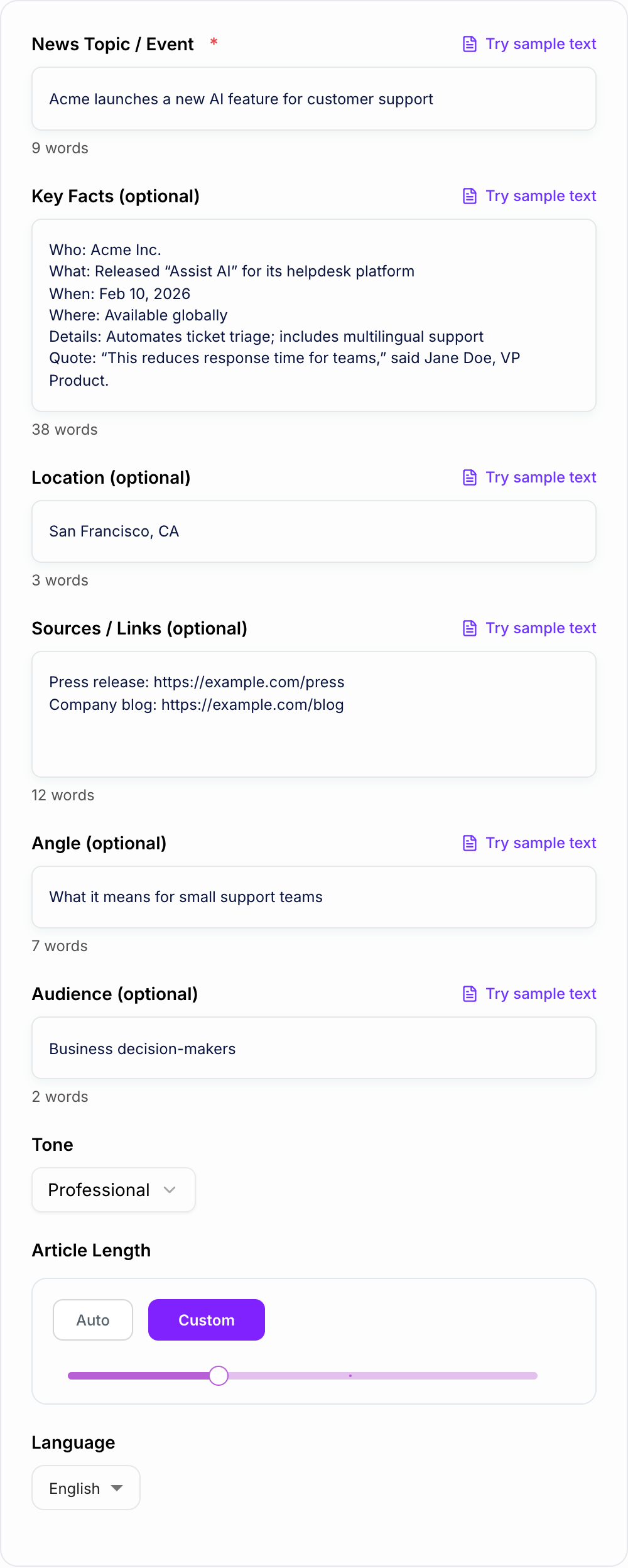
It should not replace reporting or fact-checking. Use it to structure the first draft faster, then verify every name, number, date, quote, and claim before publishing.
What to enter into the news article generator
The best inputs are factual and specific. Give the generator confirmed details, not promotional language.
Include:
- Topic: what happened, who did it, and why it matters.
- Key facts: who, what, when, where, numbers, timeline, availability, affected groups.
- Quotes: real quotes with names and titles, or a note that quotes still need verification.
- Sources: press release, official statement, filing, report, event page, or source notes.
- Location: city, state, country, or region if the story has local relevance.
- Angle: customer impact, community impact, market context, technology change, policy shift, or what happens next.
- Audience: general readers, local community, business decision-makers, industry readers, customers, or internal stakeholders.
Weak input: Write news about our product launch.
Stronger input: Acme Inc. launched Assist AI on Feb. 10, 2026 for global helpdesk customers. It automates ticket triage and supports 12 languages. Quote from Jane Doe, VP Product: "This helps support teams respond faster without adding headcount." Angle: impact on small support teams.
The stronger input gives the generator material for a real lede and neutral context.
Choose the right news mode
Use the mode that matches the story:
- Straight News: best for neutral reporting and general announcements.
- Press Release → News: best for turning promotional copy into a more journalistic article.
- Local News: best for community events, city updates, schools, nonprofits, and location-specific stories.
- Business News: best for funding, partnerships, product launches, leadership changes, and market impact.
- Tech News: best for software releases, platform changes, security updates, integrations, and AI features.
- Editorial Brief: best when you want questions to verify, suggested source types, and follow-up angles alongside the draft.
If the input is mostly a press release, choose the press-release mode. It helps reduce hype and surface the actual news.
What a strong generated news article should include
Before you publish news article generator output:
- Every number and name has a source you opened
- No quote was invented
- The lede still works if the last clause is cut
A publishable draft usually follows this order:
- Headline: entity + action + outcome.
- Lede: the most important confirmed facts in one or two sentences.
- Nut graf: why this matters now.
- Details: numbers, timeline, availability, affected groups, background.
- Quote: attributed to a real person or clearly marked as a placeholder.
- Context: market, community, policy, or prior events.
- What happens next: rollout, next meeting, deadline, launch date, or next update.
This structure is intentionally simple. News writing works when the reader gets the facts quickly.
How to convert a press release into news
When you paste a press release, the generator can help strip away marketing language, but you still need to review the output.
Watch for:
- sales adjectives such as "revolutionary," "world-class," or "industry-leading"
- unsupported claims like "first," "best," or "fastest"
- numbers without a source
- quotes that sound like taglines
- missing context about who is affected
- a lede that delays the actual news
Replace hype with verified specifics. If a claim cannot be checked, cut it or label it clearly.
Example input and generated direction
Input:
Facts and sources you can name belong on the form. Do not invent quotes.
Learning workflow:
- Enter only facts you have.
- Generate a structured draft.
- Check names, dates, citations, and units.
- Rewrite the sentences you would actually say in class or in the paper.
If the task is graded, clinical, cited, or public, the named writer still owns the claims.
Topic: City library expands weekend hours. Key facts: Starts Aug. 3. Main branch and three neighborhood branches open Saturdays 9 a.m. to 5 p.m. Funded by a city council budget increase. Quote from Library Director Ana Patel. Audience: local residents. Angle: access for working families and students.
A good generated draft should:
- lead with the library schedule change
- mention the start date and branches early
- explain why weekend access matters
- include the director quote with title
- add what residents should do next
If the output buries the schedule below background, revise the lede manually.
SEO and source checks before publishing
Answer these before you generate a second batch. A reroll will not fix a vague brief.
News SEO should support accuracy, not distort it.
Before publishing:
- include the entity name and main action in the headline
- add the location early for local stories
- use clear subheads such as "What changed," "Why it matters," and "What happens next"
- link to primary sources when available
- add internal links only where they provide useful context
- make sure the meta title and description reflect the verified facts
For a larger editorial workflow, you can pair the generated draft with Junia AI tools for rewriting, headline testing, summaries, and repurposing once the article has been fact-checked.
Final review and fact-checking checklist
- Are all names, dates, numbers, locations, and titles correct?
- Are quotes real and attributed accurately?
- Are uncertain details labeled or removed?
- Does the lede state the news quickly?
- Does the article separate fact from interpretation?
- Are primary sources linked where possible?
- Does the ending tell readers what happens next?
If the generated news article passes those checks, it is ready for a final editorial polish and publication workflow.
Frequently Asked Questions
Is this news article generator free to use?+
Yes. You can generate news article drafts for free. Some advanced modes (like editorial briefs) may be marked as premium.
Will the article be accurate?+
The generator writes from the information you provide. Always fact-check names, dates, numbers, and claims. If you don’t provide sources, the tool will avoid inventing specifics and may add placeholders for verification.
Can it turn a press release into a more journalistic story?+
Yes. Use the “Press Release → News” mode to reduce promotional language, keep material facts, and add neutral context so the piece reads more like news coverage.
Does it include quotes and attribution?+
If you paste quotes in the Key Facts field, the article will include them with attribution. If you don’t have quotes, the tool can add clearly labeled placeholder quote slots you can replace with verified statements.
Can I choose the tone and language?+
Yes. You can set tone (e.g., neutral, formal) and output language to match your publication style and audience.
How do I make the article more SEO-friendly?+
Provide a specific topic, add key facts, include a location when relevant, and choose an angle. After generating, add internal links, a relevant meta description, and ensure the headline matches search intent and common query wording.