
Free SOAP Note Generator
Generate a structured SOAP note from a chief complaint, history, exam findings, assessment details, and plan constraints. The tool organizes your inputs into Subjective, Objective, Assessment, and Plan sections so clinicians, students, and care teams can start from a cleaner documentation draft.
SOAP Note
Your SOAP note will appear here...
How the AI SOAP Note Generator Works
Get results in seconds with a simple workflow.
Enter the Chief Complaint
Add the visit reason (e.g., symptoms, follow-up, medication management). This is the minimum required input to start generating a SOAP note.
Add Optional Clinical Details
Paste subjective history (HPI/ROS), objective findings (vitals/exam/labs), and any assessment or plan constraints to increase completeness and accuracy.
Generate, Review, and Finalize
Get a structured SOAP note. Review carefully, confirm accuracy, adjust terminology to match your documentation standards, and add any missing clinical specifics.
See It in Action
Turn a brief visit summary into a structured SOAP note with clear documentation and a complete plan.
Pt here for sore throat and fever. Started a few days ago. Exam shows red throat. Strep test positive. Wants treatment and a work note.
Subjective: Patient reports sore throat, fever, and fatigue x3 days. Pain with swallowing. Denies cough, shortness of breath, or chest pain. No known sick contacts. No medication allergies reported.
Objective: Vitals: febrile (101.4°F), otherwise stable. HEENT: erythematous pharynx with tonsillar exudates. Neck: tender anterior cervical lymphadenopathy. Rapid strep test: positive.
Assessment:
- Acute streptococcal pharyngitis.
Plan:
- Pharmacologic: Initiate appropriate antibiotic therapy for streptococcal pharyngitis per local guidelines; consider allergy-friendly options as indicated.
- Symptomatic care: Hydration, rest, analgesics/antipyretics as appropriate.
- Education: Discuss contagion precautions, expected course, and medication adherence.
- Work note provided.
- Follow-up: Return/telehealth check in 48–72 hours if not improving.
- Return precautions: Seek urgent care for worsening symptoms, inability to swallow, signs of dehydration, breathing difficulty, or persistent high fever.
Why Use Our AI SOAP Note Generator?
Powered by the latest AI to deliver fast, accurate results.
Structured SOAP Format (S/O/A/P)
Generates a clean Subjective, Objective, Assessment, and Plan layout for consistent clinical documentation, charting, and EHR-ready note structure.
Clinical Clarity + Readability
Produces concise, professional medical writing with relevant positives/negatives, organized problem statements, and scannable documentation for faster review.
Plan Builder With Follow-Up + Patient Education
Creates a practical plan section with diagnostics, treatment considerations, counseling, red-flag return precautions, and follow-up guidance tailored to the visit context.
Works With Minimal Inputs
Start with just the chief complaint, then optionally add HPI, vitals, exam findings, labs, and constraints to generate more complete SOAP notes.
Flexible for Multiple Settings
Supports outpatient, urgent care, ED, inpatient, telehealth, and behavioral health notes—helpful for clinicians, students, and multi-provider practices.
Pro Tips for Better Results
Get the most out of the AI SOAP Note Generator with these expert tips.
Include pertinent positives and negatives
For better clinical reasoning and billing support, add key positives/negatives (e.g., fever present, cough absent) and relevant ROS highlights.
Add vitals and 2–5 focused exam findings
A small set of objective details improves note quality dramatically and reduces ambiguity in the assessment and plan.
Use constraints to prevent plan conflicts
Add allergies, contraindications, pregnancy status (if relevant), and patient preferences to keep the plan clinically appropriate and consistent.
Document follow-up and return precautions
Strong SOAP notes include clear follow-up timing and red-flag symptoms that warrant urgent evaluation, which improves continuity of care.
Keep it chart-ready
After generating, quickly edit for your clinic’s templates, problem list conventions, and required documentation elements (e.g., coding prompts).
Who Is This For?
Trusted by millions of students, writers, and professionals worldwide.
Generate SOAP Notes From Visit Details, Not Guesswork
A SOAP note generator can save time, but only when the output stays tied to the clinical details you provide. The tool is designed to organize your encounter notes into Subjective, Objective, Assessment, and Plan sections, not to invent findings or replace professional judgment.
Use it as a structured drafting assistant. Add the visit reason, paste the relevant details you have, generate the note, then review every line before using it in a chart or handoff.
What to Enter Into the SOAP Note Generator
Start with the chief complaint or visit reason. This gives the generated note a clear focus.
Then add any available details in the optional fields:
- Subjective: onset, duration, severity, associated symptoms, relevant history, medications, allergies, ROS highlights
- Objective: vitals, exam findings, labs, imaging, observed behavior, point-of-care tests
- Assessment: working diagnosis, clinical impression, problem list, or differential considerations
- Plan constraints: allergies, contraindications, patient preferences, follow-up needs, return precautions, referral requirements
You do not need to fill every field. A concise note with accurate inputs is better than a longer note padded with assumptions.
How to Choose the Right SOAP Note Mode
Use Standard SOAP for most outpatient, primary care, and routine follow-up notes. It gives enough detail without making the note heavy.
Use Concise for straightforward visits where the assessment and plan are simple. This is useful for quick follow-ups, stable problems, or short documentation drafts.
Use Detailed when the case needs more reasoning, a broader differential, or clearer rationale. Review this mode carefully so the extra detail stays supported by the record.
Use Behavioral Health for therapy or mental health documentation. Add relevant MSE details, risk assessment notes, interventions, safety planning, and treatment goals when appropriate.
The care setting matters too. Telehealth notes may need limitations and patient-reported vitals. Urgent care notes often need clear return precautions. Behavioral health notes need risk and safety language when indicated.
Example Input That Produces a Better Note
Weak input:
Enter only visit details you observed. This is a draft aid, not a medical record or diagnosis.
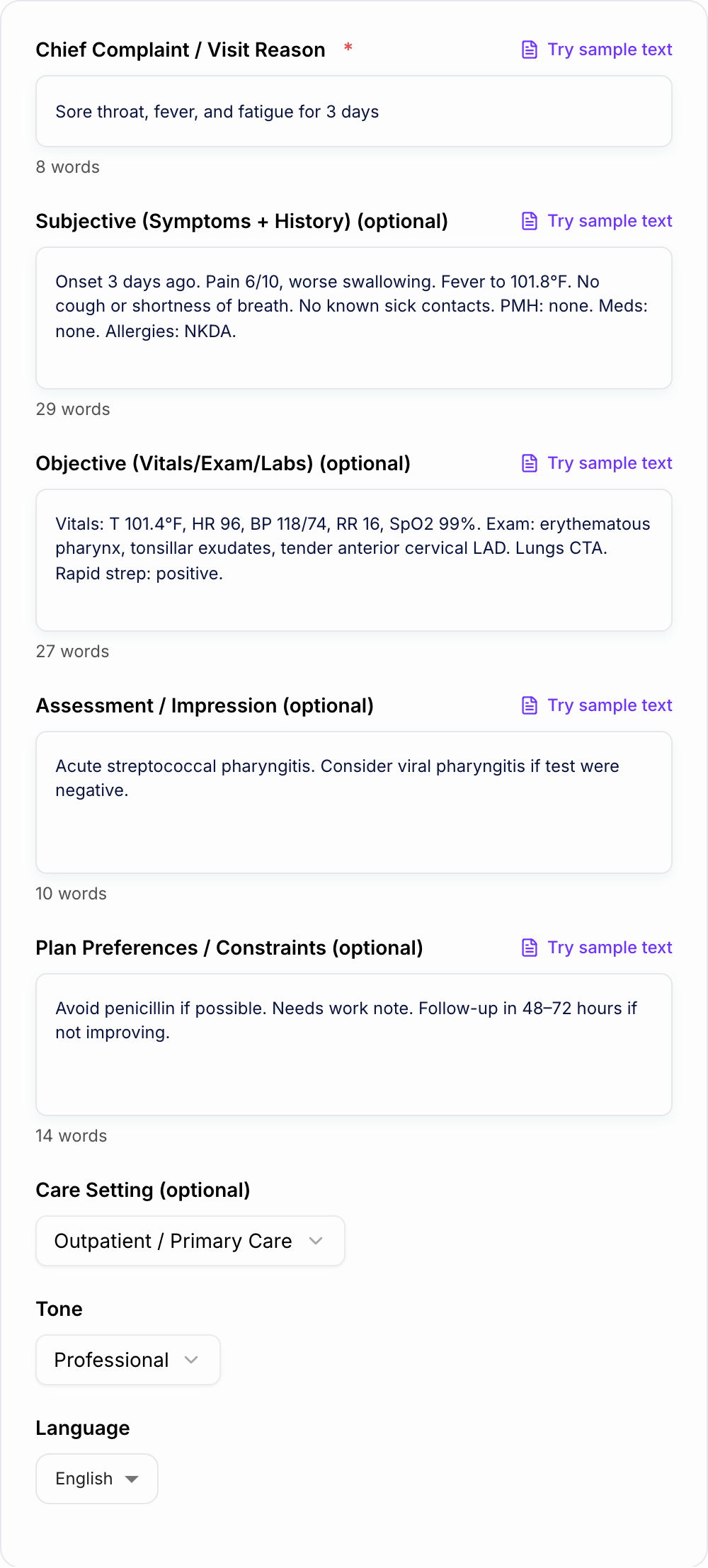
Sore throat and fever.
Better input:
Sore throat x3 days, fever to 101.8 F, pain worse with swallowing, no cough or shortness of breath, NKDA. Exam: erythematous pharynx, tonsillar exudates, tender anterior cervical LAD. Rapid strep positive. Needs work note and follow-up guidance.
The second version gives the generator enough information to separate subjective symptoms from objective findings, create a clearer assessment, and draft a more useful plan.
How to Review the Generated SOAP Note
After generating, read the note section by section.
Check Subjective for accurate patient-reported information. Remove anything the patient did not report.
Check Objective for measured or observed findings only. Do not leave invented vitals, exam findings, labs, or imaging in the note.
Check Assessment for scope and accuracy. The diagnosis, differential, or impression should match the information you provided and your clinical judgment.
Check Plan for safety and policy fit. Confirm medications, dosages if present, referrals, education, follow-up timing, and return precautions.
The final note should match your EHR style, organization policy, local requirements, and scope of practice.
Common SOAP Note Problems to Fix Before Charting
Generated drafts are easiest to clean up when you know what to look for:
- subjective and objective details mixed together
- assessment that only repeats the chief complaint
- plan section with no follow-up timing
- missing return precautions for acute complaints
- key negatives left out when they matter
- vague language such as "continue treatment" without specifics
- unsupported details that were not in the input
If you see one of these issues, edit the note directly or regenerate with clearer source details.
When This Tool Helps Most
The SOAP Note Generator is useful when you have rough notes, a dictated summary, or a quick encounter outline and need a cleaner structure. It can also help students learn how information moves from history and exam into assessment and plan.
For non-clinical drafting, templates, and structured writing outside chart documentation, Junia AI can support broader writing workflows. Keep clinical documentation separate and review SOAP output with the standard required for patient records.
Final Safety Checklist
Before using the generated note:
- Every clinical detail came from the encounter or your verified record.
- No vitals, labs, exam findings, or diagnoses were invented.
- The plan reflects actual clinical judgment and local policy.
- Follow-up and return precautions are clear.
- The note is formatted correctly for your EHR or documentation system.
The generator can give you a cleaner draft. The final responsibility remains with the clinician or authorized reviewer.
Frequently Asked Questions
What is a SOAP note?+
A SOAP note is a clinical documentation format that organizes a patient encounter into Subjective (reported symptoms/history), Objective (measurable findings like vitals/exam/labs), Assessment (clinical impression/diagnosis), and Plan (treatment, tests, follow-up, and education).
Is this SOAP note generator free to use?+
Yes. You can generate SOAP notes for free. Some advanced modes (like more detailed documentation) may be labeled as premium.
Can I use the output in an EHR?+
The output is designed to be copy-friendly and structured like common EHR notes. Always review, edit for accuracy, and ensure it matches your organization’s documentation policies and local requirements.
Will it invent clinical details like vitals or lab results?+
It should not. Provide the data you have. If key details are missing, the note will either keep them unspecified or use neutral placeholders rather than fabricating facts.
Does this tool provide medical advice or a diagnosis?+
No. It helps draft documentation based on the information you enter. Clinical judgment remains with the licensed professional, and you should verify all assessments and plans before use.
What should I include for the best SOAP note output?+
At minimum, include the chief complaint. For stronger notes, add HPI details, relevant PMH/medications/allergies, vitals, focused exam findings, and any test results—plus any constraints (e.g., allergies, preferred meds, follow-up requirements).