LoginGet Started

Worksheet Generator

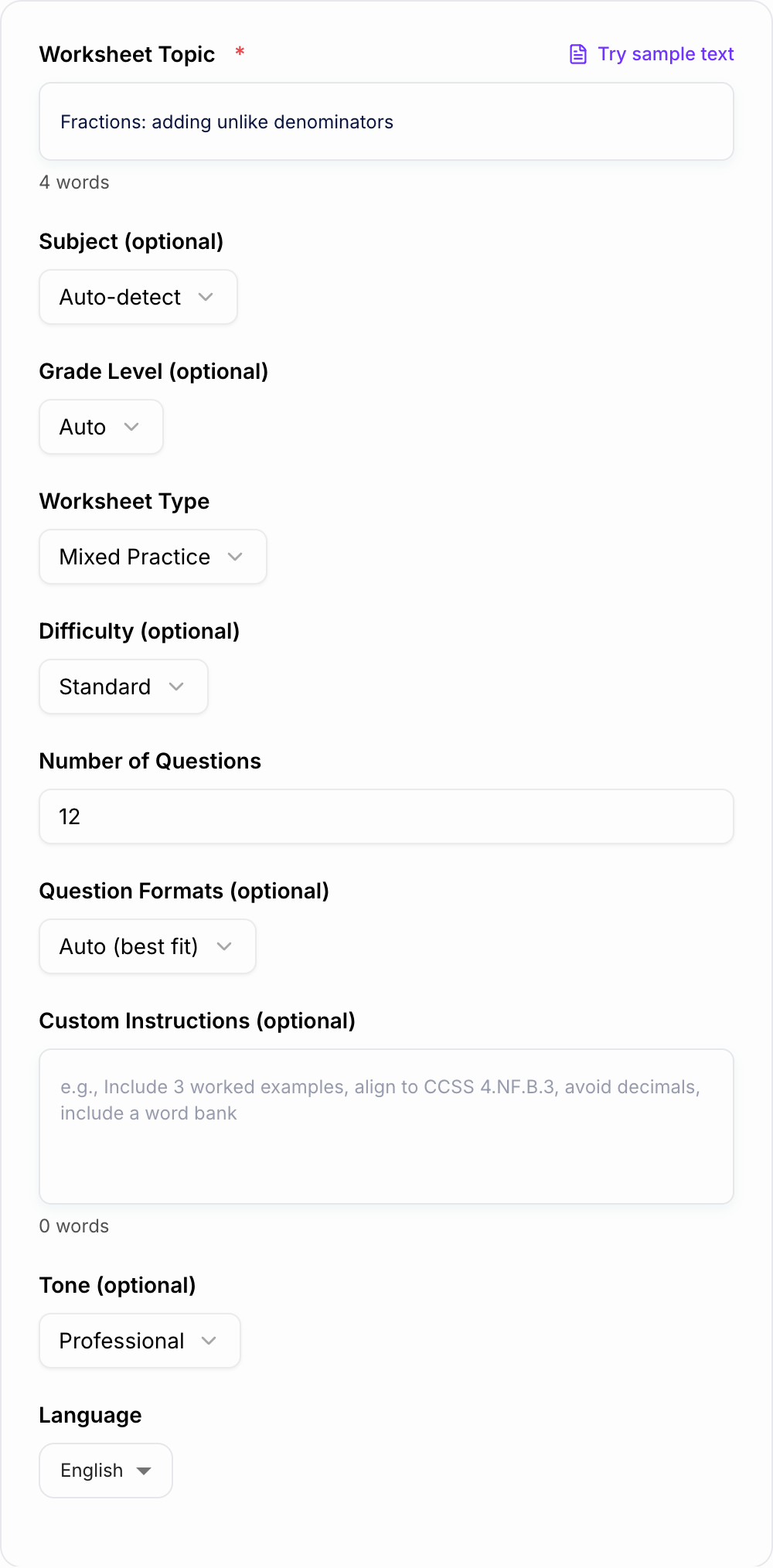
Generate educational worksheets for any subject or topic.

0/700 words

Optional

Results

Cat sitting on a rocket

Your Generated Worksheet Will Appear Here...

Junia AI’s Worksheet Generator is an AI tool that helps you make custom learning worksheets in just a few seconds instead of spending hours on them. It’s made for teachers, parents, tutors, and homeschoolers who need high‑quality practice materials fast, without fighting with formatting or staring at a blank page every single time.

You just type in what you want in normal, everyday language, like:

  • “3rd grade math worksheet on multiplication with word problems”
  • “ESL worksheet to practice irregular verbs for teenagers”
  • “Reading comprehension worksheet for 5th graders using a nonfiction passage about space”
  • “Phonics worksheet for kindergarten focusing on short ‘a’ sound”

and then the tool quickly puts together a full worksheet for you.

What is a Worksheet Generator?

A worksheet generator is a tool that automatically creates printable or digital worksheets based on the instructions you give it. Junia AI’s Worksheet Generator is an AI worksheet generator powered by advanced language models and education-focused data that can:

  • Understand your topic, subject, and learning goals
  • Create fresh, unique questions every time (not just reusing the same old items)
  • Format the content into a clean, classroom‑ready worksheet
  • Adjust difficulty for different grades and ability levels

Unlike traditional worksheet makers that use fixed templates or tiny question banks, an AI-powered worksheet generator like Junia AI can generate unlimited variations, tailored to your exact needs, in seconds.

Why Use a Worksheet Generator?

Using an online worksheet generator, especially an AI worksheet generator like Junia AI, saves time and also improves the quality and variety of your materials.

1. Save Preparation Time

  • Create a full worksheet in seconds instead of spending hours planning, writing, and formatting.
  • Quickly generate differentiated versions for advanced, on‑level, and support groups.
  • Reuse and adapt existing prompts to create new worksheets with just a few tweaks.

2. Easily Customize for Any Class

  • Tailor worksheets for specific grade levels (kindergarten, elementary, middle school, high school).
  • Match your curriculum, standards, or exam style with simple instructions.
  • Personalize content for different learners: ESL/ELL students, special education, gifted students, homeschoolers, and more.

3. Get More Variety and Engagement

  • Mix question types: multiple choice, short answer, fill in the blanks, matching, open‑ended responses, problem‑solving tasks, and creative prompts.
  • Use real‑world scenarios and age‑relevant examples to make content more engaging.
  • Create practice worksheets, homework sheets, review worksheets, quizzes, and test prep materials with one tool.

4. Improve Learning Outcomes

  • Align tasks with specific learning objectives or standards.
  • Provide structured practice, spiral review, and targeted revision.
  • Offer answer keys and explanations to support feedback, grading, and self‑correction.

5. Ideal for Many Use Cases

Junia AI’s Worksheet Generator works well for:

  • Classroom teachers planning daily lessons or emergency sub plans
  • Tutors needing quick, tailored practice for each session
  • Parents looking for extra practice at home
  • Homeschool families building personalized curricula
  • Language schools and training centers creating ESL/EFL worksheets

How Junia AI’s Worksheet Generator Works

Junia AI's Worksheet Generator uses advanced technology and educational data to create customized worksheets for teachers. Here’s basically how it works:

Understanding Your Needs

Junia AI looks at the subject, grade level, and specific learning objectives you give it. That helps the system figure out what content is relevant and appropriate for your students.

Generating Questions and Tasks

Using its underlying algorithms, Junia AI generates new questions and tasks that fit the age group you picked. These questions can be different types, like multiple choice, short answer, open-ended, matching, fill-in-the-blank, and more.

Adjusting Difficulty Levels

Based on the level you select, Junia AI can modify the difficulty of the questions it creates. This way the worksheet matches your students' abilities and still challenges them in a fair way.

Providing Answer Keys

To make grading faster, Junia AI offers optional answer keys for the generated questions. This lets you quickly check student work without spending tons of time on manual marking.

Maintaining Clear Formatting

The generated worksheets are designed with clear formatting, so they’re ready to use right away. You can download, print, or share these worksheets digitally without doing extra formatting.

After generating a worksheet, you can still tweak things however you like. By using simple follow-up prompts such as "Add more challenge problems," "Include real world examples," or "Simplify the language for ESL beginners," you can customize the content to match your teaching needs better.

With Junia AI's Worksheet Generator, you can create professional-looking worksheets that line up with curriculum standards and fit your students' needs. It saves you time and effort because you don’t have to do manual formatting or write every question yourself.

What Makes a Good Worksheet?

A good worksheet is more than just a bunch of questions thrown on a page. The best educational worksheets are:

1. Goal-Focused

  • Each worksheet should support a clear learning objective: like “practice 2-digit multiplication,” “identify main ideas,” or “use past simple tense correctly.”
  • Tasks should connect directly to what you’ve taught in class or what you’re about to teach.

2. Age-Appropriate

  • Vocabulary, layout, and question style should match the grade level and reading ability of your students.
  • For younger learners, this might mean bigger fonts, more spacing, visuals, and simpler instructions.

3. Well-Structured and Clear

  • Instructions are short, direct, and not confusing.
  • Questions are in a logical order, usually from easier to more challenging.
  • Sections are clearly separated so students know where to start and what to do next.

4. Varied and Engaging

  • A mix of question types to hold attention and support different learning styles.
  • Interesting topics and contexts that feel connected to students’ lives.
  • Occasional puzzles, problem-solving activities, or creative tasks to break the monotony.

5. The Right Level of Challenge

  • Not too easy (or students get bored) and not too hard (or they get frustrated).
  • Includes some stretch questions for higher-level thinking while still letting all students feel some success.

6. Easy to Use and Assess

  • Space for students to write answers clearly.
  • Logical numbering and layout so you can quickly check and grade.
  • An answer key or model answers when it makes sense.

Junia AI’s Worksheet Generator is designed to help you make worksheets with these qualities built‑in, by adjusting content, difficulty, and style based on your prompts.

How to Write a Good Worksheet (and How AI Can Help)

When you’re creating your own worksheets or using an AI worksheet generator, try to follow these steps.

1. Start With a Clear Objective

Ask yourself:

  • What exactly should students be able to do after finishing this worksheet?
  • Is this for practice, assessment, review, or extension?

You can say this directly in your prompt to Junia AI, for example:

  • “Create a 7th grade algebra practice worksheet to help students solve one‑step equations with integers.”
  • “Generate a 4th grade reading comprehension worksheet that focuses on identifying the main idea and supporting details.”

2. Choose the Right Question Types

Match question types to your goals:

  • Multiple choice for quick checks of understanding and test prep.
  • Short answer / fill‑in‑the‑blank for recall and focused practice.
  • Matching for vocabulary, definitions, and concept connections.
  • Open‑ended questions for deeper thinking, writing, and explanation.
  • Word problems / scenarios for applying skills in context.

You can spell this out in your prompt, such as:

  • “Include 5 multiple‑choice questions, 5 short‑answer questions, and 3 word problems.”

3. Adjust Difficulty Thoughtfully

  • Start with simpler, more guided questions and build up to more complex tasks.
  • Use smaller numbers or clearer language for easier levels; more steps or more abstract ideas for advanced students.

With Junia AI, you can control this by saying things like:

  • “Make this suitable for struggling 3rd grade readers.”
  • “Increase the difficulty for honors 10th grade students.”
  • “Add a challenge section at the end for faster learners.”

4. Write Clear Instructions

Every section needs short and clear instructions:

  • Use simple verbs: “Circle, underline, write, choose, solve, complete, match.”
  • Avoid long, complicated sentences.
  • If needed, include a worked example.

You can prompt the Worksheet Generator with:

  • “Use very clear, student‑friendly instructions.”
  • “Include one example at the top of each question type.”

5. Organize the Layout

  • Group similar question types together in sections.
  • Number questions clearly and consistently.
  • Leave enough space for students to write their answers.

You can add requests like:

  • “Organize the worksheet into three sections: A) Basic Practice, B) Problem Solving, C) Challenge.”
  • “Leave extra space for students to show their work.”

6. Provide an Answer Key

  • Include correct answers to speed up grading.
  • For more complex questions, short explanations or step‑by‑step solutions can really help.

With Junia AI, just say:

  • “Generate an answer key on a separate page.”
  • “Provide brief explanations for each answer.”

7. Adapt and Iterate

Once you see how students react to a worksheet:

  • Adjust the difficulty, wording, or question types next time.
  • Use the AI worksheet generator to quickly create revised or alternative versions.
  • Create extension worksheets for students who finish early or need extra practice.

Examples of Prompts for Junia AI’s Worksheet Generator

You can create many different types of custom worksheets just by changing your prompt:

  • “Generate a printable 2nd grade math worksheet on double‑digit addition without regrouping, with 20 problems and an answer key.”
  • “Create an ESL worksheet for intermediate adults to practice the present perfect vs past simple, with fill‑in‑the‑blank and speaking prompts.”
  • “Make a 5‑page exam‑style worksheet for biology students on cell structure and function, including multiple‑choice and short‑answer questions.”
  • “Design a phonics worksheet for kindergarten focusing on ‘sh’ and ‘ch’ sounds with pictures and simple words.”
  • “Create a high‑school chemistry worksheet on balancing equations, with step‑by‑step practice problems and a challenge section.”

Using clear, specific prompts like these helps the AI worksheet generator produce exactly the kind of custom worksheet you need, whether it’s for classroom use, tutoring, or homeschooling.

Use Cases

Discover how this tool can be used in various scenarios

  • Lesson Reinforcement Worksheets

    Generate worksheets that reinforce the exact topic you taught today—such as “Grade 6 ratios practice, mixed question types, including real-life word problems”—and give them as classwork or homework.

  • Differentiated Practice for Mixed-Ability Classes

    Create multiple versions of the same worksheet (easy, standard, challenge) for the same topic so all students practice the same concept at a suitable level of difficulty.

  • Homework and Revision Packs

    Build weekly or unit-based homework sets and exam revision packets by chaining multiple prompts (e.g., algebra equations, geometry review, word problems) into a cohesive set of worksheets.

  • Targeted Intervention Sheets

    Design focused practice for students struggling with a specific skill—like multiplication facts, reading comprehension, or punctuation—based on your observations or test results.

  • Test and Quiz Preparation

    Generate practice papers that mirror the structure of upcoming tests, including mixed question types and timed-practice style sets to build exam confidence.

  • Curriculum-Themed Units

    Create a sequence of worksheets for an entire unit (e.g., photosynthesis, fractions, persuasive writing) with increasing difficulty, review checkpoints, and cumulative tasks.

  • Home Learning and Holiday Practice

    Parents can produce light, engaging worksheets to keep skills active during breaks or to support children who need extra practice with certain subjects.

  • Language Learning and ESL Worksheets

    Design vocabulary drills, grammar exercises, reading passages with comprehension questions, and writing prompts tailored to specific CEFR levels or class profiles.

  • Project and Inquiry-Based Learning Support

    Generate scaffolding sheets—research guides, question prompts, reflection sheets, and planning checklists—that support longer projects and inquiry tasks.

  • Diagnostic and Placement Activities

    Create quick diagnostic worksheets at the start of a term or topic to gauge what students already know and where they need the most support.

Benefits

Key benefits of Junia AI’s Worksheet Generator

  • Huge time savings
    Something that used to take you like 30 to 60 minutes can be done in just a few seconds now. You can create a full worksheet, adjust a few things, and then export it. So you don’t have to stare at a blank page trying to start from scratch anymore.

  • Really customized content
    You can aim it at specific skills, standards, or problem spots. It lets you focus on very exact topics (e.g., fractions, phonics, grammar points, historical events) and it gives you content that actually fits what you asked for.

  • Adjustable difficulty
    You just pick the level you want (e.g., Grade 2, Grade 8, adult learners) and the questions are made for that stage. And if you need easier or harder versions, you can make them quickly for different groups of students.

  • Lots of question types
    You can mix multiple choice, true/false, fill-in-the-blank, short answer, open-ended questions and a few others in the same worksheet. That way practice doesn’t feel so boring and samey.

  • Works well with your curriculum
    You can line up the tasks with learning goals and standards just by writing them in your prompt (e.g., “aligned with 4th grade common core fractions” or “GCSE chemistry revision on bonding”). So it actually fits what you’re supposed to be teaching.

  • Answer keys whenever you need them
    It can make clear answer keys right along with each worksheet. That cuts grading time and also helps with students checking their own work or marking for each other.

  • Better for mixed ability groups
    You can quickly make several versions of the same worksheet for different levels, or create special practice sheets for students who are struggling a bit and need extra support.

  • More interesting, real-life style tasks
    You can ask it for word problems, little scenarios, and puzzles that connect the learning to everyday life. That helps students get why what they’re learning actually matters.

  • No annoying layout work
    You don’t have to mess around with formatting. Junia AI puts everything in a neat layout for you, so you can spend your time on clear instructions and what you want students to learn.

  • Easy for non-teachers too
    Parents, tutors, and homeschoolers can all use it to make good quality practice sheets, even if they don’t have formal training in writing curriculum or anything like that.

Who's this tool for?

Classroom Teachers

Teachers in primary, middle, and secondary schools who need a fast way to create differentiated, curriculum-aligned worksheets for lessons, homework, and revision. They can generate topic-specific sheets for whole groups or individuals in minutes.

Parents and Caregivers

Parents who want to support learning at home with extra practice that matches what their children are doing in school. They can create age-appropriate worksheets for weekends, holidays, or exam prep without needing teaching experience.

Private Tutors

Tutors working with multiple students across various grades and subjects who need customized practice materials for each learner. The tool helps them quickly adjust difficulty and focus on specific weak areas.

Homeschooling Families

Families who design their own curriculum and need flexible, personalized learning materials. They can use the generator to build unit-based worksheets that track with their child’s pace and learning style.

School Administrators and Coordinators

Heads of departments, curriculum leaders, and coordinators who want consistent, standards-aligned materials that teachers can adapt and reuse across classes and year groups.

Learning Centers and After-School Programs

Organizations offering enrichment, remediation, or test prep that need a steady stream of level-appropriate worksheets tailored to different programs and groups.

Special Education and Support Staff

Special educators and support staff who must adapt materials to diverse learning needs, creating scaffolded practice, simplified language versions, and targeted skill practice quickly.

Language Schools and ESL/EFL Programs

Language instructors who need grammar, vocabulary, reading, and writing worksheets tuned to specific proficiency levels and themes.

Why Choose Our Worksheet Generator?

Junia AI’s Worksheet Generator was made to fix one of those sneaky time sucks in teaching, you know, when you spend forever hunting for or piecing together okay practice sheets.

Most worksheet tools still want you to write every single question yourself, mess around with templates, and play with the formatting until it looks sort of fine. That kind of thing just doesn’t really work when you’ve got a bunch of classes, different student levels, and the curriculum keeps changing on you.

Junia AI kind of flips the whole thing. Instead of starting with a blank template, you start with what you actually want to teach. You just say what topic you’re teaching, who the students are, and how you want them to practice, and then the AI takes over the hard part. It makes the questions, organizes the worksheet, and even adds the answers.

We made this tool so that:

  • Teachers can get some planning time back and use it for feedback, class conversations, and actually building relationships with students.
  • Parents and tutors can get really good, personalized practice materials without needing to know all the details of lesson planning.
  • Homeschooling families can quickly put together learning paths that actually fit their kids’ speed and what they’re interested in.

Junia AI is built around being clear, simple, and quick to respond. You just type normal language prompts, change things instantly, and the content adjusts to what your classroom or home really needs. Instead of locking you into stiff templates, it kind of bends around what you want.

If you’re trying to make better, more personal worksheets but don’t want to waste hours getting them ready, Junia AI’s Worksheet Generator is pretty much made exactly for that.

Frequently asked questions
  • Junia AI's Worksheet Generator is an online tool that uses AI to make custom worksheets for school stuff pretty fast and pretty easily. You just describe what you need in normal everyday words, like what subject it is, what grade level, and what kind of learning goals you have. Then the generator puts together full worksheets for you with different types of questions and answer keys that match what you asked for.
  • The tool is meant for teachers, parents, tutors and also homeschooling families. It helps teachers save time when they’re getting materials ready and stuff. Parents can use it to make practice sheets at home that are the right level for their kids. Tutors can change and adjust the content so it fits each student better. And homeschooling families can use it to put together their own kind of curriculum that matches their child’s speed and learning style, so it’s more personal to them.
  • Junia AI uses smart content generation along with something called adaptive difficulty scaling. Basically, this means the worksheet questions change how hard they are depending on the grade level you pick and how good the student is. So the work ends up being tough enough to make them think, but still doable and understandable for students at different learning stages.
  • Yes. Junia AI's Worksheet Generator can give you worksheets in different formats like multiple choice, short answer, and open-ended questions. You can also quickly tweak or change the worksheet it makes just by typing in simple prompts, so you can kind of adjust and shape the content to match specific learning goals or, you know, your own preferences.
  • The generator uses really big education databases to pull in information and then it creates content that matches the curriculum. This way all the worksheets line up with the right standards, so teachers don’t have to spend a bunch of time cross checking every document, and it also makes sure the lessons are still right for students and actually work well.
  • Using an AI tool like Junia AI's Worksheet Generator turns what used to be a long, kind of boring job into something you can do really fast. Instead of spending hours writing questions by hand or trying to fix the layout just right, it automatically makes high-quality worksheets that fit the curriculum in just a few seconds. This way, teachers can spend more time actually teaching and talking with students, and not so much time stuck on planning and prep work.