
8 Best ChatGPT Alternatives for Coding in 2026 (By How You Work)

Yi
SEO Expert & AI Consultant

ChatGPT can write and explain code, but it is not where most developers do their best AI-assisted work anymore. The tools that pulled ahead in 2026 live inside your editor or terminal, read your whole codebase, and can make multi-file changes, run tests, and fix what breaks.
So the useful question is not "which AI is smartest?" It is "where do I want the AI to work?" Some developers want autocomplete that stays out of the way. Others want an agent that takes a ticket and opens a pull request. Teams with strict security rules need something they can host themselves.
This guide groups the best ChatGPT alternatives for coding by that workflow. If you are looking for general chat assistants rather than coding tools, start with the broader list of ChatGPT alternatives.
Prices are starting monthly prices in USD, checked in October 2026. Several tools moved to usage-based credits this year, so heavy agent use can cost more than the base price.
Quick comparison: ChatGPT alternatives for coding
| Tool | Best for | Free option | Paid from | Where it runs |
|---|---|---|---|---|
| Claude Code | Agentic, multi-file work from the terminal | Limited free Claude chat | $20/mo (Claude Pro) | Terminal, IDE extensions, desktop |
| Cursor | An AI-first editor for daily coding | Free tier | $20/mo | Own editor (VS Code-based) |
| GitHub Copilot | Teams already on GitHub and VS Code | 2,000 completions/month | $10/mo | VS Code, JetBrains, GitHub |
| Google Antigravity | A free agentic IDE | Free individual plan | $19.99/mo (Google AI Pro) | Own editor |
| Windsurf | An AI editor on a smaller budget | Free tier | $15/mo | Own editor |
| Kiro | Spec-driven development and AWS teams | 50 credits/month | $20/mo | Own editor (VS Code-compatible) |
| Tabnine | Private, self-hosted deployments | None for teams | $39/user/mo | Major IDEs, on-prem or air-gapped |
| DeepSeek | Low-cost reasoning and API use | Free chat | Pay-per-use API | Web, API |
My short version:
- Want an agent that does real work across your repo? Claude Code.
- Want the best all-round AI editor? Cursor.
- Want the cheapest paid option inside the editor you already use? GitHub Copilot.
- Want an agentic IDE for free? Google Antigravity.
- Need code to stay on your own servers? Tabnine.
1. Claude Code: Best for agentic, multi-file work
Claude Code is Anthropic's coding agent. It runs in your terminal (and in IDE extensions and the desktop app), reads your repository, and works through tasks the way a developer would: it plans the change, edits multiple files, runs your tests and commands, and fixes what fails.
That makes it the strongest ChatGPT alternative when the job is bigger than a snippet. Refactors, migrations, debugging across several files, writing tests for an untested module, and reviewing a pull request are where it pulls ahead of chat-based coding.
Pricing: included with Claude Pro from $20/month, with higher usage on the Max plans (up to $200/month).
Good fit: developers comfortable in the terminal who want to hand off whole tasks.
Poor fit: people who only want inline autocomplete while typing.
2. Cursor: Best AI-first code editor
Cursor is a code editor built around AI, forked from VS Code, so your extensions and shortcuts carry over. It combines fast tab completions, a chat that understands your codebase, and an agent mode that can make multi-file edits. You can choose between models from several providers inside the same editor.
For many developers, Cursor is the closest thing to a full replacement for "copy code into ChatGPT, paste the answer back." The AI sees your project, so answers fit your code instead of a generic example.
Pricing: free tier; Pro from $20/month.
Good fit: developers who want AI in every part of daily editing.
Poor fit: teams locked into JetBrains IDEs or strict tool policies.
3. GitHub Copilot: Best for teams already on GitHub
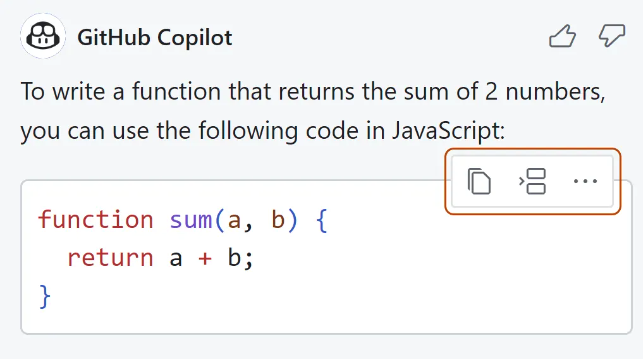
If you spend most of your day in VS Code, JetBrains tools, or GitHub itself, GitHub Copilot is still the easiest place to start. It suggests code as you type, answers questions in chat, reviews pull requests, and has an agent mode for larger changes.
The basic workflow is still the one that made it popular. You start typing a function:
# You start typing
def add_numbers(a, b):
    """Add two numbers"""
Copilot suggests the rest inline:
# Suggested completion
def add_numbers(a, b):
    """Add two numbers"""
    return a + b
Pricing: Free plan with 2,000 code completions a month; Pro $10/month, Pro+ $39/month; Business $19 and Enterprise $39 per user. Since June 2026, chat, agent mode, and code review draw from a monthly pool of usage credits, while code completions stay unlimited on paid plans.
Good fit: teams on GitHub who want AI without changing editors.
Poor fit: developers who want the most capable agent rather than the most convenient one.
4. Google Antigravity: Best free agentic IDE
Antigravity is Google's agent-first code editor. It replaced Gemini Code Assist for individual developers, which stopped serving requests in June 2026. The free individual plan includes unlimited tab completions and a weekly agent quota, with access to Gemini models and several third-party models.
Pricing: free individual plan; paid usage through Google AI Pro from $19.99/month.
Good fit: students, hobbyists, and developers who want to try agentic coding without paying.
Poor fit: heavy daily agent use, where the weekly limits run out.
5. Windsurf: Best budget AI editor
Windsurf is another AI-native editor in the same category as Cursor. Its Cascade agent indexes your codebase automatically, so it can work on large projects without you hand-picking which files to include.
Pricing: free tier; Pro from $15/month.
Good fit: developers who want an AI editor for a little less than Cursor.
6. Kiro: Best for spec-driven development and AWS teams
Kiro is AWS's agentic IDE and the successor to Amazon Q Developer, which closed new signups in May 2026. Its distinctive idea is spec-driven development: you describe a feature, Kiro turns it into requirements and a task plan, and the agent builds against that spec. Agent hooks can also run tasks automatically in the background, such as updating tests when files change.
Pricing: free tier with 50 credits a month; Pro from $20/month, with higher tiers for heavier use.
Good fit: teams that want structure around AI-written code, and AWS-heavy teams moving off Amazon Q Developer.
7. Tabnine: Best for private and self-hosted code
Tabnine is built for companies that cannot send code to a third-party cloud. It offers zero code retention and can be deployed as SaaS, in your own VPC, on-premises, or fully air-gapped, with compliance controls for regulated industries.
Pricing: Code Assistant from $39 per user/month; the Agentic Platform from $59 per user/month, billed annually.
Good fit: enterprises with strict security, compliance, or IP requirements.
Poor fit: solo developers, who get more capability for less elsewhere.
8. DeepSeek: Best low-cost option for reasoning
DeepSeek's models are strong at logical and technical reasoning at a very low price, especially through the API. That makes them popular for scripts, side projects, and as a cheap model inside other coding tools.
Pricing: free chat; pay-per-use API.
Poor fit: company code with privacy or data-residency requirements. Check its data handling before using it on anything sensitive.
How to choose a ChatGPT alternative for coding
Pick by where you want the AI to work, then by budget:
| If you want... | Choose |
|---|---|
| An agent that completes whole tasks | Claude Code |
| AI built into every part of your editor | Cursor |
| The cheapest paid AI in VS Code or JetBrains | GitHub Copilot |
| A capable agentic IDE for free | Google Antigravity |
| An AI editor on a tighter budget | Windsurf |
| Specs and structure around AI-written code | Kiro |
| Code that never leaves your servers | Tabnine |
| The lowest cost per request | DeepSeek |
Many developers combine two: an editor like Cursor or Copilot for everyday typing, and Claude Code for larger tasks.
When ChatGPT is still enough
ChatGPT is still useful for explaining unfamiliar code, learning a new language, drafting a regex, or talking through a design before you write it. If you mostly need explanations rather than changes to a real codebase, you may not need a dedicated tool. For research-heavy work like comparing libraries or reading documentation, the ChatGPT alternatives for research are worth a look too.
What I would install this week
If I were setting up today, I would start with one editor tool and one agent. Try Cursor or GitHub Copilot for daily coding, depending on whether you want a new editor or not, and give Claude Code a real task from your backlog. If budget is the constraint, Google Antigravity's free plan is the easiest way to see what agentic coding can do before paying for anything.