
Free Customer Message Reply Generator
Paste a customer message, choose the channel and tone, add any policy details, and generate a clear reply with empathy, next steps, and realistic expectations.
Customer Reply
Your ready-to-send customer reply will appear here...
How the AI Customer Reply Generator Works
Get results in seconds with a simple workflow.
Paste the Customer Message
Copy the customer’s message (email, chat, review, or DM). Include any important context like what they ordered, dates, or what they’re asking for.
Choose Channel, Tone, and Goal
Select where you’re replying (email, live chat, social DM, SMS) and pick a tone. Set a goal like resolve, request info, set expectations, or policy-based denial.
Generate, Edit, and Send
Get a ready-to-send response with clear next steps. Quickly review for accuracy, personalize with the customer’s name if needed, and send.
See It in Action
Turn a vague or stressful customer message into a calm, policy-aligned reply with clear next steps—ready for email, chat, or social support.
Customer: My package is late and I’m really frustrated. Tracking hasn’t moved. What is happening?
Agent: Sorry for the inconvenience. We are looking into it.
Hi there—thanks for reaching out, and I’m sorry for the delay. I know it’s frustrating when tracking doesn’t update.
Could you share your order number (or the email used at checkout)? Once I have that, I can check the latest carrier status and confirm the best next step.
In the meantime, if tracking hasn’t updated after 10 business days from shipment, we can offer a replacement or a refund—whichever you prefer.
Thanks, Jamie
Why Use Our AI Customer Reply Generator?
Powered by the latest AI to deliver fast, accurate results.
Professional Customer Support Replies in Seconds
Generate polished customer service responses for common support scenarios—shipping delays, billing questions, refunds, cancellations, bugs, and account issues—without sounding templated.
Channel-Specific Formatting (Email, Chat, Social DM, SMS)
Adapts length, structure, and closings to the channel so your reply fits the context—concise for live chat and SMS, more detailed for email support.
Tone and Brand Voice Control
Match your brand voice with tone selection (friendly, formal, empathetic, concise). Keeps messaging consistent across your support team and customer touchpoints.
Policy-Aware Responses (Without Being Robotic)
Incorporate your refund, return, cancellation, and shipping policies in a clear, customer-friendly way—helpful for reducing escalations and back-and-forth.
De-escalation and Empathy for Sensitive Cases
Craft calm, empathetic replies that acknowledge frustration, avoid blame, and focus on next steps—improving CSAT and helping prevent chargebacks and negative reviews.
Pro Tips for Better Results
Get the most out of the AI Customer Reply Generator with these expert tips.
Add your policy text to reduce back-and-forth
Pasting your refund/cancellation/shipping policy helps the reply set expectations, explain decisions clearly, and reduce repeat tickets.
Use one clear next step
High-performing support replies end with a single actionable request (order number, email, screenshot) or a clear timeline—this improves resolution speed.
Avoid absolutes unless you’re sure
If you don’t have real tracking/status details, don’t promise delivery dates. Ask for identifiers and provide a safe timeframe instead.
De-escalate with validation + action
Acknowledge frustration briefly, then move immediately to what you can do next. This keeps the conversation solution-focused and reduces negative sentiment.
Keep templates human
Add small personal touches (agent name, quick reassurance, concise summary) to avoid sounding automated and improve customer experience.
Who Is This For?
Trusted by millions of students, writers, and professionals worldwide.
Generate Customer Support Replies That Sound Human
Customer replies get hard when you have to move quickly, follow policy, and still sound like a person. A customer may be upset about a delay, confused about a refund, or asking for help while leaving out half the details.
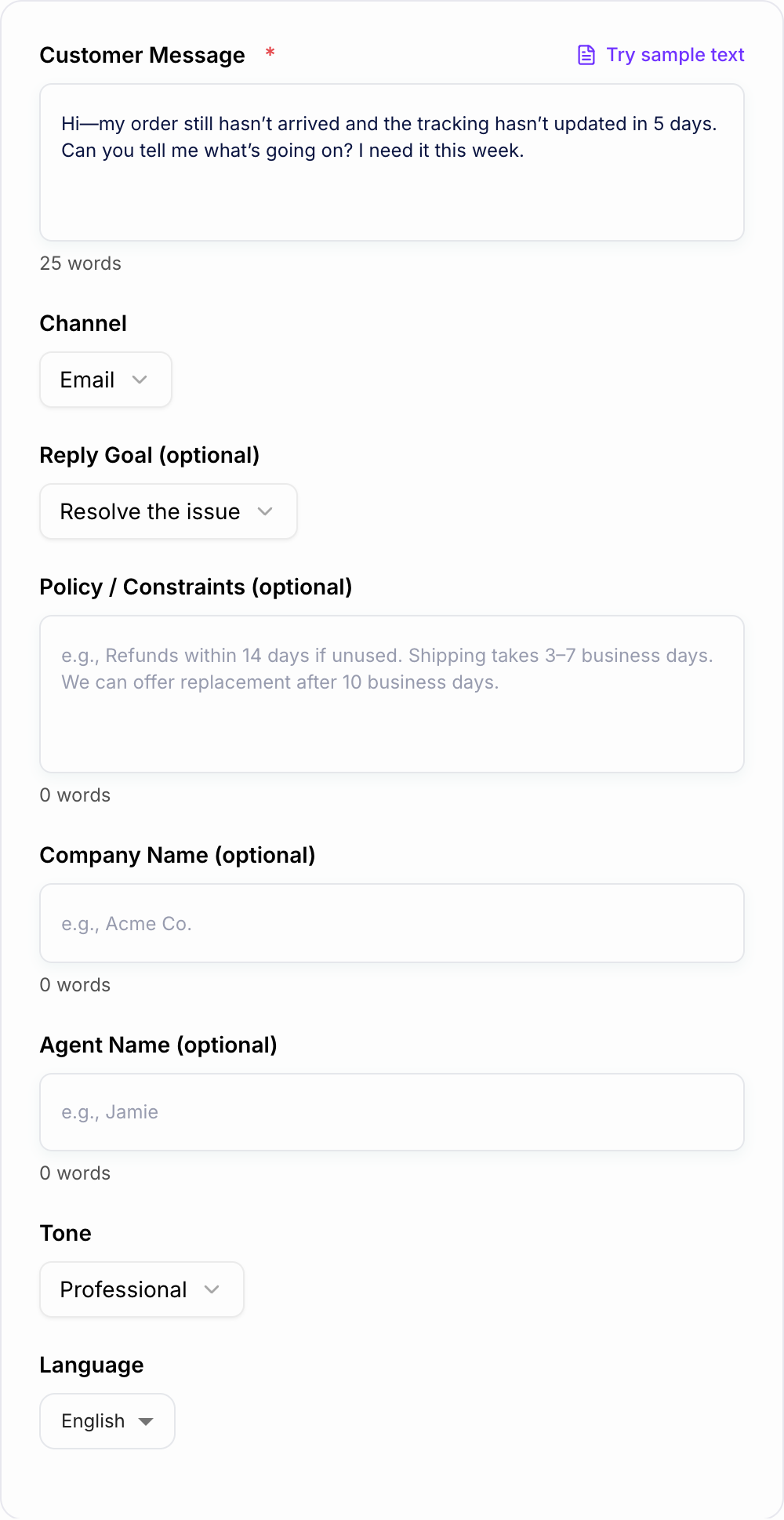
This AI Customer Message Generator gives you a cleaner first draft. Paste the customer message, choose the channel, set the goal, add any policy constraints, and the tool generates a reply with empathy, clarity, and a next step.
What to enter before generating a reply
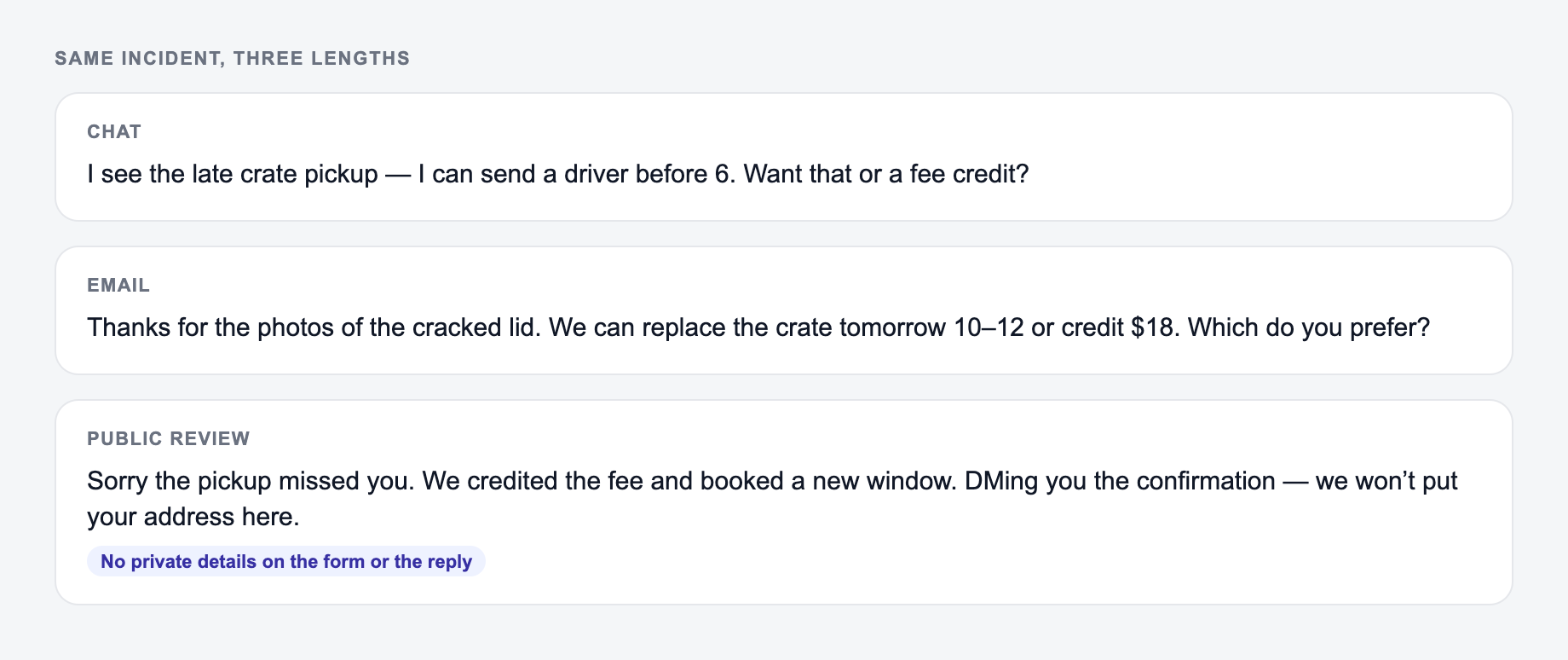
The same incident can be a chat reply, an email, or a public review response. The form is where you set channel, goal, and policy limits before the draft exists.
Campaign stub you can actually brief:
- One promise.
- Three assets (ad, email, on-site) that share the promise and change the ask.
- A kill list — offers you will not make this week.
If the AI Customer Reply Generator output ignores the kill list, the brief never made it onto the form.
| Channel | Length | What has to change |
|---|---|---|
| Chat / DM | Short, one next step | No long policy quotes |
| Context + one ask | Thread-safe names and dates | |
| Public review | Calm, no extra facts | Do not argue in public |
| Social mention | Fast acknowledgment | Move details off-thread |
A reply that names the delay, the option you can actually offer, and a time window usually beats a warmer paragraph that promises a refund you cannot issue.
The best output comes from context. Paste the full customer message, not just the sentence you want to answer.
Add these details when you have them:
- the original customer email, chat, DM, or review
- the channel you will reply in
- the outcome you want: resolve, request info, explain policy, escalate, or decline politely
- refund, shipping, warranty, cancellation, or escalation rules
- any verified order details, timelines, or case notes
Do not ask the generator to invent data. If you do not know the tracking status, refund eligibility, or account details, ask for the missing information in the reply.
Choose the right channel and tone
The same answer should look different depending on where it is sent.
- Email can include context, a greeting, and a structured close.
- Live chat should use short lines and one question at a time.
- Social DM can be friendly, but still needs a clear next step.
- SMS should be brief and action-focused.
- Public review replies should avoid private details and invite the customer into a support channel.
Tone is not just “friendly” or “formal.” For customer support, tone controls how much empathy, certainty, and explanation the response includes.
How to review the generated reply
Before sending, check the draft against the real customer record.
- Did it answer the actual issue?
- Did it promise anything your policy does not allow?
- Did it include a clear next step?
- Did it avoid blaming the customer?
- Did it match the channel length and format?
- Did it remove private details from public replies?
A good generated reply should save time, but it still needs a human accuracy pass.
Example support reply framework
For most customer messages, this structure works:
- Acknowledge the issue in one sentence.
- Restate the situation so the customer knows you understood.
- Give the next step or explain the decision.
- Add a realistic timeline if you have one.
- Close with a specific path forward.
That structure is the difference between “we are looking into it” and a reply that actually reduces confusion.
Build reusable support workflows
If the same issue keeps showing up, save the best generated reply as a base template. Then update the variables: order status, policy detail, customer name, timeline, and resolution path.
For broader writing workflows, the Junia AI platform can help keep customer-facing emails, docs, and message templates consistent instead of scattered across separate tools.
Final check before sending
Read the reply once as the customer. If the next step is unclear, the message is not done yet. Tighten the answer until the customer knows what happens next, what they need to provide, or why the decision was made.
One Incident, Four Channel Variants
Illustrative situation: a shipment is delayed and the carrier has not supplied a revised date.
If your input looks like the miss, do not judge the tool yet — add the noun and the constraint first.
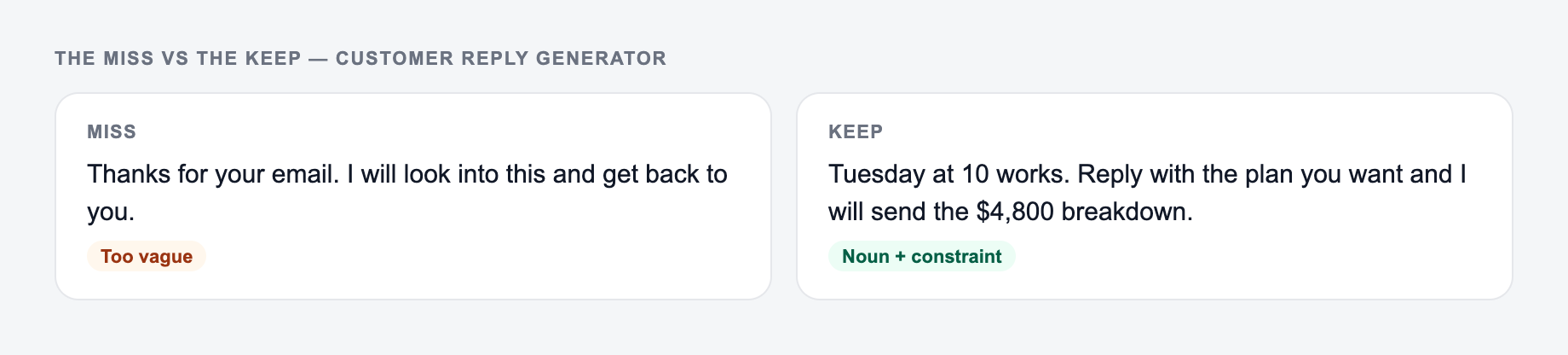
A synonym is not a test. If you change “unlock” to “discover,” you did not run a variant — you changed the mood of the same fog.
- Email: acknowledge the delay, state that no revised delivery date is confirmed, provide the tracking path, and explain when support will follow up.
- Chat: give the known status in one line, then ask whether the customer wants notification by email or SMS.
- SMS: identify the order safely, state the delay, and link only to an approved status page.
- Public review: apologize for the experience without exposing order details, then invite the customer to a private channel.
Frequently Asked Questions
Is this customer message reply generator free?+
Yes. You can generate customer support replies for free. Some advanced modes (like de-escalation or soft upsell) may be marked as premium depending on your setup.
Will the reply match my brand tone and support style?+
Yes. Choose a tone and optionally add your company name, agent name, and policy constraints. The generator will produce a response that’s consistent, professional, and channel-appropriate.
Can it handle refunds, cancellations, and policy-based denials?+
Yes. Add your policy details (refund window, conditions, timelines). The reply will explain the decision clearly and politely while offering next steps or alternatives when possible.
Does it keep the customer’s meaning and context?+
It responds to the customer message you provide. For best results, paste the full message thread (or the most relevant part), include any constraints, and specify the goal (resolve, request info, set expectations).
Can I use it for email, chat, and social media DMs?+
Yes. Select the channel and the tool will adjust the response length and formatting—for example, shorter for chat/SMS and more structured for email replies.
Will it invent order details, tracking updates, or refunds?+
No. It’s designed to avoid fabricating specifics. If key details are missing (order number, dates, tracking ID), it will ask for them or provide a safe, generic next step.