
Free Text Simplifier
The AI Text Simplifier works like a plain English converter for difficult writing. Simplify text, sentences, paragraphs, essay sections, technical documents, academic writing, reports, support content, policies, and SEO pages while preserving the original meaning.
Simplified Text
Your simplified text will appear here...
How the AI Text Simplifier Works
Get results in seconds with a simple workflow.
Paste Your Text
Add the paragraph(s) you want to simplify—technical writing, academic content, SEO copy, documentation, or emails.
Set Your Options (Optional)
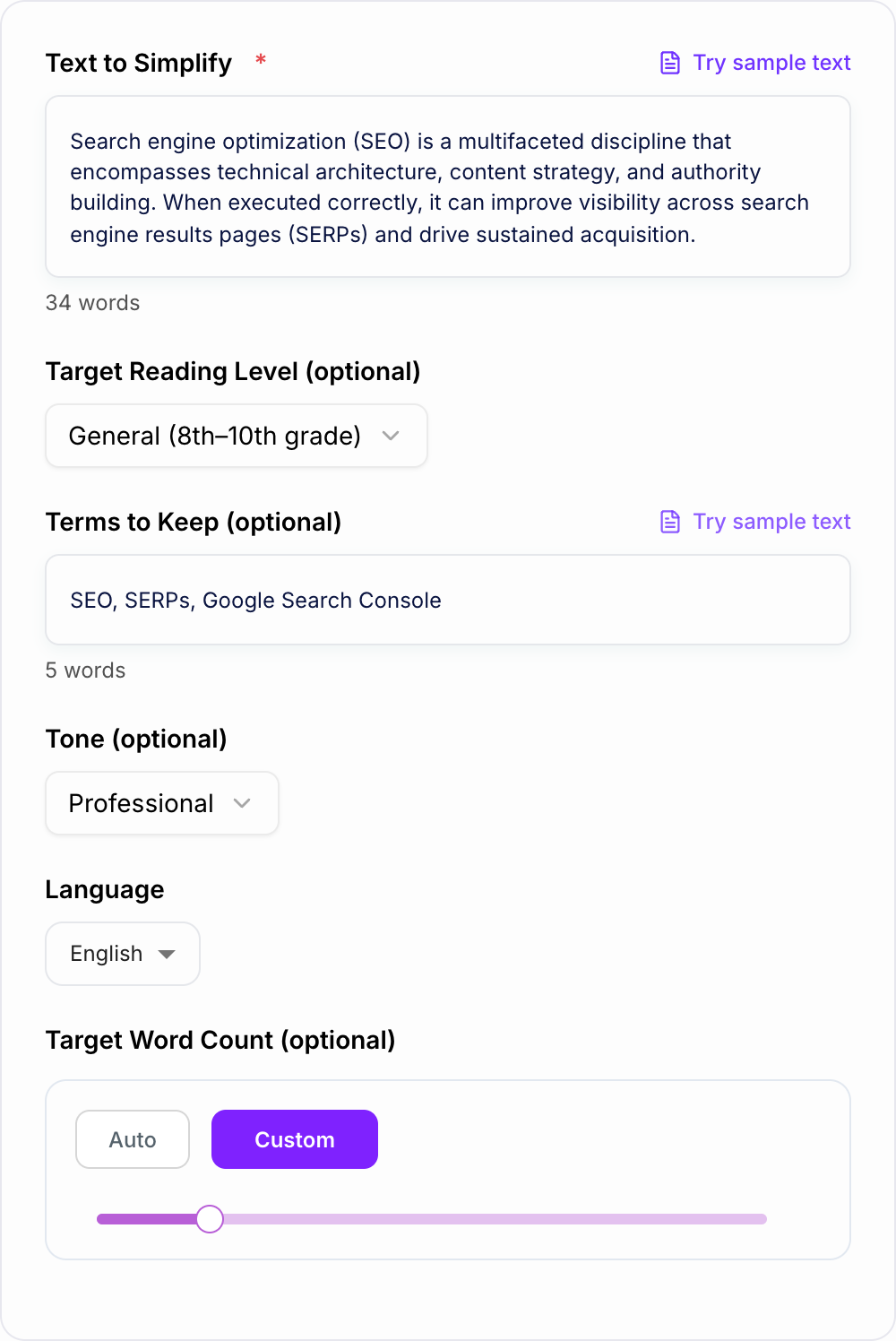
Pick a reading level, choose a tone, and list any terms you want to keep unchanged (keywords, acronyms, brand names).
Generate and Review
Get a simplified version instantly. Review for nuance, add any required context, and run another variation if you want it shorter or even easier.
See It in Action
Example of simplifying technical writing into clear, plain language while preserving meaning and key terms.
Search engine optimization (SEO) is a multifaceted discipline that encompasses technical architecture, content strategy, and authority building. When executed correctly, it can improve visibility across search engine results pages (SERPs) and drive sustained acquisition.
Search engine optimization (SEO) includes improving your site’s technical setup, content, and credibility. When you do it well, your pages can show up more often in search results (SERPs) and bring in steady traffic over time.
Why Use Our AI Text Simplifier?
Powered by the latest AI to deliver fast, accurate results.
Plain-Language Rewriting (Meaning Preserved)
Transforms complex writing into clear, simple text while keeping the original meaning, intent, and key details—ideal for readability and accessibility.
Better Readability for SEO and On-Page UX
Creates scannable, easy-to-understand copy that can improve engagement metrics (time on page, comprehension, bounce rate) while maintaining topical relevance.
Keeps Important Terms and Proper Nouns Intact
Optionally preserve domain-specific terms (e.g., medical, legal, SaaS, SEO keywords), product names, and acronyms so accuracy and context remain intact.
Adjustable Reading Level and Tone
Simplify for different audiences—students, customers, executives, or general readers—by selecting a target reading level and preferred tone.
Concise Outputs Without Losing Key Points
Remove redundancy and wordiness to make writing easier to read, faster to understand, and more conversion-friendly for landing pages and help docs.
Pro Tips for Better Results
Get the most out of the AI Text Simplifier with these expert tips.
Preserve key terms to avoid meaning drift
Add acronyms, product names, and must-keep phrases in “Terms to Keep” (e.g., SEO, SERPs, GA4) to protect accuracy and consistency.
Simplify section-by-section for long articles
For long blog posts or docs, simplify one section at a time to maintain structure and ensure each part stays accurate and coherent.
Use simpler sentences for better on-page engagement
Shorter sentences and clearer wording help readers scan faster—useful for SEO content, landing pages, and help articles where clarity drives action.
Keep specificity—remove jargon, not meaning
Replace complex phrasing with clear wording, but keep concrete details (steps, constraints, requirements) so the simplified text stays useful.
Do a final edit for voice and brand style
After simplifying, quickly adjust phrasing to match your brand voice and ensure the tone is consistent across the page or document.
Who Is This For?
Trusted by millions of students, writers, and professionals worldwide.
AI Text Simplifier and Plain English Converter
Most “hard to read” writing is not actually smarter. It is just packed with jargon, long sentences, and extra words that hide the point.
An AI text simplifier helps you keep the meaning, but say it in a way people can understand on the first pass. Use it as a plain English converter, sentence simplifier, or readability tool when complex writing needs to become clearer without losing important details. Less rereading. Less confusion. Better flow.
If the draft also needs structure, tone, and sentence-level polish, start with the AI text editor, then use this simplifier for the plain-language pass.
This text simplifier is built for the material that gets dense fast:
- technical explanations
- academic paragraphs
- policy and legal language
- product docs and help articles
- SEO content that got a little too “SEO”
Use it when the goal is not to paraphrase everything into a new style, but to make the same message easier to understand.
What You Can Simplify
You do not have to paste a full article. The tool works just as well for smaller pieces of writing:
- Sentences that are too long, nested, or full of jargon
- Paragraphs that make the reader work too hard
- Essay sections that need to sound clearer without losing the argument
- Technical explanations that need a plain-language version
- Support docs and policies that should be easier for customers to follow
For a single sentence, focus on the exact meaning you need to keep. For a paragraph, check that the simplified version still connects the ideas in the right order. For an essay section, simplify one section at a time so the voice and logic stay consistent.
What a text simplifier does (and what it should not do)
A good simplifier rewrites for clarity, not for vibes.
It should:
- use simpler words when possible
- shorten sentences and reduce nesting
- remove filler and repetition
- keep key details and relationships intact
- preserve important terms like acronyms, product names, and keywords
It should not:
- change claims or introduce new facts
- delete important caveats
- oversimplify until it becomes inaccurate
- rewrite “technical” into “vague”
When simplifying text actually improves SEO
Google is not ranking content because it sounds complicated. It is ranking content that satisfies intent and is easy to consume.
Simplifying helps with on page UX in a very practical way:
- clearer headings and sentences make scanning easier
- readers find answers faster, so they stay longer
- fewer confusing paragraphs can reduce pogo sticking
- your content becomes more linkable because it is easier to quote
If you are updating older posts, simplifying is one of the quickest wins. Keep the topical terms, remove the fog.
For readability-specific improvements, the readability improver is a better fit when the goal is smoother scanning rather than simpler wording alone.
How to simplify writing without losing meaning
If you want consistently good results, a few habits help a lot:
1) Keep the “must keep” terms
If you have words that cannot change (SEO keywords, medical terms, legal phrases, brand names), add them in Terms to Keep. This reduces meaning drift.
2) Pick the right reading level for the audience
- General (8th to 10th) is great for most blog content
- Easy (5th to 7th) works for help docs and onboarding
- Very Easy (3rd to 5th) is for truly broad audiences and quick comprehension
- Professional keeps it clear, but still grown up
3) Simplify in passes for long content
For long articles, do it section by section. Then do a final pass to make sure the voice feels consistent.
4) Remove jargon, keep specificity
Replace phrases like “multifaceted discipline” with what it actually means. But keep the concrete details: steps, constraints, numbers, definitions.
Quick examples of simplification ideas (you can copy these patterns)
- “utilize” → “use”
- “in the event that” → “if”
- “a significant number of” → “many”
- “prior to” → “before”
- “facilitate” → “help”
- Break one 35 word sentence into two 15 to 20 word sentences
Small edits. Big readability shift.
Who this tool is for
You will get a lot of value from a plain language rewrite if you are:
- a student turning research into understandable notes
- a marketer cleaning up landing page copy that feels too complex
- a founder rewriting product messaging so it clicks faster
- an SEO updating content for better readability while keeping keywords
- a support or docs writer making instructions easier to follow
If you are already using other writing workflows, plug this in as a clarity pass near the end. Generate, review, simplify the parts that slow readers down, then lightly edit for brand voice.
Worked Plain-Language Pass
Source: “Eligibility for reimbursement is contingent upon submission of itemized documentation no later than 30 calendar days subsequent to the date on which the expense was incurred.”
Paste the source text and choose how simple the rewrite should be. Simpler should never mean dropping a condition or exception.
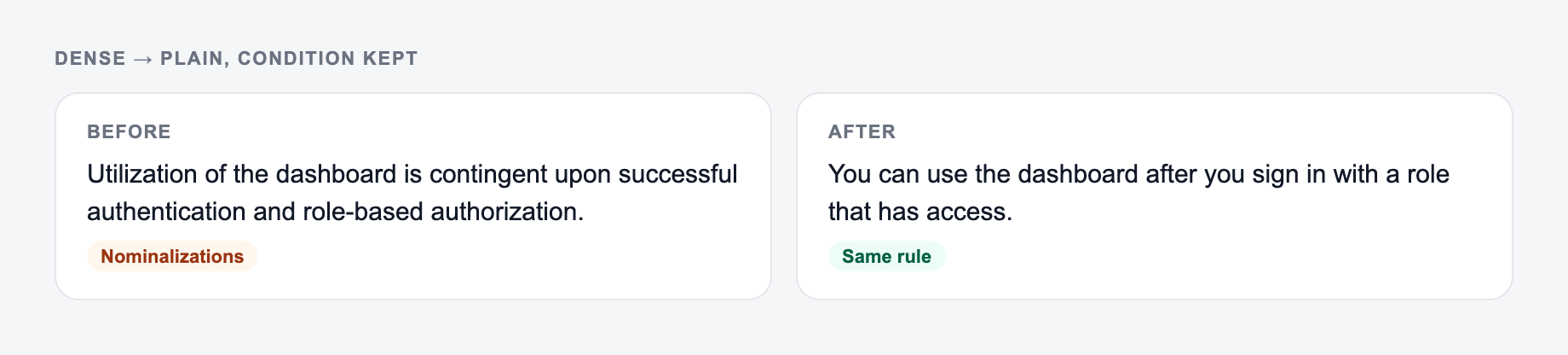
- Compare to: “You can use the dashboard after you sign in with a role that has access.” — same facts, less drag.
Too simple: “Send receipts soon to get paid back.”
Clearer version: “To request reimbursement, submit itemized receipts within 30 calendar days of the expense date.”
The too-simple version loses the deadline’s precision, changes “documentation” to receipts without checking whether that is equivalent, and makes eligibility sound guaranteed. The clearer version keeps the action, document detail, and time rule, but “receipts” should be used only if the underlying policy defines it that way.
Use a preservation sheet for dense material: actor, action, condition, deadline, exception, technical term, source reference. Check all seven after simplifying. Define essential jargon on first use instead of deleting it. Split nested logic into bullets when several exceptions apply, and ask a representative reader to explain the result back in their own words. Reading-grade scores can flag long words and sentences, but they do not prove comprehension or accuracy.
Frequently Asked Questions
What does a text simplifier do?+
A text simplifier rewrites complex or jargon-heavy writing into clearer, easier-to-read language. It keeps the meaning the same while improving readability, sentence flow, and comprehension.
Will the simplified text keep the same meaning?+
Yes. The tool is designed to preserve your original meaning and intent. You can also list specific terms to keep unchanged (like acronyms, product names, or technical keywords).
Can I simplify text for SEO without losing keywords?+
Yes. Use the SEO-friendly simplification mode (if available) and add important terms in “Terms to Keep.” This helps preserve topical keywords and search intent while improving readability.
Can I choose a reading level?+
Yes. Select a target reading level (General, Easy, Very Easy, or Professional) to match your audience—students, customers, or stakeholders.
Can I simplify multiple paragraphs at once?+
Yes. Paste one or a few paragraphs. For best results on long content, simplify section-by-section and then do a final pass to ensure consistent voice and terminology.
Does simplifying help with accessibility?+
Often, yes. Plain-language writing can improve accessibility by making content easier to understand, especially for non-native speakers, readers with cognitive load constraints, and mobile users.