
Free Blog Post Generator
Create publish-ready blog posts with a strong SEO structure: title ideas, introduction, H2/H3 outline, and a high-quality draft that matches your topic, target keywords, and audience. Great for content marketing, topical authority, and consistent blogging.
Generated Blog Post
Your SEO-friendly blog post will appear here...
How the AI Blog Post Generator Works
Get results in seconds with a simple workflow.
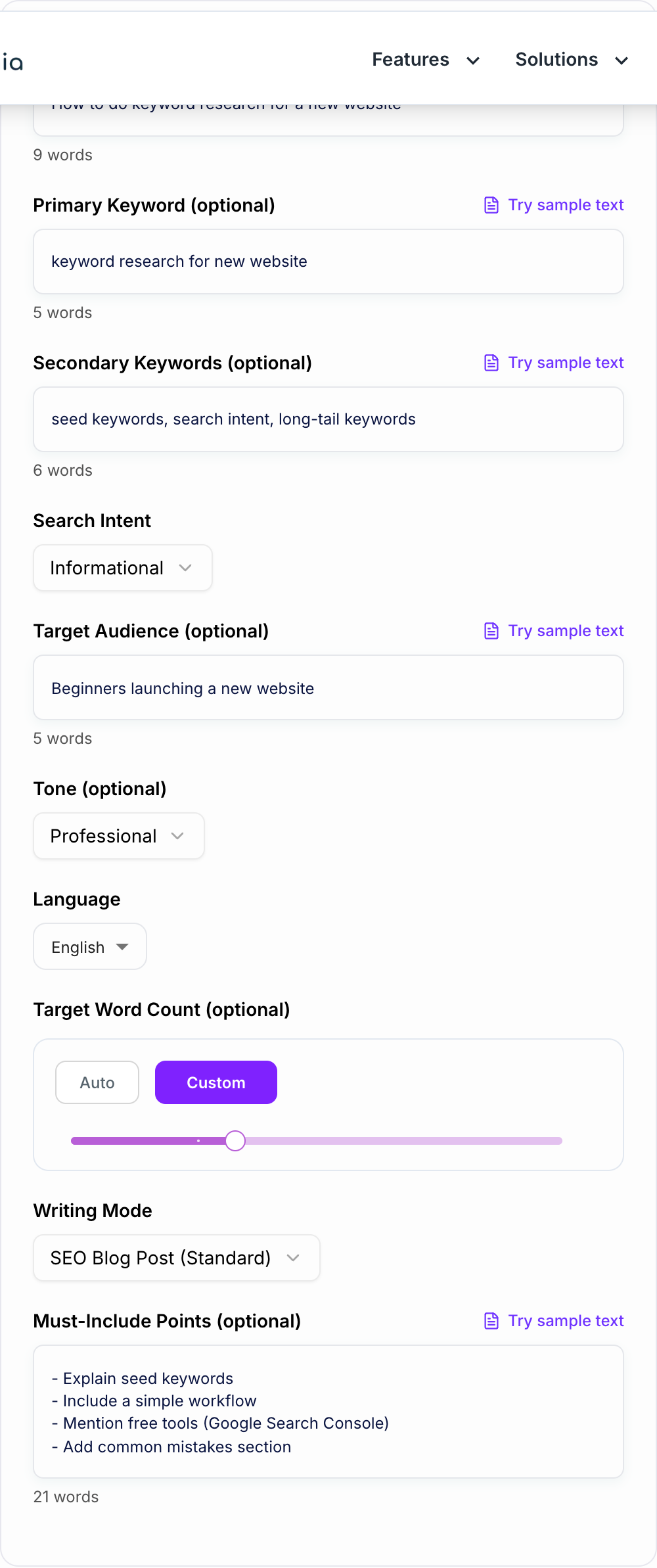
Enter Your Topic (and Optional Keywords)
Add a blog topic and optionally include a primary keyword and supporting keywords to increase topical relevance and on-page SEO clarity.
Choose Intent, Mode, and Tone
Pick search intent (informational, commercial, etc.) and a format (standard, outline-first, how-to, listicle). Set a tone to match your brand voice.
Generate, Then Add Your Unique Value
Review the draft, add internal links, real examples, and any product specifics. This improves E-E-A-T, originality, and conversion performance.
See It in Action
Example showing how a vague topic becomes a structured, SEO-friendly blog post with clear headings and intent-aligned sections.
Topic: keyword research I want a blog post about keyword research. Explain it and give some tips.
H1: Keyword Research for a New Website (Step-by-Step)
Introduction: Why keyword research matters for a new site
H2: What keyword research is (and how it works) H2: Step 1 — Define your niche and audience H2: Step 2 — Find seed keywords (with examples) H2: Step 3 — Expand into long-tail keywords H2: Step 4 — Analyze search intent and difficulty H2: Step 5 — Build a simple keyword map for your site H2: Common keyword research mistakes to avoid H2: Quick checklist + next steps
Why Use Our AI Blog Post Generator?
Powered by the latest AI to deliver fast, accurate results.
SEO-Optimized Structure (H1 + H2/H3 Headings)
Generates a search-friendly blog layout with clear H2/H3 sections aligned to search intent, making it easier to rank for your primary keyword and supporting terms.
Keyword-Aware Writing (Natural, Non-Spammy)
Uses your primary and secondary keywords naturally throughout the intro, headings, and body—supporting topical relevance without keyword stuffing.
Intent-Matched Content for Higher Organic CTR and Engagement
Adapts the content to informational, commercial, transactional, or navigational intent so the article answers what searchers actually want—improving time on page and reducing bounce.
Skimmable, Publish-Ready Drafts
Creates clean paragraphs, scannable sections, and clear transitions that read naturally—ideal for content marketing teams and busy creators.
Flexible Modes: How-To, Listicle, Outline-First, and E-E-A-T
Choose the blog format that fits your topic and audience, from step-by-step tutorials to list posts and more authoritative E-E-A-T-focused writing.
Pro Tips for Better Results
Get the most out of the AI Blog Post Generator with these expert tips.
Use one clear primary keyword per post
Pick a single primary keyword and let secondary keywords support it. This keeps the article focused and improves the chance of ranking for a specific query.
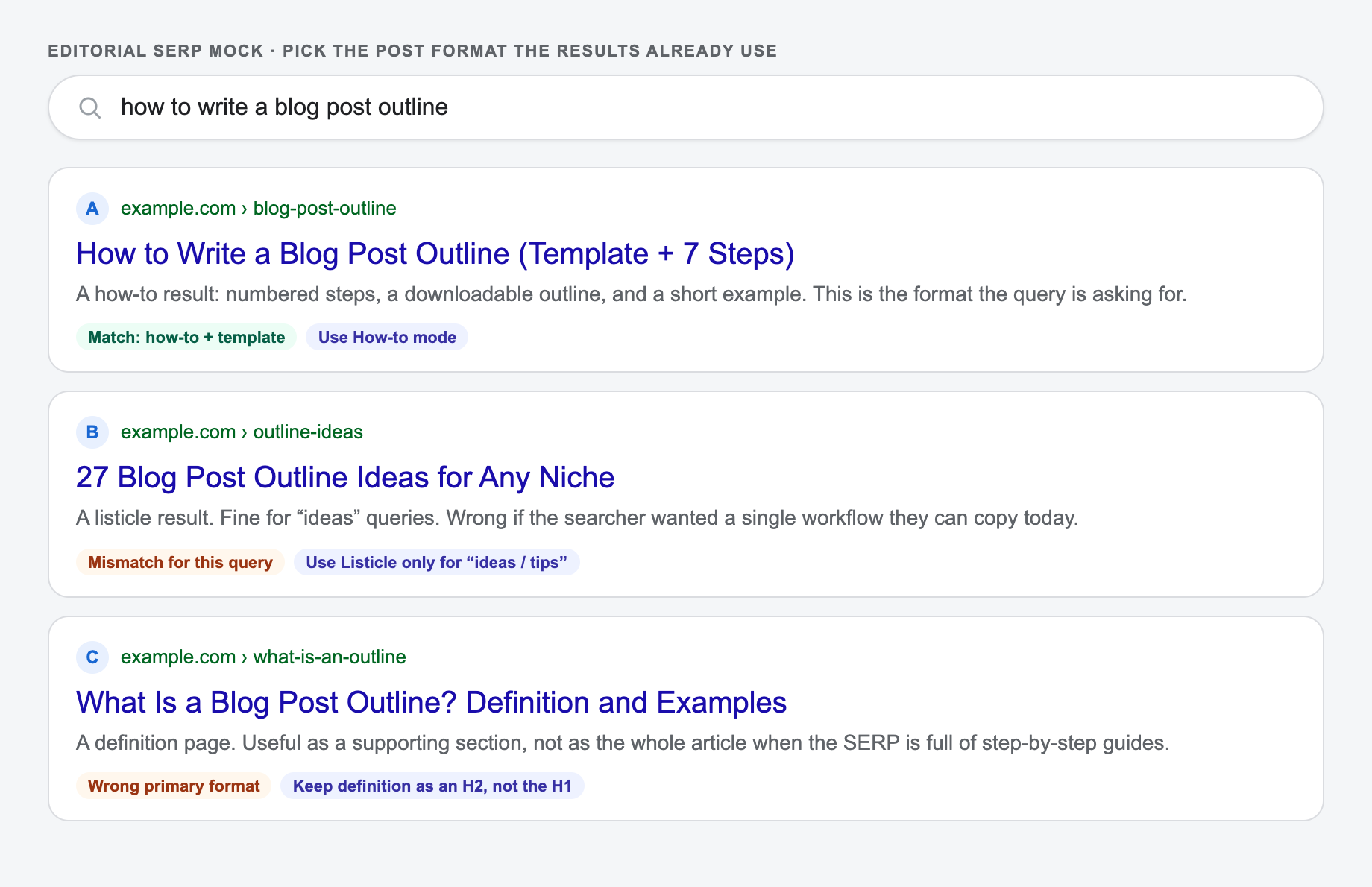
Match the SERP format
If top results are listicles, write a listicle. If they’re tutorials, use a how-to structure. Aligning format with SERP expectations improves engagement.
Add internal links and a clear next step
Link to related guides and include a natural CTA (newsletter, tool, product page). Strong internal linking helps crawlability and topical authority.
Strengthen E-E-A-T with real examples
Add screenshots, mini case studies, step-by-step workflows, and first-hand insights. This makes content more trustworthy and less generic.
Optimize the intro and headings for clarity
Make sure the intro answers the query quickly and headings reflect real subtopics people search for. Clean headings also improve featured snippet potential.
Who Is This For?
Trusted by millions of students, writers, and professionals worldwide.
How to Generate SEO Blog Posts That Actually Rank (Without Sounding Generic)
Publishing more content doesn’t automatically increase organic traffic. What moves rankings is consistent, intent-matched content that covers a topic better than what’s already on the SERP—while still being readable.
A blog post generator is most useful when it helps you do three things faster:
- Choose the right structure for the query (how-to, list, comparison, definition, etc.)
- Build a clear outline that covers the subtopics people expect
- Write a clean first draft you can improve with your own expertise
That's what this tool is designed to produce: an SEO-friendly outline and draft you can edit into a publish-ready article.
If you are not sure what structure to use yet, start with a blog post outline template, review a few blog post examples, or use stronger AI blog writing prompts before generating the draft.
What “SEO-Friendly” Really Means for a Blog Post
SEO-friendly writing is not about repeating a keyword. It’s about making the page easy for search engines to understand and genuinely helpful for readers.
A strong SEO blog post typically includes:
- A clear H1 that matches the query
- H2 sections that cover the main subtopics (often the same themes you see in top-ranking pages)
- Natural keyword usage (primary + supporting terms)
- Scannable formatting (short paragraphs, lists, clear headings)
- Practical examples and steps (especially for how-to content)
- A conclusion with next steps to improve satisfaction
How to Pick the Best Mode (Standard vs How-To vs Listicle)
Different queries perform better with different formats.
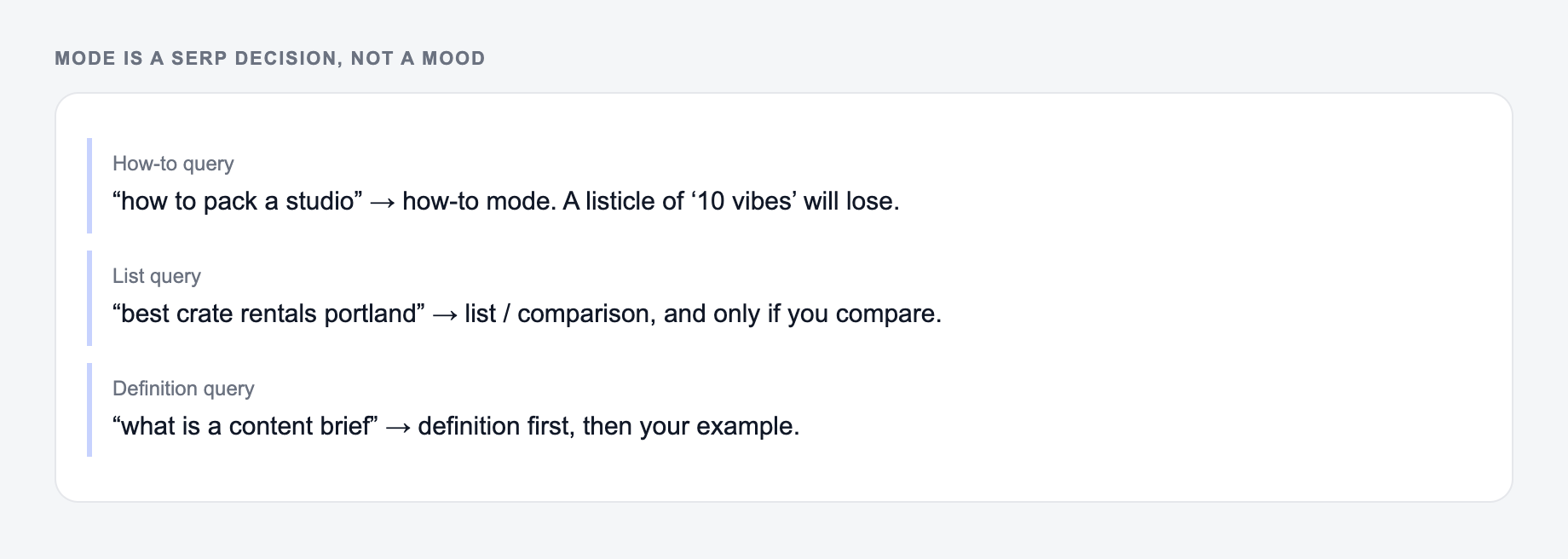
Topic, primary keyword, and the format the SERP actually rewards belong on the form before you generate a draft.
Same keyword, different page types — the AI Blog Post Generator should not emit the same line:
- Guide: how-to or step language, no “buy now.”
- Product / service: noun + qualifier the page can fulfill.
- Local: city only if you serve it.
- Comparison: only if the page actually compares.
A useful SERP-shaped check (not a live Google capture): title, URL path, and one line a searcher would believe after the click.
- Standard: best for broad topics and evergreen guides
- Outline-first: best when you want to review structure before drafting
- How-to: best for “how to” queries and tutorial intent
- Listicle: best for “best”, “ideas”, “tips”, and comparison-style queries
- E-E-A-T upgrade: best for YMYL-adjacent topics, B2B, or anything that needs a more expert voice
The mock below is the same query with three SERP formats. Pick the generator mode that matches the format already winning, not the one that sounds clever.
How to Avoid Generic AI Content (The Biggest Risk)
The fastest way to make an AI draft feel generic is to publish it with no added value.
After generating a draft, improve it with:
- first-hand experience (what actually worked, what didn’t)
- screenshots and real workflows
- product-specific details (if relevant)
- internal links to related posts
- a unique example, template, or checklist
Search engines and readers both reward that kind of specificity.
A Simple Workflow to Turn Drafts Into Ranking Content
Give the Blog Post Generator a real brief: who it is for, where it will appear, and one thing it is not allowed to invent.
- Generate a post with a clear topic and intent
- Adjust headings to match what the SERP expects
- Add internal links and any missing subtopics
- Add your unique examples (E-E-A-T)
- Optimize metadata (title tag + meta description)
- Publish and iterate based on Search Console queries
For more SEO-focused planning, create the brief first with the SEO content brief generator. If you need a broader tool for intros, summaries, emails, and support copy around the article, use the AI text generator. And if the project needs a deeper long-form workflow, use Junia's AI article writer instead of treating every page like a quick blog draft.
If you do that consistently, a generator becomes a content engine—not just a writing shortcut.
When to Move From One-Off Posts to Autoblogging
A blog post generator is enough when you need a single draft. If you want the system to plan, generate, optimize, and publish posts repeatedly, AI autoblogging software is the next step.
That is especially true when every post needs to match an AI brand voice and fit into a larger SEO plan. If you are new to the concept, start with this guide on what AI autoblogging is.
Frequently Asked Questions
Is this free blog post generator SEO-friendly?+
Yes. It generates an SEO-friendly structure (H1/H2/H3), writes with search intent in mind, and integrates your primary and secondary keywords naturally without keyword stuffing.
Do I need to provide keywords to generate a blog post?+
No. You can generate a post with just a topic. Adding a primary keyword and a few secondary keywords improves topical focus and on-page SEO relevance.
Will the generated blog post be ready to publish?+
It produces a strong draft you can publish after a quick review. For best results, add your unique experience, screenshots, internal links, and verify any claims or recommendations for your niche.
Can it match different search intents (informational vs commercial)?+
Yes. Choose the search intent that matches your target query. The generator will adjust the angle, section choices, and call-to-action style accordingly.
How do I avoid generic AI content?+
Provide must-include points, add audience details, and choose E-E-A-T Upgrade mode when available. After generating, add real examples, data from your product/experience, and unique perspectives to stand out.
Does it include citations or external sources?+
No. It won’t fabricate citations or statistics. If you need references, add them yourself (or provide sources in your notes) and verify accuracy before publishing.