
Free Acronym Generator
Turn a phrase, project, product, or idea into acronym options that are easier to remember and explain. Generate pronounceable acronyms, professional initialisms, and creative expansions for naming, branding, presentations, research projects, and internal initiatives.
Acronym Ideas
Your acronym suggestions will appear here...
How the AI Acronym Generator Works
Get results in seconds with a simple workflow.
Enter a Phrase or Keywords
Add the phrase you want to shorten (like a program name) or a few keywords describing your concept (like a product’s value proposition).
Choose Style and Context
Pick a style (short, medium, long) and optionally add industry context so the acronym expansions match your niche and sound natural for your audience.
Generate and Shortlist
Get multiple acronym suggestions with expansions. Copy your favorites, then refine by pronunciation, clarity, and how well the meaning matches your message.
See It in Action
Example of turning a plain phrase into multiple acronym name ideas with clear expansions.
Phrase: Customer Relationship Management
I need a short, memorable acronym name.
Acronym ideas:
- CRM — Customer Relationship Management (standard)
- CARE — Customer Advocacy & Relationship Enablement
- CONNECT — Customer Outreach & Nurture Engine for Conversion & Engagement Tracking
- CLARITY — Customer Lifecycle & Relationship Intelligence
- CRAFT — Customer Retention & Feedback Toolkit
Notes: CARE and CRAFT are more brandable; CRM is the widely recognized standard.
Why Use Our AI Acronym Generator?
Powered by the latest AI to deliver fast, accurate results.
Instant Acronym Ideas With Expanded Meanings
Generates multiple acronym options along with clear expansions (what each letter stands for), helping you quickly shortlist the best acronym for a name, project, program, or brand.
Brandable, Professional, or Fun Styles
Choose an acronym style that matches your goal—brand-friendly acronyms for product naming, professional acronyms for internal initiatives, or catchy options for campaigns and communities.
Readable, Pronounceable Suggestions
Prioritizes pronounceable acronyms (where possible) and flags letter combinations that may be awkward, improving memorability and reducing friction when used in presentations and marketing.
Keyword-Driven Relevance Without Stuffing
Uses your phrase or keywords as the semantic anchor so expansions stay aligned with your topic, value proposition, and messaging—without forcing unnatural wording.
Multilingual Acronym Generation
Generate acronyms in different languages for global teams and international brands, with expansions written naturally in the selected output language.
Pro Tips for Better Results
Get the most out of the AI Acronym Generator with these expert tips.
Aim for 3–6 letters for maximum memorability
Short acronyms are easier to say, remember, and design for logos and slide titles. If you need longer acronyms, prioritize readability and avoid awkward clusters.
Add context to avoid generic expansions
Including an industry or audience (e.g., healthcare, cybersecurity, education) helps the acronyms and expansions align with your domain vocabulary and positioning.
Check unintended meanings and associations
Before finalizing, search the acronym online and scan major platforms to avoid conflicts with existing brands, slang meanings, or confusing abbreviations.
Prefer pronounceable options for marketing
If you plan to say the acronym out loud (sales calls, podcasts, demos), pick one that reads like a word or is easy to sound out.
Use 2–3 finalists and test with real users
Shortlist a few strong options and ask teammates or customers which one is easiest to remember and best matches the intended meaning.
Who Is This For?
Trusted by millions of students, writers, and professionals worldwide.
Create Memorable Acronyms with an AI Acronym Generator
This AI Acronym Generator is for turning a phrase, project, product, framework, or campaign idea into acronym options that are easier to say, remember, and explain. Instead of forcing random letters into a name, use the tool to generate a shortlist with clear meanings, then choose the version that fits your audience.
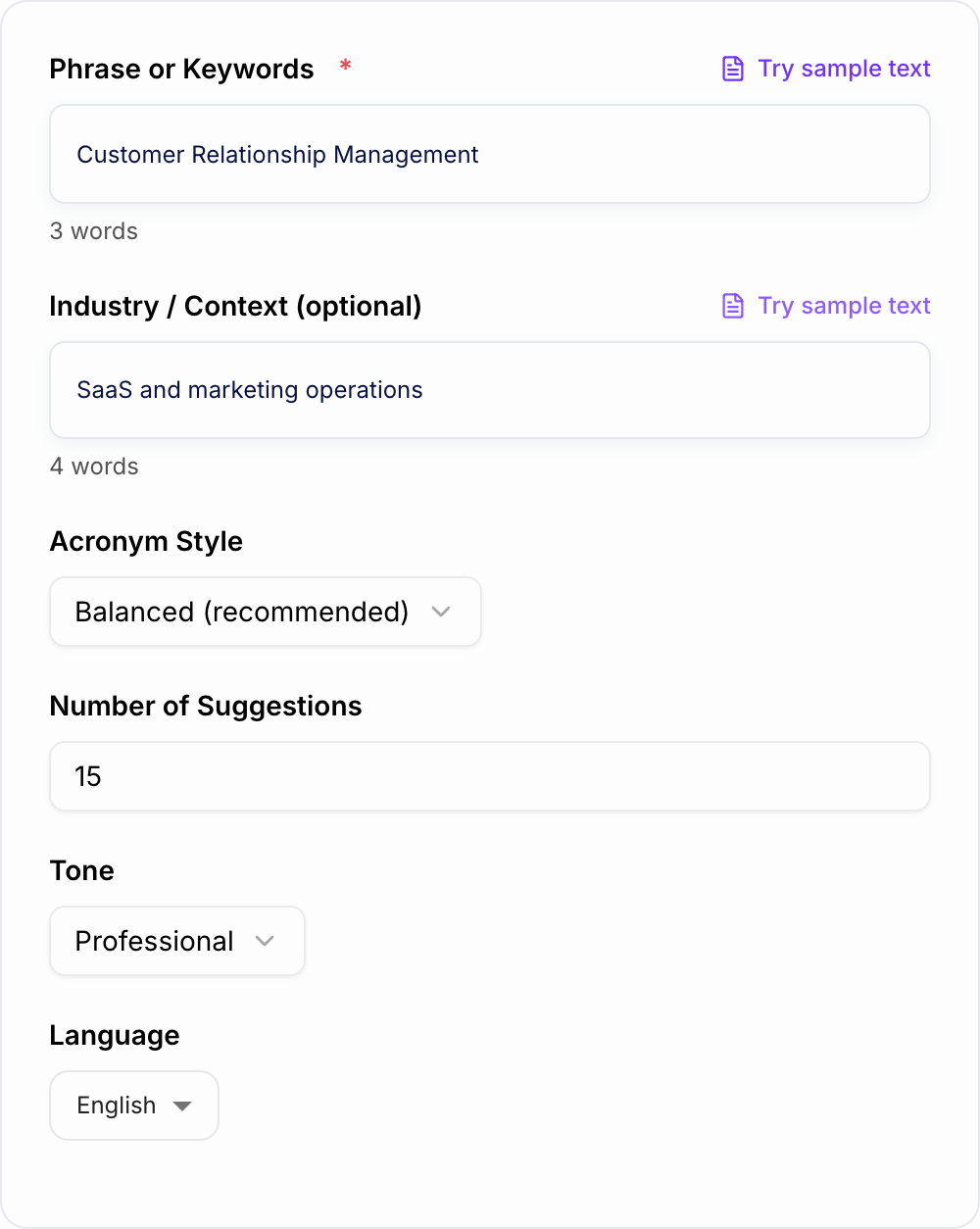
The best acronym output starts with a plain description of what the acronym should represent. Do not start with polished branding language. Start with the real idea.
What to Enter into the Acronym Generator
Give the generator enough context to understand both meaning and style.
- Core phrase or idea: the project, initiative, product, study, or campaign
- Audience: customers, internal team, academic reviewers, students, donors, or stakeholders
- Tone: brandable, professional, creative, academic, playful, or formal
- Target length: short for public names, flexible for internal frameworks
- Must-include words: terms that need to show up in the expansion
- Words to avoid: slang, competitor names, awkward letters, or anything too casual
For example, "Customer Retention Improvement Program for a SaaS support team" gives the tool more to work with than "retention acronym."
How to Choose the Right Acronym Mode
Use the mode based on where the acronym will appear.
Brandable Acronyms
Choose this for products, features, campaigns, communities, or names that need to be said out loud. The generator should prioritize pronounceable options with smoother letter patterns.
Professional or Internal
Use this for team initiatives, operating frameworks, training programs, and business projects. The output should be clear before it is clever, especially if people need to understand it in slides or docs.
Creative or Fun
Pick this for events, social campaigns, school projects, or lighter internal programs. Creative mode can be playful, but you should still reject options that feel too forced.
Academic or Research
Use academic mode for studies, labs, models, methods, and research programs. The acronym should sound credible and avoid wording that feels like marketing copy.
Reverse Acronym
Use reverse acronym mode when you already know the letters you want. This is useful when you have a desired word, but it also creates the highest risk of meaning stuffing, so review the expansion carefully.
Example Input, Output, and Review Notes
The form is the brief behind that shortlist: the idea, audience, and how serious or playful the letters can be.
How to stop after a usable pass with the Acronym Generator:
- State the job in one sentence (who + outcome).
- Add one fact you already have.
- Generate more options than you need, then delete anything a competitor could paste.
- Read the finalist out loud.
How to get a usable shortlist from the AI Acronym Generator:
- State the job in one sentence (who + outcome).
- Add one fact you already have — a number, a place, a constraint.
- Generate more options than you need, then delete anything you could paste on a competitor’s site.
- Read the finalist out loud. If you have to explain it, it is not ready.
Input: Customer Retention Improvement Program for a SaaS support team.
Mode: Professional / Internal.
Target length: Short.
Generated directions to look for:
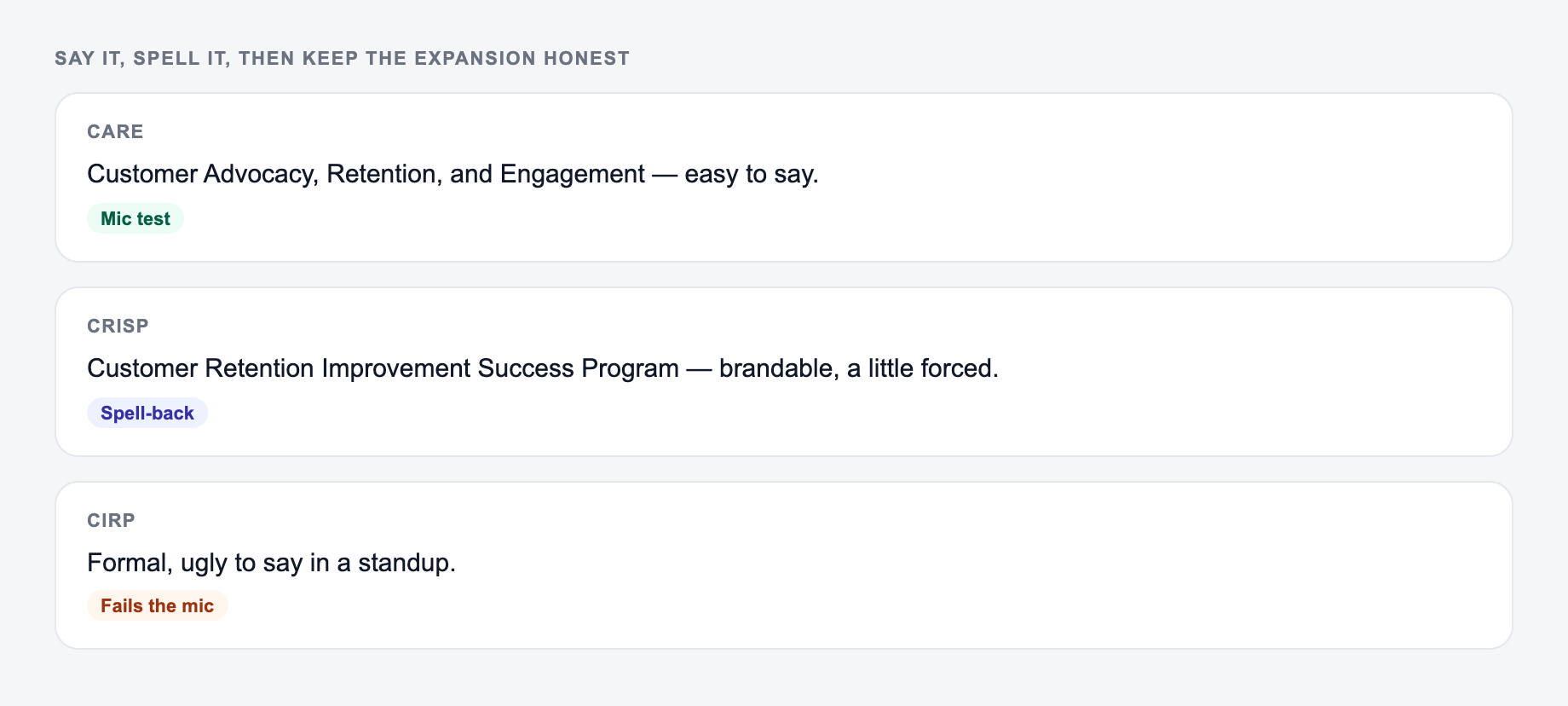
- CARE: Customer Advocacy, Retention, and Engagement
- CRISP: Customer Retention Improvement Success Program
- CIRP: Customer Improvement and Retention Plan
How to review them: CARE is easier to remember, CRISP is more brandable, and CIRP is more formal but less pleasant to say. The best choice depends on whether the acronym is for an internal dashboard, a team program, or a customer-facing campaign.
How to Pick the Best Acronym from the Shortlist
After the generator gives you options, do not pick only the cleverest one. Use a practical review pass.
- Say it out loud in a sentence.
- Check whether people can spell it after hearing it once.
- Make sure the expansion still means what you intended.
- Search for existing brands, products, slang, or negative meanings.
- Avoid options that need too much explanation.
- Ask one or two real users which version they remember later.
An acronym is only useful if people can repeat it without looking it up.
How to Avoid Forced Acronym Output
The most common failure case is meaning stuffing: picking a cool word first and bending the expansion until it barely makes sense.
Use the generator the other way around. Let the meaning lead, then choose the acronym that expresses it cleanly. If the acronym is memorable but the expansion sounds fake, reject it.
You can also improve weak output by adding constraints:
- "Avoid hard-to-pronounce consonant clusters."
- "Keep it professional, not playful."
- "Prioritize clarity over cleverness."
- "Include the word retention if possible."
- "Avoid anything that sounds like an existing SaaS brand."
When to Use This Acronym Maker Instead of Brainstorming Manually
Use the tool when you need volume, variation, or a fresh angle. It is especially useful for naming internal programs, creating research study labels, developing campaign shorthand, and comparing professional versus creative directions.
For broader naming, copy, and content work, Junia AI can help you move from acronym shortlist to landing page copy, product descriptions, campaign messaging, and supporting content without starting over in separate tools.
Final Review Checklist
Answer these before you generate a second batch. A reroll will not fix a vague brief.
Before using an acronym publicly, check:
- It is easy to say.
- It is easy to remember.
- The expansion is clear and not forced.
- The tone fits the audience.
- It does not conflict with an existing brand or awkward meaning.
- It still makes sense when someone sees it without your explanation.
That is the real value of an AI acronym generator: faster options, cleaner meanings, and a better shortlist to judge.
A Decision Matrix for the Final Three
Score each finalist from 1–5 for pronunciation, spelling after hearing, fidelity to the underlying idea, audience fit, and collision risk. Treat a serious trademark or unwanted-language collision as a veto, not an averageable weakness. Also test the expansion without the acronym: if it reads like words chosen only to force initials, the name is not ready.
Frequently Asked Questions
What is an acronym generator?+
An acronym generator creates short abbreviations from a phrase or keywords and suggests expanded meanings for each letter. It helps you quickly brainstorm acronyms for brand names, projects, teams, programs, and marketing campaigns.
Can I generate brandable acronyms for a business or product name?+
Yes. Use the Brandable mode for short, memorable acronym ideas that are easier to pronounce and recall. You can also add industry context to keep suggestions relevant to your market.
Will the tool use the exact first letters of my phrase?+
By default, it generates multiple options that may include strict-initial acronyms and creative variations. If you need exact initials only, select the Strict Initials mode (if available).
How many letters should an acronym have?+
For most names, 3–6 letters is ideal for memorability and usability (e.g., in slides, URLs, and social handles). For internal programs, 6–8 letters can work if the acronym remains readable.
How do I make an acronym easier to pronounce?+
Prefer vowel-friendly patterns (e.g., alternating consonants and vowels) and avoid heavy consonant clusters. Shorter acronyms also tend to be more pronounceable and brand-friendly.
Can I generate acronyms in different languages?+
Yes. Choose a language to generate acronym expansions that read naturally for that audience—useful for localization, multilingual teams, and international marketing.