
Free Google Ads Headlines Generator
Generate Responsive Search Ad headlines that fit Google Ads' 30-character limit. Add your keyword, offer, audience, location, benefits, and compliance notes to create ready-to-test PPC headline variations for stronger ad groups.
Google Ads Headlines
Your Google Ads RSA headlines will appear here (each within 30 characters)...
How the Google Ads Headlines Generator Works
Get results in seconds with a simple workflow.
Enter Your Product or Service
Add what you’re advertising (and optionally your brand, keyword, audience, and location). This anchors headlines to the right Google Ads ad group theme.
Add Benefits, Offer, and Compliance Notes (Optional)
Include your key USPs and a CTA or offer (e.g., free quote, free trial). Add compliance notes to keep ad copy policy-friendly and brand-safe.
Generate, Review, and Test in RSAs
Get multiple 30-character headlines. Paste them into Google Ads RSAs, then test variations across ad groups and measure CTR, CVR, and CPA to iterate.
See It in Action
Example of turning a basic input into RSA-ready Google Ads headline variations within the 30-character limit.
Product: Solar panel installation Keyword: solar installation Location: Austin, TX Offer: Free estimate
Solar Installation Austin Get a Free Solar Estimate Austin Solar Installers Cut Your Energy Bill 0% Financing Options Fast Solar Installation 25-Year Panel Warranty Top-Rated Solar Team Schedule a Free Quote Go Solar This Year
Why Use Our Google Ads Headlines Generator?
Powered by the latest AI to deliver fast, accurate results.
30-Character Google Ads Headline Limit Checks
Generates Responsive Search Ad (RSA) headlines designed to fit Google Ads headline character limits (≤30 characters) to reduce disapprovals and speed up launch.
Keyword + Relevance Variations for Higher CTR
Creates keyword-focused headline options and close variants to improve ad relevance, boost CTR, and support better Quality Score—without keyword stuffing.
Benefit-Led, Offer-Led, and CTA Headline Mix
Produces a balanced set of Google Ads headlines including benefits, differentiators, offers, and strong CTAs so you can build RSA combinations that match intent.
Local and Service Business-Friendly Headlines
Supports local lead generation with location-based and trust-based headline templates (e.g., service + city, fast response, licensed/insured) for local Google Ads campaigns.
Brand-Safe, Compliance-Aware Copy
Lets you add compliance notes (e.g., avoid superlatives, no guarantees). Headlines are written to be clear, verifiable, and policy-friendly.
Pro Tips for Better Results
Get the most out of the Google Ads Headlines Generator with these expert tips.
Use one tight theme per ad group
For better relevance and ad strength, keep each ad group focused on a single service/product and one primary keyword cluster—then generate headlines specific to that cluster.
Mix intent: keyword + value + CTA
A strong RSA set includes: 3–5 keyword headlines, 3–5 benefit headlines, 2–4 offer/price-style headlines (if allowed), and 2–3 CTA headlines to cover different user intents.
Add location modifiers for local lead gen
If you serve a region, include city/area in some headlines to match 'near me' searches and improve perceived relevance (without overusing the location in every line).
Avoid unverifiable superlatives
Skip claims like “#1,” “best,” or guaranteed results unless you can verify them. Cleaner, specific benefits tend to convert better and reduce policy risk.
Iterate using search terms and performance data
After launch, pull the Search Terms report and top-performing assets. Regenerate headlines using actual queries and proven benefits to steadily improve CTR and conversions.
Who Is This For?
Trusted by millions of students, writers, and professionals worldwide.
Generate RSA-ready Google Ads headlines without fighting the 30-character limit
Google Ads headlines look simple until you need 10 to 15 lines that are unique, relevant, policy-safe, and short enough to fit the 30-character Responsive Search Ad limit.
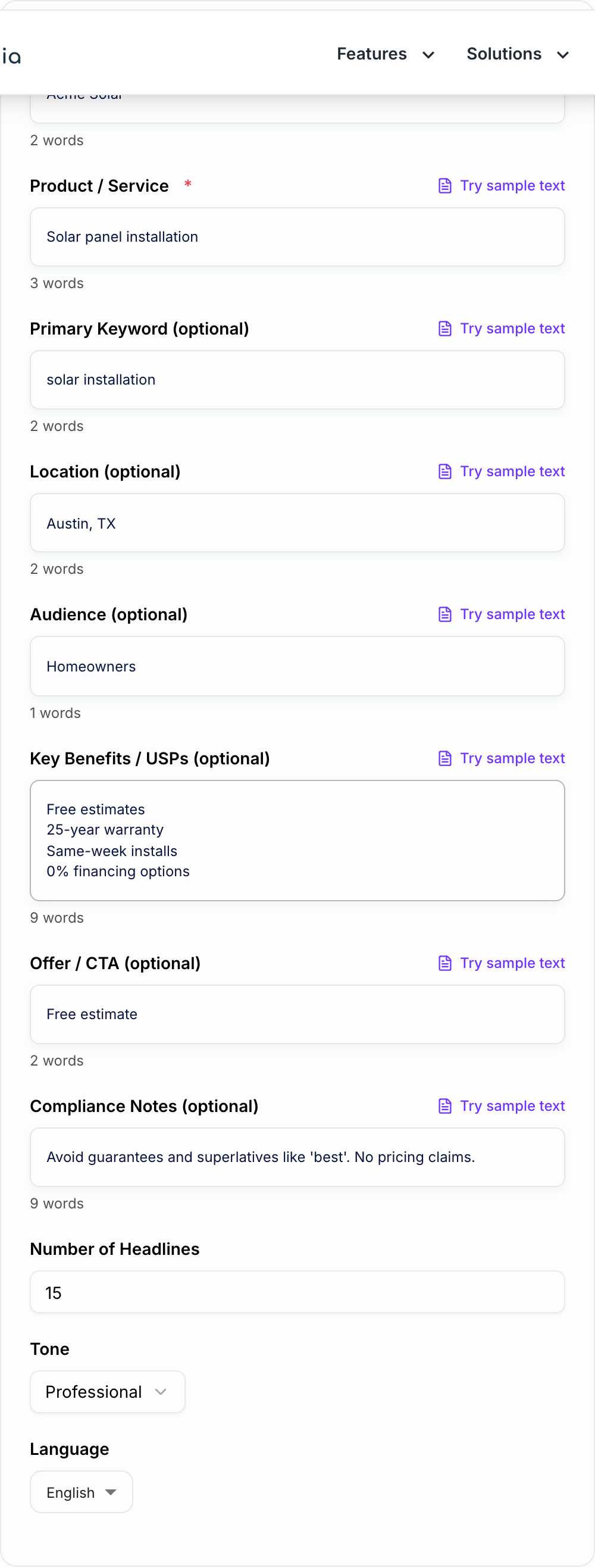
This Google Ads Headlines Generator is built for that exact job. Add the product or service, keyword, location, offer, audience, benefits, and any compliance notes, then generate headline options you can review and paste into Google Ads.
The point is not to replace PPC judgment. It is to get a stronger first batch of RSA assets so you can spend your time trimming, testing, and matching the right headlines to the right ad group.
What to enter into the Google Ads Headlines Generator
The output gets sharper when the input is specific. At minimum, enter the product or service being advertised. For stronger headline sets, add:
- Primary keyword: the query theme for the ad group, such as "solar installation" or "payroll software".
- Location: useful for local service campaigns and "near me" intent.
- Audience: homeowners, founders, enterprise IT teams, new patients, or another clear buyer group.
- USPs: warranties, turnaround time, financing, integrations, years in business, or service guarantees you can prove.
- Offer or CTA: free estimate, book a demo, start a trial, get a quote, or order online.
- Compliance notes: claims to avoid, terms to include, or regulated language.
Avoid feeding the generator a giant list of unrelated services. One tight ad group theme usually creates better headlines than one broad prompt trying to cover the whole account.
How to build a balanced RSA headline set
Responsive Search Ads are not about finding one perfect headline. They are about giving Google enough good options to mix and match.
A solid set usually includes:
- Keyword anchored headlines for relevance (and to support Ad Strength)
- Benefit first headlines that say why someone should care
- Offer or promo angles (if you can legally and realistically claim it)
- CTA lines that push the next step
- Trust cues like “Licensed” or “Since 2012” (only if true)
You want range. You also want to avoid repeating the same idea 8 different ways. Google treats that as low variety, and users feel it too.
Quick RSA headline formulas to generate and compare
These structures tend to work across industries, especially when you keep them specific.
1) Keyword + outcome
- “{Keyword} That Saves Time”
- “{Keyword} For Busy Teams”
2) Service + location
- “{Service} In {City}”
- “{City} {Service} Pros”
3) Benefit led
- “Lower Your Energy Bill”
- “Setup In 10 Minutes”
4) Offer led
- “Get A Free Estimate”
- “Start Your Free Trial”
5) Trust and proof (only if verifiable)
- “Licensed And Insured”
- “Trusted By 5,000+ Teams”
If you are unsure, generate a balanced batch first, then keep the headlines that feel like something a real business would confidently stand behind.
How to choose the right mode
Discard pile:
- Fake urgency with no date you will honor
- Personalization tokens that resolve empty
- A line a competitor could paste without lying less than you
Use RSA (Balanced) when you need a normal launch set with keyword, benefit, CTA, offer, and trust angles.
Use Keyword-Focused when your current ad strength is weak because the headline set does not clearly match the ad group's search terms. Keep the keyword natural; exact-match repetition is rarely better.
Use Offer / Promotion for time-bound campaigns, free trials, discounts, seasonal services, or lead magnets. Include the deadline or eligibility if it matters.
Use Local Services when city or service-area relevance is part of the click decision.
Use B2B / SaaS when buyers care about outcomes, integrations, teams, use cases, or product categories rather than a single local CTA.
Use Competitor Alternative carefully. Do not use competitor trademarks unless you know your policy and legal constraints. Generic alternative positioning is safer.
How to review the generated headlines before launch
A simple workflow:
- Pick one keyword cluster (example: “solar installation”)
- Add 3 to 5 USPs (warranty, financing, install speed, etc.)
- Add an offer or CTA (free estimate, book a call)
- Generate 15 headlines, then trim ruthlessly
- Keep a mix of keyword, benefit, CTA, and trust
- Remove near-duplicates and claims you cannot prove
- Paste the final set into Google Ads and check asset warnings
And if you are doing local, add the city. Just not in every single headline. That gets repetitive fast.
Compliance notes are not optional (even when you are in a rush)
After you generate, sort the draft into keep / fix / leave-alone. Do not “improve” a sentence that was blunt on purpose.
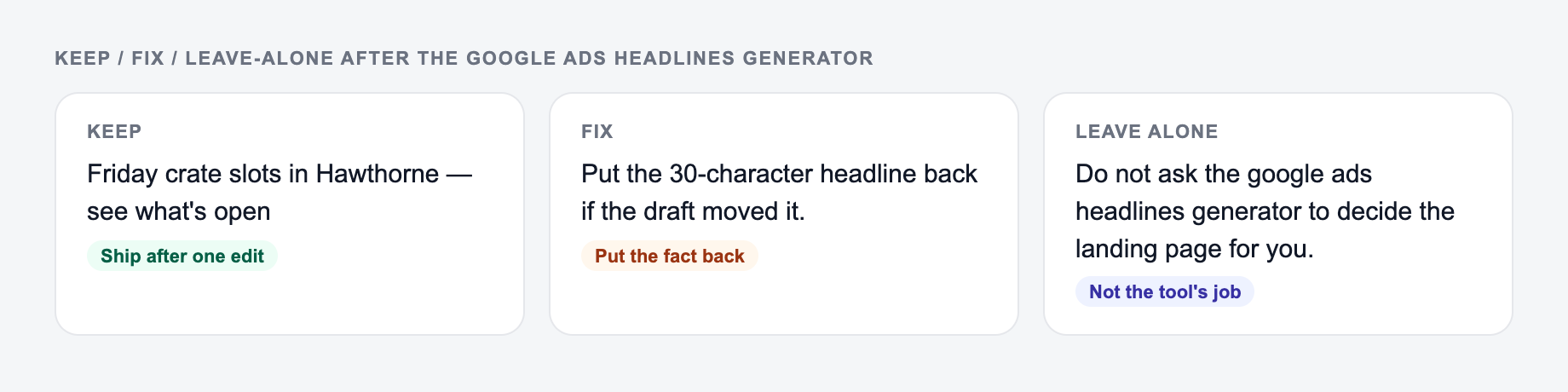
Google Ads disapprovals are annoying, but worse is running ads that overpromise.
Use the compliance field to flag things like:
- Avoid “best” or “#1”
- No guarantees (“Guaranteed results”)
- No pricing claims
- Must include license info (if your industry requires it)
It is not glamorous, but it saves time later. And it keeps your copy cleaner.
Improve generated headlines with real account data
After your RSA runs for a bit, do this:
- Pull the Search Terms report and look for wording you should mirror
- Identify the benefits users respond to (CTR is a clue, conversions are the truth)
- Replace weak headlines with new ones that build on what is working
- Keep the set fresh, especially in competitive auctions
If you want a faster way to build and iterate on ad copy workflows, you can also explore more tools at Junia AI and keep campaign copy moving without rewriting every asset from scratch.
Small checklist before you paste headlines into Google Ads
- Are they all 30 characters or less?
- Do you have enough variety (not 12 near duplicates)?
- Are your claims true and provable?
- Do you have at least a few strong CTAs?
- Do they match the landing page (message match still matters)
That is it. Generate, review, launch, then iterate based on real performance.
RSA Roles, 30 Characters, Pin With Care
A useful set is a mix of jobs, not 15 paraphrases of the keyword.
Keyword, offer, and the landing-page claim belong on the form. Pin only what must always show.
Annotate one winner:
The same job, named: who it is for, where it will appear, and what must stay true.
Why it can run: it names a noun, a next step, and nothing you would have to unsay. Kill it if the landing page cannot do that job today.
- Role: Keyword/path · Example (count characters): B2B Content Briefs · Pin?: Maybe H1 if relevance needs it
- Role: Benefit · Example (count characters): Writer-Ready SEO Outlines · Pin?: Rarely
- Role: Proof · Example (count characters): Includes Filled Example · Pin?: Only if true
- Role: CTA · Example (count characters): Get the Brief Template · Pin?: If the landing CTA matches
- Role: Disqualifier · Example (count characters): For In-House SEO Teams · Pin?: Useful if you want fewer junk clicks
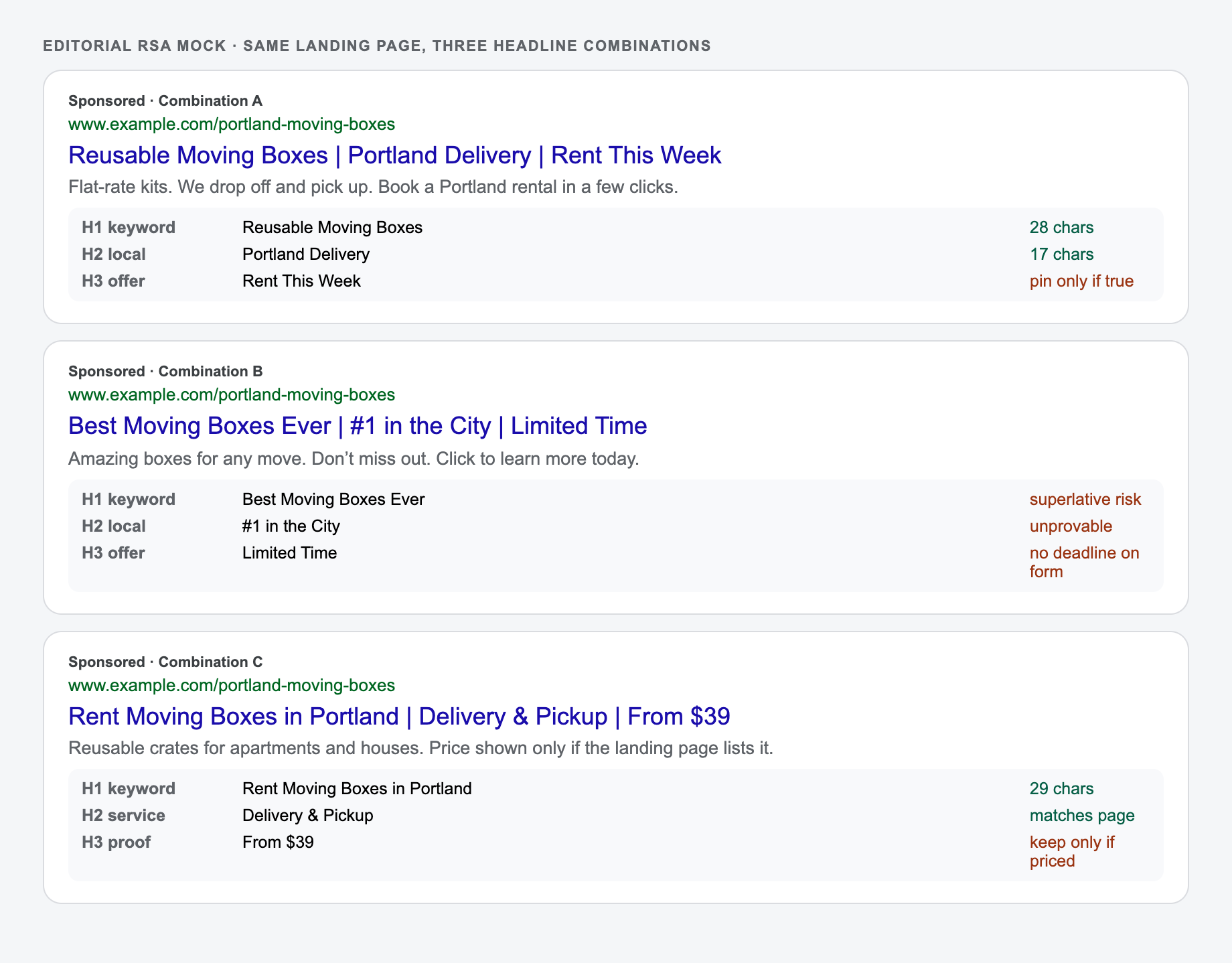
Count in Google Ads, including spaces. Trademark, misleading claims, and unsupported superlatives are policy problems. Pins reduce combinations; pin only when a line must always appear. Headlines must match the landing page path and offer.
The RSA mock below combines headlines into three ads. Read character count, then whether the landing page can support the claim.
Frequently Asked Questions
What is a Google Ads headline generator?+
A Google Ads headline generator creates multiple headline variations for Responsive Search Ads (RSA). It helps you produce keyword-relevant, benefit-led, and CTA-focused headlines that fit Google’s character limits and improve ad testing speed.
Do these headlines fit Google Ads character limits?+
Yes. The tool is designed to output headlines that are ≤30 characters (including spaces). You should still review final copy inside Google Ads, especially if you edit or add punctuation.
How many RSA headlines should I use?+
Google Ads allows up to 15 headlines per RSA. A common best practice is to provide 10–15 unique headlines with a mix of keyword, benefit, offer, and CTA angles so Google can learn which combinations perform best.
Will this improve CTR and Quality Score?+
It can help by producing more relevant, clearer headlines that align with search intent and keywords. Performance still depends on your targeting, landing page experience, ad extensions, bids, and competition—so treat headlines as an optimization lever, not a guarantee.
Can I generate local Google Ads headlines with a city or area?+
Yes. Add your location (city/region) and service, and the tool will generate local-friendly headline options. This is useful for service-area businesses targeting location-based searches.
How do I avoid policy issues or misleading claims?+
Use the compliance notes field to specify restrictions (e.g., avoid “best,” avoid guarantees, no pricing claims). Always verify claims, credentials, and promotions to ensure your ads comply with Google Ads policies and local regulations.