
Free Readability Improver
Paste difficult, wordy, or overly dense writing and turn it into clear, scannable text without losing the original meaning. Improve sentence flow, reduce jargon, tighten paragraphs, protect important terms, and adapt copy for web, SEO, broad audiences, or specific reading levels.
Improved Text
Your clearer, more readable version will appear here...
How the AI Readability Improver Works
Get results in seconds with a simple workflow.
Paste Your Text
Add a paragraph or multiple paragraphs you want to make clearer. The tool works well for blog content, SEO pages, emails, and documentation.
Choose a Readability Style
Pick Balanced, Simplify, Tighten (Concise), or More Scannable. Optionally set audience, tone, and terms to keep (like keywords or product names).
Generate and Review
Get a readability-optimized version instantly. Review for accuracy, add any domain-specific nuance, and publish with clearer structure and improved flow.
See It in Action
Example of improving readability by simplifying wording, tightening sentences, and making the text easier to scan—without changing meaning.
Search engine optimization is a multifaceted discipline that encompasses on-page enhancements, technical optimizations, and authority-building initiatives. When executed effectively, these efforts can yield compounding growth in qualified organic traffic over time.
Search engine optimization (SEO) includes on-page updates, technical fixes, and link-building. When you do these consistently, you can earn more qualified organic traffic over time—and that growth can compound.
Why Use Our AI Readability Improver?
Powered by the latest AI to deliver fast, accurate results.
AI Readability Rewrite (Meaning Preserved)
Improves readability while preserving meaning, intent, and key details—ideal for polishing blog posts, SEO landing pages, help docs, and emails without losing accuracy.
Clearer Sentences and Better Flow
Fixes awkward phrasing, improves transitions, and reduces run-on sentences so your writing feels natural, confident, and easier to follow for real readers.
Less Jargon, More Plain Language
Replaces overly complex words and jargon with simpler alternatives (when appropriate) to increase comprehension—especially useful for product pages and educational content.
Scannable Web Formatting
Creates shorter paragraphs and cleaner structure for web readers. When helpful, converts dense blocks into readable bullets while keeping the original message intact.
SEO-Friendly Readability (Keyword-Aware)
Helps make content easier to read without stripping important SEO terms. Preserves key phrases naturally to support on-page SEO and search intent matching.
Pro Tips for Better Results
Get the most out of the AI Readability Improver with these expert tips.
Aim for one idea per paragraph
On the web, shorter paragraphs improve readability and scannability. If a paragraph covers multiple ideas, split it into two or three focused blocks.
Keep key SEO terms consistent
If you must preserve exact keyword phrasing (e.g., product name or primary keyword), add it to “Words/Terms to Keep” to prevent unwanted substitutions.
Use Tighten mode for conversions
Wordy copy can weaken CTAs. Tighten mode is useful for landing pages, pricing pages, and email copy where clarity and momentum matter.
Simplify for top-of-funnel content
For informational search intent, simpler language often performs better. It keeps readers engaged and makes the content feel more helpful and accessible.
Do a final pass for specificity
Readability improves comprehension, but specificity improves trust. Add concrete examples, steps, and definitions where needed to strengthen E-E-A-T.
Who Is This For?
Trusted by millions of students, writers, and professionals worldwide.
Improve Readability with an AI Readability Improver
A readability improver is useful when the idea is right but the writing makes readers work too hard. Long sentences, buried points, jargon, vague transitions, and dense paragraphs can make even accurate content feel harder than it needs to be.
This AI Readability Improver rewrites existing text so it is clearer, smoother, tighter, or easier to scan while preserving the original meaning. It works best when you give it the actual draft, choose the right mode, and protect any terms that should not change.
What to Paste into the Readability Improver
Paste the section that needs a clarity pass, not the whole document by default. A focused paragraph, email, landing page section, documentation block, or article excerpt usually produces cleaner results.
Before generating, add any words that must stay unchanged:
- Brand and product names
- Feature names and UI labels
- SEO keyword phrases
- Technical terms the reader still needs
- Legal, compliance, medical, or policy wording
- Names, numbers, dates, and exact claims
If the draft needs deeper restructuring before the readability pass, use the AI text editor first to fix the argument, order, or tone. Then use this tool for a narrower clarity rewrite.
Choose the Right Readability Mode
Use Balanced when the writing is mostly fine but clunky. It keeps the voice close to the original while cleaning sentence flow.
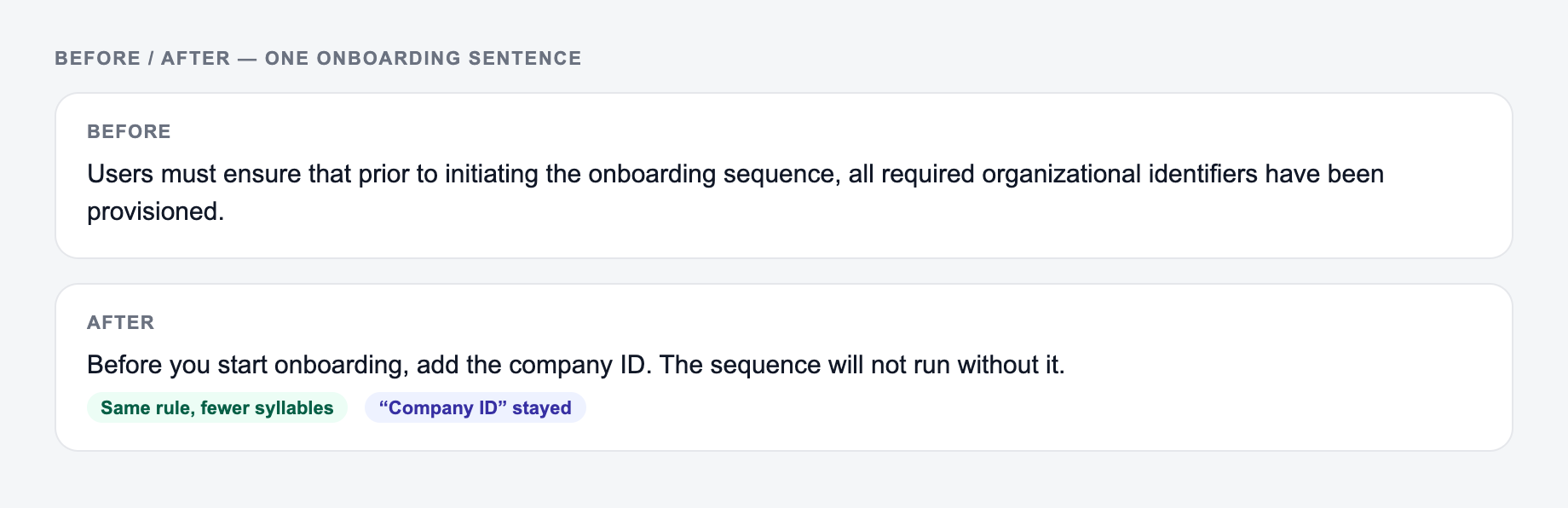
Use Simplify when the audience is broad or the topic is unnecessarily complex. This mode swaps avoidable jargon for plain language and shortens hard-to-follow sentences.
Use Tighten / Concise for landing pages, emails, product copy, and any copy that feels padded. It removes throat-clearing, repeated ideas, and soft qualifiers.
Use More Scannable when readers need to skim. It can break up long paragraphs, strengthen topic sentences, and add bullets where the structure genuinely helps. For blog posts, that structural pass often matters more than any sentence rewrite: improving blog post readability usually starts with short paragraphs, descriptive subheadings, and one idea per section.
Use Web/SEO Readability when the draft needs to stay search-friendly while becoming clearer. Protect important keywords so the rewrite does not erase the page’s intent.
Use 6th Grade Reading Level for public-facing instructions, accessibility-focused content, and text that must be understood quickly by a wide audience.
Example Readability Rewrite
Original:
In order to successfully complete the onboarding process, users should make sure that all relevant profile information has been submitted prior to attempting to access the dashboard functionality.
Improved:
Before opening the dashboard, complete your profile information. This helps the system show the right settings, permissions, and next steps.
The improved version is shorter, but the real win is order. It starts with the action, then explains why the action matters. That rewrite is the kind of paragraph you paste into Text to Improve. The filled form below uses a similar onboarding sentence, plus a style and a short keep-list so product names do not get simplified away.
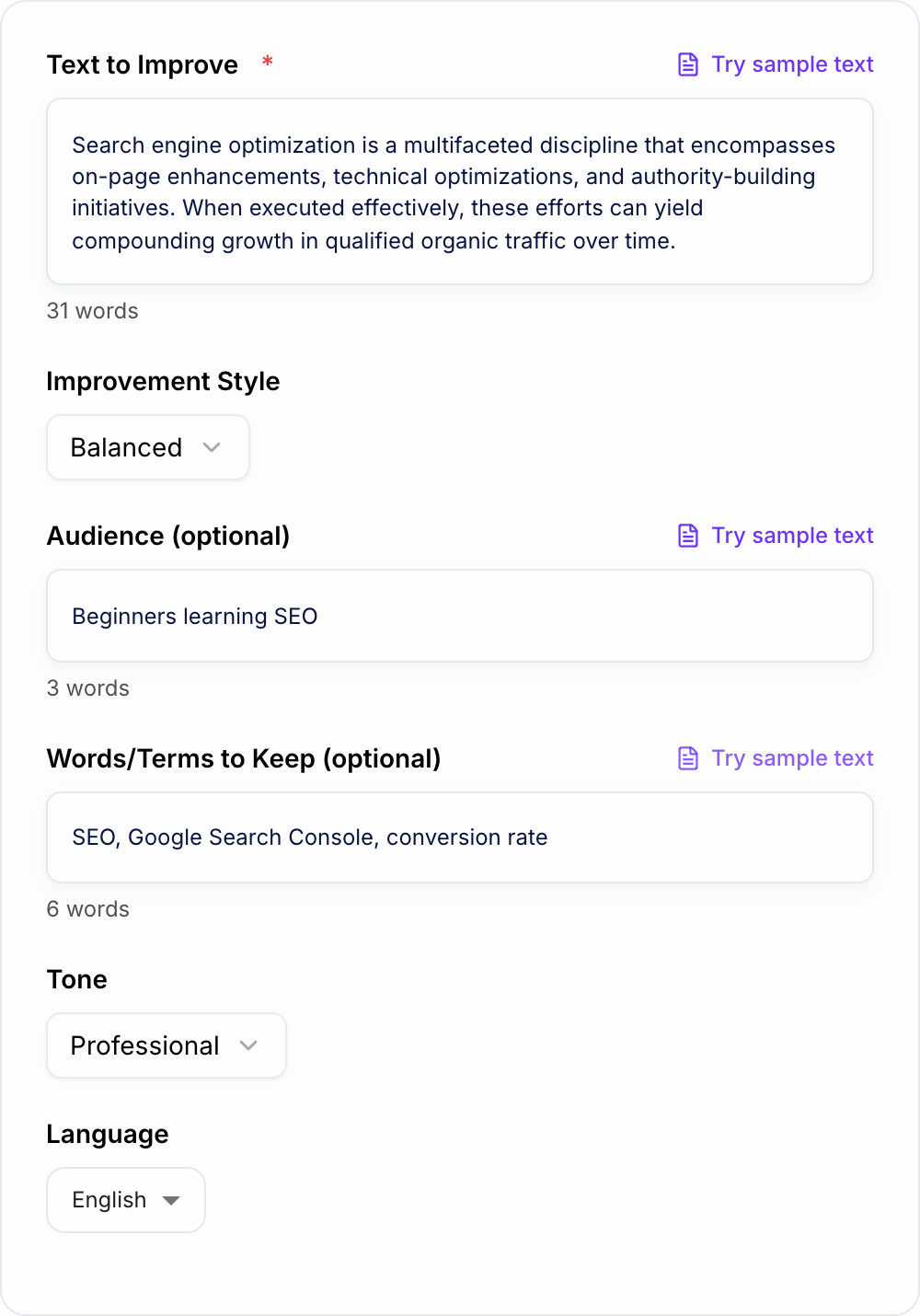
- Compare to: “Before you start onboarding, add the company ID. The sequence will not run without it.” — same facts, less drag.
| What changed | Keep | Restore if missing |
|---|---|---|
| Sentence order (action first) | Product and UI names | Conditions and exceptions |
| Jargon → plain verbs | Numbers, dates, claims | Legal or policy wording |
| One idea per sentence | Required keywords | Tone that still fits the audience |
Review the Improved Text Before Publishing
Readability tools can make text easier to understand, but they can also smooth over important detail if you do not review the output.
Check for:
- Meaning changes in claims, recommendations, or instructions
- Missing examples, numbers, names, or steps
- Over-simplified technical terms
- Headings that no longer match the paragraph below them
- Tone that became too casual or too blunt for the audience
For long-form content, a broader workspace like Junia AI can help keep drafts, outlines, and optimization passes organized. If you are starting from scratch, create the first version with the AI blog post generator, then use this tool to improve the readability of specific sections.
How This Tool Fits into an Editing Workflow
Use the readability improver near the end of the editing process, after the structure is mostly settled. If you simplify too early, you may polish paragraphs that later need to be cut.
A practical workflow looks like this:
- Fix the main idea and structure
- Remove sections that do not support the reader’s goal
- Paste dense paragraphs into the readability improver
- Protect terms that should stay unchanged
- Compare the rewrite against the original
- Add back any necessary examples, links, or context
For AI-generated drafts that sound stiff before they sound unclear, run an AI humanizer pass first, then use this readability tool to remove friction from the final wording. Neither pass can add a real example or a clear opinion, though. That part of humanizing AI text still has to be done by hand.
Common Readability Problems the Tool Can Fix
Long sentences often need to be split into a clear point and a short explanation. Dense paragraphs often need a stronger first sentence before they need bullets. Jargon usually needs either a plain replacement or a short definition.
Wordiness is another common issue. Phrases like “due to the fact that,” “it is important to note,” and “in order to” can usually be cut without losing meaning.
The tool is also useful when AI text repeats the same point in slightly different words. In that case, use concise mode and ask it to preserve only the strongest version of each idea.
Final Readability Checklist
Before using the improved version, confirm:
- The main point appears early
- Sentences are easier to follow on the first read
- Paragraphs are not too dense for the format
- Protected terms stayed intact
- The rewrite did not remove facts, conditions, or examples the reader needs
- The tone still matches the brand, audience, and purpose
Readable writing is not weaker writing. It is writing with less friction between the reader and the point.
Compare Clarity Without Rewarding Oversimplification
Run the same paragraph through Balanced, Simplify, and Concise modes. Score each version on four separate questions: Is the action easier to find? Are conditions and exceptions intact? Are required terms preserved? Does the tone still fit the reader? A shorter version is not automatically the clearest one.
Frequently Asked Questions
What does a readability improver do?+
A readability improver rewrites your text to make it clearer and easier to understand. It reduces wordiness, improves sentence structure, and strengthens flow while keeping the original meaning.
Will it change the meaning of my content?+
The tool is designed to preserve meaning and intent. It focuses on clarity, structure, and simpler wording. For best results, include any terms you must keep (like brand names or technical phrases).
Can I use this to improve SEO content?+
Yes. Readable content can improve user engagement metrics and help your page better satisfy search intent. The tool aims to keep important keywords and SEO terms while making paragraphs more scannable and clear.
What’s the best mode for website copy?+
Balanced is a good default. For dense content, try More Scannable. If your copy feels wordy, use Tighten (Concise). For the most web-focused output, choose Web/SEO Readability (if available).
Can I target a specific reading level?+
Yes. The 6th Grade Reading Level mode rewrites your text using plain English, shorter sentences, and simpler words—useful for accessibility and broad audiences.
What languages are supported?+
You can improve readability in many languages. Select your output language and the tool will rewrite your text accordingly while keeping meaning and key terms intact.