
AI Autoblogging Workflow: From Keywords to Published Posts

Thu
AI SEO Specialist, Full Stack Developer

I've watched teams turn autoblogging on, publish 40 posts in a week, and then spend the next month cleaning up the mess.
The writing was never the bottleneck. The bottleneck was deciding which pages deserved to exist, what each one needed to cover, and who would actually review them before they went live. If you skip that, you do not have an AI autoblogging workflow. You have a content dump with a nicer UI.
Here is the 8-step process I use when the goal is ranked, reviewed posts rather than a folder full of drafts that merely sound finished.
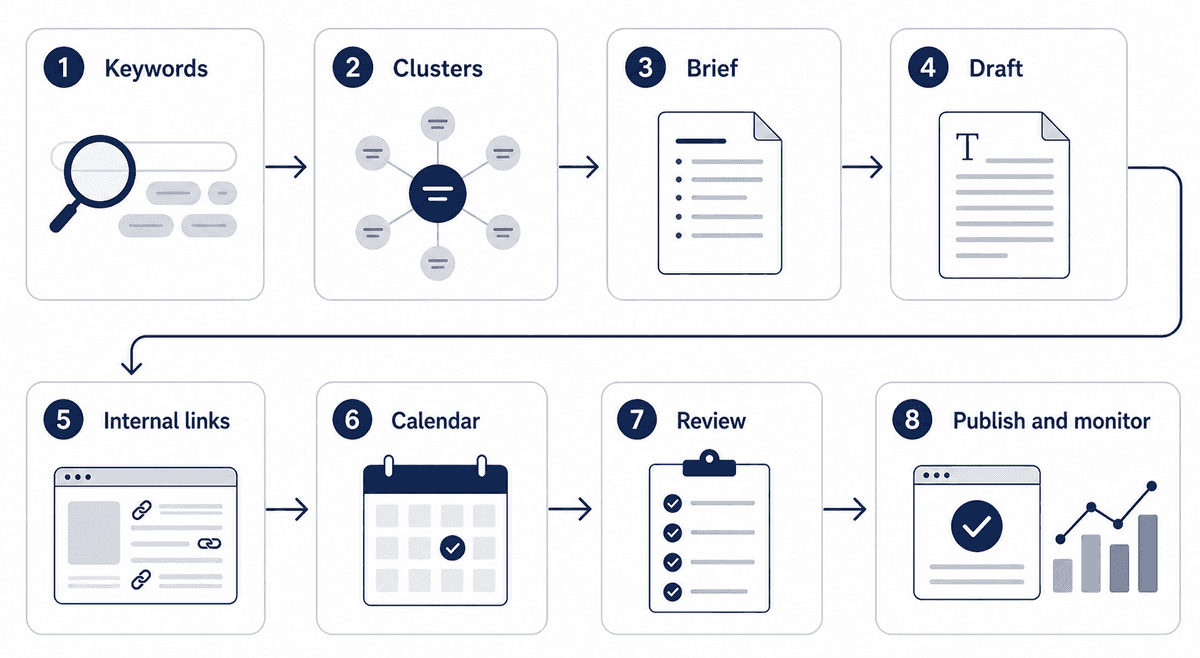
- 1. Keywords
- 2. Clusters
- 3. Brief
- 4. Draft
- 5. Internal links
- 6. Calendar
- 7. Review
- 8. Publish and monitor
View diagram source
flowchart LR
    A[1. Keywords] --> B[2. Clusters]
    B --> C[3. Brief]
    C --> D[4. Draft]
    D --> E[5. Internal links]
    E --> F[6. Calendar]
    F --> G[7. Review]
    G --> H[8. Publish and monitor]
Step 1: Start With Keyword Research
The first step is not asking AI to write 50 posts. It is deciding which posts deserve to exist. I would rather start a site with 12 focused articles than 80 loosely related ones that compete with each other.
Use AI keyword research to collect topics, questions, long-tail keywords, and search intent patterns. Then clean the list manually. The tool is for volume. The cleanup is where the strategy happens.
Look for keywords that have:
- a clear search intent
- a page type you can satisfy
- enough relevance to your product or audience
- a logical place in your content cluster
- a realistic path to ranking
Do not chase every keyword just because it has volume. Autoblogging works better when the topic set is focused.
For example, a cluster around AI blogging might include autoblogging tools, publishing frequency, quality control, internal linking, and content calendars. Those topics support each other. Random posts about unrelated AI trends do not.
Step 2: Group Topics Into Clusters
Once you have keywords, organize them before writing.
This is where AI-driven content clustering helps. Instead of publishing disconnected articles, you map each topic to a role:
- pillar page
- supporting guide
- comparison article
- checklist
- template or tool page
- FAQ-style article
This makes internal linking easier later. It also prevents duplicate articles from targeting the same intent.
If two keywords need the same answer, they should usually become one stronger article, not two thin posts. I have killed more autoblogging drafts for duplicate intent than for bad prose.
Step 3: Create a Brief Before the Draft
A brief gives the AI boundaries.
Before generating the article, use a SEO content brief generator or create a manual brief with:
- primary keyword
- search intent
- reader pain point
- required headings
- internal links to include
- examples to cover
- claims to avoid
- product angle, if relevant
This step matters because AI fills empty space with generic advice. A brief is the constraint that stops that. When I skip it, the draft usually sounds polished and still misses the query.
This matters most when you are generating more than a handful of posts. One weak brief is an editing nuisance. Thirty weak briefs is an editorial backlog.
Step 4: Generate the First Draft
Now you can generate the draft.
Use your AI autoblogging platform to create the article from the brief. The goal is not to get a perfect post in one pass. The goal is to create a structured first draft that is easier to review than a blank page.
At this stage, check for obvious problems:
- repeated phrasing
- vague claims
- missing sections
- weak transitions
- overlong introductions
- unsupported statements
If the first three drafts are bad, stop generating. Fix the brief. A poor brief multiplied across 30 articles is not a speed win. It is a cleanup project you scheduled for yourself.
Step 5: Add Internal Links While the Draft Is Still Flexible
Internal links should not be an afterthought.
Once the draft has a clear structure, add links to the pages that genuinely help the reader. For example, a workflow article can link to keyword research, briefs, content calendars, internal linking, and the main autoblogging page.
Avoid forcing links into a final paragraph just to satisfy a checklist. The link should appear where the reader naturally needs the next step.
This is also where broader content automation becomes useful. A full workflow can connect topic planning, drafting, linking, scheduling, and refreshing instead of treating each step as separate work. The last step matters more than people expect: if approved posts still have to be pasted into the CMS by hand, the schedule slips. Most CMSs can be connected directly, and custom stacks can receive each post through a webhook.
Step 6: Schedule Content With a Realistic Cadence
Autoblogging makes it easy to publish too fast. That is usually the failure mode, not the feature.
Use a content calendar generator to plan a cadence you can actually review and maintain. For a newer site, I would start at two or three strong posts per week, not daily. Daily only works if someone is still reading every draft. For a larger site with authority and an editor on the calendar, it can be more.
Cadence rule I actually use: do not schedule the next batch until the last batch has been reviewed, linked, and checked in Search Console. If review is slipping, cut volume before you cut the review step. A calendar that outruns your editors is just a delayed quality problem.
The key is not the raw number. The key is whether every article gets enough review, internal linking, and post-publish monitoring.
A calendar should include:
- publish date
- target keyword
- content cluster
- assigned reviewer
- internal links
- refresh date
- status
That keeps autoblogging from becoming a pile of unmanaged drafts.
If you need a public example of planning volume before you turn autoblogging on, this 6-month calendar walkthrough is the useful version of Step 6. Watch the sequencing, not the tool.
Watch Me Build a 6-Month SEO Content Calendar (Step by Step)
Step 7: Review Before Publishing
The review step is where the article becomes publishable.
Check the draft for:
- search intent match
- factual accuracy
- useful examples
- clear formatting
- helpful internal links
- unique value compared with similar posts
- brand voice consistency
Do not skip this because the article “looks fine.” Many AI drafts look polished while still being shallow. The biggest mistake I see is treating formatting as quality control.
Use this as a pass/fail gate before anything goes live. When a draft fails two rows, I would not generate the next batch until the quality control checklist is actually being followed.
| Check | Pass | Fail |
|---|---|---|
| Search intent | The article answers the query in the first screen | It warms up with background and never commits |
| Examples | Named scenarios, screenshots, or constraints | Vague advice that could fit any niche |
| Claims | Facts are checkable or clearly opinion | Unsupported stats or tool claims |
| Internal links | 2–5 links a reader would actually click | A dump of related URLs in the last paragraph |
| Uniqueness | It adds something similar posts do not | It reads like a summary of the SERP |
| Voice | It sounds like your site | It sounds like a generic assistant |
If two or more rows fail, do not publish. Fix the brief or the draft first.
Step 8: Publish, Monitor, and Improve
After publishing, track what happens.
Watch impressions, clicks, rankings, crawl behavior, and engagement. If a page gets impressions but poor clicks, improve the title and intro. If it ranks for unexpected queries, update the article to answer them better.
Autoblogging should not end at publishing. The best systems also refresh content, improve internal links, and merge weak pages when needed. I would avoid this workflow entirely if nobody owns the 30-day review. Publishing without monitoring is just delayed regret.
Final Workflow
Here is the simple version:
- Research keywords.
- Group topics into clusters.
- Create briefs.
- Generate drafts.
- Add internal links.
- Schedule posts.
- Review quality.
- Publish and monitor.
That is the difference between AI autoblogging as a content strategy and AI autoblogging as content spam. The tool speeds up production. The workflow is what keeps you from publishing junk at scale.
If you are still choosing software, compare the best AI autoblogging tools against this process, not against a feature list. I would pick the stack that makes steps 3, 6, and 7 easier to enforce. Those are the steps that usually break first.