
Blog Post Examples: Formats, Structures, and Templates You Can Copy

Thu
AI SEO Specialist, Full Stack Developer

The fastest way to write a better blog post is not to stare at a blank page. In my experience, it is to study a finished format, understand why it works, and adapt the structure to your own topic.
That does not mean copying another writer's article. It means copying the shape: the promise in the headline, the order of the sections, the type of examples used, and the way the article helps the reader move from question to answer. I think this distinction matters because most weak "example" posts fail by borrowing the topic, not the thinking behind the structure.
TL;DR: The Best Blog Post Example for Each Goal
| Reader goal | Best blog post format | Use this structure when... |
|---|---|---|
| Learn a process | How-to guide | The reader wants clear steps from start to finish. |
| Compare options | Listicle or roundup | The reader wants ideas, tools, examples, or recommendations. |
| Make a decision | Comparison post | The reader is choosing between two products, methods, or strategies. |
| Review work | Checklist post | The reader needs a repeatable pre-publish or pre-launch check. |
| Copy a framework | Template post | The reader wants a structure they can reuse immediately. |
| Understand a concept | Definition post | The reader needs a plain-English explanation before applying the idea. |
| Build trust | Case study | The reader wants proof, results, examples, and a real before-and-after. |
| Share a point of view | Opinion post | The reader expects a clear argument, not neutral summary. |
| React to change | News or trends post | The topic is timely and needs current context. |
If I were starting from scratch, I would choose the format before writing the headline. The format decides what the reader expects next. A how-to post needs steps. A comparison needs criteria. A template post needs the reusable asset early, not buried near the end.
Build that structure in a blog post outline template before you draft. Then edit in your own examples. An AI blog post generator can fill the shape. It cannot decide the job.
What Makes a Blog Post Example Worth Copying?
A useful blog post example makes the structure visible. I want to see the article's architecture almost immediately, before I pay attention to polish or design.
You should be able to answer five questions after scanning it:
- What does the headline promise?
- What question does the introduction answer first?
- How are the sections ordered?
- Where do examples, screenshots, data, quotes, or templates appear?
- What should the reader do after finishing?
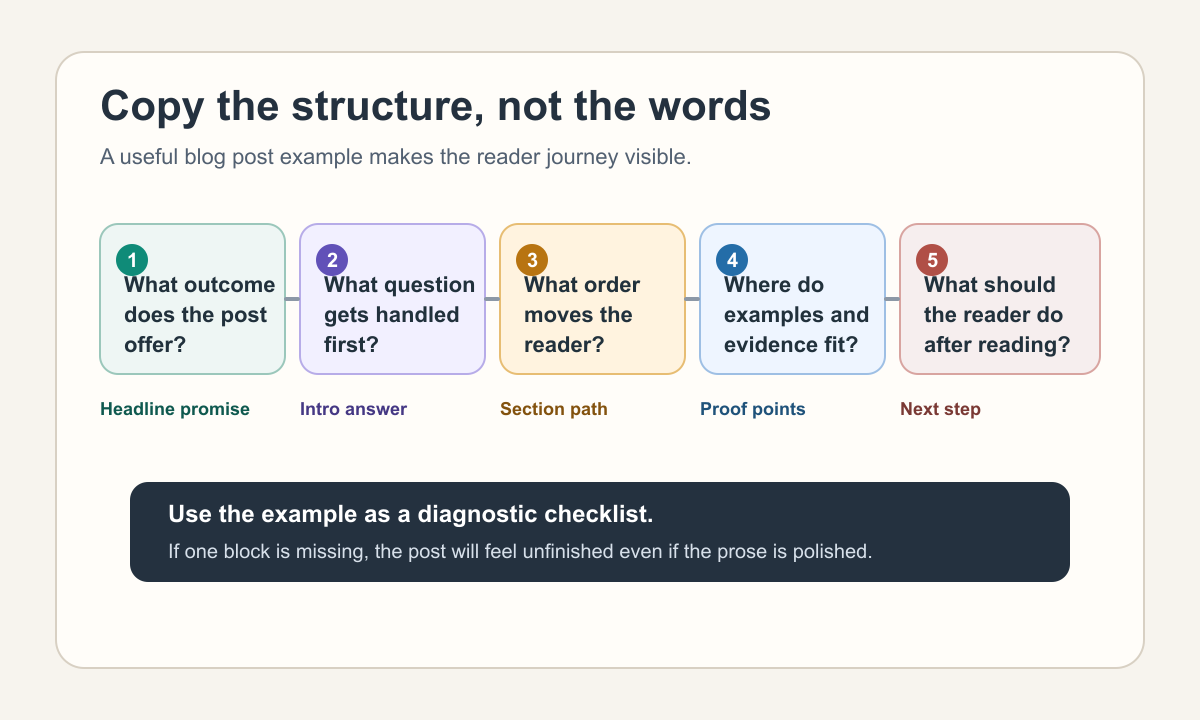
The best examples are not just well-written. They match the job. A listicle that gives ten nearly identical tips is weak, even if the prose is polished. A case study without numbers, quotes, or a clear result is just a story. A how-to guide that skips the messy middle is not very useful.
This is where I get fairly strict as an editor. If the example cannot help me make a drafting decision, I do not treat it as a model worth copying.
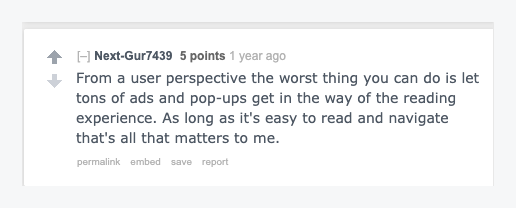
When you study examples, do not overvalue surface design. The reading experience still depends on simple things: clear navigation, readable copy, useful content, and fewer distractions.
Google's guidance on helpful, people-first content is a good standard here: the article should satisfy the reader's intent, show first-hand or practical understanding, and avoid feeling like it was produced only to capture search traffic. That matters even more now that content may be summarized by AI Search features before a reader clicks.
1. How-To Blog Post Example
Use a how-to post when the reader wants to complete a task.
Example title:
How to Write a Blog Post That Ranks in Google
Copyable structure:
## Introduction
Name the task, the problem, and the result the reader will get.

## Step 1: Choose a Focused Topic
Show how to narrow a broad idea into one article.

## Step 2: Match Search Intent
Explain what the reader should look for in the search results.

## Step 3: Build the Outline
Give the section-by-section structure.

## Step 4: Write the Draft
Explain how to turn the outline into useful copy.

## Step 5: Edit and Optimize
Review accuracy, examples, internal links, metadata, and readability.

## Final Checklist
Give the reader a quick way to confirm the post is ready.
Why this example works:
The format follows the order of the work. Readers do not need to guess what comes next. Each heading starts with an action, and the article can include screenshots, before-and-after examples, mini checklists, or a simple workflow diagram.
The mistake I see most often is writing a how-to post like a definition article. If the reader searched for "how to write a blog post," they do not need 700 words on why blogging matters. They need the process.
That intent is visible in the SERP itself. The useful results lead with a plan, then an outline, then the draft. If your example does not match that sequence, you copied the wrong shape.
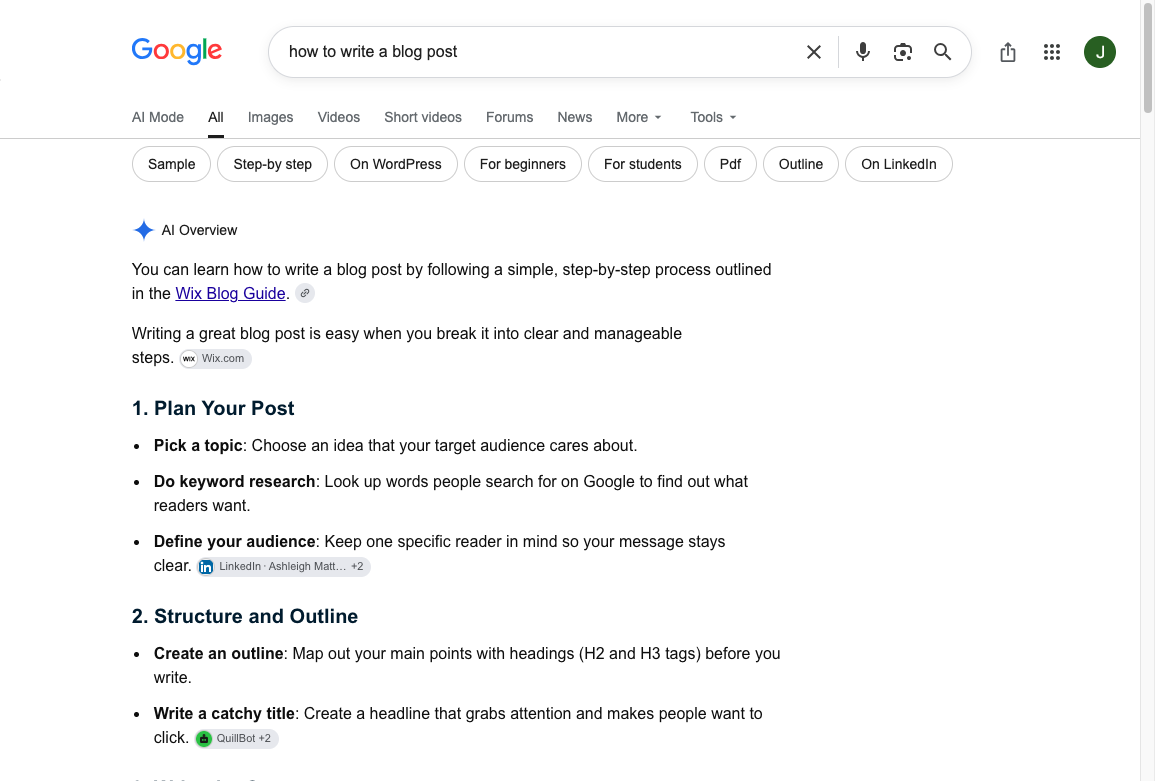
A how-to example should still give the core steps on the page. When I review this kind of article, I look for the point where the writer stops explaining and starts helping. When the topic is broader than one example can handle, a dedicated workflow for how to write a blog post can cover research, drafting, optimization, and revision without overloading the example section.
This walkthrough is the supporting version of that same sequence, not a competing roundup of formats.
How to write a blog post from start to finish
2. Listicle Blog Post Example
Use a listicle when readers want options, ideas, tips, tools, or examples.
Example title:
10 Blog Post Ideas for Small Business Websites
Copyable structure:
## Introduction
Explain who the list is for and how to use it.

## How We Chose These Ideas
State the criteria so the list feels intentional.

## Quick Comparison Table
Show each idea, best use case, and difficulty.

## 1. How-To Guide
Explain the idea, give an example, and say when to use it.

## 2. Checklist Post
Explain the idea, give an example, and say when to use it.

## 3. Comparison Post
Explain the idea, give an example, and say when to use it.

## How to Choose the Right Idea
Help the reader pick based on audience, funnel stage, and effort.

## Final Recommendation
Point the reader to the easiest useful starting point.
Why this example works:
A strong listicle is not just a pile of items. It has selection logic. The reader should know why each item made the list, who it is for, and what makes it different from the others. I usually trust a shorter list with sharper criteria more than a long list padded with repeats.
For example, a list of blog post ideas could include "customer story," "product comparison," and "industry trend," but each item needs a distinct job. The customer story builds trust. The product comparison captures bottom-of-funnel demand. The trend post helps with thought leadership and social sharing.
If you are writing listicle headlines, use numbers carefully. A headline generator can help you test variations, but the final headline should reflect the actual depth of the article. "50 ideas" sounds useful only if the ideas are specific enough to use.
3. Comparison Blog Post Example
Use a comparison post when readers are choosing between two tools, products, methods, formats, or strategies.
Example title:
AI Blog Generators vs AI Article Writers: Which Should You Use?
Copyable structure:
## Introduction
Frame the decision and who it matters for.

## Quick Verdict
Give the short answer before the detailed comparison.

## Option A: What It Does Best
Define the first option and its strongest use case.

## Option B: What It Does Best
Define the second option and its strongest use case.

## Side-by-Side Comparison
Compare cost, speed, quality, control, SEO fit, and limitations.

## Which Should You Choose?
Recommend based on use case.

## Final Recommendation
Summarize the decision rule.
Why this example works:
Comparison posts work because they respect the reader's decision-making process. They give the answer early, then justify it with criteria. Personally, I would rather read one clear recommendation with caveats than a perfectly balanced article that refuses to help me choose.
Here is the basic comparison pattern:
| Criterion | Option A | Option B |
|---|---|---|
| Best for | Speed and first drafts | Deeper control and long-form structure |
| Weakness | Can feel generic without editing | Takes more setup |
| Reader fit | Solo bloggers, quick campaigns | Teams, SEO workflows, in-depth articles |
The weak version of this article says both options are "powerful." The useful version tells the reader which one to choose and what tradeoff they are accepting. That tradeoff is usually the real value of the post.
4. Checklist Blog Post Example
Use a checklist post when readers need to review work before publishing, launching, submitting, or sending something.
Example title:
Blog Post Editing Checklist: What to Review Before You Publish
Copyable structure:
## Introduction
Explain when to use the checklist.

## Content Checklist
Review accuracy, structure, examples, claims, and missing context.

## SEO Checklist
Review search intent, title tag, meta description, headings, and links.

## Readability Checklist
Review paragraph length, transitions, formatting, and clarity.

## Publishing Checklist
Review images, previews, links, attribution, and final proofread.

## Final Pass
Explain what to do if the article still feels weak.
Why this example works:
The checklist format matches the job. Readers want to move through the article item by item, not read a long essay about editing.
The best checklist posts include brief explanations under each item. A line like "check internal links" is too thin. A better version says: "Check that every internal link supports the section it appears in and that the article does not repeat the same URL several times."
When I use a checklist, I want it to catch the problems I am most likely to miss when I am tired of the draft. A strong blog post editing checklist should catch the practical issues that make a post feel unfinished: vague claims, unsupported examples, awkward links, weak introductions, missing images, and titles that do not match the article.
5. Template Blog Post Example
Use a template post when the reader wants something they can copy, fill in, and adapt.
Example title:
Blog Post Outline Template: Structure Your Article Before You Write
Copyable structure:
## Introduction
Explain who the template is for and when to use it.

## The Template
Give the reusable structure early.

## How to Customize It
Explain what changes for how-to, listicle, comparison, and checklist posts.

## Filled Example
Show the template applied to one real topic.

## Common Mistakes
Explain what people get wrong when using the template.

## Next Step
Show how to turn the template into a draft.
Why this example works:
The asset arrives quickly. That is the whole point of a template post. If the reader has to scroll through a long essay before reaching the template, the article is fighting its own promise. I would put the reusable framework high on the page, then use the rest of the article to make it easier to apply.
Here is a simple filled example:
# How to Plan a Month of Blog Content

## Quick Answer
Plan around four buckets: search topics, product education, customer questions, and thought leadership.

## Step 1: Collect Topic Ideas
Use sales calls, support tickets, keyword research, and competitor gaps.

## Step 2: Group Ideas by Intent
Separate tutorials, comparisons, templates, and opinion pieces.

## Step 3: Build the Calendar
Assign one goal, one audience, and one next step to every post.

## Step 4: Review the Mix
Check whether the month covers awareness, consideration, and conversion.
That filled example matters because it shows how the template behaves in a real article. Without it, the reader may understand the structure but still struggle to use it. A blank template can look tidy and still leave the hard thinking to the reader.
6. Definition Blog Post Example
Use a definition post when the reader is trying to understand a concept before applying it.
Example title:
What Is Search Intent? A Simple Guide for Content Writers
Copyable structure:
## Introduction
Name the concept and explain why it matters.

## Quick Definition
Give the plain-English answer immediately.

## Why It Matters
Explain the practical impact.

## Types and Examples
Break the concept into useful categories.

## How to Apply It
Show what the reader should do next.

## Common Mistakes
Clarify misunderstandings.

## Final Takeaway
Restate the concept in one useful sentence.
Why this example works:
Definition posts should not stay abstract. The reader needs the meaning, then examples, then application.
A good definition article on search intent, for example, would not stop at "search intent is the purpose behind a search." It would show how a query like "best blog post examples" differs from "how to write a blog post" or "blog post outline template." Those queries may look related, but they need different article formats.
I like definition posts most when they quickly move from "what this means" to "what this changes." Otherwise, they tend to become glossary entries with more words.
7. Case Study Blog Post Example
Use a case study when the reader wants proof that a product, method, or strategy worked in a real situation.
Example title:
How a SaaS Team Increased Blog Signups by Rewriting 12 Product-Led Posts
Copyable structure:
## Introduction
Name the customer, challenge, and outcome.

## The Problem
Explain what was not working before.

## The Strategy
Show the changes made and why they were chosen.

## The Results
Use numbers, screenshots, quotes, or concrete outcomes.

## What We Learned
Explain the lesson other readers can apply.

## Next Steps
Connect the story to a practical recommendation.
Why this example works:
Case studies need evidence. That can mean analytics screenshots, revenue numbers, customer quotes, timeline details, before-and-after examples, or a clear explanation of what changed.
The article should lead with the result, then explain the work. A reader who is considering a tool or service wants to know whether the outcome is relevant to them before they invest time in the whole story.
In practice, I am skeptical of case studies that hide the baseline. "Traffic increased" means very little if the article never says from what, over what period, or after which changes.
8. Opinion Blog Post Example
Use an opinion post when the value is the writer's point of view.
Example title:
Most Blog Intros Are Too Slow. Here Is How to Fix Them.
Copyable structure:
## Introduction
State the opinion clearly.

## Why This Matters
Explain the problem the opinion responds to.

## Evidence or Examples
Show specific examples that support your argument.

## The Counterargument
Address what a reasonable reader might push back on.

## What I Recommend Instead
Give the practical replacement.

## Final Thought
Leave the reader with one sharp takeaway.
Why this example works:
Opinion posts are weak when they pretend to be neutral. The reader came for judgment. That judgment still needs support, but the article should have a spine.
For example, "blog introductions should be shorter" is an opinion. It becomes useful when you show a slow intro, rewrite it, and explain why the second version works better. Tools like an introduction generator can help produce options, but the writer still has to choose the version that gets closest to the article's real point.
9. News or Trends Blog Post Example
Use a news or trends post when the topic is timely and the reader needs context.
Example title:
7 Blogging Trends Content Teams Should Watch in 2026
Copyable structure:
## Introduction
Explain what changed and why it matters now.

## Quick Takeaways
Summarize the most important trends.

## Trend 1
Explain the change, evidence, and implication.

## Trend 2
Explain the change, evidence, and implication.

## What This Means for Your Strategy
Turn the trends into decisions.

## Final Recommendation
Tell the reader what to do next.
Why this example works:
Trend posts need current context. If you are writing about AI Search, for example, it is not enough to say "search is changing." The useful angle is what writers should do differently: answer the main question early, use clear section labels, support claims, include examples, and make the article easy to quote or summarize.
Google's documentation on AI features in Search gives the same practical direction most content teams should follow anyway: make pages accessible to Google, use relevant structured data where appropriate, and create content that is useful to people rather than trying to optimize only for a feature.
My bias with trend posts is to be early with implications and careful with predictions. Readers can find the news elsewhere; what they need from a writer is a grounded read on what changes, what does not, and what to do next.
How to Choose the Right Blog Post Format
Start with the reader's job, not the keyword. I have seen too many articles go sideways because the keyword looked simple and the format decision was never made.
Use this decision path:
- If the reader wants to do something, write a how-to guide.
- If the reader wants ideas or options, write a listicle.
- If the reader is choosing between two things, write a comparison.
- If the reader needs to review finished work, write a checklist.
- If the reader wants a reusable asset, write a template post.
- If the reader is learning a concept, write a definition guide.
- If the reader needs proof, write a case study.
- If the reader wants judgment, write an opinion post.
- If the reader needs timely context, write a news or trends post.
You can mix formats, but do it deliberately. A how-to guide can end with a checklist. A comparison article can include a quick verdict and a table. A template post can include a filled example. The problem starts when the formats compete with each other and the reader cannot tell what kind of article they are reading.
Blog Post Example Planning Template
Use this before drafting:
| Planning question | What to write down |
|---|---|
| What does the reader want? | A task, decision, explanation, template, proof, or opinion. |
| What format fits that job? | How-to, listicle, comparison, checklist, template, definition, case study, opinion, or trend. |
| What should appear early? | TL;DR, quick verdict, template, definition, or comparison table. |
| What evidence belongs in the article? | Examples, screenshots, quotes, data, sources, before-and-after edits, or product details. |
| What should the reader do next? | Draft, compare, revise, publish, test, or choose a tool. |
After that, write a simple outline. If the page will compete in search, I would also create a brief before drafting so the article has a clear angle, target reader, related questions, and internal links. A good SEO content brief keeps the draft from turning into a generic overview.
Common Mistakes When Copying Blog Post Examples
The first mistake is copying the topic instead of the structure. If you copy another article's examples, phrasing, and claims, you are not learning from the format. You are just making a weaker version of the same page.
The second mistake is delaying the useful part. A template post should show the template early. A comparison should give a verdict early. A definition post should define the term early. Readers should not have to dig for the reason they clicked.
The third mistake is using links as decoration. Internal links should help the reader understand the topic or take the next step. For example, after choosing a post format, the next practical challenge is usually writing a title that matches the promise. Studying finished headline examples helps here because it shows how different angles sound before you commit to one.
The fourth mistake is publishing an AI-generated draft without adding judgment. Google's guidance on AI-generated content is not that AI is automatically good or bad. The practical question is whether the article is helpful, accurate, original, and created for readers. In my experience, examples are where weak AI drafts fall apart first because they use vague scenarios instead of real, specific details.
The fifth mistake is treating the conclusion as filler. A good ending should make the next step obvious. A conclusion generator can help test endings, but the final version should restate the main decision and point the reader toward action.
Final Takeaway
Good blog post examples make structure easier to see.
Choose the format that matches the reader's goal, put the most useful element near the top, and support the article with concrete examples instead of generic advice. Once the structure is right, the draft becomes easier to write, easier to edit, and easier for readers or AI systems to summarize accurately.
If you are starting today, pick one format from the TL;DR table, outline the sections, write one filled example, and edit until every section helps the reader make progress. That is the simplest test I use: if a section does not help the reader move, it either needs a sharper job or it needs to go.