
Blog Post Outline Template: Plan a Better Article Before You Draft

Thu
AI SEO Specialist, Full Stack Developer

A blog post outline is the plan you make before drafting: the working title, reader intent, section order, supporting points, examples, links, and final takeaway.
I would rather spend 20 minutes fixing an outline than two hours rescuing a messy draft. A clear outline does not make the article stiff. It tells each section what job it has to do, so the finished post feels focused instead of patched together.
TL;DR: The Blog Post Outline Template
Use this template when you need a practical blog structure you can copy, customize, and hand to a writer or AI drafting tool.
# Working Title

Primary keyword:
Search intent:
Audience:
Angle:
Main takeaway:
Desired action after reading:

## Introduction
- Name the reader's problem or question
- Give the direct answer quickly
- Preview the useful parts of the article

## What Readers Need to Know First
- Define the topic or clarify the context
- Explain any confusion that would slow the reader down
- Keep this section short unless the topic is complex

## Main Point 1
- Key idea
- Supporting detail
- Example, source, screenshot, or practical note

## Main Point 2
- Key idea
- Supporting detail
- Example, source, screenshot, or practical note

## Main Point 3
- Key idea
- Supporting detail
- Example, source, screenshot, or practical note

## Common Mistakes
- Mistake 1 and how to avoid it
- Mistake 2 and how to avoid it
- Mistake 3 and how to avoid it

## Quick Checklist
- Action item
- Action item
- Action item

## Conclusion
- Restate the main takeaway
- Give the reader a clear next step
For most informational posts, this is enough. If the article is a comparison, listicle, product review, or template page, adjust the middle sections before you start writing.
What a Blog Post Outline Should Include
A useful outline answers six questions before the draft begins:
- What is the article promising?
- Who is it helping?
- What does the reader need first?
- What sections will deliver the answer?
- What examples, sources, visuals, or tools will make the answer easier to trust?
- What should the reader do next?
That is the difference between a heading list and a real outline. A heading list says, "Here are some sections." A real outline says, "Here is the path the reader will follow."
At minimum, include these elements:
| Outline element | Why it matters |
|---|---|
| Working title | Keeps the promise clear before you draft. |
| Search intent | Prevents the article from answering the wrong question. |
| Audience | Changes the examples, tone, and level of detail. |
| Angle | Gives the post a reason to exist beyond repeating competitors. |
| H2/H3 structure | Creates the article's logic and scan path. |
| Section notes | Tells the writer what each section must cover. |
| Examples and evidence | Makes the draft specific enough to be useful. |
| Internal links | Plans the reader journey before links feel forced. |
| CTA or next step | Gives the article a purposeful ending. |
If you are creating an SEO-led article, start one step earlier with a content brief. A brief defines the keyword, audience, intent, competitors, and success criteria. The outline turns that strategy into the actual section-by-section draft plan. Junia's SEO content brief template is a better starting point when the article needs keyword research, SERP analysis, and editorial requirements before the writer touches the structure.
Blog Post Outline vs. Content Brief
Writers often mix these up, and that is where a lot of weak drafts begin.
A content brief answers the strategic questions: target keyword, audience, search intent, tone, required links, competing pages, and conversion goal.
A blog post outline answers the execution questions: H1, H2s, H3s, section order, examples, screenshots, evidence, and the final takeaway.
Here is the simple distinction:
| Item | Content brief | Blog post outline |
|---|---|---|
| Main job | Defines what the article needs to achieve | Defines how the article will be structured |
| Usually created by | SEO lead, editor, strategist, or content manager | Writer, editor, strategist, or AI workflow |
| Includes keywords | Yes | Yes, but placed inside headings and notes |
| Includes section order | Sometimes lightly | Yes, in detail |
| Includes examples and evidence | Requirements or suggestions | Specific places where they belong |
| Best used for | Planning the assignment | Writing the draft |
For solo writers, you can combine both into one working document. For teams, I would keep them separate enough that the writer can see both the strategy and the article path.
An outline is not a brief. A brief says what success looks like. An outline says which heading does which job. If you skip the brief, you still need the outline. If you skip the outline, the brief just becomes a document nobody uses while drafting.
How to Build a Blog Post Outline Step by Step
The best outline starts with the reader's problem, not the keyword. A keyword like "blog post outline template" tells you what the person searched. The real problem is usually clearer:
I need a structure so I can write faster, cover the right points, and avoid a messy draft.
That sentence gives you a better article than a keyword list does.
Google's people-first content questions are a useful filter while you build the outline: if a section would not help a real reader, it does not belong in the H2 list.
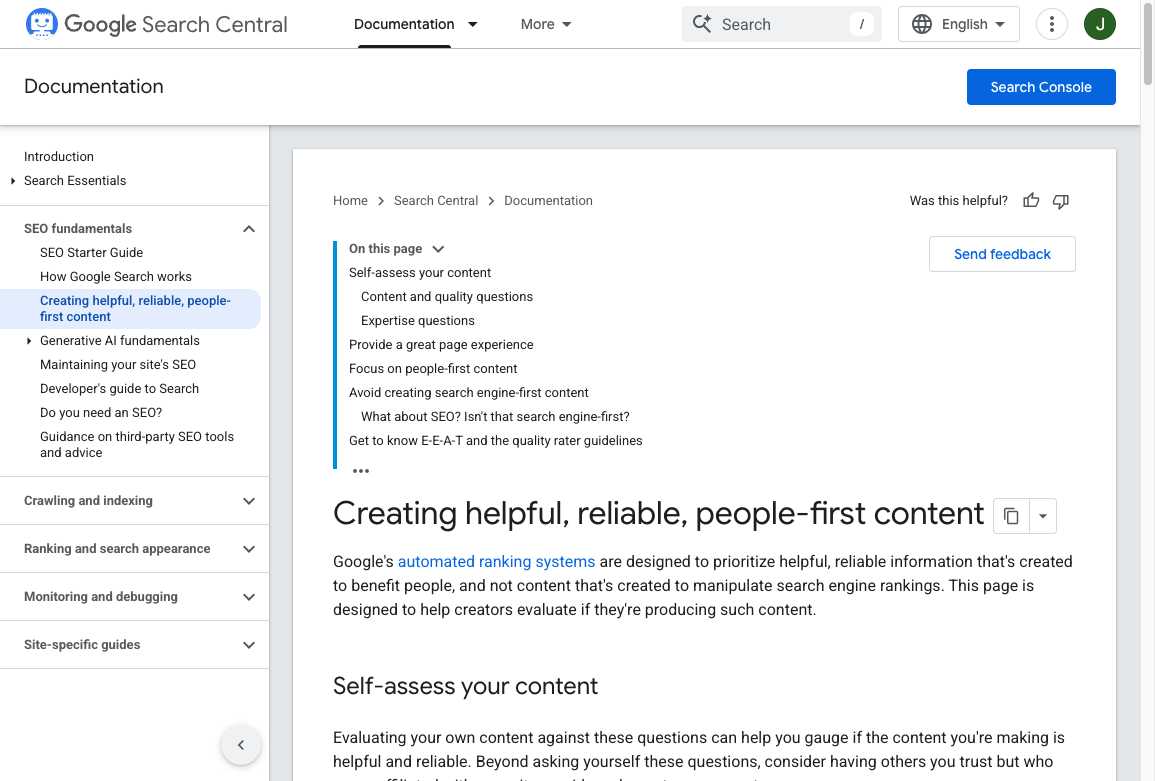
This Google walkthrough is the supporting version of the same idea: useful structure first, keyword theater later.
Google Search Central: creating helpful, people-first content
1. Define the article promise
Start with a working title and a one-sentence promise.
Weak promise:
This article is about blog outlines.
Better promise:
This article gives readers a copyable blog post outline template and shows them how to adapt it for different article formats.
The second version tells you what has to be included: a template, customization advice, and examples for different formats.
If the title still feels vague after the outline is done, use a headline generator for more options. The final headline should come after the structure is clear, because a good title has to match the actual article.
2. Identify search intent
Search intent is the reason behind the query.
For "blog post outline template," the intent is practical and instructional. The reader does not want a long essay about why planning matters. They want a copyable structure, a quick explanation of how to use it, and enough examples to adapt it to their article.
For SEO articles, this step matters even more. Google says its AI features and classic search systems are designed to help people find helpful, relevant content, and Google's own guidance for AI features still emphasizes clear, useful pages that can be crawled and understood. That means the outline should make the answer easy to extract without making the article thin or robotic.
Useful intent checks:
- Are top-ranking pages mostly templates, tutorials, examples, or tools?
- Does the reader want a quick answer, a full process, or a decision?
- What subtopics appear repeatedly across competitors?
- What questions show up in People Also Ask or autocomplete?
- What is missing from the current results that you can explain better?
3. Choose the angle
The angle is the specific perspective that makes the article worth reading.
For this article, the angle is not "outlines are good." That is obvious. The stronger angle is:
A blog post outline should help the reader, writer, editor, search engine, and AI answer engine understand the article before the draft exists.
That gives the article a modern reason to exist. It also changes what the outline includes. Instead of only listing headings, you plan definitions, direct answers, examples, visuals, internal links, and evidence where they will help.
4. Pick the right post format
Different formats need different outlines. Do not force every article into the same structure.
| Post type | Best outline shape | What to plan carefully |
|---|---|---|
| How-to guide | Steps in order | Prerequisites, examples, common mistakes |
| Listicle | Numbered items | Selection criteria, item consistency, final recommendation |
| Comparison | Criteria-based sections | Verdict, tradeoffs, who each option is best for |
| Template post | Copyable template first | Customization notes and filled example |
| Definition post | Direct answer, examples, use cases | Avoiding too much background |
| Product review | Verdict, testing notes, features, pros/cons | Evidence, screenshots, pricing, limitations |
| Case study | Situation, action, result, lesson | Specific numbers, timeline, and constraints |
If you are outlining a general writing guide, look at finished blog post examples before you lock the H2s. The format should be visible in the outline, not discovered during the third rewrite.
5. Map the H2s and H3s
Now create the section order.
I usually use this order for practical articles:
- Direct answer or TL;DR
- Definition or quick context
- Main template, framework, or process
- Step-by-step explanation
- Examples or variations
- Mistakes to avoid
- Checklist or final recommendation
The order matters. If the reader searched for a template, give them the template early. If they searched for a comparison, give them the verdict early. If they searched for instructions, get to the steps quickly.
6. Add notes under each section
Do not stop at headings.
This is a weak outline:
## Introduction
## Benefits
## Steps
## Conclusion
This is more useful:
## Introduction
- Open with the problem: messy drafts waste editing time
- Define what a blog outline is in one sentence
- Promise a copyable template and examples

## How to Build the Outline
- Start with reader intent
- Choose the article format
- Add H2s and H3s in logical order
- Plan examples, links, and evidence before drafting
Those bullets save time because the writer no longer has to guess what the section should do.
7. Plan examples, evidence, visuals, and links
This is the step many outlines skip.
Examples make the article concrete. Evidence supports claims. Visuals explain structure quickly. Internal links help readers continue the job without forcing every detail into one page.
For example, if your outline includes a section on intros, plan whether the draft needs a hook example, a bad/good comparison, or a tool mention. A hook generator can help brainstorm openings, but the outline should still define the reader problem and article promise before any tool writes copy.
For SEO-driven articles, plan internal links before drafting. A natural internal link belongs where the reader already needs the related idea. If a link has to be introduced with "read this guide" or "check out this article," the paragraph probably needs a stronger point first.
8. Review the outline before drafting
Read the outline once like an editor.
Ask:
- Does the intro get to the point quickly?
- Does each H2 have a distinct job?
- Are any sections overlapping?
- Are examples planned where the advice would otherwise feel generic?
- Are claims backed where they need support?
- Are internal links placed where the reader actually needs them?
- Does the conclusion give a clear next step?
This review is small, but it prevents the worst kind of editing: moving entire sections after the draft is already written.
Blog Post Outline Examples by Format
Use these as starting points, not rigid rules.
How-to article outline
# How to [Do X]

## TL;DR
## Before You Start
## Step 1: [Action]
## Step 2: [Action]
## Step 3: [Action]
## Common Mistakes
## Final Checklist
## Conclusion
Use this when the reader needs a process. Each step should build on the previous one.
Listicle outline
# [Number] [Items] for [Audience or Goal]

## Quick Picks
## How We Chose These Items
## 1. [Item]
## 2. [Item]
## 3. [Item]
## Comparison Table
## How to Choose
## Final Recommendation
Use this for tools, tips, examples, ideas, or resources. Keep each item consistent so readers can compare them quickly.
Template article outline
# [Topic] Template

## TL;DR
## Copyable Template
## When to Use This Template
## How to Customize It
## Filled Example
## Mistakes to Avoid
## Conclusion
Use this when the reader wants something they can copy. Put the template near the top instead of making them scroll through background.
Comparison article outline
# [Option A] vs [Option B]

## Quick Verdict
## Comparison Table
## What [Option A] Does Better
## What [Option B] Does Better
## Best For
## Pros and Cons
## Final Recommendation
Use this when readers are choosing between options. Lead with the verdict, then support it.
SEO article outline
# [Keyword]: [Specific Promise]

## TL;DR
## Search Intent and Reader Need
## What the Topic Means
## Step-by-Step Process
## Examples or Templates
## Evidence, Sources, or Data
## Internal Linking Plan
## Common Mistakes
## Publishing Checklist
This format works well when you need the article to satisfy readers, classic search engines, and AI search systems. Google's guidance on creating helpful content is still a useful baseline: make the page people-first, accurate, and genuinely useful rather than built only to hit a keyword.
Filled Blog Post Outline Example
Here is what a practical outline might look like for the topic "how to improve blog readability."
# How to Improve Blog Readability Without Making Your Writing Boring

Primary keyword: improve blog readability
Search intent: practical how-to
Audience: bloggers, content marketers, and editors
Angle: readability is not about dumbing down ideas; it is about reducing friction
Main takeaway: clear structure, shorter sentences, better examples, and stronger formatting make posts easier to finish

## Introduction
- Open with the problem: readers leave when the article feels hard to follow
- Define readability in plain English
- Promise a practical editing workflow

## What Blog Readability Actually Means
- Explain scannability, sentence clarity, paragraph length, and structure
- Clarify that complex topics can still be readable
- Add one before/after example

## 7 Ways to Improve Blog Readability
- Shorten overloaded sentences
- Break long paragraphs
- Use descriptive headings
- Add examples after abstract claims
- Use lists only when they improve scanning
- Remove filler transitions
- Read the draft aloud before publishing

## Before and After Example
- Show a dense paragraph
- Rewrite it with shorter sentences and clearer structure
- Explain what changed

## Common Readability Mistakes
- Chasing a score instead of clarity
- Making every paragraph one sentence
- Removing voice while editing

## Final Checklist
- Every section has one job
- No paragraph carries too many ideas
- Examples support the advice
- The conclusion gives a next step
Same outline as a table, if you prefer to scan it that way:
| Section | Job of the section | What to write under it |
|---|---|---|
| Introduction | Orient, then answer | Problem, one-sentence definition, promise of a workflow |
| What readability means | Prevent the wrong argument | Scannability vs dumbing down; one before/after |
| 7 ways | Deliver the method | One tactic per H3, each with an example |
| Before and after | Prove it | Dense paragraph, rewrite, what changed |
| Common mistakes | Save the reader time | Score-chasing, one-sentence paragraphs, flattening voice |
| Final checklist | Close the loop | One job per section, examples present, next step |
If readability is the main issue in your draft, a readability improver can help identify clunky passages. I would still review the output manually, because tools can simplify a sentence without understanding the article's voice.
How to Optimize a Blog Outline for AI Search
AI search systems need clear, extractable answers. That does not mean writing in a robotic style. It means planning the article so important answers are easy to find, quote, and summarize.
Build these into the outline:
- Direct answer early: Include a TL;DR, quick verdict, or definition near the top.
- Descriptive headings: Use headings that say what the section answers.
- Short definition leads: Start key sections with one or two crisp explanatory sentences.
- Complete lists: If the article promises steps, include all steps in a clean order.
- Evidence notes: Mark where sources, screenshots, data, or examples should support a claim.
- Original examples: Add something competitors cannot copy from the same SERP.
- Clear internal links: Connect related topics where the reader needs more depth.
For example, an outline about writing better search snippets should include title tags and descriptions as separate steps. A meta title generator can help create options once the article promise is final. The writer still needs to choose the version that matches the page honestly.
Common Blog Outline Mistakes
The first mistake is writing the draft before you know the article's promise. That is how intros get vague, sections overlap, and conclusions repeat the same idea.
The second mistake is making headings too generic. A heading like "Benefits" does not tell the writer or reader much. "Why outlines reduce rewriting time" is clearer.
The third mistake is copying competitor structures without adding a stronger angle. Competitor research is useful, but your outline should still add something: a better template, clearer examples, fresher evidence, stronger visuals, or more practical judgment.
The fourth mistake is skipping examples. Advice like "make the article useful" is not useful until the reader sees what that looks like in an outline.
The fifth mistake is forcing internal links after the draft is finished. Plan links where they naturally support the reader's next step. If the article mentions editing before publishing, the blog post editing checklist belongs there because it helps the reader move from outline to final review.
The sixth mistake is treating AI as the outline owner. AI can suggest headings quickly, but it does not know your firsthand experience, product priorities, reader objections, or editorial standards unless you provide them. Use AI to accelerate structure, then edit the outline like a person who understands the audience.
Quick Blog Post Outline Checklist
Before drafting, check the outline against this list:
- The title makes a clear promise.
- The intro gives value quickly.
- The search intent is explicit.
- The audience is defined.
- The angle is different from generic competitor pages.
- Each H2 has one distinct job.
- H3s support the H2 instead of creating a second article inside it.
- Each section has notes, not just headings.
- Examples, visuals, or sources are planned where they help.
- Internal links are placed where the reader already needs the related idea.
- The conclusion has a real next step.
Once the outline passes that check, writing the post itself is much easier. You can write manually, assign it to a writer, or turn the structure into a first draft with Junia's blog post generator. The outline is what keeps the draft from drifting.
Outline until the draft feels obvious
A strong blog post outline is the thinking stage, not a form you fill so you can say you planned.
If the outline is vague, the draft will probably be vague. If it defines the promise, reader intent, section jobs, examples, evidence, links, and next step, the first draft has a much better chance of being usable.
My rule is simple: outline until the article feels obvious to write. Then draft. Do not wait for a “Conclusion” heading to invent the point.