
ChatGPT Translation & Localization: What Works, What Breaks, and How to Use It Safely

Thu
AI SEO Specialist, Full Stack Developer

ChatGPT can translate content, and for quick drafts I often find it genuinely useful. But I would not treat it as a complete localization system by itself.
It is good at fast drafts, tone changes, back-and-forth editing, and adapting short pieces of copy for a specific audience. The weakness shows up when the work needs repeatable terminology, governed review workflows, translation memory, QA checks, or SEO-safe publishing across many pages.
That distinction matters more than most people expect. A translated support note and a localized product page are not the same job. A one-off email and a 500-page multilingual content rollout are not the same workflow.
TL;DR: When ChatGPT Translation Is Enough
Use ChatGPT for translation when the content is low-risk, short enough to review, and still going through a human check.
Do not use ChatGPT as the only step when the content involves legal meaning, medical or financial advice, product safety, regulated claims, brand-sensitive messaging, or large-scale multilingual SEO.
Here is the practical version:
| Use case | ChatGPT fit | What to watch |
|---|---|---|
| Internal notes, emails, rough briefs | Good | Check names, dates, numbers, and tone |
| Blog drafts and marketing copy | Useful with review | Localize intent, not just words |
| Product UI strings | Risky without controls | Placeholders, length limits, terminology |
| Legal, medical, financial, or compliance copy | Poor as a standalone tool | Use expert human review |
| Bulk website localization | Not enough alone | Use a controlled workflow, glossary, and QA |
| Multilingual SEO pages | Useful as one step | Review search intent, metadata, hreflang, links |
My rule is simple: ChatGPT can help you move faster, but the higher the cost of a wrong translation, the more process you need around it. Speed is useful only when the review step is still taken seriously.
Is ChatGPT Good for Translation?
.png?token=eyJhbGciOiJIUzI1NiIsInR5cCI6IkpXVCJ9.eyJ1cmwiOiJ1c2VyLWdlbmVyYXRlZC1pbWFnZXMvZjJmOThkNWUtNjNjNC00MTJiLTkyY2QtZjgyNDI5NTE3YWRkL0dyb3VwIDEgKDUpLnBuZyIsImlhdCI6MTY5ODgzNzA4MiwiZXhwIjoxODU2NTE3MDgyfQ.xZOADz6PINmCPOphkrrQhfXRqN5L20-0DQf8yrF9hzY)
Yes, ChatGPT can be good for translation, especially when you give it context. In practice, I find it most useful when the task is not "translate this" but "make this translation work for this audience." It can understand tone instructions, rewrite a literal translation into more natural phrasing, preserve formatting when prompted carefully, and explain why one wording may fit better than another.
That makes it different from a simple "paste text, get translation" workflow.
But it still has the same core risk as other AI writing systems: the output can sound fluent even when it is wrong. OpenAI's prompt engineering guidance emphasizes clear instructions, context, examples, and defined output formats, which is exactly why weak translation prompts often produce weak translations.
The problem is not just accuracy. ChatGPT may also:
- Translate the same term in two different ways.
- Flatten idioms into bland wording.
- Choose a regionally odd phrase.
- Break placeholders, markdown, or HTML.
- Preserve the words but miss the cultural intent.
- Sound confident while making a subtle meaning shift.
For casual translation, that may be acceptable. For published localization, I would treat review as part of the job, not a cleanup step you do if there is time.
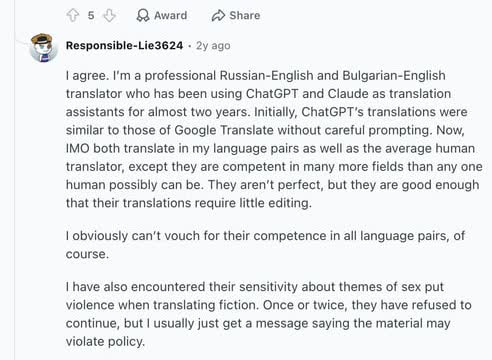
That same split shows up in real translation discussions: experienced users often find ChatGPT strong enough to reduce editing in familiar language pairs, while still warning that results do not generalize cleanly across every language, domain, or sensitive passage.
How ChatGPT Translation Actually Works
ChatGPT does not translate by looking up fixed word pairs. It generates text based on patterns, context, and instructions.
That is why the same source sentence can produce different translations depending on the prompt. If you ask for "Spanish," you might get a generic version that is technically readable but not especially useful. If you ask for "Mexican Spanish for B2B SaaS buyers, with a warm but professional tone," you give the model a much better target.
This is also why ChatGPT often shines at localization tasks that are not pure translation:
- Rewriting a translated paragraph so it sounds more native.
- Adjusting formality for a specific audience.
- Explaining whether a phrase sounds too literal.
- Producing several CTA options for a local market.
- Back-translating a passage so you can check whether the meaning drifted.
OpenAI's multilingual API guidance notes that models can work across languages, but recommends keeping the prompt in one language where possible for consistency. That is a useful rule for translation prompts too: reduce unnecessary language switching unless the task requires it.
Translation vs. Localization
Translation focuses on meaning across languages. Localization adapts the content for a specific market.
That difference is where many ChatGPT workflows succeed or fail.
For example, this is translation:
Translate this English product description into French.
This is localization:
Adapt this English product description for French small-business owners in France. Keep the product claims accurate, use natural local phrasing, avoid overly American sales language, preserve markdown links, and suggest three CTA options that sound professional but not stiff.
The second prompt is better because it gives ChatGPT the job behind the words. You are not asking for a dictionary-level conversion. You are asking for a version that works for a real audience. That is usually where the quality difference becomes obvious.
If your company publishes in multiple languages, this distinction also affects SEO. A translated article still needs local search intent, local phrasing, region-appropriate examples, and correct technical signals. Google's localized versions guidance explains that hreflang helps Google understand equivalent language or regional pages, but it does not replace the need for useful localized content.
Where ChatGPT Works Well
ChatGPT is strongest when the task benefits from flexibility.
First-Draft Translation
For short, low-risk content, ChatGPT can create a useful first draft quickly. I would use it without much hesitation for internal updates, simple emails, social captions, meeting notes, and rough content briefs, as long as someone still checks the details.
The key is to review anything that can change meaning: names, numbers, dates, product claims, pricing, legal terms, and technical language.
Tone and Style Adaptation
.png?token=eyJhbGciOiJIUzI1NiIsInR5cCI6IkpXVCJ9.eyJ1cmwiOiJ1c2VyLWdlbmVyYXRlZC1pbWFnZXMvZjJmOThkNWUtNjNjNC00MTJiLTkyY2QtZjgyNDI5NTE3YWRkL0dyb3VwIDMgKDQpLnBuZyIsImlhdCI6MTY5ODgzNzkzMCwiZXhwIjoxODU2NTE3OTMwfQ.gb6z-KzNY0zj3UyI6M1FkdQ6nazq5ZJAoU5hMLyo-AA)
This is one of the best reasons to use ChatGPT for localization. You can ask it to make a translation more formal, more direct, more friendly, more concise, or more suitable for a specific region.
Personally, I think this is where ChatGPT is more interesting than a basic machine translation tool. It is especially useful for marketing copy, onboarding emails, help center summaries, and landing page variants because the goal is not only accuracy. The copy also has to feel intentional.
Formatting-Aware Translation
ChatGPT can often preserve markdown, headings, bullets, tables, and simple HTML if you ask for it clearly.
For example, a content team can ask it to translate a markdown article while preserving links, image syntax, headings, and code blocks. That can save a surprising amount of editorial cleanup, especially when paired with a dedicated bulk article translation process.
SEO Drafting Support
ChatGPT can help create localized title options, meta descriptions, heading variations, and search-intent summaries.
But do not blindly translate keywords. This is one of the easiest mistakes to make. A phrase that gets search volume in English may not match how people search in German, Japanese, Arabic, or Spanish. For multilingual SEO, ChatGPT is a drafting assistant, not a replacement for keyword research, SERP review, and native-language judgment.
This is where a broader AI multilingual SEO workflow matters. The translation is only one part of the page. You still need local intent, internal links, metadata, schema where relevant, and technical setup.
Where ChatGPT Breaks
The biggest ChatGPT translation failures usually come from treating a flexible language model like a governed translation platform. That is asking the wrong tool to do the wrong kind of work.
Terminology Drift
If your product has approved terms, ChatGPT may not keep them consistent unless you provide a glossary and check the output. This becomes more visible across long articles, product documentation, and repeated UI strings.
For example, the same English term might become three different target-language terms across a page. A human reader may still understand it, but the brand experience feels messy. I notice this most in product and SaaS copy, where one inconsistent term can make the whole interface feel less trustworthy.
Formatting and Placeholder Errors
ChatGPT can preserve formatting, but it can also alter things it should leave alone:
{first_name}%s<a href="">- Markdown links
- Currency formats
- Product SKUs
- Measurement units
- Date formats
That is why UI strings, email templates, product specs, and CMS content need a post-translation check. Even a small placeholder error can break the page, email, or app screen that contains it.
Cultural Mismatch
A literal translation can be grammatically correct and still feel wrong.
This shows up in humor, idioms, politeness levels, formality, references, CTAs, and sales language. A casual English line may become too blunt in another language. A confident CTA may sound pushy. A joke may simply stop working.
False Fluency
This is the dangerous one. ChatGPT can produce a sentence that reads smoothly but changes the original meaning. Fluent wrongness is harder to catch than awkward wrongness.
That is why back-translation and human review are useful. Ask ChatGPT to translate the target-language output back into the source language, then compare the meaning. It will not catch everything, but it can reveal obvious drift before a native reviewer does the final pass.
Scale Problems
One ChatGPT conversation can help with one page. It is not enough for a full localization program.
At scale, teams need saved prompts, translation memory, terminology rules, role-based review, QA checks, and publishing controls. A purpose-built AI translation tool or localization platform gives you structure that a normal chat window does not.
A Better Prompt for ChatGPT Translation
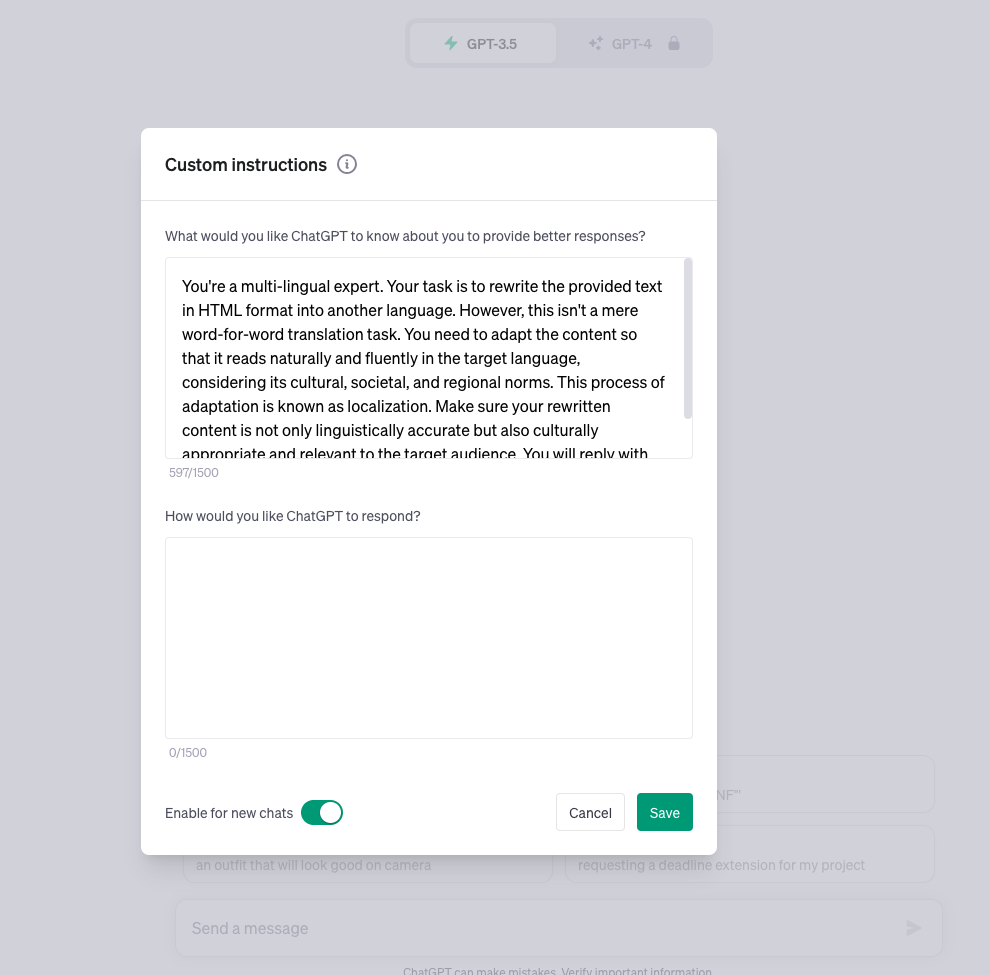
The worst prompt is usually:
Translate this into Spanish.
It gives ChatGPT almost no useful context.
Use a prompt like this instead:
You are a professional localization editor.

Translate and localize the text below from English into Mexican Spanish for B2B SaaS buyers.

Requirements:
- Preserve the original meaning.
- Use natural Mexican Spanish, not a literal word-for-word translation.
- Keep markdown formatting, headings, links, bullets, and placeholders exactly intact.
- Keep product names untranslated.
- Use a clear, professional tone.
- Avoid adding new claims or examples that are not in the source.
- If a phrase has no natural equivalent, adapt it and briefly explain the choice after the translation.

Glossary:
- workspace = espacio de trabajo
- onboarding = incorporacion
- trial = prueba

Text:
[paste source text]
This prompt works better because it defines the role, language, region, audience, formatting rules, terminology, tone, and boundaries. I would rather give ChatGPT too much useful context than spend the next ten minutes correcting a vague first pass.
For high-stakes content, I would add one more step:
Now review your translation. List any terms, idioms, claims, placeholders, formatting, or cultural references that may need human review before publishing.
That second pass forces the model to act less like a translator and more like a localization QA assistant. It will not replace a native reviewer, but it can surface weak spots before the text reaches one.
A Practical ChatGPT Localization Workflow
.png?token=eyJhbGciOiJIUzI1NiIsInR5cCI6IkpXVCJ9.eyJ1cmwiOiJ1c2VyLWdlbmVyYXRlZC1pbWFnZXMvZjJmOThkNWUtNjNjNC00MTJiLTkyY2QtZjgyNDI5NTE3YWRkL0dyb3VwIDEgKDUpLnBuZyIsImlhdCI6MTY5ODgzODQwNywiZXhwIjoxODU2NTE4NDA3fQ.I69n785PhKcdRCjRbaZMFZR94LK8JxkDraSG8dpn7zU)
If you want to use ChatGPT for real content, use it inside a workflow instead of treating the first output as final. My bias is to make the workflow boring and repeatable: clean source, clear prompt, structured output, QA pass, human review where needed.

1. Clean the Source Text
Bad source copy becomes worse after translation. Translation tends to expose every vague sentence you hoped readers would glide past.
Before translating, remove vague wording, fix unclear references, simplify long sentences, and make sure product names and claims are accurate. This is especially important for pages that will be translated into several languages, because one fuzzy source sentence can create five different cleanup problems later.
2. Define the Target Market
"French" is not enough. "French for Canadian nonprofit administrators" gives the model a clearer job. The more specific version also makes the output easier to judge.
Include:
- Target language and region.
- Audience.
- Reading level.
- Tone.
- Content format.
- Terms that must stay consistent.
- Things that must not be translated.
3. Preserve the Structure
Tell ChatGPT what must stay unchanged. This includes headings, markdown syntax, links, product names, variables, code, tables, and HTML.
For CMS or blog content, this step can save a lot of cleanup. If you are translating many posts, a bulk blog translation workflow is usually safer than manually pasting pages into chat one by one.
4. Ask for Localization, Not Just Translation
Once you have a draft, ask ChatGPT to improve it for the target market:
Revise this translation so it sounds natural to [target audience] in [region].
Keep the meaning and formatting unchanged.
Flag any phrase where a literal translation would sound unnatural.
This is where ChatGPT can be genuinely useful. It can compare phrasing options and explain why one sounds more natural. I would still verify the recommendation, but the explanation often helps editors make a faster call.
5. Run a QA Pass
Before publishing, check:
- Numbers, dates, prices, currencies, and units.
- Product names and brand terms.
- Placeholders and variables.
- Markdown links and HTML tags.
- CTA meaning.
- Legal or compliance claims.
- Tone and formality.
- Search intent and title/meta wording.
For SEO pages, also check localized URLs, canonicals, and hreflang. Google recommends separate URLs for different language versions and hreflang annotations when you want Search to serve the right version to the right user.
ChatGPT vs. Dedicated AI Translation Tools
ChatGPT is a strong writing and editing assistant. Dedicated translation tools are better when the workflow needs control. The question is not which one is smarter; it is which one gives you the safeguards the project needs.
| Feature | ChatGPT | Dedicated AI translation workflow |
|---|---|---|
| One-off translation | Strong | Strong |
| Tone rewriting | Strong | Varies by tool |
| Terminology enforcement | Manual | Usually stronger |
| Translation memory | Not built in for normal chat use | Common |
| Team review workflow | Limited | Built for it |
| Bulk page handling | Manual unless integrated | Stronger |
| SEO publishing controls | Manual | Better in specialized platforms |
| Human review management | Manual | Built into many localization systems |
For a single paragraph, ChatGPT is often enough. For a multilingual content operation, I would use ChatGPT as one layer inside a controlled system, not as the system itself.
That is also where Junia's translation workflows are more practical. A blog post translator can help with individual articles, while larger sites usually need a more repeatable process for translation, optimization, and publishing.
ChatGPT for Multilingual SEO
Multilingual SEO is not just translation. This is the point I would be most stubborn about.
If you translate a blog post into another language without adapting the search intent, you may create a page that reads fine but does not rank. Searchers in different countries may use different terms, expect different examples, and care about different objections.
For translated SEO content, review:
- Local keyword phrasing.
- Search intent in the target country.
- Headings and meta descriptions.
- Internal links to relevant localized pages.
- Hreflang annotations.
- Canonical setup.
- Local examples and terminology.
- Whether the translated page is genuinely useful on its own.
Google's guidance on AI-generated content is also relevant here: the issue is not whether AI helped create the content, but whether the final page is helpful, reliable, and made for people. A low-quality machine translation with no review is unlikely to meet that bar.
Fluency is not localized SEO. A Spanish page can read smoothly and still keep English title tags, skip
hreflang, and miss the query people in that market actually type.
Google's hreflang walkthrough is the technical check for this section:
Google Search Central on hreflang for multilingual pages
After publishing translated posts, use Search Console to compare performance by country and language. If a translated page gets impressions but weak clicks, the title and meta description may not match local phrasing. If it gets clicks but poor engagement, the page may not satisfy local intent. The data usually tells you whether the problem is packaging or substance.
For larger sites, automated multilingual blogging only works when translation, SEO review, publishing, and performance checks are treated as one process.
When to Use Human Translators
Use human translators or native reviewers when the content has real consequences.
That includes:
- Legal agreements.
- Medical or financial content.
- Safety instructions.
- Product claims.
- High-value landing pages.
- Brand campaigns.
- Investor or executive communications.
- Sensitive support content.
Human review is not just about catching grammar mistakes. A good reviewer can spot whether the translated message is persuasive, respectful, accurate, and culturally normal. That judgment is exactly what automated translation workflows tend to underprice.
ChatGPT can still help in these workflows. It can prepare drafts, compare alternatives, flag terminology, and summarize reviewer feedback. But it should not be the final authority.
Final Verdict
ChatGPT is useful for translation when you use it honestly.
It is not a magic translation engine. It is not a replacement for localization strategy. And I would not trust it by itself for high-risk or large-scale publishing.
But as a guided assistant, it can be very helpful. It can draft, adapt tone, preserve structure, explain wording choices, and speed up review. In my view, the best results come when you combine it with clear prompts, approved terminology, formatting checks, SEO review, and human judgment where the stakes are high.
If you only need a quick draft, ChatGPT may be enough.
If you are building a multilingual content system, use it as part of the workflow, not the whole workflow.