
Free ChatGPT Prompt Generator
Get copy-and-paste prompts for ChatGPT, Gemini, and Claude. Pick a ready-made prompt below, or describe what you want and generate your own: photo edits, study help, resumes, captions, and more.
Generated Prompt
Your copy/paste-ready ChatGPT prompt will appear here...
Writing prompts to get blog posts out of ChatGPT? The AI article writer skips the prompt and turns one topic into a full, SEO-optimized article.
Free ChatGPT Prompts to Copy and Paste
Ready-made prompts for the things people use ChatGPT for most. Copy a prompt, paste it into ChatGPT or Gemini, and replace the [brackets] with your details.
Photo Editing & AI Images
Studio portrait from a selfie
Using the photo I uploaded, create a professional studio portrait of me. Keep my face, features, and skin tone exactly the same. Soft studio lighting, plain [light grey] background, sharp focus on the face, natural skin texture, shallow depth of field, shot on an 85mm lens. Make it look like a real photograph, not a painting.
Retro saree portrait
Using my uploaded photo, create a 1990s retro Bollywood-style portrait. Keep my face exactly the same. I'm wearing a flowing [red chiffon] saree, with a soft breeze in my hair. Warm golden-hour light, grainy film texture, slightly faded colours, plain textured wall in the background, cinematic vintage mood. Vertical 4:5 frame.
Professional LinkedIn headshot
Turn my uploaded photo into a professional LinkedIn headshot. Keep my face and expression natural and unchanged. Dress me in a [navy blazer with a white shirt]. Clean office background with soft blur, even front lighting, head-and-shoulders crop, friendly confident look.
Couple photo in a new setting
Using the photo I uploaded of us, place the two of us [walking on a beach at sunset]. Keep both our faces exactly the same. Warm golden light, soft shadows, candid natural pose, realistic photo style, no extra people in the background.
Cinematic edit of my photo
Edit my uploaded photo to look like a still from a movie. Keep me and my face unchanged. Add cinematic teal-and-orange colour grading, soft film grain, dramatic but natural lighting, and a slightly blurred city background with bokeh lights at night.
Image from scratch
Create a realistic image of [a cosy reading corner by a rainy window]. Include [a soft armchair, warm lamp light, a cup of chai, stacked books]. Style: realistic photography, warm tones, calm mood. Camera: eye level, 35mm lens. Aspect ratio 16:9.
Study & Exams
Explain any topic simply
Explain [topic] to me like I'm a [Class 10 student]. Use simple words, one real-life example, and a short analogy. Then give me 3 quick questions to check if I understood, with answers at the end.
Short notes for revision
Make short revision notes on [chapter name] for my [exam name] exam. Use headings and bullet points, highlight key terms and formulas, and finish with the 10 most important points to remember. Keep it to one page.
Practice question paper
Create a practice test on [subject / chapter] for [class / exam]. Include 5 MCQs, 3 short-answer questions, and 2 long-answer questions, the way they usually appear in the exam. Put the answers with brief explanations at the end.
Study timetable
I have [number] days until my [exam]. Subjects: [list subjects]. I can study [hours] hours a day and I'm weakest in [subject]. Make a day-by-day study plan with revision days and short breaks, as a table.
Solve step by step
Solve this problem step by step and explain each step in simple language: [paste the question]. After solving, tell me the concept it tests and one similar question for practice.
Resume & Jobs
Resume for a job post
You are an experienced recruiter. Rewrite my resume for this job. Make the bullet points action-based, add results where possible, and match the keywords in the job post without making things up. Job post: [paste job description] My resume: [paste resume]
Cover letter
Write a short cover letter (under 250 words) for the [job title] role at [company]. I'm a [fresher / X years experience] with skills in [skills]. Make it confident but not over the top, and mention why I want to join this company: [reason].
Mock interview
Act as an interviewer for a [job title] role at a [company type]. Ask me one question at a time, wait for my answer, then give feedback on what was good and what to improve. Start with “Tell me about yourself”.
LinkedIn About section
Write a LinkedIn About section for me in first person, under 200 words. I'm a [role] with experience in [areas]. My key achievements: [list]. Tone: professional and friendly. End with what kind of opportunities I'm looking for.
YouTube & Instagram
YouTube video script
Write a script for a [length]-minute YouTube video on [topic] for [audience]. Start with a strong 10-second hook, then the main points with simple examples, and end with a call to subscribe. Use a casual, spoken style with short sentences.
Instagram captions
Write 5 Instagram captions for a post about [describe the photo or topic]. Mix styles: one funny, one inspiring, one short, one with a question, one storytelling. Add 5 relevant hashtags to each.
Reels ideas
Give me 10 Instagram Reels ideas for a [niche] account. For each idea, give the hook for the first 3 seconds, what to show, and a caption idea. Focus on ideas that are easy to shoot on a phone.
YouTube titles and description
Suggest 10 click-worthy but honest YouTube titles for a video about [topic]. Then write a 150-word description with keywords and 3 timestamp placeholders.
Everyday Life
Trip plan
Plan a [number]-day trip to [place] for [who is travelling] with a budget of [budget]. Include day-wise places to visit, local food to try, how to travel between places, and rough costs. Present it as a table.
Monthly budget
Help me make a monthly budget. My income is [amount]. My fixed expenses are [list]. I want to save [amount or %]. Suggest how to split the rest and give 5 practical tips to cut spending.
Diet plan
Create a 7-day [vegetarian] meal plan for a [age]-year-old who wants to [lose weight / gain muscle]. Use simple home-cooked [Indian] food, include approximate calories, and add a grocery list at the end.
Write a message or letter
Write a polite [email / WhatsApp message / application] to [person] about [situation]. Keep it [short / formal / friendly] and make sure it clearly asks for [what you want].
Coding
Fix my code
Here is my [language] code and the error I get. Explain what's wrong in simple terms, then give the corrected code with comments on what you changed. Code: [paste code] Error: [paste error]
Explain code line by line
Explain this code line by line for a beginner. Then tell me what it does overall and one way to improve it. [paste code]
Learn a programming topic
Teach me [topic, e.g. Python loops] from scratch. Explain with simple examples, then give me 3 small exercises with solutions hidden at the end.
Business & Marketing
Business ideas
Suggest 10 small business ideas I can start in [city / online] with a budget of [amount] and skills in [skills]. For each, give startup cost, how to get the first customers, and the main risk.
Product description
Write a product description for [product] for my [online store / Instagram shop]. Audience: [who buys it]. Highlight 3 benefits, include key details (size, material, price), and end with a short call to action.
Marketing plan
Create a simple 30-day marketing plan for my [type of business] in [location] with a budget of [amount]. Focus on [Instagram / WhatsApp / Google]. Give week-by-week actions in a table.
How the ChatGPT Prompt Generator Works
Get results in seconds with a simple workflow.
Say What You Want
Type your request in plain words, for example “prompt to make my photo look like a studio portrait” or “explain photosynthesis for my exam”.
Pick a Type and Language
Choose what the prompt is for (image, study, career, social media, and more) and the language you want. Open Advanced options if you want to add more detail.
Copy and Paste Into ChatGPT
Click Generate, then copy the prompt and paste it into ChatGPT, Gemini, or any AI tool. Replace anything in [brackets] with your own details.
See It in Action
A short request turned into a detailed prompt that gets a much better answer from ChatGPT.
Help me study for my biology exam.
You are a friendly biology teacher.
Task: Help me revise the chapter “Photosynthesis” for my Class 10 board exam.
Please:
- Explain the topic in simple language, step by step.
- Give one real-life example for each key idea.
- List the 5 most important points to remember.
- Add 5 likely exam questions with short model answers.
- Point out 2 common mistakes students make.
Format: Short headings and bullet points. Keep it under 500 words.
Why Use Our ChatGPT Prompt Generator?
Powered by the latest AI to deliver fast, accurate results.
Copy & Paste Prompts That Work Right Away
Get a complete prompt with the role, task, details, and format already filled in. Paste it into ChatGPT, Gemini, or Claude and get a useful answer on the first try.
Image and Photo Editing Prompts
Describe the look you want and get a detailed image prompt with pose, outfit, lighting, background, and style, ready for ChatGPT image generation or Gemini.
Study, Exam, and Homework Help
Turn “explain this chapter” into a prompt that asks for simple explanations, examples, short notes, and practice questions at your level.
Prompts in Hindi and 50+ Languages
Pick a language and the prompt is written in it, so you can ask ChatGPT in Hindi, Tamil, Bengali, Indonesian, Portuguese, and more.
Free, With No Prompt-Writing Skills Needed
Just describe what you want in plain words. The generator adds the structure that makes ChatGPT answer better, so you don't have to learn prompt engineering.
Pro Tips for Better Results
Get the most out of the ChatGPT Prompt Generator with these expert tips.
Add one detail about you
“I'm a Class 12 student” or “I'm a fresher applying for IT jobs” changes the answer more than any fancy wording.
Say what the answer should look like
Ask for a table, bullet points, a short paragraph, or step-by-step instructions. ChatGPT follows format requests very well.
For photo edits, keep the face the same
When you upload your own photo, add “keep my face and features exactly the same” so the AI changes the style, not the person.
Replace every [bracket]
Library prompts use [brackets] for your details. Fill them in before sending, or ChatGPT will guess.
Ask follow-up questions
If the first answer is close but not right, reply with “make it shorter”, “simpler”, or “more examples”. You don't need to start over.
Who Is This For?
Trusted by millions of students, writers, and professionals worldwide.
ChatGPT Prompt Generator and AI Prompt Maker
Most people type one short line into ChatGPT, like "make my photo look professional" or "explain this chapter", and get an answer that's just okay. The AI isn't the problem. The request is too short, so ChatGPT has to guess what you want.
A good ChatGPT prompt fixes that by telling the AI three things:
- What you want – the exact result, not just the topic.
- A little about you – who it's for, your level, your situation.
- What the answer should look like – a list, a table, steps, a short paragraph, or an image style.
This free ChatGPT prompt generator adds those parts for you. Type what you want in your own words, pick the prompt type and language, and you get a complete prompt to copy and paste into ChatGPT, Gemini, Claude, or any other AI tool. If you'd rather not type anything, copy a ready-made prompt from the library above. Want to understand why this works? Read our guide on how to write better AI prompts, or browse more AI prompt examples.
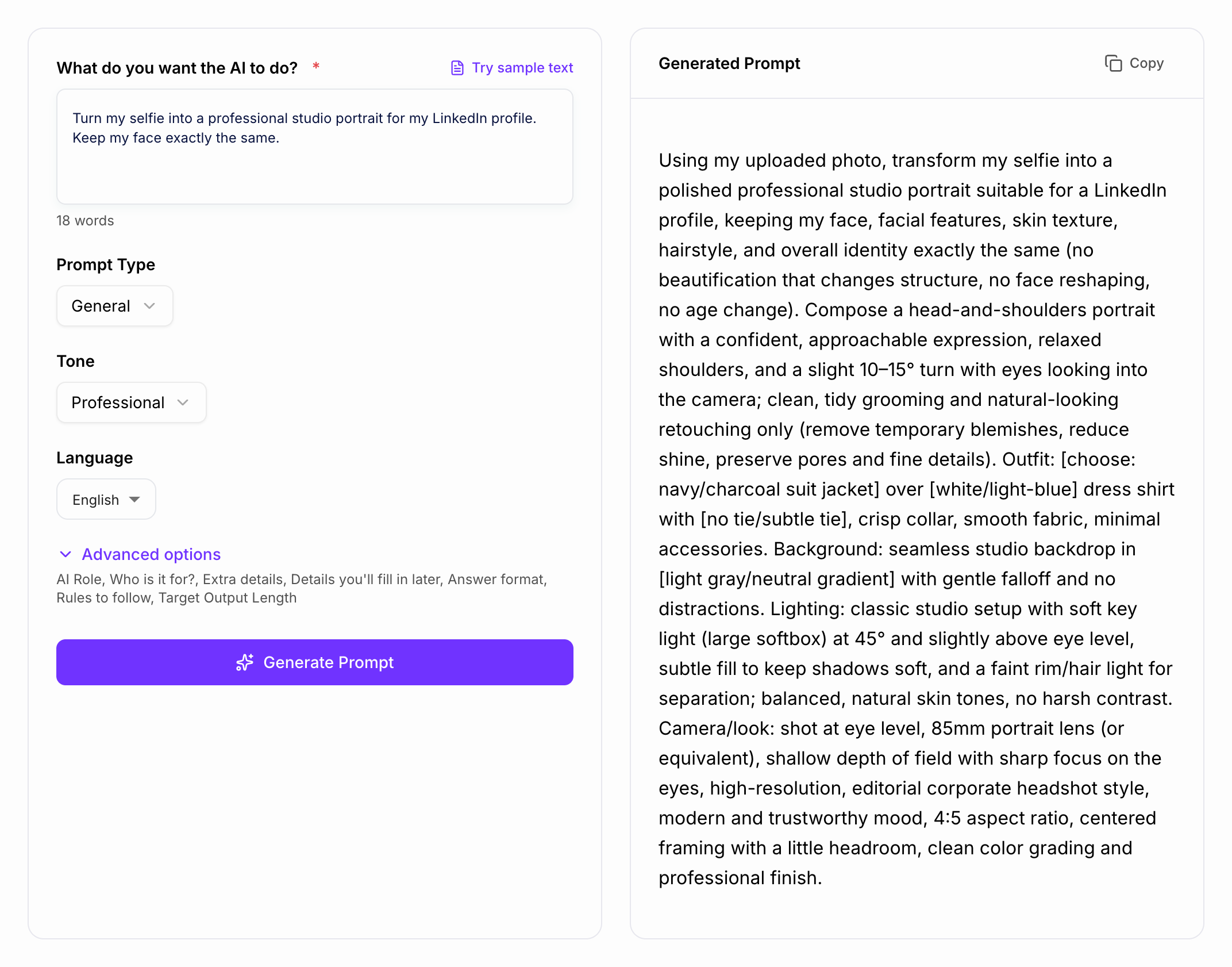
How to Use a ChatGPT Prompt (Copy and Paste)
- Pick or generate a prompt. Copy one from the prompt library, or generate your own with the form.
- Open ChatGPT (or Gemini, Claude, Copilot) and paste the prompt into the message box.
- Replace every [bracket] with your own details, such as your topic, exam, job title, or city.
- For photo prompts, upload your photo first, then paste the prompt in the same message.
- Send, then adjust. If the answer isn't quite right, reply with "make it simpler", "shorter", or "give more examples". You don't need to start again.
ChatGPT Prompts for Photo Editing and AI Images
Photo editing is one of the most popular uses of ChatGPT and Gemini right now: studio portraits from a selfie, retro saree looks, LinkedIn headshots, cinematic edits, and every new trend that goes viral.
A photo prompt works best when it describes the picture the way a photographer would:
- Subject and pose – who is in the photo and what they're doing
- Outfit and details – clothes, accessories, colours
- Setting – background, place, time of day
- Lighting – soft studio light, golden hour, neon, natural window light
- Style – realistic photo, 90s film, cinematic, anime, oil painting
- Frame – close-up or full body, vertical (4:5, 9:16) or wide (16:9)
When you edit your own photo, always add "keep my face and features exactly the same". Without it, the AI may change how you look.
Weak: "Make my photo look nice." Better: "Using my uploaded photo, create a professional studio portrait. Keep my face exactly the same. Soft studio lighting, plain grey background, sharp focus, natural skin texture, realistic photo style."
To build a photo prompt from scratch, choose Image & Photo mode in the generator above and describe the look you want.
ChatGPT Prompts for Students and Exams
ChatGPT is a great study partner when you tell it your level and what kind of help you need. Compare these:
Weak: "Explain photosynthesis." Better: "Explain photosynthesis to a Class 10 student in simple words with one real-life example. Then give me 3 quick questions to test myself, with answers at the end."
The second prompt gets an answer at the right level, in a format that's easy to revise, plus practice questions. Use the Study & Learning mode or the study prompts in the library to get:
- simple explanations of difficult topics
- one-page revision notes
- practice papers in your exam's pattern
- day-by-day study timetables
- step-by-step solutions to maths and science problems
ChatGPT Prompts for Resumes, Jobs, and Interviews
For job applications, the most useful thing you can give ChatGPT is the job description. Paste it together with your resume and ask the AI to match the two without making up experience. Also try asking ChatGPT to act as an interviewer for your role and ask you one question at a time. It's a free way to practise before the real interview.
ChatGPT Prompts in Hindi and Other Languages
You don't have to write prompts in English. Choose your language in the Language field and the generator writes the whole prompt in that language. ChatGPT will usually reply in the same language.
Example prompts you can copy:
- Hindi: "मुझे [विषय] आसान भाषा में समझाओ, जैसे मैं कक्षा 10 का छात्र हूँ। एक असली जीवन का उदाहरण दो और अंत में 3 अभ्यास प्रश्न उत्तर के साथ दो।"
- Portuguese: "Crie um plano de estudos de [número] dias para a prova de [matéria]. Eu estudo [horas] horas por dia. Mostre em uma tabela."
- Indonesian: "Buatkan 5 caption Instagram untuk foto [deskripsi foto], dengan gaya santai dan 5 hashtag yang relevan."
The same works for Tamil, Telugu, Bengali, Marathi, Urdu, Spanish, Arabic, and many more.
Why Detailed Prompts Get Better Answers
A detailed prompt isn't about using long or clever words. It's about removing the guesswork:
- Fewer follow-up messages. ChatGPT gets it right the first time.
- Answers at your level. Not too basic, not too advanced.
- Easier to use. You get a table, a checklist, or steps instead of a wall of text.
- Reusable. Save a prompt that works, change the [brackets], and use it again. For more reusable formulas, see these prompt engineering templates.
Common Prompt Mistakes (and Quick Fixes)
Mistake 1: Only giving the topic. Fix: say the result you want, like "short notes", "5 captions", or "a table comparing 3 phones".
Mistake 2: Not saying who it's for. Fix: add one line, like "I'm a beginner" or "for a Class 12 student". It changes the whole answer.
Mistake 3: Forgetting to replace the [brackets]. Fix: fill in every bracket before sending, or ChatGPT will make things up.
Mistake 4: Starting over when the answer is close. Fix: reply with what to change ("simpler", "shorter", "more examples") instead of writing a new prompt.
Mistake 5: Changing your face in photo edits. Fix: add "keep my face and features exactly the same" to every edit of your own photo.
More Free Prompt Tools
Once your prompt is ready, you can test it in the AI text generator. If you want ChatGPT to always answer in a certain way, set it up with the ChatGPT persona instructions generator. For stories and creative writing, try the writing prompt generator, and for detailed art and image ideas, use the AI art prompt generator.
AI Article Writer
Turn one keyword into a complete, SEO-optimized article
- Researches the topic and outlines the article for you
- Writes headings, images, FAQs, and internal links in one go
- Publishes to WordPress, Webflow, Shopify, Ghost, and more
Frequently Asked Questions
What is a ChatGPT prompt generator?+
It turns a short request like “help me prepare for my exam” into a complete, detailed prompt that tells ChatGPT exactly what you want. Better prompts get better answers, without you having to learn prompt writing.
Is this ChatGPT prompt generator free?+
Yes. You can generate prompts for free without signing up, and every prompt in the library on this page is free to copy and use.
How do I use a prompt in ChatGPT?+
Click “Copy prompt”, open ChatGPT, paste it into the message box, and replace anything in [brackets] with your own details. Then press send.
Can I get prompts for AI photo editing?+
Yes. Choose the Image & Photo mode, describe the look you want, and you'll get a detailed image prompt. You can also copy one of the ready-made photo prompts above. Upload your photo in ChatGPT or Gemini and paste the prompt with it.
Do these prompts work in Gemini, Claude, and other AI tools?+
Yes. The prompts are plain text, so they work in ChatGPT, Gemini, Claude, Copilot, Meta AI, and most other AI chat tools.
Can I get prompts in Hindi or other languages?+
Yes. Choose your language in the Language field and the prompt will be written in that language. ChatGPT will usually reply in the same language.
Why does ChatGPT give me generic answers?+
Usually because the request is too short. Say who the answer is for, add one or two details about your situation, and say what format you want (list, table, steps). The generator adds these for you.