
Free AI Debate Generator
Generate debate arguments for both sides of a topic with an AI debate generator built for clear prep. Enter a motion to create pro and con points, rebuttals, cross-examination questions, evidence ideas, and closing statements for classroom debates, practice rounds, and speech prep.
Debate
Your debate pack (arguments, rebuttals, cross-ex questions, and closings) will appear here...
How the AI Debate Generator Works
Get results in seconds with a simple workflow.
Enter a Motion or Debate Topic
Type your debate motion (e.g., “This house would…”) or a clear topic. The tool will define key terms so both sides argue the same question.
Choose Format, Tone, and Length
Optionally select a debate format (Policy, LD, Parliamentary, Oxford), a tone (formal, persuasive, neutral), and an approximate word count.
Generate, Then Add Evidence
Get pro/con cases, rebuttals, cross-ex questions, and closings. Replace evidence suggestions with real sources and tailor arguments to your rubric or judge preferences.
See It in Action
Turn a basic debate topic into a structured debate pack with clear pro/con cases, rebuttals, cross-ex questions, and closing statements.
Topic: ban TikTok
I need arguments for and against banning TikTok.
Motion: This house would ban TikTok in the United States
Definitions:
- “Ban” = prohibit distribution via app stores and restrict platform operations
- “United States” = federal policy across all states
Affirmative (Pro) Opening:
- Framework: prioritize national security and data protection
- Argument 1: Data access risk and foreign influence operations
- Argument 2: Youth mental health and addictive design incentives
- Argument 3: Enforcement and transparency gaps vs. domestic regulation
Negative (Con) Opening:
- Framework: prioritize free expression and proportional policy
- Argument 1: Free speech and precedent for platform censorship
- Argument 2: Economic impact on creators and small businesses
- Argument 3: Better alternatives (privacy law, audits, data localization)
Rebuttals + Clash:
- Pro vs Con: why alternatives fail / why ban is disproportionate
Cross-Ex Questions:
- For Pro: “What specific threshold of risk justifies a ban over regulation?”
- For Con: “How do you verify compliance if the platform’s incentives conflict?”
Closing Statements:
- Clear weighing (magnitude, probability, timeframe) and a final ballot story for each side.
Why Use Our AI Debate Generator?
Powered by the latest AI to deliver fast, accurate results.
Complete Debate Pack (Pro + Con)
Generate a structured debate with definitions, key terms, a clear framework, affirmative and negative cases, rebuttals, cross-examination questions, and closing statements—ideal for fast debate prep.
Stronger Arguments with Warrants and Reasoning
Each point includes the logic behind it (claims, warrants, and impacts) so your debate arguments are persuasive, not just a list of opinions.
Rebuttals, Clash Lines, and Weighing
Get targeted rebuttals and strategic ‘clash’ guidance to respond to the other side, compare impacts, and prioritize the strongest winning paths.
Evidence Suggestions (No Fake Citations)
Includes practical suggestions for what evidence to look up (reports, datasets, expert viewpoints) without inventing statistics or fabricating sources.
Works for Students, Classrooms, and Competitive Debate
Adapt output to different debate formats (Policy, Lincoln–Douglas, Parliamentary, Oxford) and skill levels, with language and tone controls for your audience.
Pro Tips for Better Results
Get the most out of the AI Debate Generator with these expert tips.
Start by tightening the motion
A specific motion produces better debate arguments. Add scope (country/region), timeframe, and what counts as success (e.g., reduced harm, improved rights, lower costs).
Use a framework to win the weighing
Decide early what matters most (rights, safety, fairness, economic welfare). Then weigh impacts by magnitude, probability, and timeframe to make your strongest argument decisive.
Convert arguments into cross-ex traps
Turn each opponent claim into a yes/no question that forces concessions (definitions, thresholds, unintended consequences, alternatives).
Swap ‘evidence suggestions’ for verified sources
Use credible reports (government statistics, reputable research institutes, peer-reviewed papers) and quote them accurately—this is the fastest way to level up competitiveness.
Prewrite 2–3 reusable rebuttal templates
Common rebuttals include: link turns, impact defense, counterexamples, and better alternatives. Reuse templates and customize to the motion for faster prep.
Who Is This For?
Trusted by millions of students, writers, and professionals worldwide.
How to Use an AI Debate Generator to Build Better Arguments (Without Sounding Robotic)
Most debate prep fails in the same boring way. You collect a few points from Google, you write them down, then you realize none of them actually clash with what the other side will say. No framing. No weighing. No plan for cross examination. Just a pile of ideas.
An AI debate generator fixes that, not because it magically wins debates for you, but because it forces structure fast. Definitions, a clean affirmative, a clean negative, then the parts most people skip until it is too late: rebuttals, clash lines, and cross ex questions.
If you are practicing for school, coaching a classroom discussion, or even just trying to sharpen critical thinking, this kind of “debate kit” approach is the difference.
Use It as an AI Debater, Debate Helper, or Prep Tool
People search for this in different ways: AI debate, debate AI, AI debater, debate helper. The practical goal is the same. You want a tool that helps you think through both sides before you write or speak.
Use it when you need:
- quick pro and con arguments for a motion
- rebuttals against likely opposing claims
- cross-examination questions for practice
- a balanced classroom debate outline
- closing statements that weigh impacts instead of repeating points
The output is best treated as prep, not a finished performance. Keep the structure, verify the facts, then rewrite the most important lines in your own voice.
What You Actually Get From This Debate Generator
When you run a motion through this tool, the output is built to look like real debate prep, not random paragraphs.
Usually it includes:
- A clear motion restatement and definitions so both sides argue the same thing
- A framework (what matters most and why)
- 3 to 5 pro arguments with warrants and impacts
- 3 to 5 con arguments with warrants and impacts
- Rebuttals for both sides (including common responses you will actually hear)
- Cross examination questions with the goal behind each question
- Closing statements that weigh impacts instead of repeating points
And importantly, it gives evidence ideas without making up citations. That is the right tradeoff. You still verify sources, but you are not staring at a blank page.
A Simple Workflow That Makes the Output Way Better
If you want results that feel specific and usable, do this:
-
Write a tight motion
Not “Should social media be banned?”
Better: “This house would ban TikTok in the United States.” -
Add one or two constraints
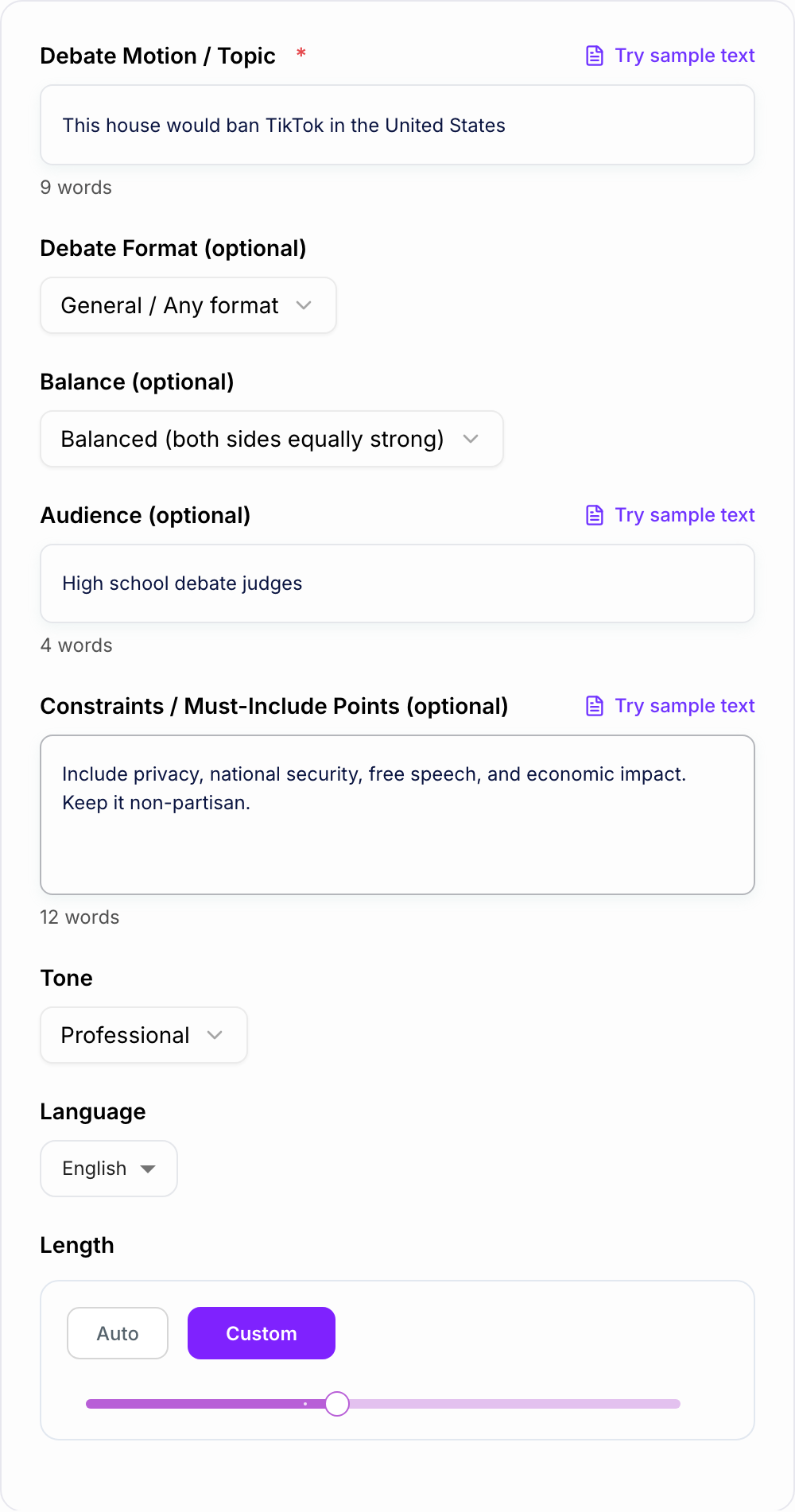
Things like: include privacy, national security, free speech, and economic impact.
Or: keep it non partisan. Avoid legal citations. -
Pick the format if you know it
Policy, Lincoln Douglas, Parliamentary, Oxford, classroom. Even a rough choice helps the structure. -
Set the audience
“High school judges” creates different wording than “classmates” or “general public”. -
Generate, then refine like a human
Keep the best 60 percent. Rewrite intros and closings in your voice. Add real evidence.
If you are already using Junia for writing or SEO content, this tool fits nicely into the same workflow. You generate structure fast, then polish the final draft in your own style. If you are new here, you can explore the rest of the tools on the Junia AI homepage and see what else supports long form writing and editing.
Debate Formats This Tool Can Adapt To (And What Changes)
Different formats reward different skills, so the generator lets you steer the structure.
General or Classroom
Best for discussion and practice. Clear, balanced, easy language. Less jargon.
Oxford Style
More emphasis on speeches, clarity, and persuasive framing. Closings matter a lot here.
Parliamentary
Quick prep energy. Strong signposting, clean clash, punchy rebuttals.
Policy Debate
More focus on impacts, tradeoffs, solvency style reasoning, and “why this policy works”.
Lincoln Douglas
Typically more value based framing. You want a crisp framework and weighing early.
If you are not sure, choose General first. You can always rerun the same motion in a different format and compare.
Cross Examination: The Part Most People Underprepare
Cross ex is not a time to argue everything. It is a time to force concessions.
Good cross ex questions do one of these:
-
Expose a vague definition
“What counts as a ban, exactly?” -
Force a threshold
“How much risk is enough to justify a ban over regulation?” -
Test feasibility
“Who enforces this and how do you verify compliance?” -
Pull out an unintended consequence
“What happens to creators and small businesses dependent on the platform?”
This generator produces cross ex questions with strategic intent, which is honestly what most people forget to do.
How to Make the Arguments Less Generic
AI outputs get bland when the input is bland. If you want originality, add specifics.
Try adding:
- Region and timeframe (US in 2026, EU this decade, etc.)
- What “wins” means (rights, safety, economic welfare, fairness)
- A stakeholder lens (students, parents, small businesses, national security agencies)
- A comparison baseline (ban vs regulation, audits, data localization, age gating)
Also, do not be afraid to ask for fewer arguments but deeper warrants. Three sharp arguments beat five shallow ones.
Evidence Suggestions: How to Turn Them Into Real Proof
The tool will suggest what to look up, not fake numbers. That is on purpose.
A quick way to upgrade the draft:
- Replace “studies show” with a specific source type (government stats, reputable institutes, peer reviewed research)
- Pull one strong quote or data point per major contention
- Use evidence to support the warrant, not just the claim
If you are doing competitive debate or graded assignments, this step matters more than any fancy wording.
Common Motions People Use This For
If you need a starting point, here are motions that usually generate strong, balanced rounds:
- This house would ban TikTok in the United States
- This house would implement a universal basic income
- This house would lower the voting age to 16
- This house would ban targeted advertising to minors
- This house would require AI systems to be explainable by law
- This house would prioritize nuclear energy in the clean transition
- This house believes social media does more harm than good
Pick one, then narrow it. Narrow topics create cleaner clash.
One Last Tip: Win on Weighing, Not Volume
A lot of people think debate is about having more points.
It is usually about having a clearer story of impact.
When you finalize your draft, make sure each side answers:
- What matters most?
- Why does our impact outweigh theirs on magnitude, probability, and timeframe?
- What is the clean “ballot story” in the closing?
That is how a generated debate kit turns into something you can actually deliver.
Clash Test: One Burden, One Counter, One Weighing Line
A generated case becomes usable when you can state, for each contention: the burden you accept, the most likely counter, and the weighing line you will actually say.
Enter a narrow motion. The form cannot supply real studies—only a case structure.
If you cannot explain a sentence without looking it up, do not leave it in. The AI Debate Generator drafts structure; you still own the claim.
Worked motion: “This house would ban homework in primary schools.”
- Proposition burden: show that homework’s academic gain is small relative to sleep, equity, and family stress for this age group.
- Likely opposition: practice and parental involvement improve outcomes; schools can assign “better” homework instead of banning it.
- Weighing line: even if some homework helps some students, a ban is justified if the average harm to sleep and unequal home support outweighs the average gain—and if in-school practice can replace it.
Turn “evidence suggestions” into real sources before you speak. A citation-shaped sentence from the model is not a study. For classroom use, follow academic integrity rules: the generator is prep, not a substitute for your own argument or required citations.
Frequently Asked Questions
Is this AI debate generator free to use?+
Yes. You can generate debate arguments, rebuttals, cross-ex questions, and closing statements for free. Some advanced, tournament-style modes may be marked as premium.
Does it generate both sides of the debate?+
Yes. By default it produces a balanced affirmative (pro) and negative (con) case. You can also choose modes to generate only one side or focus on rebuttals and cross-examination.
Can it match a specific debate format like Policy or Lincoln–Douglas?+
Yes. Choose a debate format and the generator will adapt structure and terminology (e.g., framework/value criterion for LD, impacts and trade-offs for policy-style).
Will it include sources and citations?+
It provides evidence suggestions and what to search for (credible organizations, datasets, experts), but it avoids inventing citations or statistics. You should add your own verified sources for competitive or academic use.
Can I control tone and audience?+
Yes. Set the audience and tone to generate age-appropriate, persuasive, or formal debate writing—useful for classrooms, judges, or public audiences.
How do I get more original and less generic debate arguments?+
Add constraints such as required angles (privacy, economics, ethics), a specific region or timeframe, and any must-include facts you already have. Then refine the best arguments and add real evidence.