
Free Instagram Reel Captions Generator
Create Instagram Reel captions that fit your niche, video topic, tone, and goal. Generate hook-first captions with context, CTAs, optional emojis, hashtags, and keyword phrasing so your Reels are easier to watch, save, comment on, and share.
Instagram Reel Captions
Your Instagram Reel captions (hooks + CTAs + hashtags) will appear here...
How the AI Instagram Reel Captions Generator Works
Get results in seconds with a simple workflow.
Describe Your Reel in One Sentence
Enter what your video is about (the main idea or moment). Add niche and keywords if you want more targeted, search-friendly phrasing.
Choose Style, Goal, and Hashtag Mix
Pick a caption style (short, hook-first, tips, story, funny) and your goal (engagement, followers, clicks, leads). Select how many hashtags you want.
Generate, Post, and Test Variations
Get multiple caption options at once. Try different hooks and CTAs for the same Reel to learn what your audience responds to most.
See It in Action
Turn a basic caption into a hook-first, engagement-focused Reel caption with targeted hashtags.
New Reel is up. Hope you like it.
#reels #instagram
I wish someone told me this earlier: SEO isn’t hard—you just need a system.
Want my beginner checklist? Comment “SEO” and I’ll send it.
#seotips #keywordresearch #contentmarketing #saasmarketing #digitalmarketing #marketingstrategy #growoninstagram #reelstips #instagramgrowth #smallbusinessmarketing
Why Use Our AI Instagram Reel Captions Generator?
Powered by the latest AI to deliver fast, accurate results.
Hook-First Captions for Higher Retention
Generates strong first lines (hooks) designed to stop the scroll, increase watch time, and encourage viewers to read the caption—crucial for Reel engagement.
Multiple Caption Styles for Any Niche
Create short, funny, aesthetic, educational, story-driven, or promo captions so you can match your content format, audience expectations, and creator brand voice.
Built-In CTAs That Drive Comments, Saves, and DMs
Adds conversion-friendly calls-to-action (comment, save, share, follow, DM keywords) to help you grow followers, generate leads, and boost engagement signals.
Niche-Relevant Instagram Hashtags (Balanced Mix)
Outputs hashtag sets with a strategic mix of broad, niche, and long-tail tags to improve discoverability and reach—without spammy hashtag stuffing.
Keyword-Aware Captions for Discoverability
Naturally incorporates your keywords (topics, offers, and niche terms) to align with Instagram search, content categorization, and audience intent.
Pro Tips for Better Results
Get the most out of the AI Instagram Reel Captions Generator with these expert tips.
Put the hook in the first line (before “more”)
The first line is prime real estate. Use curiosity, a bold claim, a mistake, or a quick promise to keep viewers reading and improve engagement.
Match the caption to the Reel’s pacing
Fast, trend-based Reels often perform better with short captions. Tutorials and educational Reels can use a slightly longer caption with a clear takeaway and save CTA.
Use one clear CTA (not five)
Choose one primary action: comment, save, share, follow, click, or DM. Too many CTAs reduce clarity and conversion.
Rotate hashtag sets to avoid repetition
Create 3–5 hashtag clusters for your niche and rotate them. Reusing the same exact set every post can limit experimentation and reach.
Add searchable keywords naturally
Instagram search increasingly surfaces keyword-relevant content. Include your niche and topic terms naturally (e.g., “SEO tips,” “meal prep,” “real estate lead gen”) without forcing them.
Who Is This For?
Trusted by millions of students, writers, and professionals worldwide.
Generate Instagram Reel captions with hooks, CTAs, and hashtags
The Instagram Reel Captions Generator helps you turn a video topic into a caption that supports the Reel instead of sitting under it as an afterthought. A strong caption can reinforce the hook, add context, include niche keywords, and ask for one clear action.
Use it when you need caption options for trend Reels, tutorials, product videos, stories, launches, educational clips, or batch-created content.
What to enter into the caption generator
Give the tool the same details you would give a teammate writing the caption for you.
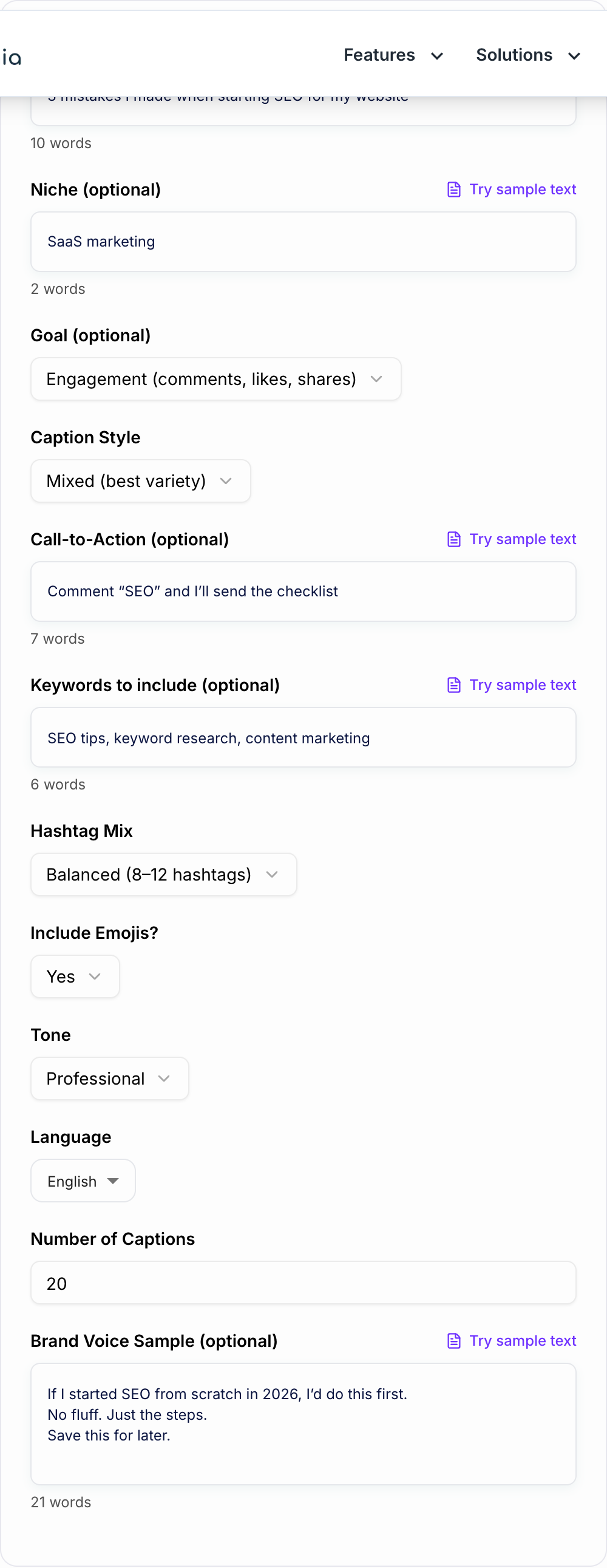
Include:
- What happens in the Reel
- The niche or content pillar
- The audience
- The goal, such as comments, saves, DMs, clicks, follows, or sales
- Any phrase, offer, or keyword that must appear
- Preferred tone and emoji style
- Whether hashtags should be included
Weak input: "skincare tips."
Better input: "Reel showing 3 mistakes beginners make when layering skincare products; audience is women in their 20s with sensitive skin; goal is saves; friendly expert tone."
The better input gives the generator a clear hook, audience, and CTA direction.
Choose the right caption style
Short and hooky captions work best for trends, transitions, outfits, quick product shots, and Reels where the video already carries most of the meaning.
Educational captions work best for tutorials, checklists, mistakes, myths, and how-to Reels. These usually need a quick recap and a save-focused CTA.
Story captions work best when the Reel has a personal lesson, behind-the-scenes moment, client result, or founder point of view.
Funny or relatable captions work when the content is built around a shared frustration or niche joke.
Promotional captions need the most editing. Lead with the viewer's problem or outcome before you mention the offer.
Review the generated hook first
The first line is the most important part of the caption because it shows before the viewer expands the text.
A useful hook usually does one of these:
- Names a mistake
- Promises a simple outcome
- Creates curiosity
- Calls out a specific audience
- Introduces a quick story
- Sets up a checklist or framework
If the generated hook could fit any niche, make it more specific. "Stop making this mistake" is weaker than "Stop applying vitamin C after heavy moisturizer."
Pick one CTA based on the Reel goal
The generator can create CTA options, but you should keep only one primary action.
Use a comment CTA when the goal is engagement. Make the question easy to answer.
Use a save CTA when the Reel teaches steps, a checklist, a routine, or a repeatable process.
Use a DM or comment-keyword CTA when the Reel leads into a template, guide, consultation, or lead magnet.
Use a follow CTA when the post belongs to a clear recurring series.
Use a click or sales CTA only when the caption explains why the next step matters.
Edit hashtags and keywords after generation
Hashtags should support the topic, not decorate the caption. Keep the ones that match the Reel, niche, and audience. Remove broad tags that could apply to almost anything.
Also check the caption keywords. If the Reel is about beginner meal prep, the caption should naturally include phrases like beginner meal prep, easy lunches, grocery list, or quick meals. Do not force keywords into every sentence.
Batch captions without sounding repetitive
When you are creating several Reels at once, generate a few caption options per video and rotate the structure.
For example:
- Reel 1: mistake hook plus save CTA
- Reel 2: mini story plus comment CTA
- Reel 3: checklist recap plus save CTA
- Reel 4: contrarian hook plus follow CTA
- Reel 5: product use case plus DM CTA
This keeps your feed from sounding like the same caption rewritten five times.
Final checklist before posting a generated caption
Before publishing, check that:
- The first line matches the video hook
- The caption adds context the Reel does not already show
- The CTA asks for one action
- Hashtags are relevant and not spammy
- The tone sounds like your account
- Any claim, result, or offer is accurate
- The caption is easy to skim on mobile
For creators building a wider content workflow, Junia AI can help draft supporting pieces around the caption, such as hooks, post ideas, outlines, and campaign copy you can reuse across channels.
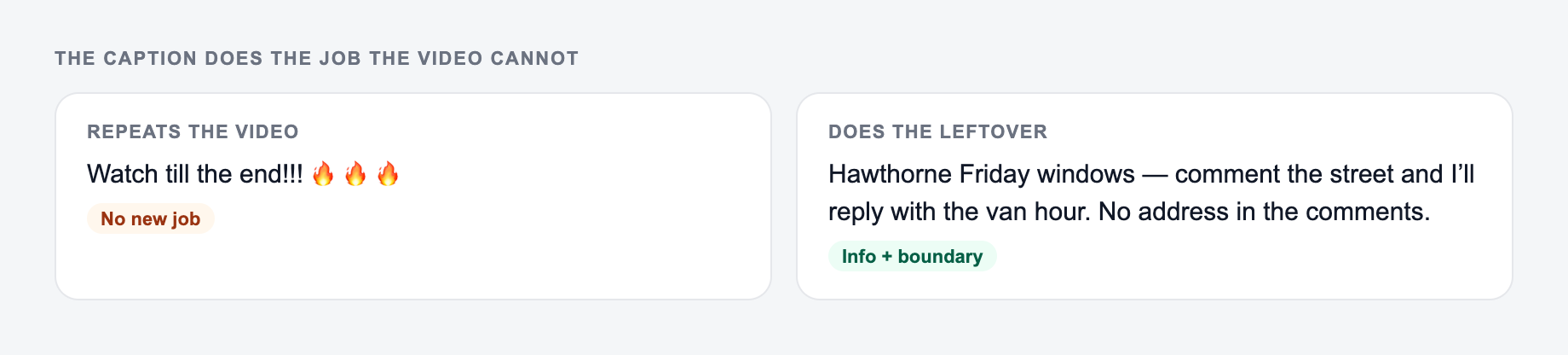
Caption Does the Job the Video Cannot
If the first line repeats the on-screen hook word for word, you wasted the caption. Use it for context, search keywords, or the CTA.
Say what the video cannot say: context, CTA, and the keyword you still want searchable.
Worked split:
- On-screen hook: “Stop rewriting macros from scratch.”
- Caption line 1: “This routing rule tags billing tickets before a human sees them.”
- Body: who it is for, one caveat, one CTA
- Hashtags: small relevant set, edited after generation
Pick CTA by goal: save (reference), comment (keyword or question), link in bio (only if the video earned the click). Claims about results need the same honesty as ads. Batching captions: keep a swipe file of first lines and forbid repeating the same opener three posts in a row.
Frequently Asked Questions
How do I write a good Instagram Reel caption?+
A strong Reel caption usually starts with a hook (first line), delivers quick context or value, and ends with a clear CTA (comment, save, share, follow, or DM). This generator creates captions with that structure automatically.
How many hashtags should I use on Reels?+
There’s no single perfect number. Many creators use a balanced set (8–12) mixing broad and niche hashtags. Use “Minimal” for a cleaner look or “Max” if you want more tag variety to test discoverability.
Can the tool generate captions for my niche?+
Yes. Add your niche (e.g., fitness, real estate, skincare, SaaS, food) and optional keywords. The tool will tailor hooks, phrasing, and hashtags to your niche and audience intent.
Will the captions include CTAs and engagement prompts?+
Yes. You can set a goal like engagement, followers, saves, clicks, leads, or sales. The generator will add relevant CTAs such as questions, “save this,” “share with a friend,” or DM/comment prompts.
Can I match my brand voice?+
Yes. Paste a few example captions in the Brand Voice Sample field. The tool can mirror your punctuation, emoji usage, humor level, and overall style for consistency.
Does this work for different languages?+
Yes. Select your output language to generate captions and hashtags appropriate to that language and audience.