
AI Text Generation Prompts: 50 Copy-and-Paste Prompts for Better Outputs

Thu
AI SEO Specialist, Full Stack Developer

A good AI text generation prompt does not need to be long. It needs to be clear.
Most weak outputs come from prompts that leave too many decisions open: the audience, format, tone, goal, examples, length, and what the AI should avoid. The prompts below are built to close those gaps.
Use them with Junia's AI text generator, adapt the bracketed parts, and keep the details honest. If you need help turning a rough idea into a cleaner instruction, start with the AI prompt generator. For the underlying prompt-writing principles, this guide on how to write better AI prompts explains what to include before you generate.
How to use these prompts
Replace anything in brackets before you generate. The more specific you are, the better the output gets.
I tested this the lazy way first: I pasted "write a blog post about email" into ChatGPT and got a draft I would never publish. Then I filled in audience, goal, length, and what to avoid. Same model. Completely different page.
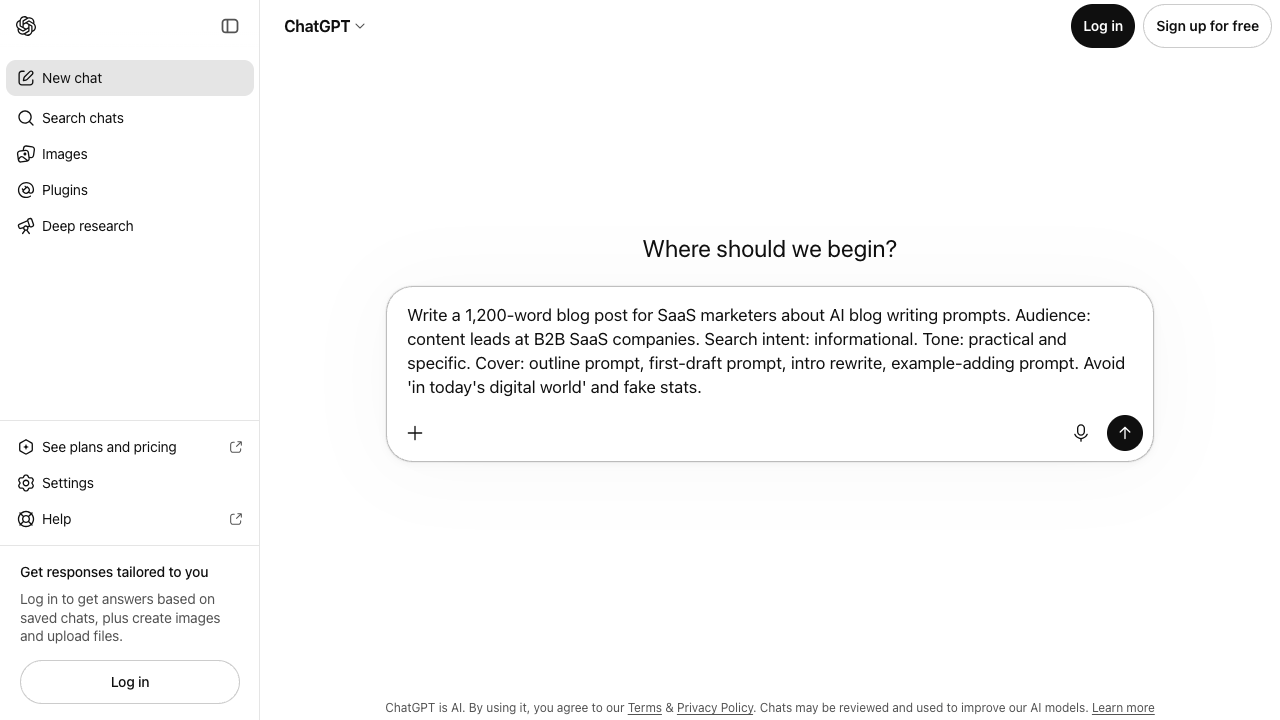
| Weak prompt | Strong prompt |
|---|---|
| Write a blog post about email marketing. | Write a 900-word blog intro and outline for B2B SaaS marketers who send a weekly newsletter. Goal: get readers to audit their last 5 subject lines. Tone: practical. Avoid "in today's digital world." Include one before/after subject line. |
| Make this better. | Rewrite this paragraph for a first-time founder. Keep the meaning. Cut filler. Add one concrete example. Do not invent stats: [paste text]. |
| Write 5 ads. | Create 5 Google ad variations for a meal-prep service. Audience: busy professionals. Offer: first week 25% off. Headline under 40 characters. No weight-loss claims. |
A few quick rules:
- Add the real audience, not “everyone.”
- Name the format you want.
- Include the goal of the text.
- Give the tool facts it should use.
- Tell it what to avoid.
- Ask for options when the wording matters.
Jeff Su's prompt formula is a useful anatomy check for the templates below: task, context, examples, persona, format, and tone. Use it to fill the brackets, not as a reason to copy the prompt word for word.
The Perfect ChatGPT Prompt Formula | Jeff Su
Do not copy these prompts blindly. Swap in your product, reader, and constraints. A template that still says [audience] is not a prompt yet. It is a blank form.
If you want to see what these prompts can produce, compare them with these AI text generator examples.
For a wider set of starting points, browse extra AI prompt examples and then adapt them the same way.
Blog and article prompts
- Blog intro
Write a blog introduction for [audience] about [topic]. The article will explain [main points]. Start with the reader’s problem, not a generic trend. Use a [tone] tone. Keep it under [word count] words.
- Blog outline
Create a practical blog outline for [topic]. Audience: [audience]. Search intent: [intent]. Include H2 and H3 headings, the key point for each section, and where examples would help. Avoid repetitive sections.
- How-to section
Write a how-to section explaining [process]. Audience: [audience]. Include clear steps, common mistakes, and one practical example. Keep paragraphs short and direct.
- Comparison section
Compare [option A] vs [option B] for [use case]. Explain when each one makes sense, where each is weaker, and how a reader should choose. Use a balanced, practical tone.
- Conclusion
Write a concise conclusion for an article about [topic]. Summarize the main takeaway, avoid repeating every section, and give the reader a clear next step.
- SEO paragraph
Write a paragraph about [keyword/topic] for a page targeting [search intent]. Include [required points]. Make it natural for readers first. Do not keyword stuff.
- Content refresh prompt
Improve this draft section for clarity, usefulness, and search intent. Keep the meaning, remove filler, add specific examples where needed, and flag any claim that needs verification: [paste draft].
- FAQ answer
Answer this FAQ in 60 to 90 words: [question]. Audience: [audience]. Be direct, accurate, and helpful. Do not add unsupported claims.
- Snippet-friendly answer
Answer [question] in one clear paragraph under 70 words, then add 3 bullet points with practical details. Use simple language.
- Article brief
Create a content brief for [topic]. Include target reader, search intent, suggested title, outline, key points, internal link ideas, external source needs, and what the writer should avoid.
These prompts work one section at a time, so a full post means running five or six of them and stitching the results together. If you write long posts often, an AI article writer does that stitching for you: give it one keyword and it researches the topic, builds the outline, and writes the full article with headings and images.
Email prompts
- Cold email
Write a cold email to [audience] about [offer]. Goal: [desired action]. Mention [specific pain point]. Keep it under 120 words. Tone: helpful and direct, not pushy.
- Follow-up email
Write a follow-up email to someone who [context]. Goal: [next step]. Keep it short, warm, and specific. Include one subject line.
- Newsletter intro
Write a newsletter opening for [audience] about [topic]. Make it feel personal and useful. Tease the main idea without sounding clickbait.
- Product update email
Write a product update email announcing [feature]. Audience: [users]. Explain what changed, why it matters, and how to try it. Keep it clear and friendly.
- Apology email
Write an apology email for [issue]. Audience: [customers/users]. Acknowledge the problem, explain what happened without excuses, state what is being fixed, and keep the tone accountable.
- Re-engagement email
Write a re-engagement email for inactive users of [product]. Goal: bring them back to try [feature/offer]. Keep it concise and avoid guilt-based language.
- Event invitation
Write an event invitation email for [event]. Audience: [audience]. Include why they should attend, what they will learn, date/time placeholder, and a clear CTA.
- Customer success email
Write a customer success email helping [user type] get more value from [product]. Include 3 practical tips and a soft offer to help.
- Sales reply
Write a reply to this sales objection: [objection]. Keep the tone calm and useful. Address the concern, give one proof point, and ask a simple next-step question.
- Short professional reply
Rewrite this email reply to sound clearer, shorter, and more professional while keeping the meaning: [paste text].
Ads and landing page prompts
- Ad variations
Create [number] ad copy variations for [offer]. Audience: [audience]. Each variation should include one headline under [limit] characters and one primary text line under [limit] characters. Avoid [claims/phrases].
- Landing page hero
Write a landing page hero section for [product/service]. Audience: [audience]. Include a clear headline, supporting copy, and CTA. Focus on [main outcome], not vague benefits.
- Feature benefit bullets
Turn these features into benefit-driven bullets for [audience]: [features]. Keep each bullet specific and easy to scan.
- Product description
Write a product description for [product]. Audience: [buyer]. Features: [features]. Buyer concern: [concern]. Tone: [tone]. Include one paragraph and 4 bullets.
- CTA options
Generate 15 CTA options for [offer/page]. Audience: [audience]. Make them specific, action-oriented, and under 5 words where possible.
- Value proposition
Write 5 value proposition options for [product]. Audience: [audience]. Main problem: [problem]. Main outcome: [outcome]. Avoid buzzwords.
- Objection handling copy
Write a short landing page section that addresses this objection: [objection]. Use a reassuring, specific tone. Include one proof point or example.
- Pricing page copy
Write pricing page copy for [plan/product]. Explain who it is for, what is included, and when to choose it. Keep the tone clear and non-pushy.
- Testimonial summary
Summarize this customer testimonial into one short quote-style blurb and one longer case-study paragraph. Do not invent details: [paste testimonial].
- Meta description
Write 5 meta description options for a page about [topic]. Keep each under 155 characters, include the main benefit, and avoid hype.
Social media prompts
- LinkedIn post
Write a LinkedIn post for [person/brand] about [topic]. Point of view: [opinion]. Audience: [audience]. Use short paragraphs, no hashtags, and a soft closing question.
- X/Twitter thread
Create an X thread about [topic] for [audience]. Include a strong first post, 6 to 8 concise follow-ups, and one practical takeaway per post.
- Instagram caption
Write an Instagram caption for [post/reel]. Audience: [audience]. Tone: [tone]. Include a hook, helpful context, and a natural CTA. Avoid generic inspirational language.
- Short social hook ideas
Generate 20 hook options for a social post about [topic]. Make them specific, not clickbait. Keep each under 12 words.
- Repurpose blog to social
Turn this blog section into 5 social post ideas for [platform]. Keep each idea focused on one takeaway: [paste section].
- Comment reply
Write a thoughtful reply to this comment: [paste comment]. Keep it brief, respectful, and useful. Do not sound defensive.
- Announcement post
Write a product announcement post for [feature/product]. Audience: [audience]. Explain what changed, why it matters, and how to try it.
- Personal story post
Draft a personal story post about [experience]. Main lesson: [lesson]. Tone: honest and useful. Avoid drama and over-polished phrasing.
- Carousel copy
Create copy for a [number]-slide carousel about [topic]. Audience: [audience]. Include slide titles and short body text. Make each slide useful on its own.
- YouTube description
Write a YouTube description for a video about [topic]. Include a short summary, key takeaways, timestamps placeholders, and a natural CTA.
Editing and rewriting prompts
- Simplify text
Rewrite this text so it is easier to understand for [audience]. Keep the meaning, remove jargon, and use shorter sentences: [paste text].
- Make it more specific
Rewrite this paragraph to make it more specific and useful. Add concrete examples where the original is vague. Do not invent facts: [paste text].
- Change tone
Rewrite this text in a [tone] tone for [audience]. Keep the facts and structure the same: [paste text].
- Shorten copy
Shorten this copy by 30% without losing the main message or important details: [paste text].
- Expand notes
Turn these rough notes into a clear paragraph for [audience]. Add transitions and context, but do not add unsupported claims: [paste notes].
- Generate sentence options
Create 10 sentence options that say [idea]. Tone: [tone]. Use them for [context]. Keep each sentence under [limit] words.
For shorter line-level work, a sentence generator is often faster than asking for a full paragraph.
- Humanize draft
Rewrite this draft to sound more natural and less generic. Keep the meaning, remove filler, add specificity where the draft is vague, and flag claims that need proof: [paste draft].
- Improve transitions
Improve the transitions in this section so the ideas flow better. Keep the content and claims unchanged: [paste section].
- Proofread lightly
Proofread this text for grammar, punctuation, clarity, and awkward phrasing. Do not rewrite the voice unless something is confusing: [paste text].
- Final publish check
Review this draft before publishing. Check clarity, structure, unsupported claims, repetition, tone, and missing examples. Return a concise list of fixes, not a rewritten article: [paste draft].
A simple master prompt
When you are not sure where to start, use this:
You are helping me write [format] for [audience]. The topic is [topic]. The goal is [goal]. Use this context: [details]. The tone should be [tone]. Include [required points]. Avoid [things to avoid]. Keep it around [length]. If any information is missing, make a reasonable assumption and keep the output practical.
That prompt is plain, but it works because it gives the AI enough direction to stop guessing.
If you are writing long-form posts, pair this master prompt with the more specific AI blog writing prompts rather than asking for "a complete article" in one shot.
The better habit is simple: do not ask the model to “write something.” Tell it what the text needs to accomplish, who it is for, and what a good answer should include.