
How to Use an AI Text Generator Without Getting Generic Results

Thu
AI SEO Specialist, Full Stack Developer

Most people blame the tool when AI-generated text sounds flat. Sometimes the tool is the problem, but usually the prompt is too thin.
If you type “write a blog intro about email marketing,” the model has to guess the reader, angle, tone, format, and goal. So it gives you the safest possible answer. That is why the output sounds familiar, vague, and hard to publish.
A good AI text generator works best when you treat it like a fast drafting assistant, not a mind reader. Give it the context a human writer would need, then edit the result with a clear standard.
Here is the simple workflow.
Start with the job, not the topic
A topic is not enough. “Remote work productivity” could become a LinkedIn post, a SaaS landing page section, a cold email, a blog intro, or a customer support reply.
Before you generate anything, define the job:
| Prompt detail | What to include | Example |
|---|---|---|
| Goal | What the text should do | Get a reply, explain a feature, introduce a blog post |
| Reader | Who it is for | Startup founders, new freelancers, busy parents |
| Format | What you need back | Email, intro, paragraph, outline, ad copy |
| Tone | How it should sound | Practical, friendly, direct, expert, casual |
| Constraints | What to avoid | No hype, no jargon, no made-up stats, under 150 words |
That small bit of direction usually improves the first draft more than asking for “better writing” afterward.
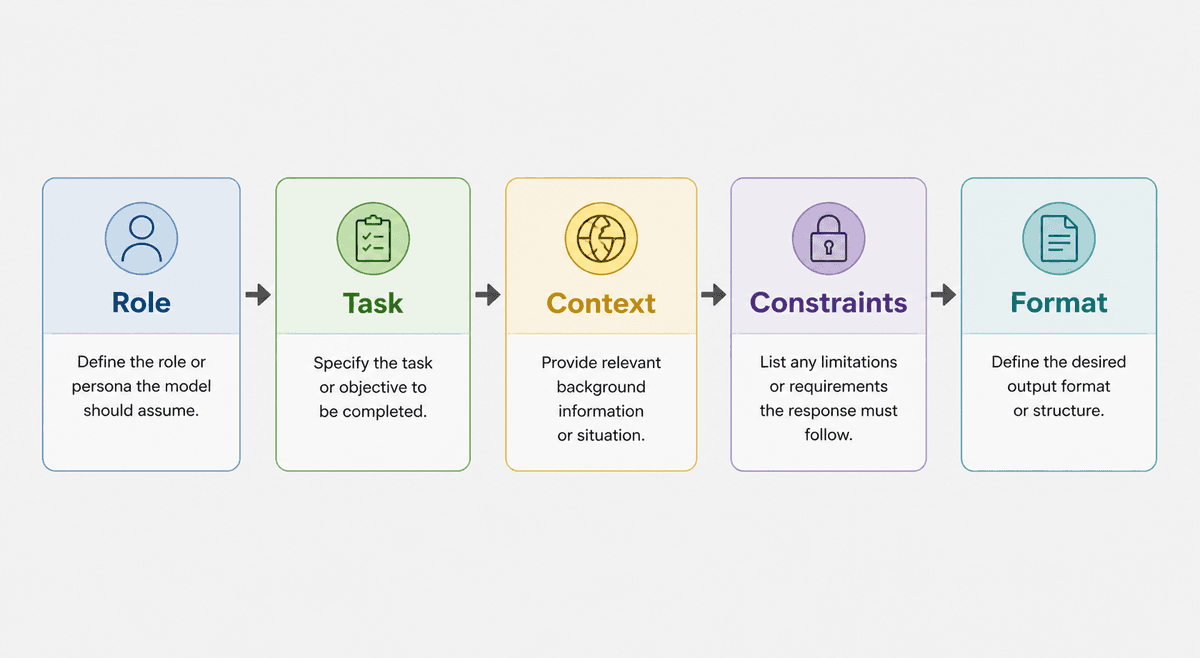
Use this prompt formula
You do not need a complicated prompt. You need a complete one.
| If output is generic… | Fix the prompt by adding… |
|---|---|
| Vague advice | Audience + real example |
| Wrong depth | Constraints + “exclude” list |
| Wrong shape | Exact format (table, steps, email) |
Start with the job. “Write about X” is how you get interchangeable drafts.
Master the Perfect ChatGPT Prompt Formula (in just 8 minutes)!
Copy this structure:
Write a [format] for [audience] about [topic]. The goal is to [goal]. Use a [tone] tone. Include [specific points]. Avoid [things to avoid]. Keep it around [length].
Example:
Write a short blog introduction for small business owners about using AI to draft email newsletters. The goal is to explain how AI can save time without replacing their voice. Use a practical, friendly tone. Mention audience fit, editing, and examples. Avoid hype and phrases like “revolutionize your workflow.” Keep it under 140 words.
If you want help building prompts like this from messy notes, use a prompt generator first. It can turn a rough idea into a cleaner instruction before you generate the actual text.
Give the AI source material
Generic input creates generic output. Specific input gives the model something real to work with.
Add any useful material you already have:
- a rough outline
- product details
- customer objections
- examples you like
- keywords or phrases that must stay
- brand voice notes
- a short paragraph you want expanded
- facts that should not be changed
For example, instead of asking for “a product description for running shoes,” add the real features: lightweight mesh, wide toe box, 8 mm heel drop, road running, beginner-friendly cushioning, and a no-hype tone.
That gives the generator substance. It also makes editing easier because you can check whether the draft used the details correctly.
Generate smaller pieces first
A common mistake is asking for the entire page in one go. That can work, but it also increases the chance of repetition, weak transitions, and invented details.
For better results, generate one piece at a time:
- Outline the angle.
- Generate the intro.
- Draft one section.
- Add examples.
- Rewrite transitions.
- Tighten the final version.
This is especially useful for blogs, landing pages, and SEO content. If you need a full article workflow, Junia's AI article writer is a better fit than trying to force a general text generator into every long-form task.
Ask for options, not one perfect draft
The first answer is rarely the best answer. Ask for three to five versions when the wording matters.
Good places to request options:
- headlines
- subject lines
- hooks
- CTAs
- ad copy
- product benefit bullets
- opening paragraphs
- social captions
Then pick the strongest version and edit it. This usually beats regenerating the same prompt over and over.
Edit for specificity
Once you have a draft, look for sentences that could appear on any website.
Weak AI sentence:
Our tool helps businesses save time and improve productivity.
Better version:
Use the tool to turn a rough campaign idea into five email subject lines, three product blurbs, and a short LinkedIn post before your next planning call.
The difference is not fancy language. It is specificity.
Run the draft through a readability improver if the wording is dense, but do not skip your own judgment. A tool can simplify a sentence. It cannot know which details are actually true for your business.
Keep a short editing checklist
Before publishing AI-generated text, check five things:
- Accuracy: Are names, claims, features, and numbers correct?
- Usefulness: Does the text answer the reader’s real question?
- Voice: Does it sound like your brand, not a generic assistant?
- Structure: Is the order easy to follow?
- Originality: Did you add examples, proof, or context that another page would not have?
For blog content, use a fuller content editing checklist before publishing. AI can speed up drafting, but editing is still where the page becomes trustworthy.
When the output still sounds generic
If the draft is clear but still too polished or robotic, do not keep prompting “make it human.” That usually creates casual filler.
Instead, ask for a targeted fix:
Rewrite this paragraph for a founder speaking to other founders. Keep the meaning. Remove generic claims. Add one concrete example. Keep it under 90 words.
You can also use Junia's AI humanizer when the main issue is tone. Just remember: human-sounding text still needs facts, examples, and a point of view.
A better AI text generator workflow
Here is the workflow I would use for most drafts:
- Write the job of the text in one sentence.
- Add the reader, tone, format, and constraints.
- Include source material or examples.
- Generate two to five options.
- Choose the best one.
- Edit for facts, specificity, and flow.
- Improve readability before publishing.
If you want ready-made instructions, start with these AI text generation prompts and adapt them to your reader.
The goal is not to make AI write everything perfectly on the first try. The goal is to remove the blank page, get a useful draft, and keep enough editorial control that the final text still feels deliberate.