
How to Write SEO Product Descriptions That Rank and Sell

Yi
SEO Expert & AI Consultant

SEO product descriptions work only when the copy helps both sides of the page: the buyer and the search engine.
The buyer needs to know what the product is, why it is useful, whether it fits their situation, and why they should trust it. Search engines need clear page context, descriptive language, useful metadata, and content that matches the product people are actually searching for.
The mistake I see most often is treating product descriptions like keyword containers. That usually creates copy that ranks poorly and converts worse. When I edit ecommerce pages, I usually get better results by starting with the buyer's hesitation first, then working the keyword into the places where it genuinely clarifies the product.
TL;DR
| Step | What to do | Why it matters |
|---|---|---|
| Start with buyer intent | Identify who is shopping, what they need, and what would stop them from buying. | The description answers real objections instead of listing random features. |
| Lead with the product promise | Explain the product type, core benefit, and best-fit customer in the first 1-2 sentences. | Readers and search engines understand the page quickly. |
| Use keywords naturally | Place the primary term in the title, opening copy, metadata, and useful product details. | The page becomes relevant without sounding stuffed. |
| Turn features into benefits | Pair specs with a practical outcome, such as fit, comfort, speed, compatibility, or durability. | Buyers understand why the feature matters. |
| Add proof | Use reviews, ratings, warranty details, return policy, product images, materials, measurements, and use cases. | Proof reduces hesitation and makes the page easier to trust. |
| Review before publishing | Check clarity, uniqueness, metadata, images, alt text, and conversion cues. | Product pages usually need a final human pass before they are ready. |
What is an SEO product description?
An SEO product description is product-page copy written to explain a product clearly, match search intent, and help shoppers make a buying decision.
That means it is not just a paragraph under a product photo. A strong description usually includes:
- what the product is
- who it is for
- the main use case
- important features and specs
- buyer-facing benefits
- search terms people actually use
- proof that reduces risk
- a clear next step
Google's own guidance is a useful reminder here: its ranking systems are designed to surface helpful, reliable, people-first content, not pages written mainly to manipulate rankings. For ecommerce, that means the best SEO copy is usually the clearest shopping copy too. Google's helpful content guidance is worth keeping in mind when you edit.
When you are working from raw specs, a product description generator can turn product details into a workable first draft. I would still treat that draft as raw material, not final copy. The last 15% of editing is usually where the product starts to sound real. For a large catalog, bulk content generation drafts descriptions for a whole product list in one run, so you can spend that editing time on your best sellers instead of on first drafts.
The simple formula
Use this formula when you are starting from a blank page:
[Product name] is a [product type] for [target buyer or use case]. It helps you [main outcome] with [key feature 1], [key feature 2], and [key feature 3]. Choose it if you need [specific reason to buy] without [common frustration or tradeoff].
Here is what that looks like in practice:
The AlpineDry Trail Runner is a waterproof running shoe for women who run on wet, uneven trails. It keeps your feet drier and more stable with a grippy outsole, breathable upper, and lightweight cushioning. Choose it if you need rain-ready traction without a stiff hiking-shoe feel.
That version works because it does more than say "comfortable running shoe." It gives the product type, audience, use case, differentiators, and natural long-tail language in one clean paragraph. I prefer this kind of compact specificity over a longer description that keeps circling the same generic benefit.
Before-and-after examples
| Weak copy | Better SEO product description | Why the better version works |
|---|---|---|
| "This backpack is durable and high quality." | "This 28L commuter backpack is made for daily train rides and office carry, with a padded 16-inch laptop sleeve, water-resistant fabric, and a separate shoe compartment." | It replaces vague claims with capacity, use case, material, and concrete details. |
| "Our candle smells amazing and is perfect for your home." | "This soy wax lavender candle is hand-poured for bedrooms, bathrooms, and evening wind-down routines, with a clean floral scent and an estimated 45-hour burn time." | It names the material, scent, setting, and measurable feature. |
| "These headphones have good sound and battery life." | "These wireless noise-canceling headphones are built for travel and focused work, with 40 hours of battery life, soft over-ear cushions, and quick USB-C charging." | It connects features to buyer situations instead of making generic quality claims. |
Personally, I like writing the plain version first, then adding SEO language only where it makes the product more specific. If the keyword makes the sentence worse, the sentence needs a different structure.
Research the right keywords
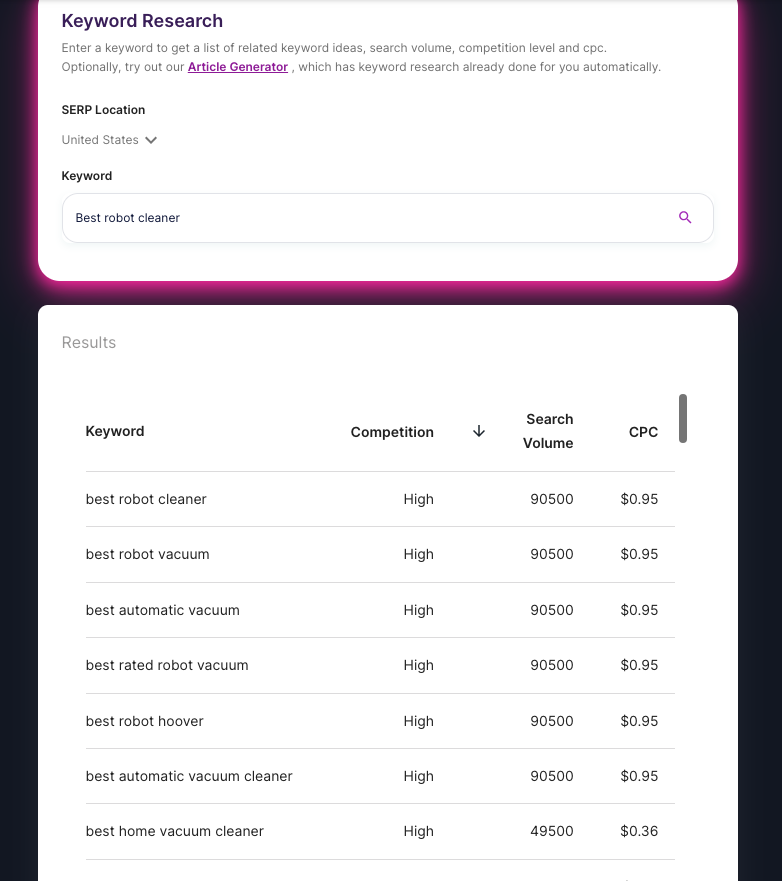
Keyword research for product descriptions should be practical. You are not trying to build a huge keyword map for one SKU. You are trying to find the language buyers use when they already have purchase intent.
Start with these keyword buckets:
| Keyword bucket | Example | Use it for |
|---|---|---|
| Product type | running shoes | The page's broad context |
| Buyer or audience | women's running shoes | Fit and audience clarity |
| Use case | trail running shoes | Intent and category relevance |
| Attribute | waterproof trail running shoes | Product-specific relevance |
| Long-tail query | women's waterproof trail running shoes for muddy trails | High-intent detail and comparison searches |
A tool like AI keyword research is useful for collecting variations, but do not paste every phrase into the description. Pick the few terms that make the product more understandable. In practice, I usually want one primary phrase, a few natural modifiers, and enough product detail to avoid sounding like every other result on the page.
If you are unsure whether to use a broad or specific phrase, think about where the shopper is in the buying process. Broad terms help define the category. Long-tail terms help sell the exact product. This is the same distinction behind long-tail vs short-tail keywords, but product pages usually need both.
Place keywords where they help
For most product pages, the primary keyword belongs in a few predictable places. This is a placement exercise, not a repetition contest:
| Field | Put the keyword here? | Why |
|---|---|---|
| Title / H1 | Yes, naturally | Matches the query the shopper typed |
| First 40 words | Usually | Scanners decide here |
| Specs table | As attributes, not stuffing | Helps compare without fluff |
| Closing CTA | Rarely | Clarity beats keyword density |
Unique beats long. Two similar SKUs with cloned descriptions compete with each other more than with Google.
Shopify SEO Optimization for Beginners - Practical Walkthrough
- Product title or H1
- First paragraph
- One or two useful subheadings, if the page has sections
- Meta title
- Meta description
- Image alt text, when the phrase accurately describes the image
- Product details, specs, or FAQs where relevant
Google's title link guidance recommends descriptive, concise title text and warns against keyword stuffing. That is a good rule for product pages: make the title specific enough to be useful, but not so packed that it reads like a search query dump. Google's title link documentation gives the official version of that principle.
For example:
| Page element | Weak version | Better version |
|---|---|---|
| Product title | Best Shoes for Women Waterproof Trail Running Shoes | Women's Waterproof Trail Running Shoes |
| Meta title | Buy Best Waterproof Women's Trail Running Shoes Online | Women's Waterproof Trail Running Shoes | AlpineDry |
| Image alt text | best shoes waterproof shoes running shoes | Women's waterproof trail running shoe, side view |
If you are writing metadata after the product copy is clear, a meta description generator can help create options. The final version still needs human review because the snippet should match the exact product, not just the keyword.
Structure the description for scanners
People rarely read product pages from top to bottom. They scan the headline, images, bullets, price, reviews, specs, and return details before deciding whether the product deserves more attention.
That behavior is not new. Nielsen Norman Group's classic research on web reading found that users scan pages and that concise, scannable writing improves usability. Product pages should respect that. NN/g's research on how users read online is still one of the clearest explanations of why formatting matters.
Use this structure for most ecommerce product descriptions:
| Section | What to include |
|---|---|
| Opening paragraph | Product type, buyer, main benefit, and differentiator |
| Key bullets | 3-5 features shoppers compare first |
| Benefit explanation | What those features change for the buyer |
| Specs | Size, material, dimensions, compatibility, ingredients, care, or included items |
| Proof | Reviews, ratings, warranty, guarantees, returns, certifications, or real product photos |
| CTA | Clear next step: choose size, add to cart, compare colors, or check availability |
The structure can be short. A $12 accessory does not need the same depth as a $1,200 appliance. The key is making the right details easy to find. Personally, I would rather see a tight product page that answers five buying questions well than a long page that hides the useful facts under brand language.
If your team also writes category pages, blog posts, and buying guides, keep the product-page promise aligned with your broader SEO content strategy. Product descriptions should not contradict the way your site explains the category elsewhere.
Turn features into benefits
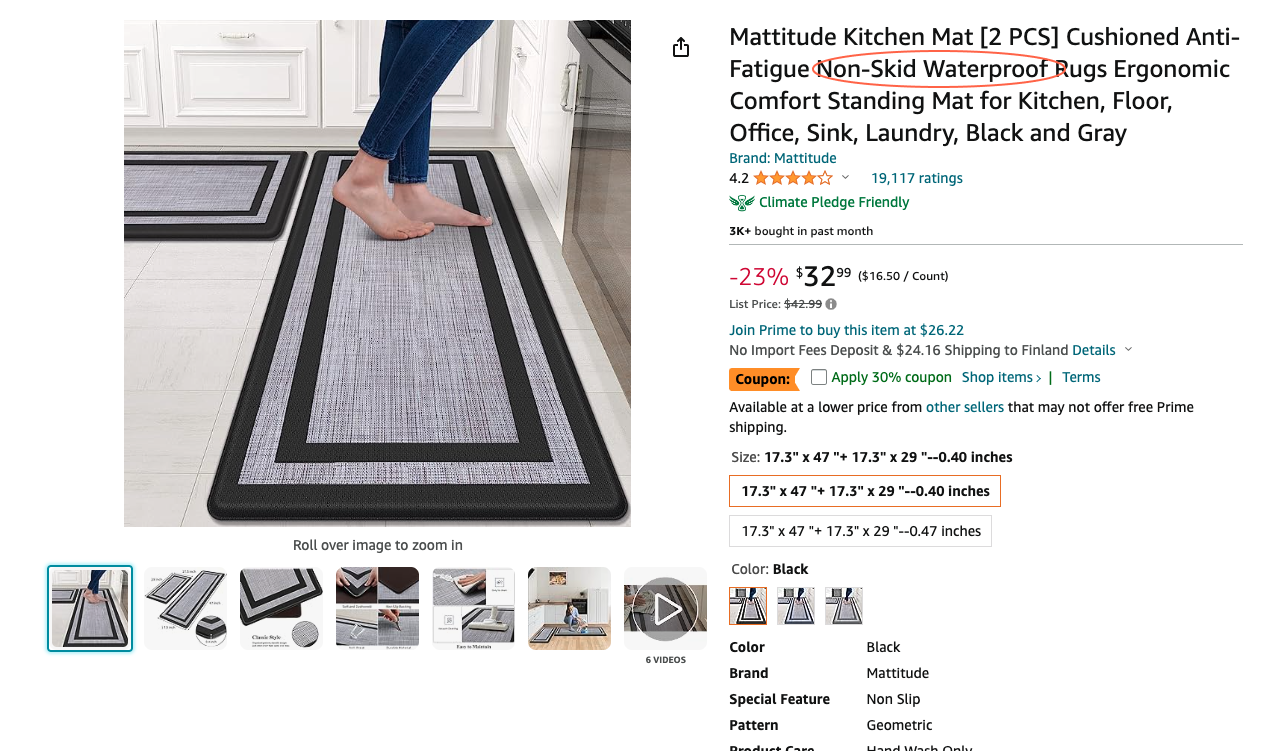
Features are facts. Benefits explain why those facts matter.
That difference is where a lot of product copy gets weak. A feature like "stainless steel" may matter because it resists rust, feels sturdy, looks premium, or handles daily use. The right benefit depends on the product and the buyer. When I review weak descriptions, this is often the fastest fix: keep the feature, then add the buyer-facing consequence.
Use this conversion:
| Feature | Better benefit-led copy |
|---|---|
| 100% cotton | Soft, breathable cotton that feels comfortable against skin during all-day wear |
| Adjustable straps | A more flexible fit, especially if you are between sizes |
| Dishwasher-safe parts | Easier cleanup after daily use |
| Recycled aluminum frame | Lightweight strength with a lower-material-impact design |
| 16GB RAM | Smoother multitasking when you keep many browser tabs, documents, and apps open |
This is also where brand voice matters. If every product description sounds identical, shoppers can feel the copy was generated in bulk. A clear AI brand voice workflow helps teams keep scale from turning into sameness.
Add proof without overloading the page
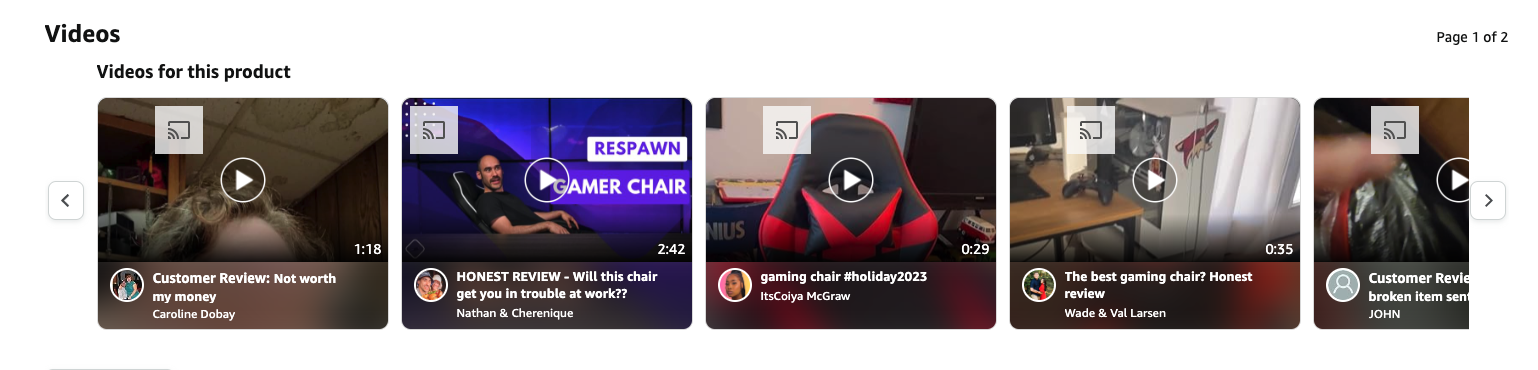
Product descriptions become more persuasive when they include proof. That does not mean every page needs a heavy evidence section. It means the page should answer, "Why should I believe this?"
Useful proof includes:
- average rating and review count
- short customer review snippets
- product photos from multiple angles
- material, ingredient, or certification details
- sizing notes based on returns or review patterns
- warranty, shipping, and return policy details
- comparison notes against older models or common alternatives
Do not fake urgency or proof. "Limited stock" only belongs on the page when stock is genuinely limited. "Best-selling" only belongs there when you can back it up. I am fairly strict about this because fake proof does not just weaken one sentence; it makes the whole page feel less trustworthy.
If conversion is the goal, honest proof usually beats louder language. The same principle applies when you use AI content to increase conversion rates: the copy should reduce hesitation, not simply decorate the page.
Use visuals like product evidence

Images and videos should answer questions text cannot answer quickly:
- What does the product look like from the front, side, and back?
- How large is it compared with a familiar object?
- What texture, finish, or material detail matters?
- What comes in the box?
- How does it look in real use?
- Which variant, color, or size is shown?
For SEO, image details also matter. Use descriptive file names when possible, write accurate alt text, and avoid stuffing keywords into image descriptions. If you are working through many SKUs, an image description generator can speed up first drafts, but the final alt text should match the actual image.
Google Merchant Center's product data specification also emphasizes accurate product information. Even if you are not editing feed data directly, the same principle applies on the product page: titles, descriptions, images, prices, and availability should describe the real item clearly. Google Merchant Center's product data specification is a useful reference for ecommerce teams.

Visuals matter most in categories where the buyer needs to inspect appearance, fit, material, or size. Fashion, furniture, beauty, electronics, food, jewelry, and home decor usually need stronger image support than a simple digital download or replacement part. I have seen product pages improve dramatically just by showing scale, texture, and use context more honestly.
Write unique descriptions for similar products
Similar SKUs are where ecommerce SEO gets messy.
If you sell 40 candles, 80 shirts, or 200 replacement parts, it is tempting to reuse the same description and swap the color or size. That creates thin, repetitive pages. It also gives shoppers little reason to compare one product with another.
Instead, keep a shared structure but vary the useful details:
| Product difference | How to make the copy unique |
|---|---|
| Color | Describe the exact shade, styling context, and best matching use case. |
| Size | Explain who the size fits and what problem it solves. |
| Material | Mention texture, durability, care, comfort, or environmental details. |
| Compatibility | Name models, dimensions, versions, or setup requirements. |
| Bundle | Explain what is included and when the bundle is better than buying separately. |
For large catalogs, it is reasonable to use AI tools for ecommerce descriptions to create first drafts. The important part is feeding the tool real product attributes and reviewing the output so each SKU has a reason to exist. My rule of thumb: if two descriptions could be swapped between products without anyone noticing, they are not specific enough yet.
SEO product description template
Use this template as a starting point:
[Product name] is a [specific product type] designed for [target buyer/use case]. It helps you [main benefit] with [feature 1], [feature 2], and [feature 3].
Use it for [primary situation], especially if you need [specific requirement]. The [material/spec/detail] gives you [practical benefit], while [proof or reassurance] helps you buy with more confidence.
Then add a short bullet list:
- Best for: [buyer/use case]
- Key feature: [feature + benefit]
- Material/specs: [important product facts]
- Fit/compatibility: [sizes, models, dimensions, or requirements]
- Proof: [rating, warranty, returns, certification, or review insight]
- Next step: [choose size, compare variants, add to cart, or check availability]
Here is a filled-in example:
The StudioWarm Ceramic Mug is a 14-ounce ceramic coffee mug designed for daily home-office use. It helps keep your morning coffee comfortable to hold with a wide handle, balanced weight, and microwave-safe glaze.
Use it for desk work, slow mornings, and small gift sets, especially if you want a sturdy mug that does not feel too heavy. The smooth ceramic finish is easy to rinse, while the gift-ready box makes it simple to send directly to a friend or client.
That copy is not complicated. It is just specific. That is usually the bar I want product copy to clear before I worry about making it more polished.
Quick checklist before you publish
Before a product description goes live, check the page against this list:
| Check | What good looks like |
|---|---|
| Opening clarity | The first sentence says what the product is and who it is for. |
| Search intent | The page uses the terms buyers use, not just internal product jargon. |
| Benefits | Important features are connected to real outcomes. |
| Proof | Reviews, specs, warranty, materials, or images support the claims. |
| Scannability | Bullets, short paragraphs, and section labels make the page easy to skim. |
| Metadata | The title tag and meta description are specific, concise, and not stuffed. |
| Images | Product visuals are clear, useful, and paired with accurate alt text. |
| Uniqueness | Similar products do not share the same generic description. |
| CTA | The next action is obvious. |
Headline and title-tag work deserves its own pass. A strong product H1 can be slightly more descriptive for the shopper, while the title tag needs to be concise enough for search results. Junia's guide to SEO headlines is useful when the wording feels clunky.
Common mistakes
The first mistake is repeating the keyword too many times. If the title, first paragraph, bullets, and metadata all say the exact same phrase over and over, the page starts to sound machine-written.
The second mistake is listing features without explaining benefits. "Water-resistant shell" is a feature. "Water-resistant shell that helps protect your laptop during rainy commutes" is a reason to care.
The third mistake is using empty adjectives. "Premium," "best," "high-quality," and "must-have" are weak unless the sentence explains what makes the product premium, better, durable, or useful.
The fourth mistake is hiding important buying details. If shoppers care about dimensions, compatibility, ingredients, care instructions, warranty, or returns, do not make them search for that information.
The fifth mistake is publishing AI-generated product copy without editing it. A first draft may be useful, but the final page needs product truth: exact specs, real benefits, brand voice, and clean formatting. A readability improver can help tighten wording, but it cannot verify whether the details are true. I would rather publish fewer descriptions that are accurate than push hundreds of polished-sounding pages with shaky facts.
How to scale product descriptions without making them generic
For small catalogs, write each product manually. For large catalogs, build a repeatable workflow. The best scaling systems I have worked with are boring in the right way: clean data in, predictable structure out, human review before publishing.
- Collect structured product data: title, category, attributes, specs, materials, audience, use case, variants, warranty, and reviews.
- Group products by type so each group has its own copy structure.
- Draft descriptions from product attributes, not vague prompts.
- Add brand voice rules before generation.
- Review the output for accuracy, duplication, readability, and search intent.
- Test the pages that matter most by traffic, revenue, or margin.
This is where an ecommerce-focused workflow can help. Junia's ecommerce SEO solution is built around the larger problem: creating product and category content that can scale without losing specificity.
For Shopify stores, the same principle applies inside the platform. Product descriptions, collection pages, metadata, and internal links should work together instead of being edited as disconnected fields. That is especially important if you are managing SEO across many SKUs in a Shopify SEO workflow.
Test and improve the page
Publishing the product description is not the end of the work.
Track:
- organic impressions
- organic clicks
- click-through rate
- add-to-cart rate
- conversion rate
- returns or support questions tied to missing information
- product-page engagement
If the page gets impressions but few clicks, revisit the title tag and meta description. If it gets clicks but weak add-to-cart activity, the copy may not be answering objections or proving value. If shoppers keep asking the same support question, add that information directly to the page. That last signal is easy to overlook, but it is one of the clearest ways customers tell you what the description failed to explain.
Test one meaningful change at a time:
| Test | What it can show |
|---|---|
| Benefit-led opening vs. feature-led opening | Whether shoppers respond better to outcome or spec framing |
| Bullets near the top vs. longer paragraph | Whether scanners need faster comparison details |
| Review snippet placement | Whether proof earlier on the page reduces hesitation |
| Different CTA wording | Whether the next step feels clear enough |
| More specific metadata | Whether search snippets better match intent |
The best SEO product descriptions are not the longest ones. They are the ones that help shoppers understand the product faster, trust it more easily, and take the next step with fewer doubts. That is the standard I would use before publishing: clearer than the competitor, more specific than the supplier copy, and honest enough to survive a real customer reading it closely.