
12 Reasons Your SEO Isn't Working And What To Fix First

Thu
AI SEO Specialist, Full Stack Developer

If your SEO is not working, do not start by asking, "What ranking trick are we missing?"
Start with a more useful question: where is the SEO system breaking?
In my experience, stalled SEO usually comes down to one of four problems. The page is targeting the wrong search intent. The content is not useful enough to win trust. The site has technical or internal-linking problems that limit discovery. Or the team is measuring traffic when the business actually needs leads, signups, demos, sales, or qualified readers.
That distinction matters. A site can publish every week, earn impressions, and still fail because its content answers low-value searches. Another site can rank for useful keywords and still underperform because the article never proves expertise, shows the product, or gives the reader a clear next step.
Before changing title tags, buying more links, or publishing another batch of posts, run a diagnosis.
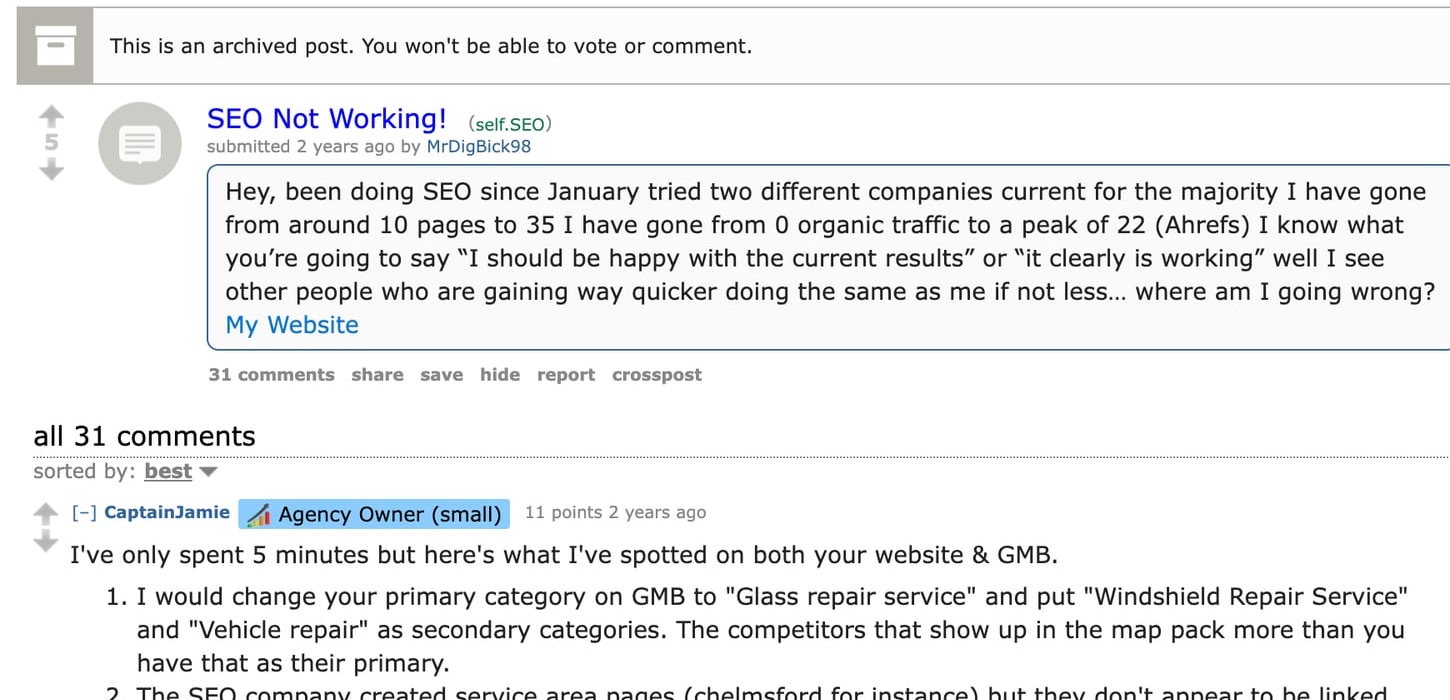
That diagnostic intent shows up in public SEO discussions, too. In this Reddit SEO thread about SEO not working, the useful answers do not start with generic SEO theory. They look for local intent, internal links, page titles, citations, conversion paths, and whether the reported metrics actually mean anything.
TL;DR: What To Check First
If SEO is not working, check these issues in this order:
| Symptom | Likely first fix |
|---|---|
| Impressions without clicks | Titles/metas vs SERP promise |
| Rankings without pipeline | Intent/offer mismatch |
| Lots of posts, flat traffic | Generic AI pages / no clusters |
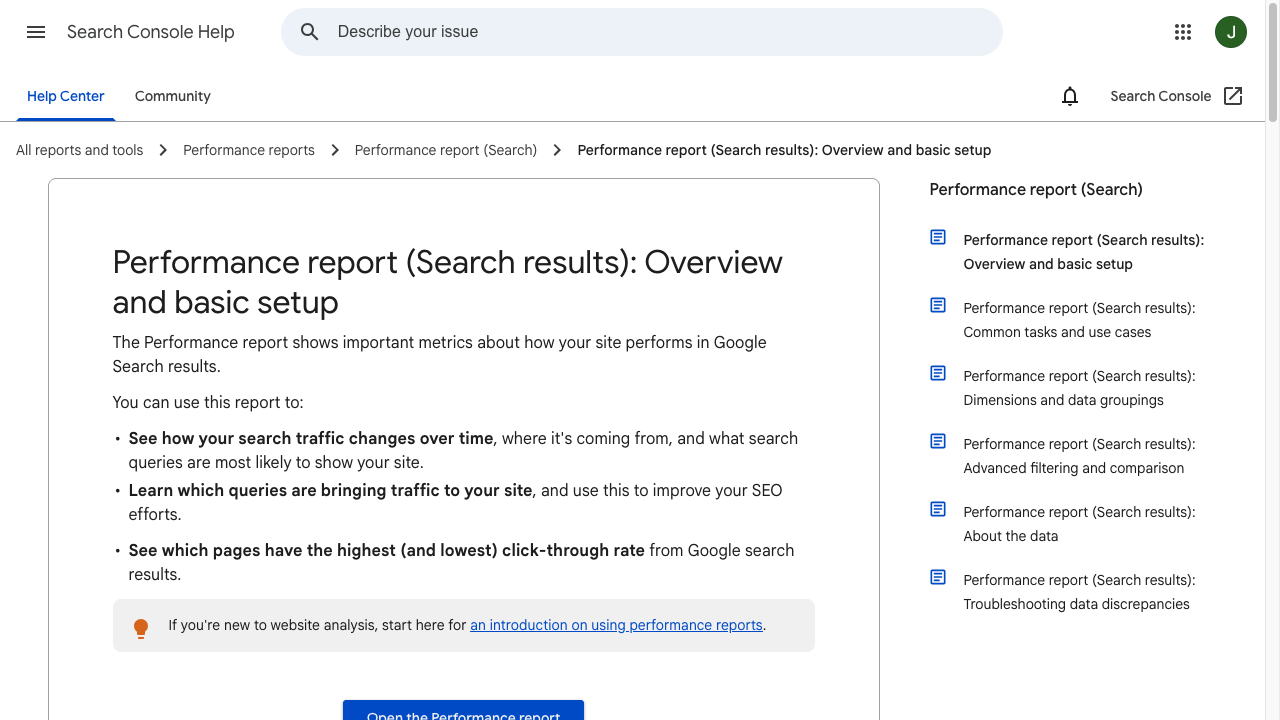
Fix measurement before you rewrite the whole site. Activity is not an outcome.
Performance reports in Search Console - Google Search Console Training
| What you see | What it usually means | What to fix first |
|---|---|---|
| Rankings improved, but leads did not | Keywords have traffic but weak business intent | Rebuild the keyword map around problems your product solves |
| Impressions are high, but clicks are low | The title, meta description, or page angle does not match the search result promise | Rewrite the SERP promise and compare it with the current top results |
| Traffic lands but leaves | The content is shallow, generic, or missing practical proof | Add examples, product context, screenshots, citations, and clearer answers |
| Important pages are invisible | Crawl, index, canonical, sitemap, or internal-linking issues | Check Search Console, robots rules, noindex tags, canonicals, and links |
| Many pages compete with each other | Keyword cannibalization or duplicate intent | Consolidate overlapping pages and assign one primary intent per page |
| AI search is not surfacing your content | The page is hard to summarize, cite, or understand structurally | Add concise answers, entity clarity, tables, source-backed claims, and schema where appropriate |
The fastest fix is rarely "write more content." When I audit pages like this, the real fix is usually making the current system clearer: clearer intent, clearer measurement, clearer structure, clearer internal links, and clearer proof that the page deserves trust.
1. You Are Targeting Keywords That Do Not Match The Business Goal
The most common reason SEO "doesn't work" is that the keyword strategy is built around search volume instead of intent.
A keyword can look attractive in Ahrefs, Semrush, or Google Keyword Planner and still be almost useless for the business. Someone searching "what is project management" is not in the same mindset as someone searching "best project management software for agencies." Both searches have value, but they should not be judged by the same goal.
If your SEO goal is leads, trials, demos, or sales, sort your keyword list by business intent before you sort it by volume. A smaller keyword with a clear problem often beats a broad keyword with a large audience that is not ready to act.
Use this split:
| Keyword type | Example | What it is good for |
|---|---|---|
| Problem-aware | "why are my blog posts not ranking" | Educational content that earns trust |
| Solution-aware | "AI SEO tool for content optimization" | Product-led content and comparison pages |
| Brand or category | "best SEO content software" | High-intent pages that can drive conversions |
| Informational | "what is SEO" | Topical coverage, internal links, and brand awareness |
The mistake is not writing informational content. I like informational content when it has a clear job. The problem starts when a team expects a broad educational article to behave like bottom-of-funnel content.
I would also avoid stuffing one article with five related keywords just because they all show volume. One page needs one primary search intent. It can cover related questions, but the whole article should still serve the same reader problem.
If you are early in the strategy, use AI keyword research to group terms by intent, then assign each page one primary job.
2. You Are Measuring Activity Instead Of Outcomes
SEO can look successful in a report and still fail in the business.
Traffic, rankings, impressions, and article count are useful diagnostics, but they are not the final score. Google Search Console explains impressions, clicks, CTR, and average position as search-performance metrics. That helps you understand visibility, but it does not tell you whether the page produced a lead, sale, qualified visit, trial signup, or meaningful assisted conversion.
At a minimum, track:
- Organic clicks by landing page.
- Queries that brought those clicks.
- Conversions by landing page.
- Conversion rate by article or page type.
- Assisted conversions from content that starts the journey.
- Pages that get impressions but almost no clicks.
- Pages that get traffic but no business action.
This is where many teams fool themselves. They publish 40 posts, show a traffic graph going up, and call SEO a win. Then six months later someone asks why pipeline has not moved. I have seen this pattern enough times that I now treat "organic traffic is up" as the start of the conversation, not the conclusion.
If you cannot tell which organic pages produced business outcomes last month, you do not know whether SEO is working yet. You only know that SEO activity is happening.
3. Your Content Matches A Keyword But Not The Search Intent
Search intent is not the keyword. It is the job behind the keyword.
For example, "SEO not working" usually does not mean the reader wants a beginner explanation of search engine optimization. They want a diagnosis. They want to know what is broken, how to prove it, and what to fix first.
That means the article needs to answer quickly, then help the reader isolate the cause. If the page opens with generic SEO definitions, algorithm commentary, or a long explanation of why search matters, it delays the value.
Google's Search Essentials recommend using the words people would use to find your content in prominent places, including titles, headings, alt text, and link text. But placement only helps when the page actually satisfies the query.
Before rewriting a page, compare your article with the current results and ask:
- Are ranking pages diagnostic, tactical, opinion-led, beginner-level, or product-led?
- Do they answer the problem in the first few paragraphs?
- Are they focused on rankings, leads, indexing, technical SEO, content quality, or AI-era visibility?
- What do they explain that your page skips?
- What do they fail to explain clearly?
- What would a reader still need after reading them?
Then make your page more useful, not just longer. My bias is to fix the first five minutes of the page before adding another thousand words, because that is where most intent mismatches become obvious.
4. The Content Is Too Generic To Earn Trust
Generic content is one of the fastest ways to make SEO feel broken.
It usually has the right headings, the right keywords, and the right length. But when you read it closely, there is no real judgment. No examples. No tradeoffs. No screenshots. No first-hand point of view. Nothing a reader would remember or cite.
Google's guidance on helpful content is clear about the direction: content should be helpful, reliable, and people-first. In practice, that means your article should show why the reader should trust it.
Add proof where the claim needs proof:
- Use examples when explaining strategy.
- Use screenshots when discussing tools, workflows, or product steps.
- Use tables when comparing options.
- Cite official sources when explaining Google behavior.
- Include expert, founder, sales, customer-support, or product insight when the topic requires experience.
- Explain the reason behind a recommendation instead of listing tips.
.png?token=eyJhbGciOiJIUzI1NiIsInR5cCI6IkpXVCJ9.eyJ1cmwiOiJ1c2VyLWdlbmVyYXRlZC1pbWFnZXMvZjJmOThkNWUtNjNjNC00MTJiLTkyY2QtZjgyNDI5NTE3YWRkL0dyb3VwIDM4MCAoMSkucG5nIiwiaWF0IjoxNjk1OTQzMTk0LCJleHAiOjE4NTM2MjMxOTR9.dFiMaPYzc-gJvzpbPTC_9PSFjDDwCw0uRDteDKwD9pY)
Competitor analysis can help here, but do not copy their structure blindly. I use competing pages as a map of reader expectations, not as a template. Look at what the top pages cover, then add a clearer angle, fresher evidence, better examples, and a stronger answer.
5. Your Content Does Not Convert Even When It Ranks
Ranking is not the same as conversion. I would rather have one page bring in 30 qualified trial users than ten articles bring in a thousand visitors who were never going to buy, subscribe, or act.
This is the part many SEO audits skip. A page can rank for a useful keyword and still generate nothing if the content never connects the reader's problem to the product, service, offer, or next step.
That does not mean every article should sound like a sales page. It means the article should not hide the business context when it is relevant. If a reader is searching for a solution, show the solution clearly. If a product workflow is the natural fix, show it. If a service solves the problem, explain how it works and what kind of reader it is for.
A strong converting article usually does three things:
| Content element | What it does | Weak version |
|---|---|---|
| Problem specificity | Shows the reader you understand the real situation | Broad advice that any competitor could publish |
| Product or solution context | Connects the fix to a practical workflow | A vague CTA at the bottom |
| Proof | Gives the reader a reason to believe the recommendation | Unsupported claims like "boost rankings fast" |
For SEO content, conversion often improves when the article includes the actual workflow: how the keyword was chosen, how the page was structured, how the internal links were added, how the page will be measured, and what action the reader should take next.
6. You Are Publishing Content Without A Topic Cluster
One isolated article rarely carries an entire SEO strategy. I get nervous when a site treats every article like a standalone asset, because organic growth usually comes from how the pages support each other.
Search engines and readers both need context. A topic cluster gives that context by connecting one main page with supporting articles that answer related questions. This helps users move deeper into the topic and helps search engines understand how your site covers the subject.
The simplest version looks like this:
| Cluster role | What it does | Example |
|---|---|---|
| Pillar page | Covers the broad topic | SEO strategy guide |
| Support page | Answers a specific subtopic | How to improve page rankings |
| Comparison page | Helps readers choose between options | Best AI SEO tools |
| Problem page | Diagnoses a pain point | Why SEO is not working |
| Tool page | Helps the reader act | SEO content improver |
The internal links matter, but the page relationships matter more. A link should help the reader move to the next useful idea.
For example, if weak internal linking is hiding important pages, AI internal linking belongs in the fix because it supports the exact task: finding relevant pages and adding useful connections. If that same link appears in a random paragraph about SEO strategy, it feels forced.
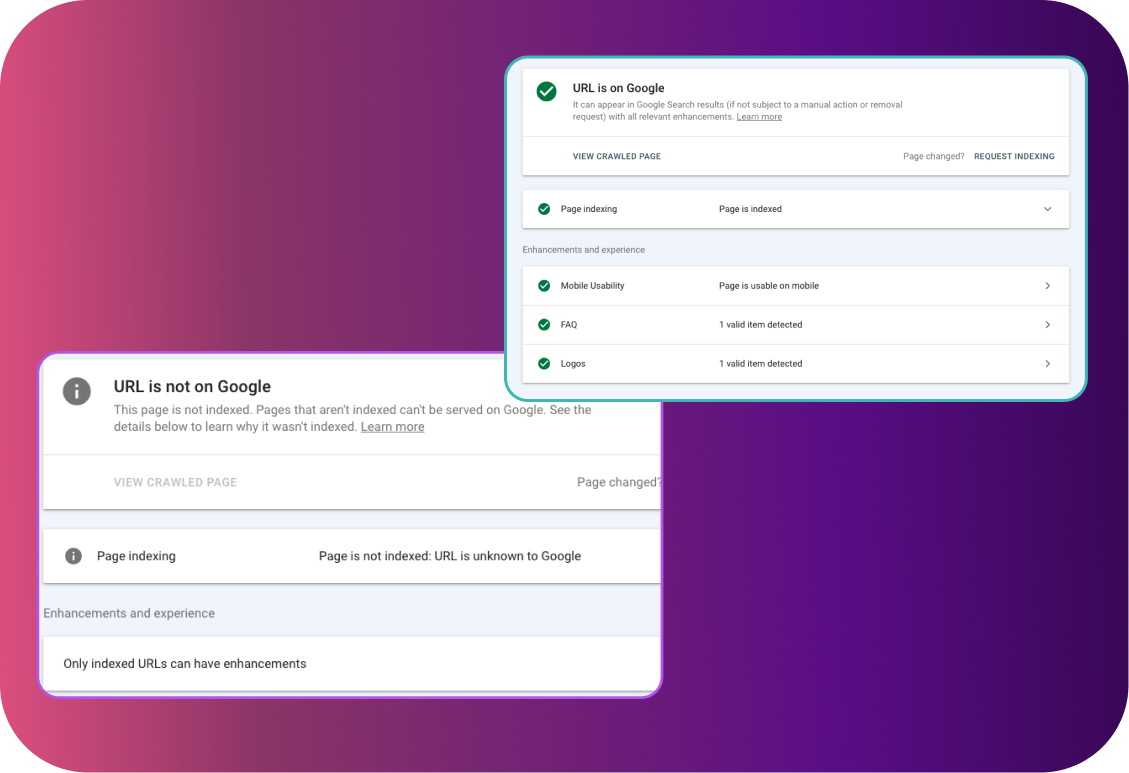
7. Important Pages Are Not Crawled, Indexed, Or Canonicalized Correctly
Sometimes SEO is not working because Google is not handling the page the way you think it is. This is the least glamorous part of SEO, but I would check it before debating headline tone or word count.
Start with the boring checks:
- Is the page indexable?
- Is there a noindex tag?
- Is the canonical pointing to another URL?
- Is the page blocked in robots.txt?
- Is the page linked from anywhere important?
- Does the sitemap include the canonical URL?
- Does Search Console show crawling or indexing errors?
Google's documentation is worth being precise about here. A robots.txt file controls which URLs crawlers can access, but it is not the right way to keep a page out of Google. For that, Google recommends noindex or access control. Google also chooses a canonical URL when it finds duplicate or very similar pages, which means the URL you want to rank may not be the one Google selects.
If a page is important, do not leave discovery to chance. Link to it from relevant pages, include it in the sitemap, avoid accidental noindex rules, and make sure the canonical URL is clean.
For pages that were recently published or updated, website indexing tools can help you check the basics faster, but they cannot fix a weak page or a messy site structure by themselves.
8. You Have Keyword Cannibalization Or Duplicate Content
Duplicate content is not always a manual penalty problem. More often, it is a clarity problem.
If five pages target nearly the same query, Google has to decide which one best represents the topic. That can split links, dilute internal relevance, and make rankings unstable. It also confuses readers because each page feels like a slightly different version of the same idea.
Look for overlap like this:
- Two posts targeting the same primary keyword.
- Several articles with near-identical H1s.
- Old posts that answer the same query as new posts.
- Category, tag, and parameter pages creating duplicate versions.
- Location or industry pages with only lightly changed text.
The fix is usually consolidation. Keep the strongest URL, merge useful sections from weaker pages, redirect where appropriate, and update internal links so they point to the canonical page. In my experience, this often feels uncomfortable because it reduces page count, but it usually makes the site easier for both readers and search engines to understand.
This is also where many teams misunderstand "unique content." You do not need a strange angle no one searches for. You need a focused page that answers a real query better than the alternatives. If traffic dropped after a quality or relevance shift, treat algorithm recovery as a diagnosis problem: separate technical issues, intent drift, weak content, and lost authority before you rewrite everything.
9. Your AI Content Workflow Is Producing More Content, Not Better Content
AI is not the reason SEO fails. A lazy AI workflow is. Personally, I do not worry much about whether a draft started with AI; I worry about whether anyone with judgment improved it before publishing.
Google's guidance on generative AI content does not say AI content is automatically bad. The issue is scaled content that adds little value for users. That distinction matters.
.png?token=eyJhbGciOiJIUzI1NiIsInR5cCI6IkpXVCJ9.eyJ1cmwiOiJ1c2VyLWdlbmVyYXRlZC1pbWFnZXMvZjJmOThkNWUtNjNjNC00MTJiLTkyY2QtZjgyNDI5NTE3YWRkL0dyb3VwIDM3NiAoMSkucG5nIiwiaWF0IjoxNjk1OTM5OTA3LCJleHAiOjE4NTM2MTk5MDd9.dh4iZsEKntPnihp-NrCUOPTPreIIKP_M4B-V2lRMl6Y)
The right AI workflow looks more like an editorial system:
- Pick a keyword because it supports the business.
- Study the search result and competing pages.
- Build an outline around intent, not word count.
- Use AI to speed up research, structure, drafts, summaries, and rewrites.
- Add human judgment, examples, product knowledge, and fact-checking.
- Run a final pass for clarity, citations, links, and conversion paths.
.png?token=eyJhbGciOiJIUzI1NiIsInR5cCI6IkpXVCJ9.eyJ1cmwiOiJ1c2VyLWdlbmVyYXRlZC1pbWFnZXMvZjJmOThkNWUtNjNjNC00MTJiLTkyY2QtZjgyNDI5NTE3YWRkL0dyb3VwIDM3OSAoMSkucG5nIiwiaWF0IjoxNjk1OTQxNTkxLCJleHAiOjE4NTM2MjE1OTF9.pyzuLnBfLu6WjrxgBoDkUkzCXXLmwpo8pmixnlZ4H48)
An AI SEO agent is most useful when you treat it as part of that system: research, draft, optimize, and improve with clear human direction. If you use AI only to publish more average articles, you are just scaling the problem.
10. Your Content Is Not Built For AI Search And Answer Engines
AI search has made one old SEO weakness more visible: vague content is hard to summarize, cite, and trust.
Google's guidance for generative AI search still starts with the fundamentals: helpful, reliable, people-first content, clear technical structure, and unique value beyond common knowledge. That means your content should be easy for people and machines to understand.
Practical fixes:
- Define the main entity early.
- Use headings that answer real sub-questions.
- Add short answer blocks for important questions.
- Use comparison tables when readers need to choose.
- Use structured data where it accurately represents the page.
- Add source-backed claims where a reader would reasonably ask, "How do you know?"
- Strengthen author, brand, product, and source signals.
- Link related pages together with descriptive anchors.
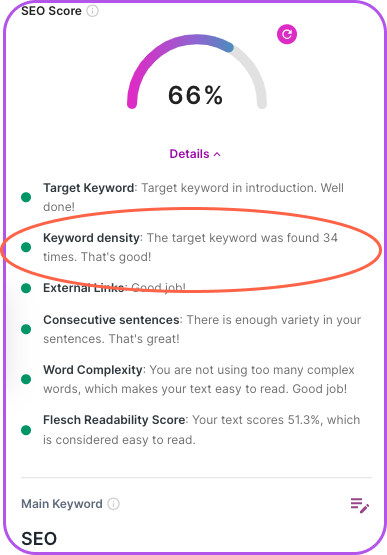
Do not obsess over keyword density. Use important terms naturally in the title, intro, headings, image alt text, and body. Then make sure the page actually covers the topic with enough depth and clarity for someone else to reference it. If I have to choose, I will take a page with slightly imperfect keyword placement and strong explanations over a perfectly optimized page that says nothing memorable.
11. SEO Is Treated As A Silo Instead Of An Operating System
Sometimes the SEO team is not the problem. The system around them is.
SEO depends on decisions made by content, product, engineering, design, legal, sales, analytics, and leadership. If the SEO team only hears about site migrations, CMS changes, product launches, localization decisions, and content pruning after they happen, organic visibility will suffer no matter how good the team is.
This shows up in practical ways:
| Structural problem | SEO impact | Better operating model |
|---|---|---|
| No owner for organic visibility | SEO recommendations stay optional | Assign visibility ownership across content, product, and engineering |
| CMS limits | Titles, schema, canonicals, or templates cannot be fixed quickly | Put SEO requirements into CMS and design-system planning |
| Content teams rewarded for volume | Teams publish pages that do not answer demand | Measure useful visibility, qualified traffic, and conversions |
| Dev work blocks indexing fixes | Technical SEO becomes a report, not a fix | Give crawl, index, and performance issues an escalation path |
| AI search is ignored | Content is accurate but hard to summarize or cite | Add structured answers, clear entities, and source-backed explanations |
For larger sites, I would treat SEO like infrastructure. It needs ownership, standards, quality gates, analytics, and refresh cycles. Otherwise, every fix becomes a one-off request competing with louder work.
12. You Are Not Improving Pages After They Go Live
SEO is not finished at publish.
The first version of a page is a hypothesis. I find this framing useful because it removes some of the emotion from SEO underperformance. Search Console tells you how Google and searchers respond to that hypothesis. If impressions grow but clicks do not, the title or angle may be weak. If clicks grow but conversions do not, the page may attract the wrong intent or fail to sell the next step. If rankings stall, the page may need better internal links, stronger evidence, fresher sections, or more focused coverage.

Build a refresh rhythm:
- After 30 days, check indexing and early impressions.
- After 60 to 90 days, compare queries against the intended keyword.
- After 3 to 6 months, update weak sections, titles, internal links, examples, and conversion paths.
- After major algorithm volatility, audit pages that lost impressions or clicks.
A good SEO improver is useful for this kind of refresh pass because the goal is not to rewrite everything. The goal is to find the sections holding the page back and improve those first.
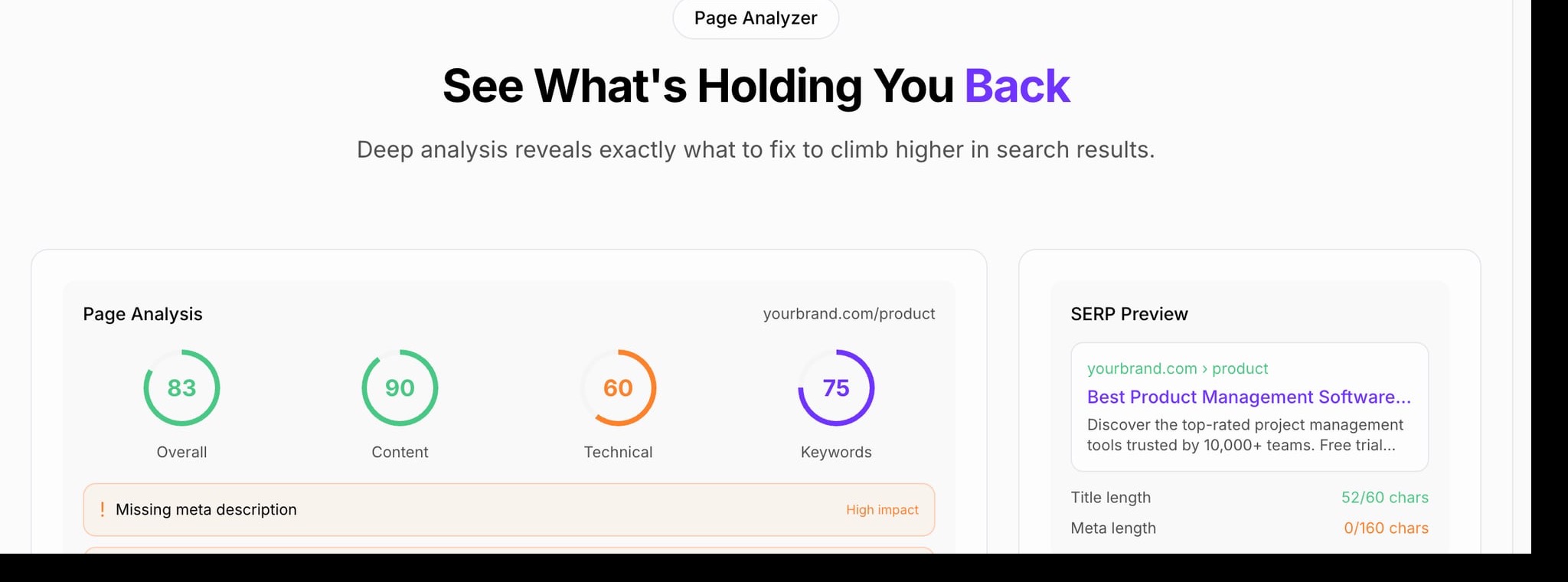
A 30-Minute SEO Diagnosis Checklist
If you only have 30 minutes, check these in order:
- Open Search Console and confirm the page is indexed.
- Check whether the page gets impressions for the intended query.
- Compare the title and intro with the top-ranking pages.
- Identify whether the query has informational, commercial, product-led, or diagnostic intent.
- Look for overlapping pages on your own site.
- Check whether important pages link to this page internally.
- Read the page and mark every claim that needs proof.
- Add missing examples, data, screenshots, or citations.
- Confirm the page has a clear next step.
- Track conversions by landing page before judging the result.
For broader strategy work, pair this checklist with current SEO best practices, but keep the diagnosis grounded in page-level evidence. The question is not whether the site is doing SEO in general. The question is where the current search journey breaks.
The Fix Is Usually A Better System, Not One More SEO Trick
When SEO is not working, resist the urge to chase the smallest visible issue first. My rule of thumb is simple: fix the bottleneck that would still matter even if rankings improved tomorrow.
Sometimes the title tag is weak. Sometimes the page needs better links. Sometimes the content needs a stronger intro. But the deeper problem is usually the system: the wrong keywords, weak measurement, unfocused content, poor internal linking, technical bottlenecks, organizational handoffs, or no refresh process.
Start with intent. Prove the page can be crawled and indexed. Make the content more useful than the competing results. Add evidence where readers need to trust you. Structure the page so AI search systems can understand and cite it. Then measure the page by what it actually contributes, not just how much traffic it collects.