
Free Monologue Generator
Generate original monologues for auditions, acting class, self-tapes, theatre scenes, and character development. Add the speaker, listener, objective, stakes, genre, tone, and length to create performance-ready material you can rehearse, trim, and personalize.
Monologue
Your monologue will appear here...
How the AI Monologue Generator Works
Get results in seconds with a simple workflow.
Add a Prompt (or Leave It Blank)
Enter a scenario, confession, argument, or moment of change. If you leave it blank, the generator will infer a compelling premise based on your genre and tone.
Customize Character, Listener, and Stakes
Optional details like who the character is, who they’re speaking to, and what they want create stronger subtext and clearer beats—making the monologue easier to perform.
Generate, Then Adjust for Your Audition
Use the first draft as performance material. Trim to time, sharpen actions, and rehearse for pacing. Generate variations to find the voice that fits you best.
See It in Action
Example of turning a simple idea into a structured, performance-ready monologue with objective, stakes, and an emotional turn.
Prompt: A person talks to their best friend after a betrayal. Make it emotional.
Title: The Apology I Keep Rehearsing
I didn’t come here to yell. I came here to do the thing I’m always telling myself I’m brave enough to do—tell the truth without turning it into a performance.
Because if I make a joke, you’ll laugh. And if you laugh, we can pretend this is normal. We can pretend you didn’t look me in the eyes and choose them anyway.
I keep replaying the moment like it’s a scene I can rewrite—like if I pause on the right line, I’ll find the version where you hesitate. Where you say my name like it means something.
But you didn’t hesitate. That’s the part that keeps scraping at me.
And I know—before you say it—I know people are messy. I know it wasn’t “about me.” But betrayal doesn’t care what it’s about. Betrayal is just the sound of trust snapping.
So here’s what I want. Not an explanation. Not a speech. I want you to look at me and admit you understood. You knew exactly what it would do, and you did it anyway.
Because if you can say that—if you can own it—then I can stop trying to turn you back into the person I thought you were. And I can finally decide what I am without you.
(Beat.)
So. Did you understand? Or was I the only one taking this seriously the whole time?
Why Use Our AI Monologue Generator?
Powered by the latest AI to deliver fast, accurate results.
Original, Audition-Ready Monologues
Generate fresh monologues designed for performance: strong objective, clear beats, playable actions, and a satisfying emotional arc—ideal for auditions, acting reels, and scene study.
Custom Character Voice and Point of View
Shape distinct character voice with optional speaker details (age, occupation, attitude, flaws) so the monologue sounds specific, human, and easy to embody on stage or on camera.
Genre and Style Control (Theatre, Film/TV, Period, and More)
Choose genre and style to match your casting call or writing project—contemporary realism, heightened theatre, period flavor, thriller tension, or poetic spoken-word rhythm.
Clear Stakes, Subtext, and Emotional Turns
The monologue is built with tension and subtext so every line has purpose. Expect turning points (beats) that help actors show range without forced melodrama.
Fast Iteration for Acting Class and Writing Drafts
Generate multiple variations quickly—perfect for acting students, teachers, playwrights, and creators who want new material for practice, workshops, and content production.
Pro Tips for Better Results
Get the most out of the AI Monologue Generator with these expert tips.
Give the character a specific listener
Monologues land better when the character is talking to someone concrete (a judge, a parent, an ex, a voicemail, the audience). A clear listener instantly creates stakes and subtext.
Use an objective you can play
Instead of “be sad,” choose a playable objective like “get forgiveness,” “win them back,” “buy time,” or “make them admit it.” This creates momentum and clear beats.
Add one vivid concrete detail
Include a sensory detail (a smell, a sound, a specific object) to make the monologue feel real and grounded—especially for contemporary realism auditions.
Target 150–350 words for most auditions
If you need 60 seconds, start around 200–250 words and rehearse. Adjust length by trimming repetition while keeping the turning point and final button.
Generate two variations and combine the best lines
Use one version for structure and another for voice. Mixing the strongest beats and images often produces the most unique, performance-ready monologue.
Who Is This For?
Trusted by millions of students, writers, and professionals worldwide.
Generate a Performable Monologue with an AI Monologue Generator
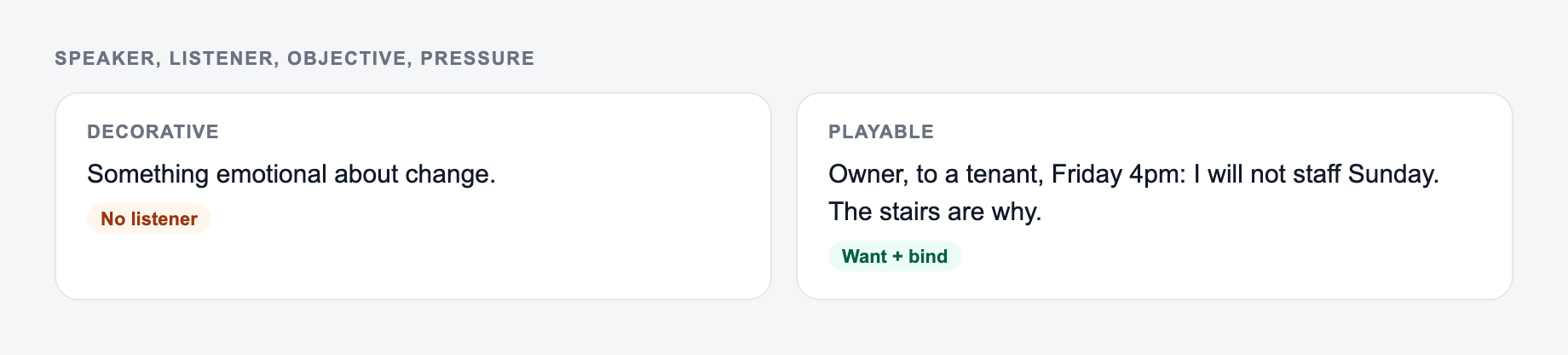
The fastest way to get a useful monologue is not to ask for "something emotional." A strong monologue needs a speaker, a listener, an objective, and pressure. When those details are clear, the AI Monologue Generator can produce material that feels playable instead of decorative.
A clear character, a want, and an obstacle keep the monologue playable instead of essay-like.
Use the draft as performance material, not a finished script you must accept as-is. Generate a version, mark the beats, review the tone and style, trim what you do not need, and edit the language until it fits your voice.
What to enter into the monologue generator
The prompt box can be short, but it should contain dramatic fuel. The best inputs usually answer four questions:
- Who is speaking? Add age, role, attitude, contradiction, or emotional state.
- Who are they talking to? A parent, judge, ex, sibling, audience, mirror, voicemail, or absent person.
- What do they want? Forgiveness, control, proof, love, silence, attention, escape.
- What happens if they fail? A secret comes out, a relationship ends, a job is lost, or the character has to change.
Weak input: A sad monologue about betrayal.
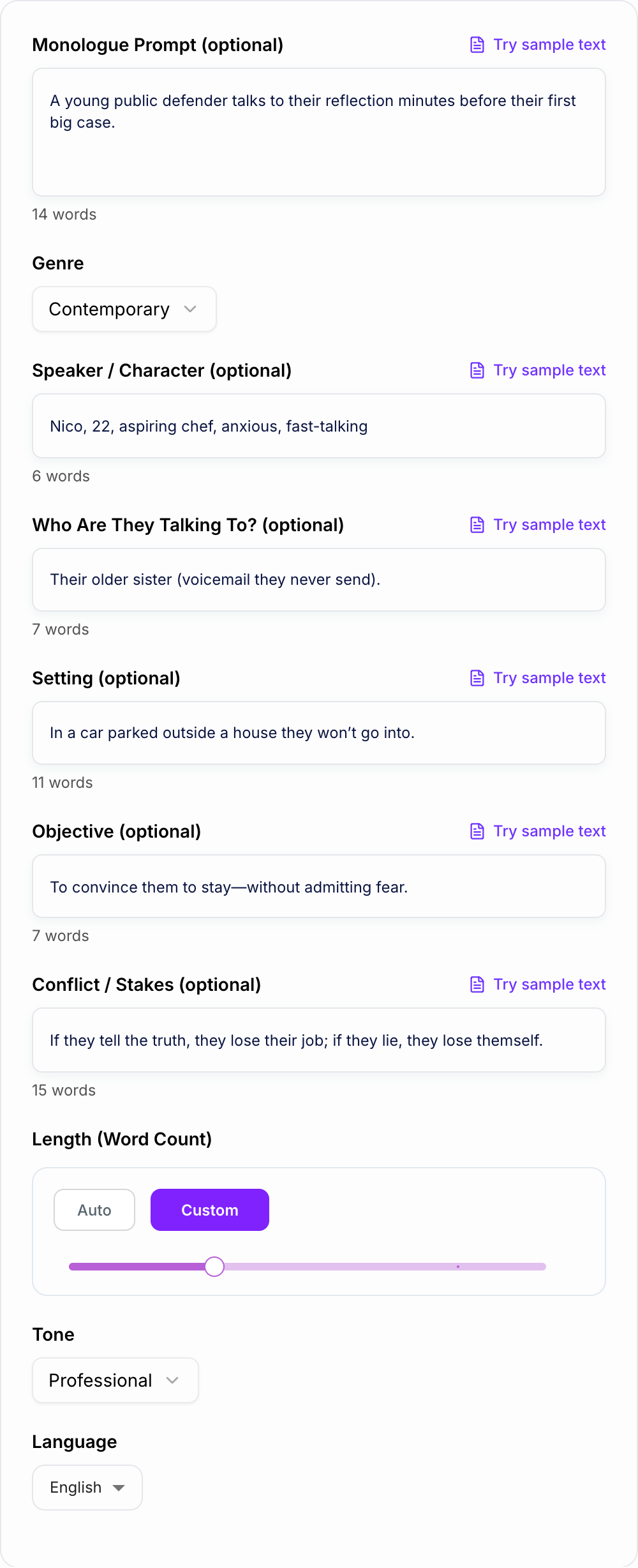
Stronger input: A 24-year-old actor leaves a voicemail for the friend who took their role. They want an apology, but they are afraid the friendship was never real.
That second prompt gives the generator something to dramatize. It creates subtext, stakes, and a clear listener.
How to choose the right mode
Pick the mode based on what the monologue needs to do in performance.
- Audition Monologue: best for self-tapes, showcases, acting class, and pieces that need a clear arc.
- Comedic: best when the character has a sharp point of view and keeps escalating their logic.
- Dramatic: best for vulnerability, confession, confrontation, grief, regret, or pressure.
- Villain / Antagonist: best when you want persuasive logic, control, and menace without cartoon villain language.
- Coming-of-Age: best for identity shifts, family tension, growing up, or a moment of realization.
- Spoken Word / Poetic: best for rhythm, imagery, repetition, and performance pieces that still need a clear emotional thread.
Do not pick a mode only for mood. A comedic monologue still needs stakes. A dramatic monologue still needs action. A villain monologue still needs a human reason behind the threat.
Length settings for auditions and class work
Auditions often specify time, but the generator uses word count. Use this as a starting point:
- 30 seconds: about 120 to 180 words
- 60 seconds: about 180 to 300 words
- 90 seconds: about 300 to 450 words
Generate slightly longer than you need, then cut during rehearsal. Trimming a strong monologue is easier than padding a thin one.
Example input and generated direction
Try a prompt like this:
A public defender talks to their reflection before their first major case. They need to appear confident, but they are terrified they are about to fail someone who trusted them. Contemporary, dramatic, 250 words.
A good generated monologue should include:
- a clear listener, even if the speaker is technically alone
- a turn where the character admits what they were avoiding
- playable verbs like persuade, confess, threaten, plead, deflect, or charm
- specific details that make the piece feel lived-in
- an ending that lands as a decision, question, or emotional button
If the output is vague, regenerate with a sharper objective: "convince them to stay," "make them admit the lie," or "hide fear behind humor."
How to revise an AI-generated monologue
Read the generated monologue out loud before editing. Performance problems show up faster in your mouth than on the page.
Then make a focused pass:
- Cut the first few warm-up lines if the monologue takes too long to start.
- Underline action verbs for each beat: accuse, soften, corner, confess, distract.
- Replace generic phrases with details only this character would know.
- Mark the turning point where the speaker changes strategy or admits something.
- Check that the ending gives you something to play, not just a neat summary.
If the monologue sounds well-written but hard to act, the issue is usually not language. It is missing a clear want.
Theatre, film, and spoken-word adjustments
For theatre, you can allow a little more size in the language, but the objective still has to stay active. For film and TV, ask for tighter, more natural rhythm with fewer speech-like lines. For spoken word, keep the imagery and repetition, but make sure the piece still has a story arc.
If you are experimenting across formats, generate two versions with the same premise: one theatre version and one film/TV version. Compare the pacing and keep the lines that fit the actual audition or assignment.
Using Junia in a performance-writing workflow
The monologue generator is strongest when you use it for fast variation. Generate one version for structure, another for voice, and a third for a different ending. Then combine the best beats. If you also write scenes, speeches, or character material, the broader set of tools on Junia AI can help you build a repeatable writing workflow around the same character or project.
Final checklist before you rehearse
- Do I know who the speaker is talking to?
- Can I state the objective in one sentence?
- Are the stakes specific enough to create pressure?
- Is there a clear emotional or tactical turn?
- Can I perform it within the required time?
- Did I personalize at least a few details so it feels like mine?
If the answer is yes, the generated monologue is ready for rehearsal, cutting, and performance.
Frequently Asked Questions
Is this monologue generator free to use?+
Yes. You can generate monologues for free. Some advanced modes (like villain or spoken-word style) may be marked as premium depending on your site settings.
Are the monologues original?+
The tool generates original text based on your inputs (prompt, character, setting, and style). Always review and personalize for your performance and ensure it fits any audition guidelines.
Can I generate a monologue for a specific audition type (theatre vs film/TV)?+
Yes. Select a genre/style (Theatre, Film/TV, Period, etc.) and add optional details like objective, stakes, and who the character is speaking to for a more casting-friendly result.
How long should an audition monologue be?+
Many auditions ask for 30–90 seconds, which often lands around 150–350 words depending on pacing. Use the word count setting to target your preferred duration and adjust during rehearsal.
How do I make the monologue more playable and less generic?+
Add specifics: who they’re talking to, what they want (objective), what they’re afraid will happen (stakes), and where they are (setting). Specificity creates subtext, beats, and strong actions.
Can I generate monologues in other languages?+
Yes. Choose your output language to generate multilingual monologues—useful for international productions, language practice, and bilingual performers.