
Free Study Guide Generator
Paste lecture notes, textbook sections, review sheets, or a topic and generate a structured study guide with summaries, key concepts, definitions, flashcards, practice questions, answers, and a revision plan. Use it to turn messy material into active recall and exam prep.
Study Guide
Your study guide will appear here...
How the AI Study Guide Generator Works
Get results in seconds with a simple workflow.
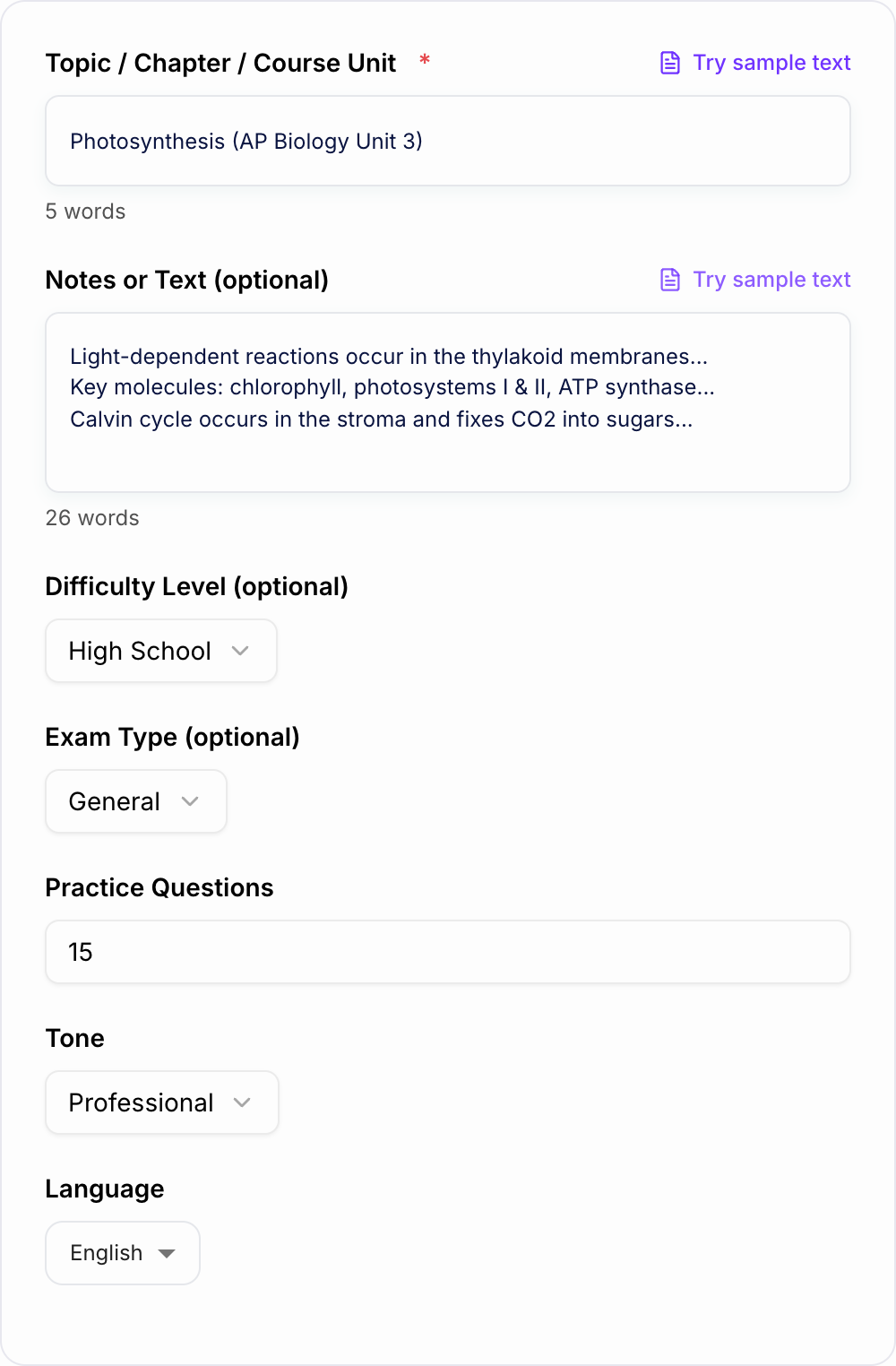
Enter Your Topic (Optional: Paste Notes)
Type the chapter, unit, or concept you’re studying. For the most personalized study guide, paste lecture notes, an outline, or key points.
Choose Level and Question Style
Select the difficulty level and exam type (multiple choice, short answer, essay). Set how many practice questions you want for self-testing.
Generate and Study (Then Repeat)
Get a structured study guide with summaries, key terms, flashcards, and practice questions. Use it to revise, identify gaps, and regenerate a new version focusing on weak areas.
See It in Action
Example of turning a topic (and light notes) into a structured study guide with key terms, flashcards, and practice questions.
Topic: Photosynthesis Notes: Light-dependent reactions, Calvin cycle, ATP/NADPH, thylakoid, stroma.
Title: Photosynthesis — Study Guide (High School)
Summary: Photosynthesis converts light energy into chemical energy. In the light-dependent reactions, plants capture light to produce ATP and NADPH. In the Calvin cycle, CO2 is fixed into sugars using ATP and NADPH.
H2: Big Picture
- Purpose: store energy as glucose
- Inputs: light, CO2, H2O
- Outputs: O2, sugars
H2: Key Concepts H3: Light-Dependent Reactions (Thylakoid)
- Photosystem II splits water → releases O2
- Electron transport chain builds a proton gradient
- ATP synthase makes ATP
- Photosystem I helps form NADPH
H3: Calvin Cycle (Stroma)
- Carbon fixation: CO2 + RuBP (via Rubisco)
- Reduction: forms G3P using ATP/NADPH
- Regeneration: reforms RuBP
H2: Key Terms
- Thylakoid: membrane where light reactions occur
- Stroma: fluid space where Calvin cycle occurs
- ATP synthase: enzyme that makes ATP from ADP + Pi
- NADPH: electron carrier used to build sugars
H2: Flashcards (Sample) Q: Where do light-dependent reactions occur? A: Thylakoid membranes. Q: What is the main product of the Calvin cycle? A: G3P (a sugar precursor).
H2: Practice Questions (Sample)
- Multiple Choice: Which molecule provides reducing power for the Calvin cycle? A) ATP B) NADPH C) O2 D) CO2 Answer: B
- Short Answer: Explain how the electron transport chain helps produce ATP. Answer: It pumps protons to create a gradient that powers ATP synthase.
H2: Quick Revision Checklist
- I can compare light reactions vs Calvin cycle
- I can define thylakoid, stroma, NADPH, ATP synthase
- I can explain why water splitting produces oxygen
Why Use Our AI Study Guide Generator?
Powered by the latest AI to deliver fast, accurate results.
Structured Study Guide Format (Summary → Concepts → Practice)
Generates a clean, exam-ready study guide with a concise overview, key concepts, definitions, and practice questions—ideal for fast revision and better retention.
Key Terms, Definitions, and High-Yield Concepts
Extracts and organizes important vocabulary, formulas, and core ideas so you can learn what matters most for quizzes, midterms, finals, and standardized tests.
Practice Questions with Answer Key (and Explanations When Helpful)
Creates targeted practice questions aligned to the topic and level, with answers to help you self-test and identify weak areas before the exam.
Flashcards for Spaced Repetition
Includes flashcard-style Q/A prompts to help you memorize key facts, definitions, and processes using proven study methods.
Revision Plan You Can Follow
Adds a simple study schedule and review checklist so you can turn notes into a repeatable study routine—great for time-boxed exam prep.
Pro Tips for Better Results
Get the most out of the AI Study Guide Generator with these expert tips.
Paste your learning objectives for better alignment
If your syllabus lists learning outcomes, paste them into the notes field. The study guide will mirror what your exam is likely to test.
Use self-testing, not rereading
After reading the summary, jump to practice questions and flashcards. Active recall is one of the fastest ways to improve exam performance.
Generate two versions: Quick Review + Practice Test
Create an “Exam Cram” guide for high-yield notes, then generate a “Practice Test” to simulate the exam and find weak areas.
Turn wrong answers into a mini study list
Collect every question you miss and regenerate a focused guide on those subtopics. This creates a personalized revision plan.
Keep inputs short and focused for highest quality
If your notes are long, paste one section at a time (e.g., one lecture or one chapter subsection) and combine the outputs into a final guide.
Who Is This For?
Trusted by millions of students, writers, and professionals worldwide.
Turn Notes into a Study Guide with Flashcards, Questions, and a Revision Plan
An AI Study Guide Generator is most useful when you treat it as a study system, not just a summarizer. Paste the right material, choose the right output style, then use the generated questions and flashcards to test what you actually remember.
This tool can turn lecture notes, textbook sections, articles, syllabus topics, or rough class notes into a structured guide with summaries, key concepts, definitions, flashcards, practice questions, answers, and a revision plan.
What to Paste Into the Study Guide Generator
The more course-specific your input is, the better the study guide will match the exam.
Useful inputs include:
- lecture notes
- textbook excerpts
- class slides
- review sheets
- learning objectives
- rubric language
- syllabus topics
- questions you missed
- teacher comments
If your notes are long, split them by chapter, lecture, or unit. Smaller inputs usually produce sharper summaries and more relevant practice questions.
How to Choose the Best Study Mode
Use a balanced study guide when you are learning a topic for the first time. It gives you a summary, key concepts, definitions, practice questions, and a reasonable revision path.
Use a flashcard-heavy output when you need repetition for vocabulary, formulas, dates, anatomy, legal terms, language learning, or certification content.
Use practice-test mode when you want active recall. This is usually better than rereading because it shows you what you cannot retrieve yet.
Use exam-cram mode when time is short. Keep the output focused on high-yield concepts, common mistakes, and questions you can answer quickly.
Use essay or short-answer formats when your exam rewards explanation, not just recognition.
A Better Workflow Than Rereading Notes
Check study guide generator output against the room you actually have:
- Times, loads, and criteria match what you typed
- Nothing medical, legal, or graded was invented
- You would still own this if a parent or clinician asked
Try this loop:
- Paste one lecture, chapter, or topic.
- Generate a balanced guide.
- Answer the practice questions before rereading the summary.
- Mark what you missed.
- Paste the missed concepts back into the generator.
- Generate a focused guide or flashcard set.
- Repeat until the weak sections shrink.
This turns the generator into a feedback loop. You are not just collecting notes. You are finding gaps and drilling them.
Example Input
Subject: Biology
Topic: Photosynthesis
Level: high school
Exam type: multiple choice and short answer
Notes:
- Photosynthesis happens in chloroplasts
- Light reactions happen in thylakoids
- Calvin cycle happens in the stroma
- ATP and NADPH carry energy
- CO2 is used to make glucose
Need: summary, key terms, flashcards, 15 practice questions, and a 3-day revision plan
Paste your notes and the exam scope. The guide should not invent facts the notes never contained.
Learning workflow:
- Enter only facts you have.
- Generate a structured draft.
- Check names, dates, citations, and units.
- Rewrite the sentences you would actually say in class or in the paper.
If the task is graded, cited, or used with students, the named writer still owns the claims.
That input gives the study guide generator level, topic, exam format, source facts, and output requirements.
How to Review the Generated Study Guide
Do not assume every generated detail is automatically correct, especially when you only enter a broad topic. Use the output as a study aid and verify anything that must match your class exactly.
Check:
- formulas
- dates
- legal or medical details
- teacher-specific terminology
- assigned readings
- exam scope
- answer explanations
- definitions that vary by textbook
If you pasted your own notes, the guide should stay closer to your class. If you only entered a topic, compare the output against your textbook, slides, or teacher's review sheet.
Common Mistakes This Tool Helps You Avoid
If the output felt generic, it is usually one of these three misses.
- Rereading summaries without testing recall.
- Studying everything with the same priority.
- Making flashcards from isolated words with no context.
- Preparing with multiple choice when the exam is essay-based.
- Ignoring the questions you got wrong.
- Waiting until the night before to build a study plan.
The broader Junia AI toolkit can also help when your study workflow turns into writing outlines, summaries, explanations, or polished drafts for class projects.
Final Checklist Before You Study From the Output
- The guide matches your actual course topic.
- The level is right for your class.
- The practice questions match the exam format.
- Key terms are defined in your course's wording.
- Weak areas are turned into follow-up prompts.
- Important facts are checked against official material.
The best use of a study guide generator is active: generate, test, correct, regenerate. That is how the output becomes a real study plan instead of another document you never use.
Frequently Asked Questions
Is this study guide generator free to use?+
Yes. You can generate a study guide for free by entering a topic. Optional pasted notes help the tool create a more accurate and personalized study guide.
Can I generate a study guide from my own notes or a textbook excerpt?+
Yes. Paste your notes or a short excerpt into the optional “Notes or Text” field. The tool will use that content to build summaries, key terms, and practice questions based on your material.
Does it include practice questions and answers?+
Yes. The tool can generate practice questions with an answer key. You can choose how many questions you want, and select an exam style like multiple choice, short answer, or essay.
What subjects does it work for?+
It works for most subjects—science, math, history, literature, psychology, business, and more. For the best results, include specific topic details (and paste notes if available).
How accurate is the study guide?+
If you provide notes or source text, accuracy is much higher because the tool can ground the guide in your material. If you only provide a topic, the tool uses general knowledge—always review and confirm details for your course.
Can I generate a study guide in another language?+
Yes. Select your output language to generate a multilingual study guide, including summaries, key terms, and practice questions.