
Free YouTube Video Description Generator
Create structured YouTube video descriptions that are easier to paste into YouTube Studio. Add a topic, keywords, timestamps, links, hashtags, and CTA, then generate a description with a strong opening, clean sections, and viewer-friendly navigation.
YouTube Video Description
Your SEO-optimized YouTube description will appear here...
How the YouTube Video Description Generator Works
Get results in seconds with a simple workflow.
Describe Your Video Topic
Add a quick summary of what the video covers and who it’s for. Optionally include your title, primary keyword, and secondary keywords for stronger YouTube SEO alignment.
Add Links, Timestamps, and CTA (Optional)
Paste any resources, affiliate links, or your subscribe link. If you have chapters, add timestamps; if not, the generator can create a template you can edit.
Generate and Publish
Get a formatted YouTube description with an SEO-friendly opening, scannable sections, and hashtags. Copy it into YouTube Studio and make quick edits to match your exact chapters and offers.
See It in Action
Turn a basic summary into a structured, SEO-optimized YouTube description with keywords, chapters, links, and hashtags.
In this video I talk about keyword research. Hope it helps.
Check out my website.
Learn keyword research step-by-step for a new website—how to find SEO keywords, evaluate difficulty, and choose terms that match search intent.
In this tutorial, you’ll learn:
- How to brainstorm seed keywords
- Free tools to expand keyword ideas
- How to assess competition and intent
- How to build a simple keyword plan you can publish against
Chapters: 00:00 Intro 00:45 Seed keywords 03:10 Free tools 06:20 Keyword difficulty 09:05 Mapping intent 11:30 Next steps
Resources: Free keyword checklist: https://example.com/keyword-checklist Subscribe: https://youtube.com/@yourchannel?sub_confirmation=1
#SEO #KeywordResearch #YouTubeSEO
Why Use Our YouTube Video Description Generator?
Powered by the latest AI to deliver fast, accurate results.
YouTube SEO-Friendly First Lines (Keyword Front-Loading)
Generates a strong opening optimized for YouTube search by naturally including your primary keyword early, clarifying the value, and improving click-through from search and suggested videos.
Structured Description Template (Links, Resources, Watch Next)
Outputs a clean, scannable structure with labeled links, resources, and suggested next videos—making it easier for viewers to take action and helping boost session time.
Chapters / Timestamps for Better Retention
Creates a chapters section (or formats your timestamps) to improve navigation, user experience, and watch time—especially useful for tutorials, reviews, and long-form content.
Natural Secondary Keyword & Topic Coverage
Incorporates related keywords and synonyms without stuffing to expand topical relevance for YouTube SEO and Google video results.
Channel Growth CTAs That Don’t Feel Spammy
Adds tasteful prompts to subscribe, comment, or download a resource with clear link labeling—helpful for conversion while maintaining trust and readability.
Pro Tips for Better Results
Get the most out of the YouTube Video Description Generator with these expert tips.
Optimize the first 2 lines for YouTube search and “Show more”
Front-load the value and primary keyword in the opening so viewers understand the topic immediately and are more likely to click—especially from YouTube search results.
Use labeled link blocks to increase clicks
Instead of dumping URLs, label them (e.g., “Free checklist”, “Tool list”, “Watch next”). Clear labels improve trust and click-through rate.
Add chapters for tutorials and long videos
Chapters help viewers jump to the part they need, improving retention and reducing drop-off—often leading to better performance in suggested videos.
Include related keywords as natural phrases
Use 3–8 secondary keywords as variations in full sentences. This expands topical coverage for YouTube SEO without making the description look spammy.
Refresh old descriptions to improve rankings
Updating older video descriptions with clearer summaries, chapters, and a better keyword strategy can improve discoverability without re-uploading the video.
Who Is This For?
Trusted by millions of students, writers, and professionals worldwide.
Generate YouTube Descriptions That Are Ready for YouTube Studio
A strong YouTube description is not just a paragraph under the video. It is the first few lines viewers see in search, the chapter map they use to navigate, and the place where your links, resources, hashtags, and calls to action have to stay organized.
The YouTube Video Description Generator helps you build that structure from a few inputs. Add the video topic, title, keywords, links, timestamps, and CTA, then generate a description that is easier to paste into YouTube Studio than a blank template.
What to Enter Into the YouTube Video Description Generator
The better your input, the more useful the generated description will be. You do not need a full script, but you should give the tool enough context to avoid generic output.
Add:
- The working video title or topic
- The main thing viewers will learn, see, compare, or decide
- The audience, such as beginners, SaaS founders, home cooks, or product buyers
- One primary keyword if you are targeting YouTube search
- A few secondary keywords only if they fit the video naturally
- Any links you want included, with labels
- Exact timestamps if the video is already edited
- A CTA, such as subscribe, download, watch next, book a call, or comment
For example, "keyword research" is too thin. "A beginner tutorial showing small business owners how to find low-competition keywords with free tools" gives the generator a clear viewer, outcome, and search angle.
How to Choose the Right Description Mode
Use the mode that matches the job the description needs to do.
Choose SEO-Optimized when the video is built around a searchable topic. This works well for tutorials, product comparisons, explainers, and evergreen how-to videos where the first two lines should clearly include the primary keyword.
Choose Chapters + Timestamps for long tutorials, podcast episodes, webinars, interviews, reviews, and walkthroughs. If you already have timestamps, paste them in. If not, use the generated chapter template as a draft and adjust it after the final edit.
Choose CTA-Focused when the description needs to drive an action, such as downloading a checklist, visiting a landing page, subscribing, joining a newsletter, or watching a related video.
Choose Short Description for quick uploads, Shorts, simple announcements, or videos where a full resource block would feel heavy.
Choose Long Description when the video has multiple sections, resources, tools, or keywords. This is usually the best choice for in-depth tutorials and videos supporting a larger content strategy.
Example Input and Generated Description Structure
Here is a practical input:
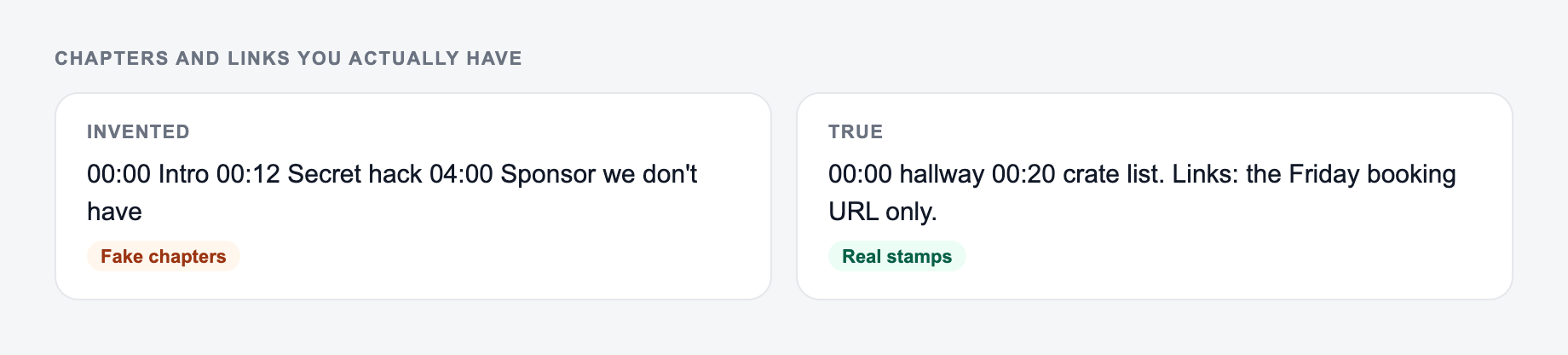
Enter the chapters and links you actually have. The form cannot invent timestamps.
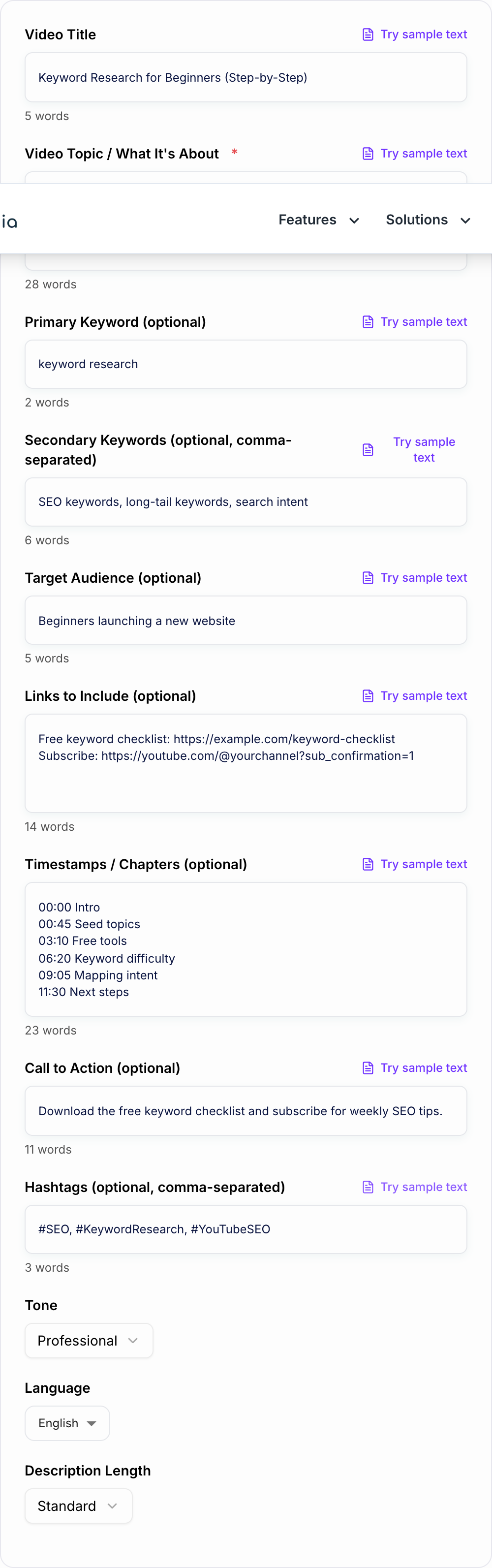
Video topic: Keyword research for beginners using free tools Audience: Small business owners building a new website Primary keyword: keyword research for beginners Links: Free keyword checklist, subscribe link CTA: Download the checklist and subscribe for weekly SEO tutorials Timestamps: 00:00 Intro, 00:45 Seed topics, 03:10 Free tools, 06:20 Keyword difficulty, 09:05 Search intent
The generator should turn that into:
- A clear first two lines with the main keyword and video promise
- A short summary of what the viewer will learn
- Bullet takeaways for scannability
- A chapters section in
00:00format - A labeled resources block instead of a raw link dump
- A CTA that fits the video
- A small hashtag set
That structure is easier to scan, easier to update, and less likely to look like keyword stuffing.
How to Review the Generated Description Before Publishing
Do not paste the output blindly. A good generator gives you a strong draft, but YouTube descriptions still need a quick human pass.
Check the first two lines first. They should explain the video before the viewer clicks "Show more." If the best information is buried lower in the description, move it up.
Check the keyword use next. The primary keyword should appear naturally, usually near the start. If a sentence sounds like it was written for a search engine instead of a person, simplify it.
Then check the link block. Every link should have a clear label, such as "Free checklist," "Tools mentioned," "Watch next," or "Book a demo." Avoid unlabeled URLs unless the link is obvious.
Finally, check timestamps and hashtags. Timestamps should match the final video edit, and hashtags should be limited to a few relevant tags.
Description Tips by Video Type
Tutorials usually need a stronger summary, clear learning outcomes, and chapters. Product reviews need pros, cons, disclosure where relevant, and links that are clearly labeled. Podcast episodes and interviews need guest links, topic chapters, and a short reason to keep listening.
Short videos need less structure, but they still benefit from a direct first line and one useful CTA. If the video is part of a series, mention the previous or next video so the description supports session time.
For channels publishing regularly, keep a repeatable format. A platform like Junia AI is useful when you want descriptions, titles, outlines, and related content to follow the same voice instead of looking like separate one-off drafts.
Common Mistakes to Fix in the Generated Output
The first mistake is using every keyword you can think of. A description that repeats the same phrase five times looks spammy and reads badly.
The second mistake is leaving placeholder timestamps in the final upload. If the generator creates a chapter template, replace it with the real edit points before publishing.
The third mistake is asking for a long description when the video is simple. A short product update, channel announcement, or Short does not need a heavy resource block.
The fourth mistake is writing a CTA that does not match the viewer's moment. Someone watching a beginner tutorial may be ready for a checklist, not a sales call.
Final Checklist Before You Paste Into YouTube Studio
Before publishing, confirm:
- The first two lines clearly state the video topic and value
- The main keyword appears naturally
- The description matches the actual video content
- Timestamps use the right
00:00format - Links are labeled and ordered by importance
- The CTA is specific and not pushy
- Hashtags are relevant and limited
- The final copy sounds like your channel, not a generic template
If the generated description passes those checks, it is ready to paste, publish, and reuse as a format for future uploads.
Frequently Asked Questions
Does a YouTube video description help with SEO?+
Yes. A well-written YouTube description can improve YouTube SEO by clarifying the topic, adding relevant keywords naturally, and increasing engagement with chapters, links, and clear next steps. It can also help Google understand your video for potential video carousel visibility.
Where should I put keywords in a YouTube description?+
Place the primary keyword naturally in the first 1–2 lines (without forcing it), then support it with related terms throughout the summary and key points. Avoid keyword stuffing—focus on clarity and usefulness.
How long should a YouTube description be?+
There’s no single best length. Short descriptions work for simple videos, while longer descriptions are useful for tutorials, reviews, and SEO-focused content. This tool lets you choose short, standard, or long to match your video type.
Can I add timestamps (chapters) automatically?+
Yes. If you provide timestamps, the tool will format them cleanly. If you don’t have timestamps, it can generate a chapter template you can adjust after publishing.
Will the tool include links and CTAs?+
Yes. Add your links and CTA (optional) and the generator will place them in a clear, labeled block such as Resources, Tools, or Watch Next—improving clicks without clutter.
Can I generate descriptions in different languages?+
Yes. Choose an output language to generate localized YouTube descriptions, which is useful for multilingual channels and international YouTube SEO.