
How to Build Multilingual Niche Sites in 2-3 Weeks

Thu
AI SEO Specialist, Full Stack Developer

Building a multilingual niche site is not just translating your English blog into Spanish, German, or Portuguese.
That is the shortcut most people take, and it is also why many multilingual sites feel thin. The content is technically in another language, but the keywords are wrong, the examples feel foreign, the internal links send users back to English pages, and Google has to guess which version belongs in which search result.
If you want to launch quickly, the better approach is simple:
- Pick one or two language markets where demand already exists.
- Translate and localize the pages that can actually earn traffic or revenue.
- Use a clean URL structure and correct
hreflang. - Publish fast, then improve the pages that show early traction.
That is how I would build a multilingual niche site in 2-3 weeks without turning the project into a six-month localization program.
The 2-3 Week Launch Plan
Here is the practical version before we get into the details.
| Phase | What to do | Output |
|---|---|---|
| Days 1-2 | Pick target languages using search demand, analytics, affiliate offers, and competition | 1-2 validated language markets |
| Days 3-4 | Build a localized keyword map instead of translating English keywords directly | Primary and secondary keywords per language |
| Days 5-7 | Set up your multilingual CMS, URL structure, templates, language switcher, and tracking | Technical foundation ready |
| Days 8-14 | Translate and localize your highest-value pages with AI plus human review | First batch of publishable pages |
| Days 15-18 | Add hreflang, localized metadata, internal links, sitemaps, and QA checks | Search-ready launch |
| Days 19-21 | Submit pages, monitor indexing, measure engagement, and prioritize fixes | Live multilingual niche site |
This timeline works best for a focused niche site with 20-40 important pages and one added language. If you are launching five languages, ecommerce catalogs, country-specific offers, or custom legal pages, the timeline gets longer.
But for affiliate sites, programmatic SEO sites, and content-led niche properties, a 2-3 week launch is realistic if you keep the first scope tight.
Step 1: Choose Languages Like an SEO, Not Like a Translator
The wrong way to choose languages is to say, "Spanish has a large audience, so let's translate everything into Spanish."
The right way is to look for a language market where four things overlap:
- People search for the topic in that language.
- The search results are weaker than the English SERP.
- You can monetize the traffic with relevant offers.
- You can produce content good enough to compete locally.
Start with your own data if the site is already live. Check Google Search Console, analytics, affiliate dashboards, and customer messages. Look for countries or browser languages that already send traffic but have weak engagement or low conversion. Those are often signs that people want the topic but do not fully connect with the English experience.
Then check keyword demand with localized research. Do not simply translate your English keyword list. A literal translation can miss the phrase people actually search.
For example, a running shoe site might translate "running shoes" correctly, but the higher-volume local phrase may be closer to "sneakers for running" or a regional term. This is one of the biggest multilingual SEO mistakes because it quietly affects titles, headings, URLs, internal links, and anchor text across the whole site.
If you want to speed up the keyword pass, use an AI keyword research tool to create the first map, then validate the final terms with native review or search-volume data.
A Simple Market Selection Scorecard
Use this before you commit to a language.
| Question | Good sign | Warning sign |
|---|---|---|
| Is there search demand? | Several relevant queries with visible demand | Only direct translations with little proof |
| Is the SERP beatable? | Forums, thin blogs, outdated guides, weak affiliate pages | Strong local brands and deep editorial content |
| Can you monetize it? | Affiliate programs, SaaS trials, ads, or product demand in that market | Offers unavailable or payouts too low |
| Can you localize examples? | Local products, prices, regulations, and terms are easy to adapt | The niche depends on country-specific expertise you do not have |
| Can you maintain it? | You can refresh the content and review translations regularly | You can launch but not maintain accuracy |
For most niche site builders, I would rather launch one language well than launch six thin language folders that never get maintained.
Step 2: Decide Whether You Are Building a Multilingual or Multi-Regional Site
This distinction matters because it changes your URL structure, keyword research, examples, offers, and SEO setup.
A multilingual site targets more than one language. For example, an English site adds a Spanish version for Spanish-speaking users broadly.
A multi-regional site targets different countries or regions. For example, a finance site may need separate pages for Spain, Mexico, and Argentina because the products, laws, currency, and examples are different.
Google makes the same distinction in its documentation for multi-regional and multilingual sites. It also recommends giving Google explicit signals for language or regional variations, such as locale-specific URLs, hreflang, sitemaps, and visible links between versions.
Here is the easiest way to choose:
| Site type | Use when | Example URL pattern |
|---|---|---|
| Language-led multilingual site | The same content works for a language across countries | /es/, /de/, /fr/ |
| Country-led international site | Offers, pricing, laws, or examples change by country | /es-mx/, /es-es/, /de-de/ |
| Hybrid site | Some languages are global, some countries need unique pages | /es/ plus /es-mx/ for money pages |
For niche sites, language-led subdirectories are usually the cleanest starting point. They are simple to manage, keep everything under one domain, and make internal linking easier.
Step 3: Choose the Right URL Structure
Your URL structure should be boring, consistent, and easy to crawl.
You have three common options:
| Structure | Example | Best for | Tradeoff |
|---|---|---|---|
| Subdirectories | example.com/es/best-ai-tools/ | Most niche sites | Clear and simple, but less country-specific than ccTLDs |
| Subdomains | es.example.com/best-ai-tools/ | Separate teams or complex infrastructure | Can feel like a separate property and adds management work |
| ccTLDs | example.es/best-ai-tools/ | Country-specific brands | Strong local signal, but expensive and harder to scale |
For most multilingual niche sites, I would use subdirectories.
They are easier to maintain, easier to link internally, and easier to expand later. You can still use country-language folders if the market needs it, such as /es-mx/ for Mexico and /es-es/ for Spain.
Avoid URL parameters like ?lang=es for important SEO pages. Google lists URL parameters as a weaker option for geotargeting because segmentation is harder for both users and search engines.
If you are using WordPress, WPML, Polylang, TranslatePress, or Weglot can handle much of the routing. If you are building a larger content operation, a headless CMS or translation management system can work better. The platform matters less than whether it gives you clean URLs, editable metadata, hreflang, translated slugs, and control over internal links.
Step 4: Build the Translation Workflow
Speed comes from using the right level of translation for the right page.
Not every page deserves the same process. A homepage, buying guide, product comparison, or affiliate money page needs more review than a basic glossary entry.
Here is the workflow I would use:
| Content type | Translation method | Why |
|---|---|---|
| Homepage and category pages | Human translation or heavy human editing | These pages set trust and navigation |
| Affiliate money pages | AI translation plus native/subject review | Accuracy affects revenue |
| Informational articles | AI translation plus editorial QA | Fast enough for scale, still needs polish |
| Old blog archives | Machine translation plus later improvement | Useful for coverage, but not launch-critical |
| Legal, medical, finance, or regulated pages | Specialist human review | Mistakes are too expensive |
For a niche site, the sweet spot is usually hybrid translation: AI does the first pass, then a human editor checks meaning, tone, examples, claims, and search intent.
That is also where tools can save real time. Junia's bulk blog translation tool is useful when you need to translate a batch of articles quickly without starting from a blank document each time.
Use a blog post translator for one-off pages, and bring in bulk content creation only when the translated site also needs new supporting pages.
If you are still choosing the translation stack, compare the options in this guide to AI translation tools. ChatGPT can help with language translation in small batches, but it is harder to control across a full niche site.
If your goal is a more automated publishing system, start with the workflow for automating multilingual blogging. Translating a blog into many languages or bulk translating affiliate content should come after you know which pages, markets, and review steps are worth scaling.
Create a Glossary Before You Translate
A glossary is not busywork. It prevents the same term from being translated three different ways across your site.
Create a small spreadsheet with:
- Brand names and product names that should not be translated.
- Primary keywords and approved local-language variants.
- Terms that must stay consistent across reviews, tables, and CTAs.
- Words to avoid because they sound awkward, too formal, or too casual.
- Currency, measurement, date, and formatting rules.
This is especially important if you use AI translation at scale. Without a glossary, each page can sound slightly different, and your internal links may use inconsistent anchors.
Step 5: Localize the Page, Not Just the Words
A translated page can still feel wrong.
Localization is where you adjust the page so it makes sense to the reader in that language or region. That includes examples, screenshots, currencies, legal references, product names, idioms, and calls to action.
If you want a deeper writing workflow, the guide on how to write and localize articles in different languages is a useful companion to this more technical launch plan.
For example:
- A credit card affiliate page needs local banks, fees, and eligibility rules.
- A SaaS comparison page may need local pricing, local support language, and region-specific alternatives.
- A health or finance article may need stricter source review and local disclaimers.
- A shopping guide may need local marketplaces, shipping expectations, and payment methods.
You should also translate the parts people forget:
- Title tags and meta descriptions.
- URL slugs.
- Image alt text.
- Table headers.
- Button text.
- Form labels.
- Error messages.
- Schema fields where relevant.
- Navigation labels and breadcrumbs.
If the article is part of a content cluster, localize the whole cluster path. A Spanish reader should not click from a Spanish buying guide into an English supporting article unless there is no translated version yet.
For deeper SEO strategy, start with AI multilingual SEO before you scale the site. It gives you the broader framework for search intent, translated content quality, and programmatic SEO across languages.
Step 6: Set Up Hreflang Correctly
Hreflang tells search engines which language or regional version of a page should be shown to users.
| Scorecard signal | Prefer this language if… |
|---|---|
| Search demand | Local keywords have volume without insane competition |
| Offer fit | You can monetize or affiliate in-market |
| Ops capacity | You can review or spot-check natively |
Don’t pick languages because the plugin supports 60. Pick ones you can maintain.
How should I handle localized content?
This is not optional once you have multiple language versions of the same page. Without it, Google can still discover and rank pages, but you make it harder for search engines to match the right version to the right user.
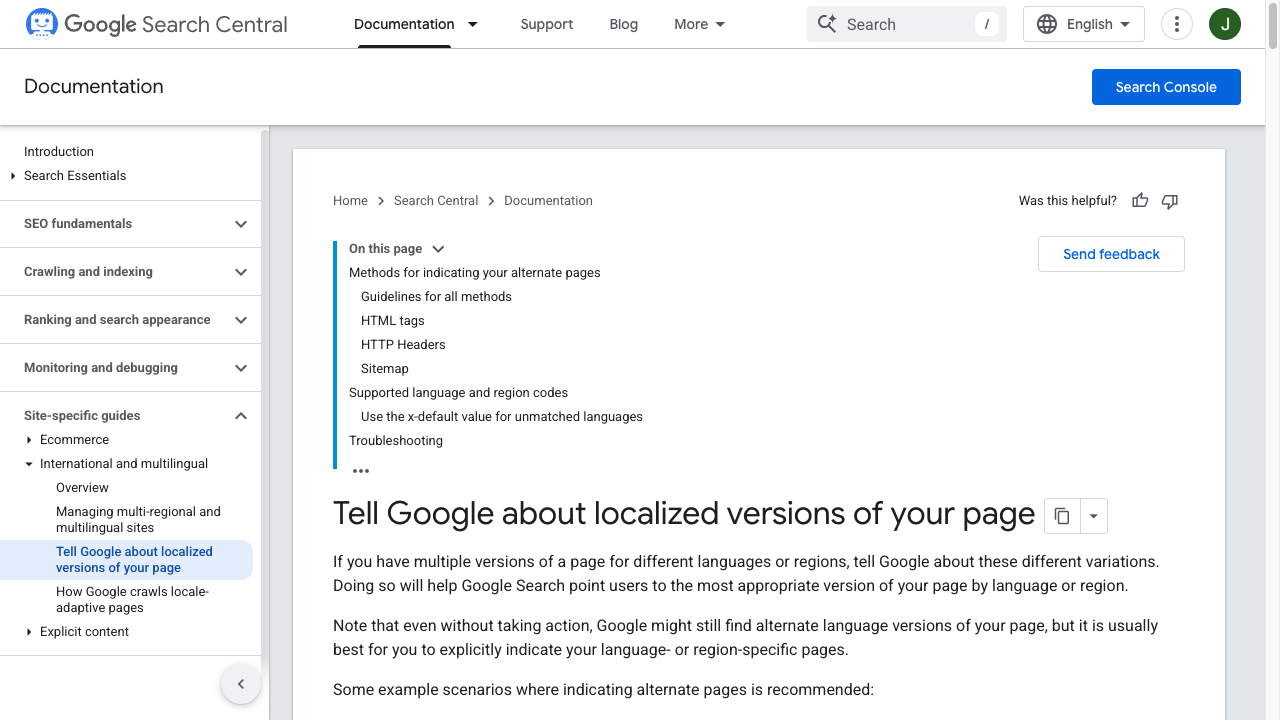
Google's localized versions documentation explains three supported implementation methods:
- HTML tags in the page head.
- HTTP headers.
- XML sitemap annotations.
For most niche sites, HTML tags or sitemap annotations are enough.
Here is a basic example:
<link rel="alternate" hreflang="en" href="https://example.com/best-ai-tools/" />
<link rel="alternate" hreflang="es" href="https://example.com/es/mejores-herramientas-ia/" />
<link rel="alternate" hreflang="x-default" href="https://example.com/best-ai-tools/" />
Every version should reference every other version, including itself. If your English page links to the Spanish alternate, the Spanish page should link back to the English alternate.
Use language codes such as es, de, and fr when targeting a language broadly. Use language-region codes such as es-MX, pt-BR, or fr-CA when the page is meant for a specific locale.
Do not fake regional targeting. If the Spanish version is not meaningfully adapted for Mexico, Spain, or Argentina, use es instead of creating region-specific pages that all say the same thing.
Step 7: Design for Real Multilingual UX
Multilingual UX is where many fast launches break.
The site technically works, but the translated text is too long for buttons, the language switcher is hidden, Arabic text has poor RTL support, or the user lands on a Spanish article and the next recommended article is in English.
Check these items before launch:
| UX element | What to check |
|---|---|
| Language switcher | Easy to find, uses language names like Español instead of only flags |
| Navigation | Main menu, footer, breadcrumbs, and category pages are translated |
| Text expansion | Buttons, headings, cards, and tables still work with longer translations |
| RTL support | Arabic, Hebrew, Persian, and Urdu layouts mirror properly |
| Internal links | Users stay inside the same language folder when possible |
| Media | Screenshots, captions, and images with text are localized or replaced |
| Forms | Labels, errors, confirmation messages, and privacy text are translated |
| Performance | Images, fonts, and scripts are not slowing down distant markets |
Flags are especially risky as the only language selector. Spanish is not one country. English is not one country. Portuguese may mean Portugal or Brazil. Use native language names first; flags can be secondary if they clarify a country-specific version.
Step 8: Build Internal Links Per Language
Internal linking matters even more on multilingual niche sites because each language folder needs its own topical depth.
Do not translate a page and leave all the internal links pointing to English pages. That weakens the user journey and makes the translated section look incomplete.
For each translated page, add:
- Links to the translated parent category.
- Links to translated supporting articles.
- Links to translated commercial pages where relevant.
- Same-language breadcrumbs.
- Same-language related posts.
If a supporting article does not exist yet, either translate it in the first batch or link to the English version only when it genuinely helps the reader.
An AI internal linking tool can speed this up, but review the output manually. Internal links should feel like a useful path, not a keyword dump.
After launch, use an SEO improver or page-level audit to find pages with weak internal links, missing metadata, thin sections, or low engagement.
Step 9: Launch in Batches, Then Improve What Moves
The fastest multilingual niche sites are not perfect on day one. They are structured well enough to launch, then improved with data.
A sensible first batch might include:
- Homepage or language landing page.
- 3-5 category or hub pages.
- 10-20 existing articles with proven English traffic.
- 5-10 money pages or affiliate pages.
- A few supporting articles for internal links.
If you run a larger operation, programmatic SEO tools can help create language-specific pages at scale. AI autoblogging can support publishing velocity, but the quality bar stays the same: programmatic pages still need local keywords, useful data, and human-readable copy.
Once the first batch is live, submit updated sitemaps, use a Google indexing tool where appropriate, and monitor:
- Indexing by language folder.
- Impressions and clicks by country and query.
- Pages with high impressions but low CTR.
- Pages with traffic but poor engagement.
- Affiliate clicks and conversion rate by language.
- Internal search queries or support questions in each language.
Then improve the pages with proof of demand first. This keeps the budget focused. If your German pages start getting impressions but low CTR, improve titles and meta descriptions. If Spanish pages get traffic but weak affiliate clicks, review the offers, examples, and CTAs. For single-page cleanup, a Page Rank Improver tool can help identify sections, keywords, and on-page gaps worth fixing.
Common Mistakes That Slow Down Multilingual Sites
These are the mistakes I would check before publishing.
| Mistake | Why it hurts | Better approach |
|---|---|---|
| Translating every page at once | Burns budget on pages with no demand | Start with proven pages and high-opportunity clusters |
| Translating keywords literally | Misses how people actually search | Research native keyword variants |
| Using only machine translation | Creates awkward, generic, or inaccurate pages | Use AI plus editorial review |
| Forgetting metadata | Weak CTR and poor relevance signals | Localize titles, descriptions, slugs, alt text, and schema |
| Linking back to English pages everywhere | Breaks the local user journey | Build same-language internal link paths |
| Hiding the language switcher | Users cannot find the right version | Put it in the header or an obvious menu |
| Creating fake regional pages | Duplicates content without real localization | Use language-level pages until regional differences matter |
| Skipping maintenance | Translated pages become outdated | Track updates and refresh translated versions |
A Practical Pre-Publish Checklist
Before the multilingual version goes live, run this checklist:
- Each translated page has a clear primary keyword in the target language.
- The title tag, meta description, H1, slug, and image alt text are localized.
Hreflangis reciprocal and includes a self-reference.- The language switcher works from every translated page.
- The page links to same-language supporting content where possible.
- The translated content has been reviewed for meaning, tone, and examples.
- Tables, buttons, forms, and navigation do not break with longer text.
- Screenshots or images with text are localized or replaced.
- The page is included in the XML sitemap.
- Analytics can segment traffic by language folder or locale.
If a page fails several of these checks, do not publish it just to hit a language count. A smaller, cleaner multilingual section usually beats a larger folder full of weak translations.
Conclusion
The best way to build multilingual niche sites fast is to treat localization as an SEO system, not a translation task.
Pick markets with demand. Build clean subdirectories. Research keywords in the target language. Translate the pages that matter first. Add hreflang, localized metadata, same-language internal links, and a language switcher users can actually find.
Then launch the first batch and improve based on data.
That gives you the speed advantage of AI translation without publishing a site that feels automated. And in multilingual SEO, that balance matters: fast enough to capture underserved search demand, careful enough that real readers trust the page when they land on it.