
Meta Descriptions That Win Clicks (With Examples)

Yi
SEO Expert & AI Consultant

Why meta descriptions still matter for clicks
A meta description is a short HTML snippet that summarizes a page for searchers. It does not directly improve rankings, but it can absolutely improve click-through rate when it clearly matches the query and gives people a reason to choose your result.
That is what makes meta descriptions worth caring about. They are often the first piece of persuasive copy a searcher sees. In a small amount of space, you need to explain what the page covers, signal relevance, and make the click feel worthwhile. Done well, that can support higher visibility and more organic traffic.
In this guide, you'll learn how to:
- Identify the elements that make a meta description effective
- Write clearer, more compelling copy
- Keep each description aligned with the actual page content
The goal is simple: write snippets that read like useful search previews, not generic filler.
Understanding the Role of Meta Descriptions in SEO
Meta descriptions play a crucial role in SEO because they give a short summary of your webpage's content to both search engines and people. Basically, they show a quick little snapshot of what users can expect before they even click and visit your site. So yeah, this is why meta descriptions are important for your SEO strategy and honestly you really shouldn’t ignore them:
How Meta Descriptions Impact User Experience on SERPs
A well-crafted meta description can really change how people experience your page on search engine result pages (SERPs). It might look like a small thing, but it kind of matters a lot:
- Enhanced User Experience: A well-written meta description gives clear, simple info that helps users quickly see if your page matches what they’re actually searching for. By summarizing what your page offers in a straightforward way, you make it easier for people to decide if they want to click, so they can find what they need without a bunch of extra effort.
- Increased Click-Through Rate (CTR): The click-through rate is a really important metric when you want to see how well your SEO is working. A compelling meta description that uses relevant keywords and a persuasive tone can grab more attention and, honestly, just get more users to click on your result instead of someone else’s.
- Attraction of Organic Traffic: Organic traffic is super important for most websites to grow and stay alive online. An effective meta description lines up with the user’s search intent and shows the value your page gives. When people see that in the description, they’re more likely to feel curious and click through to your site.
Why Meta Descriptions Are Valuable for SEO Despite Not Being a Direct Ranking Factor
So, even though meta descriptions themselves don't directly change your search engine rankings, they can still really help your SEO because they affect how people interact with your page:
- Search Intent Matching: People are way more likely to click on search results that feel like they actually match what they were looking for. If you write a meta description that clearly speaks to the user's needs and expectations, you can seriously increase the chances that they’ll choose your page over someone else’s.
- User Motivation: You don’t get much space to work with (usually around 150-160 characters), so every word in your meta description kinda has to pull its weight. If you add action-oriented phrases like "Learn More," "Try Now," or "Get Started," you give users a hint about what they can do next and you create a bit of urgency or curiosity.
Just keep in mind, yes, using relevant keywords in your meta description can help with visibility, but what really matters most is how clear and relevant the description feels overall. That’s what actually makes people take action. When you write your own meta descriptions, try to remember all this. They aren’t just some random decorative text under your URL, they’re actually powerful tools that can influence a user's choice in just a few seconds and improve how well you perform on SERPs.
Key Elements of an Effective Meta Description
Writing an effective meta description is kind of like making a tiny ad for your webpage. It needs to be interesting enough to catch people’s attention, but also actually tell them what the page is about. So yeah, it should be honest and not too confusing. Here are the main things you should think about when you’re putting one together:
| Write for | Pass if… | Fail if… |
|---|---|---|
| Click intent | Promise matches the page | Teases content you don’t deliver |
| Length | Key claim survives truncation | CTA only appears at the end |
| Differentiation | Not identical to title | Repeats the H1 verbatim |
Meta descriptions don’t rank pages. They win (or lose) the click. Google may rewrite them — write one worth keeping.
How I learned to debug troubled titles
- Be Clear and Concise: A meta description should give a clear idea of what the page is about in just a few sentences.
- Include Keywords: Use relevant keywords that people might search for. This can help improve your page's visibility.
- Make it Compelling: The description should entice users to click on your link over others.
- Avoid Duplication: Each page on your website should have a unique meta description.
- Optimize Meta Titles: While crafting a meta description, don't forget about the meta titles. These are equally important for SEO and should be optimized accordingly.
By keeping these elements in mind, you can create effective meta descriptions that not only attract clicks but also improve your website's SEO performance.
1. Succinctness
- Brevity is Key: Try to sum up what your page is really about in a short, clear way. Since search engines usually only show around 155 characters of your meta description, you kinda have to make every single word count and actually mean something.
2. Incorporation of Relevant Keywords
- Strategic Keyword Use: Find the main keywords that really describe what your page is about and also match what your target audience is actually typing into search. You basically want the same words they would use.
- Natural Integration: Try to include these keywords in your meta description in a way that feels natural, so it reads smoothly and doesn’t sound weird or stuffed with terms. Also, you can use an image description generator to create detailed descriptions for your images. This tool helps you figure out the right words to describe your images and make them more engaging, which can kind of boost your SEO efforts even more.
3. Persuasive Call-to-Action (CTA)
- Action-Oriented Language: Try using verbs that push people to do something, like "discover," "learn," "get," or "start." Stuff that feels active and a little urgent, so they feel like they should click now instead of later.
- Offer Value: Make it super clear what the reader gets by clicking on your link. Are they going to solve a problem, learn something new, or maybe get some kind of exclusive offer? Spell it out so they don’t have to guess.
When you get good at using these things, you can really boost your click-through rates and pull in more users. Just keep in mind, every meta description should work as its own little summary that both grabs attention and actually informs the reader at the same time.
Writing Unique and Engaging Meta Descriptions
Writing meta descriptions that actually stand out in that huge sea of search results is a really important part of SEO. When you use Unique copy, it helps your page look different from all the other ones out there and, you know, it grabs people’s attention more. That way, users are more likely to notice your page and actually click through to your site.
Be Distinct
Every webpage should offer something a bit different, and your meta description needs to actually show that. Try not to use boring, generic phrases that could fit anywhere. Instead, you can:
- Highlight exclusive benefits or features that make your page stand out
- Use language that really connects with your target audience and how they talk
- Present solutions to problems your audience might be facing, like what they’re actually dealing with day to day
Use Active Voice
Using active voice makes your message shorter and more powerful. It puts the subject right up front, so what you’re saying feels clearer and more direct. Kind of like you’re talking straight to the person. Check out these two examples:
- Passive: "A wide selection of tools can be found on our website."
- Active: "Find the perfect tool on our website."
The active voice gives a stronger feeling of command and it really helps with user engagement, you know, getting people actually to do something.
Implement Actionable Language
Try to nudge users to actually do something by using verbs and phrases that make them feel like they should act right now:
- "Discover" makes it feel like there’s something new and interesting waiting for them.
- "Start your trial" gives the idea that they can try something out without having to commit right away.
- "Join" helps build a feeling of community, or sometimes even a kind of exclusivity.
Actionable language creates a bit of urgency or curiosity, which kind of pushes users to click through so they can learn more or grab an offer before it’s gone.
When you put these pieces together, unique copy, active voice, and actionable language, you end up with meta descriptions that are both compelling and actually effective. Think of each description like a tiny elevator pitch for that page. It should give just enough detail to get people curious, but not so much that it feels overwhelming or boring. When you focus on these things, you really set yourself up for better click-through rates and stronger overall user engagement with your site.
Ensuring Relevance and Coherence with Page Content
When you’re writing meta descriptions, it’s really important to keep them closely connected to the actual page content. Like, they should match what people are going to see after they click. This helps users feel confident that they’re getting to the right info, and it also tells search engines that your page is a solid, credible source for the target keywords. So yeah, if you want to align your meta descriptions effectively, here’s how you can do that:
Match Meta Descriptions with Page Content
- Identify Core Messages: Try to break down the main idea of your webpage into one or two simple sentences. That way it can actually show up clearly in your meta description and not confuse people.
- Use Target Keywords: Add your target keywords in a natural way, like how you’d normally write. These should be the same main keywords the page is already optimized for, so it all lines up.
- Mirror Language and Tone: Make sure the language and tone in your meta description feels the same as the rest of your webpage. So if the page is casual, keep it casual there too, and if it’s more serious, keep that vibe consistent.
Consistency Is Key
- Reflect the User's Search Intent: Your meta description should actually match what people are hoping to find when they search for your target keywords. If they look something up and click, it should feel like, “yeah, this is what I wanted.”
- Avoid Misleading Information: When users land on the page, they should get what the meta description promised, or at least really close to it. If they feel tricked or confused, they’ll probably just leave right away, and that can make bounce rates go up.
Practical Tips to Enhance Relevance
- Review and Compare: Take a bit of time to read through your webpage content and your meta description side by side. Really look at them next to each other and tweak things so they actually match and support each other.
- Focus on Unique Selling Points (USPs): In your meta description, point out the parts of your content that really stand out and make you different from other competitors. Even just one clear USP can help a lot.
When your meta descriptions and page content stay relevant and fit together well, you build more trust with users and you’re more likely to see better click-through rates. Search engines like webpages that give people straight, direct answers to what they’re searching for, so yeah, relevance really can’t be stressed enough.
On top of relevance, you also need to watch out for redundancy across your website. That kind of repetition can cause issues, which brings us to thinking about how unique each meta description has to be, even when it’s all on the same domain...
Avoiding Duplicate Meta Descriptions for Better SEO Performance
Duplicate meta descriptions can actually be a pretty big problem for your website's search engine optimization (SEO). If a bunch of your pages end up having the same or almost the same meta descriptions, search engines might think the content on those pages is basically duplicate too. And yeah, that can hurt your website's ranking in search results, which is obviously not what you want.
Why Duplicate Meta Descriptions Harm SEO:
- Perception of Low-Quality Content: Search engines really want to show unique content to users. So if your meta descriptions are not unique, it kind of suggests that the content on those pages might not be unique or very valuable either. It just looks low-effort.
- Diluted Click-Through Rates (CTR): When you have unique meta descriptions that match the specific page content, they can actually make people more curious and more likely to click through to your site. But if everything sounds the same, users might just ignore your result and pick another website that has a more specific or interesting description.
- Wasted Opportunity: Every meta description is basically a little chance to pitch the value of that page to people who see it in search results. If you use duplicate ones, you’re kind of throwing away that chance and not really showing what makes each page different or worth visiting.
Strategies for Identifying and Avoiding Duplicate Meta Descriptions:
- Conduct a Website Audit: Use tools like Moz Pro's Site Crawl or Semrush's Site Audit to scan your site and look for duplicate meta descriptions. It’s kind of the easiest first step honestly.
- Leverage CMS Features: A lot of content management systems such as Wordpress already have built in warnings for duplicate meta tags, including descriptions, so you can just keep an eye on those alerts instead of guessing.
- Create Templates for Similar Pages: If you’ve got a bunch of really similar pages (like product listings or, you know, category pages), create a template that uses dynamic fields to automatically pull in specific details from each page. That way each one still feels a bit unique.
- Regular Monitoring: Set up a regular schedule to check and update meta descriptions so they stay unique and actually relevant. It’s easy to forget about them otherwise.
- Manual Checks: For smaller websites, just doing a manual review of each page’s meta description can work fine and helps you catch duplicates you might miss with tools.
By making sure every webpage has its own unique and interesting meta description, you boost the chances that search engines will index and rank your pages better. This kind of careful attention to detail strengthens the value of each page and can help bring in more targeted organic traffic, not just random visitors.
Tools to Help Optimize Meta Descriptions
Writing a really good meta description is kind of a mix of creativity and knowing the rules. It’s both an art and a bit of science. Luckily, there are a bunch of online tools out there that can help make this easier and faster, so you can improve your meta descriptions for SEO without overthinking every word. Each tool has its own features and little perks, all made to help you get the most out of your site's meta descriptions.
1. Junia AI's Meta Description Generator
If you’re looking for some help making content and stuff, Junia AI's Meta Description Generator uses artificial intelligence to write descriptions for you. It’s pretty handy and has a few main benefits:
- AI-Powered Writing: It quickly comes up with creative and relevant descriptions, so you don’t have to sit there stuck for ideas.
- Customization: You can add your own key information and kind of guide the AI toward the type of content you actually want.
2. Moz Pro's Site Crawl
Moz Pro's Site Crawl gives you a really detailed look at your website's metadata, including things like meta descriptions. It helps you spot duplicates, missing descriptions, and ones that are way too long or way too short. Some of the main things it does include:
- Issue Tracking: Shows you a historical view of all the issues it finds, so you can actually see how things change and improve over time.
- SEO Insights: Gives you practical recommendations you can use to optimize your site's metadata and make it perform better in search.
3. Semrush's Site Audit
With Semrush's Site Audit, you get this really detailed breakdown of your website’s overall health. It kind of goes through everything for you, including checking for meta description issues and stuff like that. Some of the main things it does are:
- Crawlability: Makes sure search engines can actually crawl your pages properly and index your content so people can find it.
- Error Detection: Spots specific problems, like duplicated meta descriptions, and points them out so you know what to fix.
4. PageImprove
PageImprove gives you real-time insights into how well your meta descriptions (and other on-page elements) are actually doing. Like, you can see how they perform and what’s going on with them. Some of the standout features include:
- User Experience Analysis: Looks at how changes to your meta descriptions might affect user engagement, kind of like checking if people will click more or stay longer.
- Content Suggestions: Suggests improvements based on best practices, so you get ideas on what to fix or tweak without guessing all the time.
5. The Web’s SERP Preview Tool
The Web’s SERP Preview Tool lets you see how your web page might look in Google’s search results before it actually shows up there. It kind of gives you a quick visual so you can tweak the length and wording by:
- Previewing Truncation: Showing you if your meta description is going to get cut off in the search results.
- SERP Simulation: Helping you check the overall visual impact of your meta description next to competitors and see how it compares.
By using these tools, you can make sure each meta description is really pulling its weight for your site’s SEO performance. Just keep in mind, even though these tools are super helpful for optimizing meta descriptions, human creativity and, like, real judgment are still necessary if you want truly engaging and effective SEO content.
Guidelines on the Ideal Length for Meta Descriptions
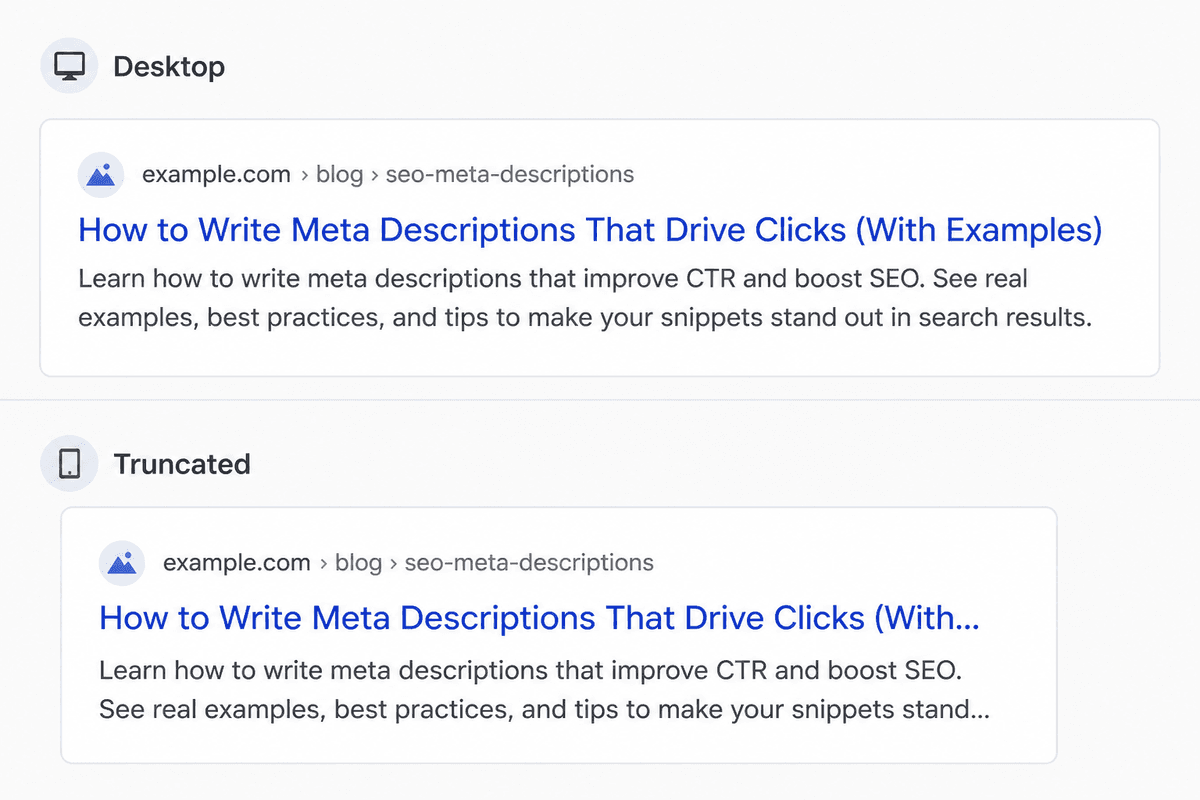
Meta description length still matters because truncation changes what searchers see. A practical target is about 50-160 characters, with the most important information placed early in the sentence.
If the description is too long, search engines may cut off the part that explains the value of the page or contains the CTA. That weakens the snippet fast.
Here are the main rules to keep in mind:
Search Engine Display Limits
Search engines like Google usually show about 155 to 160 characters of a meta description on desktop, and often a bit less on mobile. Keep the most important idea near the beginning.
Clarity and Relevance
Your meta description should tell users what they will find on the page while giving them a reason to click. If it is too vague, it will not persuade. If it is too long, it may be truncated before the value is clear.
Keyword Placement
Put the primary keyword early when possible so it remains visible even if the snippet gets shortened in search results.
Mobile-Friendly Descriptions
Because mobile snippets are often shorter, concise wording usually works better. Remove filler first, not the value proposition.
To avoid truncation issues:
- Preview your meta descriptions with SEO tools before publishing.
- Test them on desktop and mobile-style previews.
- Avoid stuffing extra keywords at the end just to squeeze in more terms.
The Role of Regular Updates in Maintaining Effective Meta Descriptions
In the always changing world of SEO, your meta descriptions are definitely not something you set up once and forget about. Just like you go back and tweak or improve your website's content every so often, your meta descriptions should also be checked and updated from time to time. Doing this helps make sure they show the most up to date and accurate stuff about your page, and that they still follow important best practices like having the right meta description length.
Why Update Your Meta Descriptions?
- Content Relevance: When you update the content on a webpage, you really need to make sure your meta description matches those changes. If not, it just feels off. Keeping it updated helps the snippet stay accurate and relevant, so people see a true, up-to-date preview before they click from the search engine results pages (SERPs).
- Keyword Optimization: As you keep tweaking your SEO strategy, you might start targeting new keywords or improving the ones you already use. So yeah, updating your meta descriptions to add these keywords can help with visibility and overall effectiveness. Just remember, relevance is super important. The keywords should fit naturally with what’s actually on the page, not feel forced.
- Adhering to Length Best Practices: Search engines like to change things a lot, including their algorithms and how they show results in SERPs. Keeping up with these changes means checking that your meta descriptions still fit within the recommended character limits, so they don’t get cut off in the search results, which looks kind of bad.
- Seasonal Adjustments: For seasonal promotions or special events and stuff like that, updating meta descriptions can help catch people’s attention at the right time and bring more traffic to certain pages that you want to highlight.
How Often Should You Review Meta Descriptions?
You should check your site's meta descriptions on a regular basis, like doing a quarterly review is usually a good starting point. Though honestly, it kind of depends on how often your site’s content changes. If you update stuff a lot, you’ll probably want to look at them more often. Tools like Moz Pro’s Site Crawl or Semrush’s Site Audit can make this a lot easier by pointing out pages with outdated or poorly optimized meta descriptions, so you don’t have to hunt them down yourself.
Best Practices for Updating Meta Descriptions
- Review in Batches: Try handling updates in groups, like by section or page type, so you can stay focused and keep things consistent across similar content. It just makes it easier to not lose track.
- Track Changes: Keep some kind of record of your old and new meta descriptions, so later you can actually see how they affected click-through rates after the updates. Otherwise it’s kind of guessing.
- Test for Impact: Play around with different wording or calls-to-action (CTAs) in your meta descriptions to see what really clicks with your audience. Some phrases just work better than others, even if they sound almost the same.
- Monitor Performance: Use analytics tools to watch if your updates line up with better results in organic search. If performance goes up, you know you’re doing something right, and if not, you can tweak again.
By regularly checking and improving your meta descriptions, you make sure they’re actually helping your SEO goals, grabbing user attention and still clearly showing what the page is about. It’s a small thing, but it really adds up.
Conclusion
A strong meta description does not try to say everything. It says the right thing clearly, quickly, and in a way that matches the page. That is what improves click quality and helps your result stand out on the SERP.
If you want a simple workflow, start with the page’s main topic, front-load the most relevant keyword, add a real benefit, and finish with a light CTA. Then compare the snippet with the actual page. If it overpromises, rewrite it. If you want help drafting faster, use Junia’s meta description generator, then edit the final version so it sounds precise and human. d look around more
With well-tuned meta descriptions, you can pull in more organic traffic, which is super important for growing your online presence. As part of your ongoing SEO work, try to regularly check and tweak these descriptions so they stay up to date and match any content changes you make.
Put this into practice and you’ll probably see it boost your SEO results a lot over time.