CHRISTMAS DEAL: Get 6 months free on all Yearly Plans (50% off).

0

Days

3

Hours

43

Mins

52

Secs

Best Surfer SEO Alternatives (We tested each one of them throughly)

Yi

Yi

SEO Expert & AI Consultant

Surfer SEO alternatives

Introduction to Surfer SEO Alternatives

As an SEO professional and full-time SEO strategist, I’ve really come to see how strong AI SEO tools can be. One tool that honestly grabbed my attention more than most is Surfer SEO. It’s kind of an all-in-one solution that gives you data-driven insights. And it’s not just for SEO professionals like me, but also for bloggers, writers, and content creators trying to rank better.

So, imagine you want to optimize a blog post or article for a specific keyword. With Surfer SEO, you can check out the top-ranking pages for that keyword and see what they’re doing right. It gives you detailed reports on their on-page SEO strategies. You see things like keyword density, how they use related keywords, how the page is structured, and a bunch of other useful stuff.

But here’s the thing, and it’s important. As powerful as Surfer SEO is, it isn’t the only tool in town. Over time, using different tools and testing a lot of things, I’ve tried out and evaluated more than 10 alternatives to Surfer SEO. After carefully comparing them and honestly nitpicking a bit, I’ve narrowed it down and handpicked what I think are the 9 best alternatives you can find on the market right now.

Among these alternatives are some of the best custom GPTs for SEO that I've tested personally. These tools are designed to automate, optimize, and elevate your workflow in 2026 and beyond.

Here's how I selected the top 9 alternatives to Surfer SEO

From my personal exploration and experience, I evaluated various tools that could potentially match or even surpass Surfer SEO in certain aspects. Each alternative brought unique strengths to the table, which I carefully considered.

Just to enhance your navigation through this guide, I have categorized these alternatives according to their distinctive features and capabilities. Having tried all of these alternatives, I ultimately chose Junia AI as the best Surfer SEO alternative. Nonetheless, each alternative on this list possesses its own strengths and could prove to be a valuable addition to your SEO toolkit.

In addition to the tools listed here, there are also some noteworthy Ahrefs alternatives for SEO that you might find useful. By the end of this guide, you'll have a clear understanding of each tool’s unique strengths and weaknesses. This will help you make an informed decision about the tool that best fits your content optimization needs.

RankingTop Surfer SEO AlternativeHighlightPricingRecommendations
1Junia AI (Best Surfer SEO Alternative)AI-powered content optimization, multilingual supportCreator: $22/month, Unlimited: $42/monthBest for those needing advanced AI writing tools and real-time SEO audit features
2ScalenutComprehensive SEO tool, real-time SEO suggestionsEssential: $23/month, Growth: $79/monthSuitable for individual creators/consultants and startups/growing businesses
3SE RankingExtensive SEO tools suite, 2 billion keywordsEssential: $55/month, Pro: $109/monthIdeal for those who want a comprehensive SEO tool suite with a large keyword database
4OutrankingAI-driven content optimization, guided workflowsSEO Writer: from $99/monthGreat for SEO professionals looking for a tool with AI-driven content optimization and workflows
5SemrushAll-in-one digital marketing platform with a wide range of SEO featuresStarts at $129/monthGood for teams needing high-quality content creation with automated keyword reporting
6WriterZenComprehensive content strategy toolCluster Only: from $19/monthRecommended for users wanting a more comprehensive approach to SEO and content strategy
7FraseAI content creation, real-time SEO suggestionsSolo: $14.99/month, Basic: $44.99/monthBest for users looking for AI-powered content creation and optimization functionalities
8ClearscopeKeyword discovery, SEO auditingEssentials Plan: $170/monthSuitable for small businesses and solo entrepreneurs looking for a general SEO tool with clean UI
9MarketmuseAI-driven content strategy tool with advanced SEO capabilities and deep topic analysisStandard Plan: $149/monthSuitable for small to large-scale enterprises.

Why Look for a Surfer SEO Alternative?

Surfer SEO is a pretty powerful tool and yeah, it gives you a lot of detailed, data-driven insights. But even with all that, it doesn’t always fit what every single person needs. So there are a bunch of reasons why you might start looking around for a Surfer SEO alternative instead.

1. Lack of Tailored Features

Every SEO tool kind of has its own personality and its own set of features. Some tools might just match your specific needs better than what Surfer SEO offers. For example:

  • Advanced AI Writing Capabilities: If you want an SEO tool that also helps with content creation, you might want something that has stronger AI writing built in. These AI writing tools can make content drafts for you, suggest edits, and sometimes even kind of predict how well your content might perform.
  • Intuitive Dashboard Design: The way a tool feels to use really matters. A simple and easy to understand dashboard can actually make you work faster, since you don’t waste time trying to find what you need or figuring out where everything is.

2. Expensive Price Point and long AI generation time

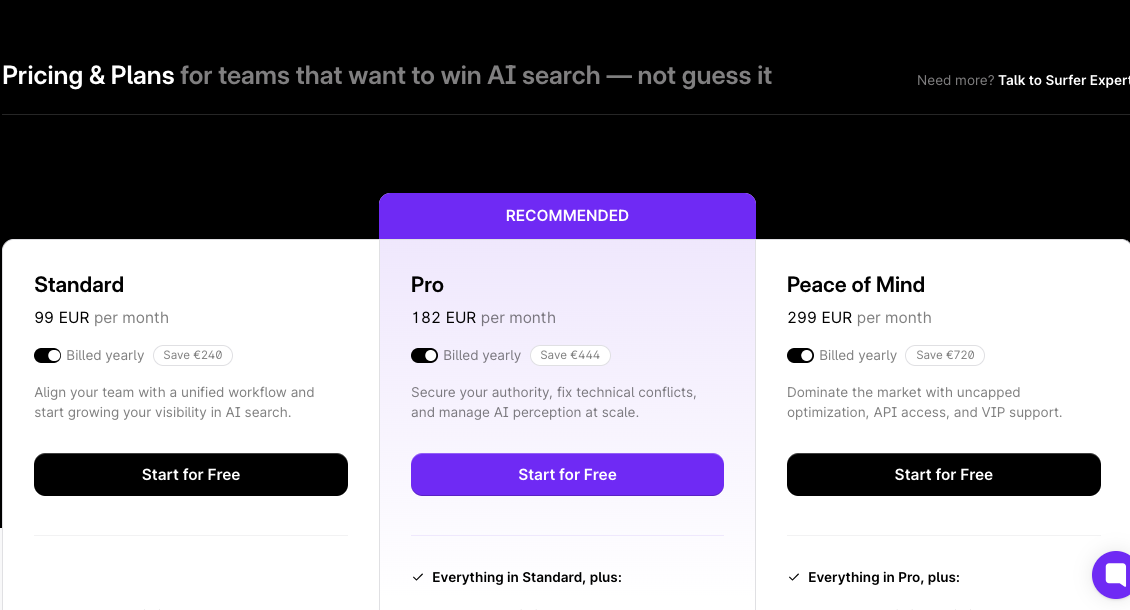
Price is another big reason people look for alternatives. If Surfer SEO's pricing of $29 per article feels a bit too high, the average wait time of 30 minutes for generating an article might also turn you off a little.

3. Lower Usability and longer Learning Curve

How easy a tool is to use and how fast you can learn it really matters too. If Surfer SEO feels kind of complicated or like it takes too long to really get the hang of, you might prefer a tool that’s more beginner-friendly or comes with clearer guides and tutorials.

4. Low Content Output Quality

The quality of the content a tool generates is super important as well. Even though Surfer SEO's AI writing is pretty solid, some users have reported that the content it creates can sometimes feel a bit off, lack flow, or just need a lot of editing. If you want high-quality content that’s closer to ready-to-publish right away, it might be worth checking out other tools that have a stronger reputation for content generation.

5. Limited Integration Capabilities

Another thing is that Surfer SEO might not work smoothly with some of the other tools or platforms you use all the time. If that’s the case, finding a Surfer SEO alternative that has better integration options can really help keep your workflow smoother and less annoying.

The digital landscape right now is honestly packed with Surfer SEO alternatives, and each one has its own mix of features and strengths.

So depending on what you actually need whether you want a huge SEO toolset, need advanced AI-powered writing, or just really want a cleaner and more user-friendly interface there’s probably an alternative out there that fits what you’re looking for.

So yeah, let’s jump in and start by looking at our first alternative: Junia AI.

1. Junia AI: Best Surfer SEO Alternative

Junia AI-best alterternative to surfer seo

Junia AI is honestly the best alternative to Surfer SEO on the top of my list right now. What really sets Junia AI apart from the other tools out there is how it uses artificial intelligence in such a smart way. It gives you a whole bunch of helpful features that can make content optimization feel a lot easier, almost like, kind of a breeze once you get into it.

Key Features

Sure Surfer SEO is definitely a solid and reliable tool in the SEO world, but i’ve found that Junia AI has a bunch of really strong features that kind of make it a better alternative. The biggest plus is the AI writing tools that Junia AI gives you, especially its really well liked AI-powered text editor. These tools are built not just for speed but also to be super easy to use, so you can create SEO-friendly content quickly and without much hassle. That way, you can spend more time on other important parts of your SEO strategy instead of getting stuck writing forever.

1. Superior AI Writing Tools Than Surfer SEO

Junia AI's AI writer feature basically levels up your whole content creation process by generating high-quality, original content from scratch. It uses advanced natural language processing algorithms to understand what you type in and then produces clear, coherent, well-written articles. For busy content creators who need to pump out a lot of content fast, this can seriously be a game-changer.

When we look closer at Junia AI's advanced AI writing tools, the benefits over Surfer SEO become even more obvious:

  • Time-Saving: The AI can generate high-quality content really fast, which saves a lot of time. With Junia AI, you can get your content ready in just a few minutes, instead of the 30 minutes you might usually spend waiting with Surfer SEO.
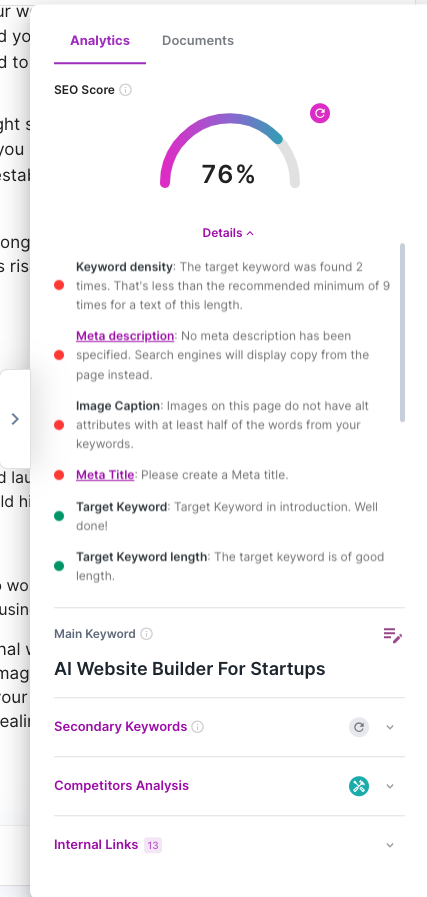
  • Optimization: With its real-time SEO content audit feature, Junia AI gives you clear suggestions on how to boost your content's SEO performance. It uses advanced natural language processing algorithms to scan through your content and offer smart recommendations, so your content is search engine optimized right from the start.
  • Consistency: The AI brand voice feature helps you generate a large amount of content that all feels consistent, making it much easier to keep up a steady and reliable output.

How Junia AI Outperforms Surfer SEO in Content Creation

Here are some of the key features of Junia AI that give it an edge over Surfer SEO when you're trying to create optimized content:

  1. SEO Content Outlines: This feature helps you make well-structured and highly optimized content by generating detailed outlines based on your target keyword. It kind of walks you through the whole process so your content lines up better with search engine algorithms.
  2. Content Briefs: With this feature, Junia AI creates briefs that list out the most important elements to include in your content, using competitor analysis and keyword research. It saves you a lot of time and energy by giving you a clear roadmap for building high-performing content.
  3. Content Expansion: Junia AI doesn’t just help with writing new stuff, it also helps expand your existing content. Its AI-powered algorithms review your content and suggest extra sections or topics you can add to make everything more complete and authoritative.
  4. Language Enhancement: Junia AI's language enhancement feature makes sure your content is not only SEO-optimized but also engaging and nicely written. It suggests ways to improve readability, tone and coherence so you can deliver a better user experience overall.
  5. Meta Title Generation: This feature of Junia AI helps you create impactful meta titles that are optimized for search engines and still attractive to users. It looks at your content and suggests relevant keywords and phrases you can use in your meta title, which increases the chances of people clicking your page in the search results.
  6. Meta Description Generation: Another really useful feature of Junia AI is its meta description generation tool. It analyzes your content and then suggests short, compelling meta descriptions that clearly summarize your page. These well-crafted meta descriptions help improve your click-through rate and can also boost your search engine rankings.

With this full set of features focused on optimizing content creation, Junia AI ends up being a powerful tool that can surpass Surfer SEO in both functionality and overall effectiveness.

2. More Comprehensive Content Optimization and Keyword Research Than Surfer SEO

Junia AI's SEO Content optimization suggestions as an alternative to Surfer SEO's

Junia AI's way of handling content optimization and keyword research is not just practical, it’s actually really extensive too.

Real-time Content Optimization

The platform’s optimization feature does a real-time analysis of your content and gives you useful hints on how to improve your SEO score while you’re writing. It pays attention to important things like:

  • Keyword density
  • Readability
  • Structure

All of these are crucial elements if you want to improve your search engine rankings.

Advanced Keyword Research

When it comes to keyword research, Junia AI honestly stands out. It helps you find:

  • Keywords with low competition
  • High traffic potential keywords
Better SERP Analyzer Tool

SERP Analyzer Tool

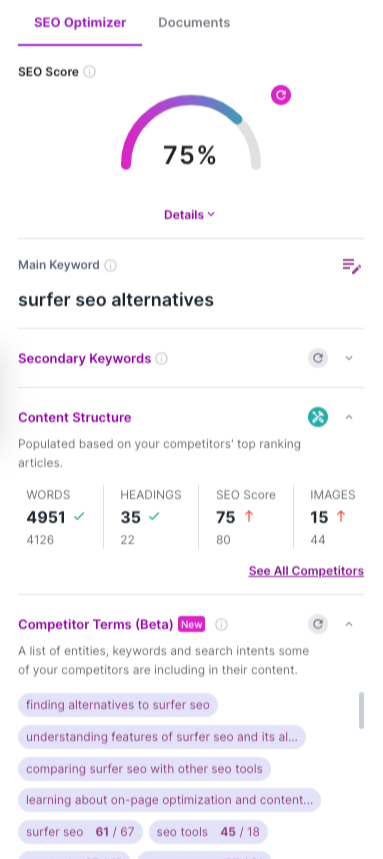
Junia AI's SERP analyzer lets you look at the top-ranking pages for your target keyword. It gives you useful insights into their content structure, word count and other things that help them rank so well. You can then use that info to tweak and optimize your own content and give it a better chance of ranking higher in search results.

This way, you can take advantage of untapped opportunities and bring in more organic traffic to your site.

3. More Powerful Integrations Than Surfer SEO

Junia AI connects smoothly with popular content management systems like WordPress, so you can publish optimized content directly without having to copy and paste or move things manually. It also offers Parasite SEO integration with well known Parasite SEO websites like Medium and Reddit. This lets you tap into the authority of those platforms and reach a much wider audience.

4. Ability to Rewrite Competitors' Articles Which Surfer SEO lacks

Junia AI's Article Rewriter

Junia AI's advanced AI abilities also cover rewriting competitors' articles. It analyzes your competitors’ content and then creates unique versions that keep the original meaning and context, while still giving you a competitive edge. This is especially helpful in really competitive industries, because it lets you stand out, refresh your angle a bit and attract more readers.

5. Better Multilingual Support Than Surfer SEO

Junia AI's multilingual support

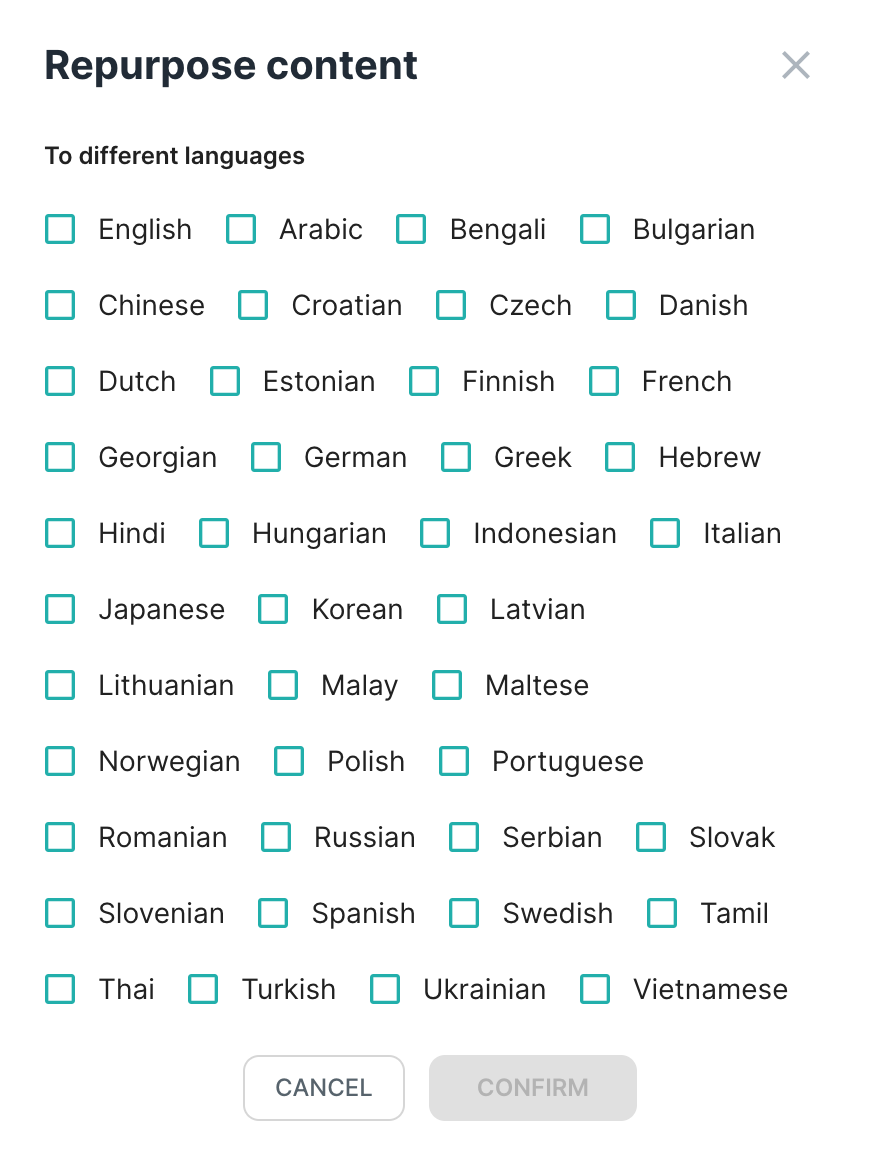
Another big advantage of Junia AI over Surfer SEO is its multilingual support. The platform can help you optimize content not just in English but also in other languages, while Surfer SEO supports only 7 languages. This is super useful for businesses working in global markets, because it helps make sure their content actually reaches and connects with international audiences.

In fact, some users have reported their content ranking on Google's front page overnight with Junia AI. The powerful mix of content optimization and keyword research basically makes Junia AI an essential tool for any content creator or marketer who wants to improve their SEO strategy and grow organic traffic to their website.

Real-World Experience: Surfer SEO vs. Junia AI

So, I’ve actually used both Surfer SEO and Junia AI myself, like in real projects, and honestly, I can say Junia AI's features are super effective. Surfer SEO is definitely a strong and powerful tool, no doubt, but I just felt like Junia AI’s user interface was easier to figure out and use. And the content output from it seemed more accurate to me too, like it just matched what I needed better.

More Affordable Than Surfer SEO

Junia AI's Pricing table

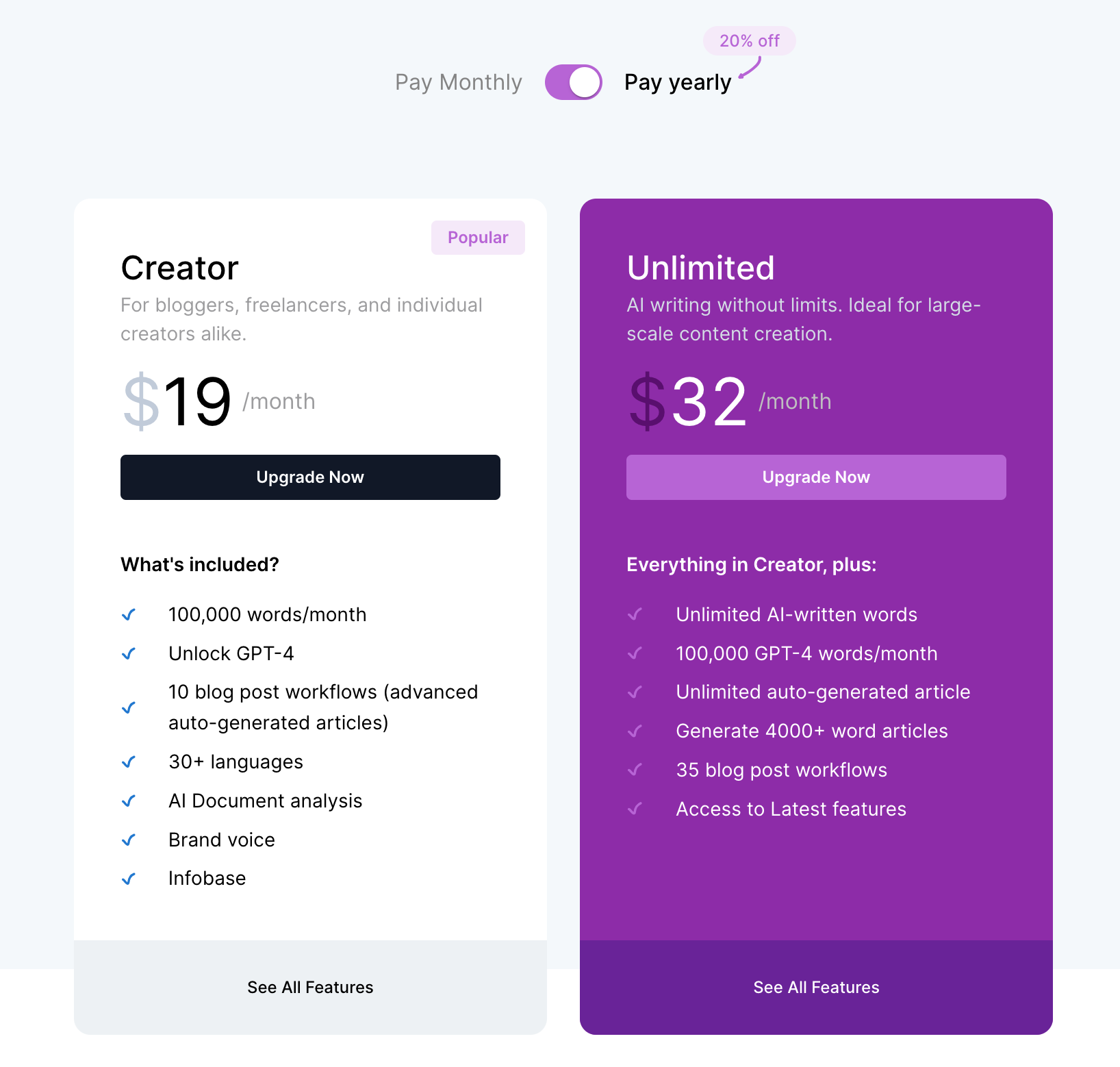
Junia AI has a few different pricing plans so, you know, people can pick what actually fits what they need:

  • The ‘Creator’ plan starts at $22 per month and gives you 10,000 words and around 60 auto-generated articles. Pretty solid if you’re just starting or don’t need a crazy amount of stuff.
  • If a business needs way more content, there’s an ‘Unlimited’ plan for $42 per month. That one comes with unlimited AI-written words and unlimited auto-generated articles, so you can pretty much write as much as you want.

Pros and Cons of Junia AI

So yeah, like pretty much any tool out there, Junia AI has its own good and bad sides. Here’s how I see it:

Pros:

  • Really intuitive interface, pretty easy to figure out once you click around a bit
  • Comprehensive keyword research functionality that covers a lot of stuff you’d normally do by hand
  • Real-time content optimization feedback, which is super helpful when you’re editing on the spot

Cons:

  • Can feel a bit overwhelming for beginners because there’s such an extensive feature set and a lot to look at
  • Pricing might be a bit high for small businesses or individual bloggers who are on a tighter budget

Final Verdict: The Best Surfer SEO Alternative

From what I’ve seen, the strengths of Junia AI really outweigh the weak parts by a lot. It gives you a pretty complete set of SEO tools, so it honestly feels like the best alternative to Surfer SEO right now. So yeah, if you’re searching for an all-in-one content optimization tool that uses the power of AI, Junia AI is definitely something you should think about trying.

2. Scalenut

Scalenut

I've also checked out Scalenut as another option besides Surfer SEO. It’s kind of like an all-in-one SEO tool, so it covers pretty much everything you’d need for content optimization. It gives you a full setup for your content optimization needs, not just little pieces here and there. Lately it’s been getting more popular in the SEO world, mostly because it has strong features and the interface is pretty easy to use, even if you’re not super advanced with this stuff.

Key Features

1. Smarter Content Optimization with Scalenut

Scalenut pretty much matches Surfer SEO when it comes to content optimization features. It gives you real-time suggestions to improve your content's SEO performance while still keeping it readable and relevant. Its AI-powered content editor checks your text against top-ranking pages, then gives you practical insights so you can improve your content using data-backed strategies. Kind of like having a smart assistant constantly comparing and tweaking things for you.

2. More Unique Keyword Research Approach

Scalenut uses a slightly different approach to keyword research. Instead of just looking at search volume or competition, it uses semantic analysis to find related keywords and topics that can help boost visibility on search engines. This more complete keyword research strategy helps you create content that actually connects with your audience and still fits what search engine algorithms are looking for. So you’re not just stuffing words in, you’re building around real topics.

3. Intuitive Dashboard and Key Metrics

The platform has an intuitive dashboard that shows key metrics at a glance, which makes it easier to track SEO progress without overthinking it. It gives you a lot of useful data, from backlink analysis to SERP overview, so you get a more holistic view of your overall SEO status. Everything feels kind of centralized, you don’t have to jump around too much.

4. AI History

Unlike Surfer SEO, Scalenut lets me see the AI’s history and learning journey, which helps me understand how its algorithms work and change over time. This kind of transparency is really useful when I’m looking at AI-generated suggestions and trying to decide if I should actually use them or ignore them. It makes the whole thing feel a bit more trustworthy, honestly.

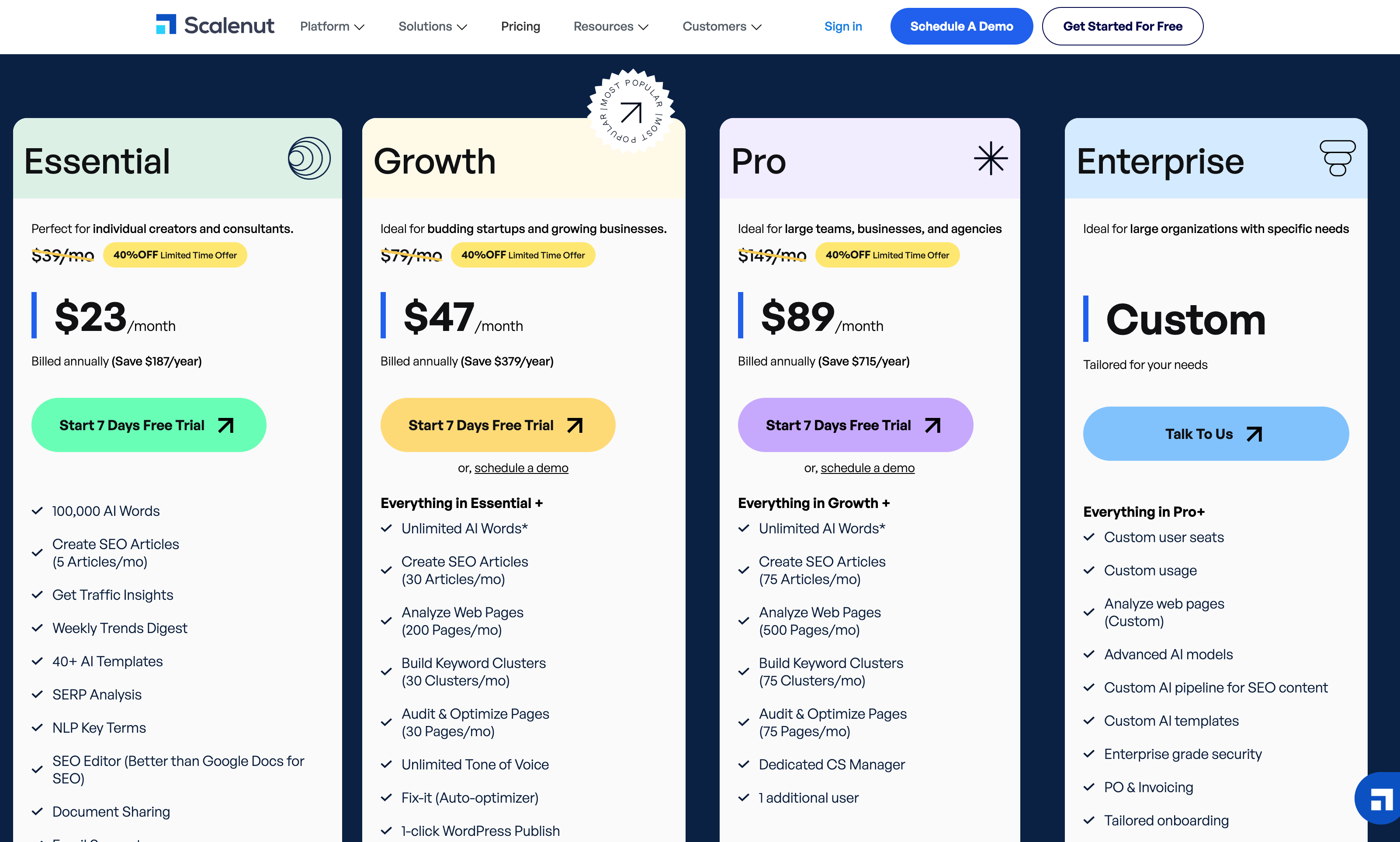
Scalenut Pricing:

Scalenut's pricing table

  • Essential: This one’s basically for solo people, like individual creators and consultants who just need the main stuff. It’s $23/month.
  • Growth: Better for small or kinda growing teams, like budding startups and growing businesses that need more room to scale. Costs $79/mo.

Pros and Cons of Scalenut

Scalenut, like any tool out there, has its own strengths and weaknesses:

Pros

  1. User-friendly interface: It has an intuitive dashboard, so you can move around the platform pretty easily and find what you need without too much confusion.
  2. Comprehensive Content Optimization: You get real-time suggestions for SEO improvements, which helps a lot for improving overall content quality.
  3. Semantic Keyword Research: It uses semantic analysis to build better keyword strategies, going further than just basic keyword statistics and simple numbers.

Cons

  1. Limited Integration: Unlike some other tools that come with integrations for platforms like WordPress and a few others, Scalenut doesn’t really have that option right now.
  2. No Free Plan: Even though it has competitive pricing plans, there isn’t a free version for users to try first, so you kind of have to commit before you actually test it properly.
  3. Lack Of Brand Voice: The AI-generated suggestions from Scalenut might not always match a brand's unique tone of voice perfectly, so you’ll probably need to go in and make some manual adjustments here and there.

My Experience with Scalenut

So, Scalenut turned out to be a pretty solid all-in-one SEO tool for me. It’s not perfect or anything, and yeah, it doesn’t really have some of the more advanced features that Surfer SEO has, but still, it kind of makes up for it. The focus on user experience and the way it handles overall content optimization gives you a pretty balanced solution for most SEO needs.

When I compare it with Surfer SEO, both of them are actually really good at content optimization. They both do that part well. But Scalenut has this interesting way of doing keyword research with semantic analysis, and that kind of gives it a bit of an edge if you’re trying to build a stronger keyword strategy. The only thing is, there’s no free plan, which might turn some people off or make them hesitate. Still, the pricing plans are pretty competitive, so honestly, it’s still worth checking out.

Is Scalenut Better for You Than Surfer?

Honestly, I think Scalenut is a really solid alternative to Surfer SEO because it takes a pretty complete approach to SEO, like it covers a lot of stuff you probably need. It might fit your specific needs and budget for an SEO tool pretty well. I ended up going with Junia AI in the end, but I still feel like Scalenut is definitely worth checking out as a possible match for your SEO strategy.

3. SE Ranking

SE Ranking

SE Ranking is another AI SEO Tool out of all the Surfer SEO alternatives I have tried, and honestly I’ve tried a bunch. I found that SE Ranking gives a pretty solid, like, all in one kind of solution if you're looking for an alternative to Surfer SEO. This versatile platform doesn’t just handle content optimization, it also comes with stuff like website auditing, competitor analysis, backlink monitoring, and a few more things packed in there too.

Key Features

1. SERP Analyzer

One thing that really made SE Ranking stand out for me was its SERP analyzer. This tool gave me a pretty detailed look into Google's search results pages for specific keywords, so I could actually see the top-ranking competitors and what kind of SEO strategies they were using.

By using the SERP analyzer, I started to understand what helps their content rank higher. That made it a lot easier to shape my own SEO approach and make more confident, like, well-informed decisions.

2. Extensive Database Feature

Another big advantage of SE Ranking compared to other tools I’ve tried is its extensive database feature. With data from over 2 billion keywords and regular updates, I pretty much always had access to fresh and up to date information.

This expansive database was super useful for finding high-potential keywords for ranking. It shows you things like search volume, keyword difficulty and more, which really helps when you’re trying to pick effective keywords for your campaigns.

3. Content Optimization

SE Ranking's content optimization feature was another highlight for me. The platform gives you practical suggestions on how to improve your content quality and relevance based on your targeted keywords, which can seriously increase your chances of ranking higher on search engine results pages (SERPs).

4. Competitive Research

The competitive research feature was really helpful for keeping an eye on competitors' performance. It helped me figure out the strengths and weaknesses in their SEO strategies and look for ways to actually outdo them, or at least try to.

5. Report Builder

SE Ranking also includes a pretty handy report builder tool that lets you create custom reports based on different metrics and KPIs. You can even schedule these reports to be sent automatically to your email, which makes it easier to keep track of your SEO progress without having to remember to check every time.

Lastly, the backlink checker tool let me keep a close watch on my link profile. It was useful for spotting high-quality backlinks and also for catching any harmful links that might mess with my SEO efforts, which honestly is something people forget about a lot.

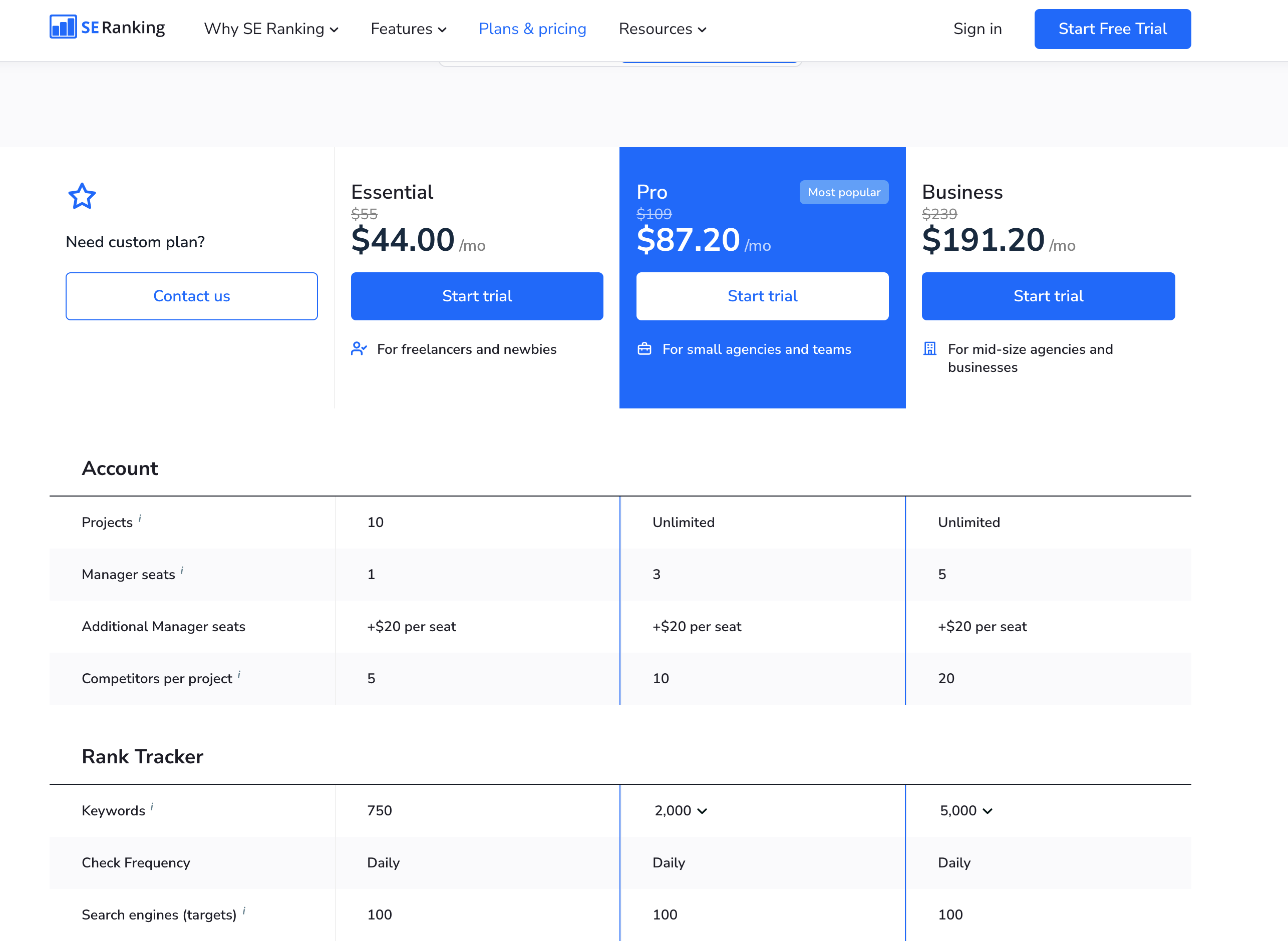
Pricing:

SE Ranking's pricing table

  • Essential - $55/month: This one is kind of the basic plan, mostly meant for freelancers and newbies who are just getting into it and don’t need anything super advanced yet.
  • Pro - $109/month: Better for small agencies and teams that need more features and, you know, plan to work on multiple projects together.

How does SE Ranking compare with Surfer SEO?

So, I’ve used both of these tools for a while now, and here’s kind of how I see the pros and cons:

Pros

  • SE Ranking offers a wider range of tools compared to Surfer SEO, like it just has more stuff you can play with overall
  • The SERP analyzer provides detailed insights that are highly valuable for SEO strategy formulation, which honestly helps a lot when you’re planning what to do next
  • Its extensive database feature offers a wealth of keyword information, so you get tons of ideas and data to work with

Cons

  • The user interface can be slightly overwhelming because there are so many features everywhere, it takes a bit to get used to it
  • While it offers much more than just content optimization, if you're specifically looking for this feature, Surfer SEO may seem more specialized and a bit more focused
  • Extra payment is required for the backlink checker, which is kind of annoying if you’re on a tight budget

Is SE Ranking Better for You Than Surfer?

So, after trying both platforms for a while, I noticed something kind of clear. Surfer SEO is mainly about content optimization, like it really focuses on that part. But SE Ranking feels more like a full package, it takes a more holistic approach to SEO overall. If you’re looking for different tools and not just content optimization stuff, SE Ranking could honestly be a really good fit for you. Still, it’s important to remember that the best alternative to Surfer SEO really depends on what you personally need from an SEO tool. Everyone’s situation is a bit different. In the end, even though SE Ranking is pretty strong and I still think it’s a solid alternative to Surfer SEO, I actually ended up choosing Junia AI as my main tool. It just fit my workflow better.

4. Outranking

Outranking

When I was looking at different alternatives to Surfer SEO, I just kinda kept coming back to Outranking. It stood out because it uses Artificial Intelligence (AI) in a pretty cool way for content optimization.

So basically, I found Outranking to be a content optimization tool powered by AI that really helps make creating SEO-friendly content a lot easier. Like, it takes a bunch of the guesswork out. It uses automated workflows and AI-driven insights together, which, honestly, makes the whole process feel way more simple and streamlined.

My Experience with Outranking

1. Guided Workflows

What really stood out to me about Outranking was its guided workflows. Basically, they’re like step by step guides that walk you through the whole content creation process. From researching keywords, to writing, to doing those last little edits before you hit publish. It kind of holds your hand, in a good way.

  • Real-time Suggestions: While I was writing, the tool gave me real-time suggestions to improve my content's SEO performance. So as I typed, it kept telling me what to fix or add. This made it way easier to create articles that were actually engaging and also more likely to rank higher in search engine results.
  • Ease of Use: The guided workflows were pretty intuitive and user friendly. I didn’t feel lost in menus or anything. They work well for SEO beginners like I used to be, but also for more experienced people who already know what they’re doing.

2. Researching SERPs and Keywords

Outranking also impressed me with how strong it is for researching SERPs and keywords. This part honestly helped me a lot.

  • SERP Analysis: With Outranking, I could actually dig into search engine result pages (SERPs) and see what was working for my competitors. I got to study the kind of strategies that were getting them good results. This helped me understand their strengths better and then build a more competitive SEO strategy of my own.
  • Keyword Research Tool: The platform has a keyword research tool that helped me find profitable keywords. Not just random stuff, but keywords that had real potential. By targeting these high potential keywords in my content, I was able to drive more organic traffic to my site over time.

3. On-page Optimization

Outranking doesn’t just stop at keyword research and competitor analysis. It goes further. It gives you tools for on-page optimization too, so each page on my website could be fully optimized for my targeted keywords and still follow SEO best practices. It made me way more confident that my pages weren’t missing something important.

4. In-document Commenting

Another feature I really liked was Outranking's in-document commenting. This made working with my team a lot smoother. We could leave feedback, share suggestions, and make edits all inside the same document instead of jumping between apps or messages. It simplified the whole process of creating SEO friendly content and helped keep everyone literally on the same page, which was honestly a relief.

Pricing:

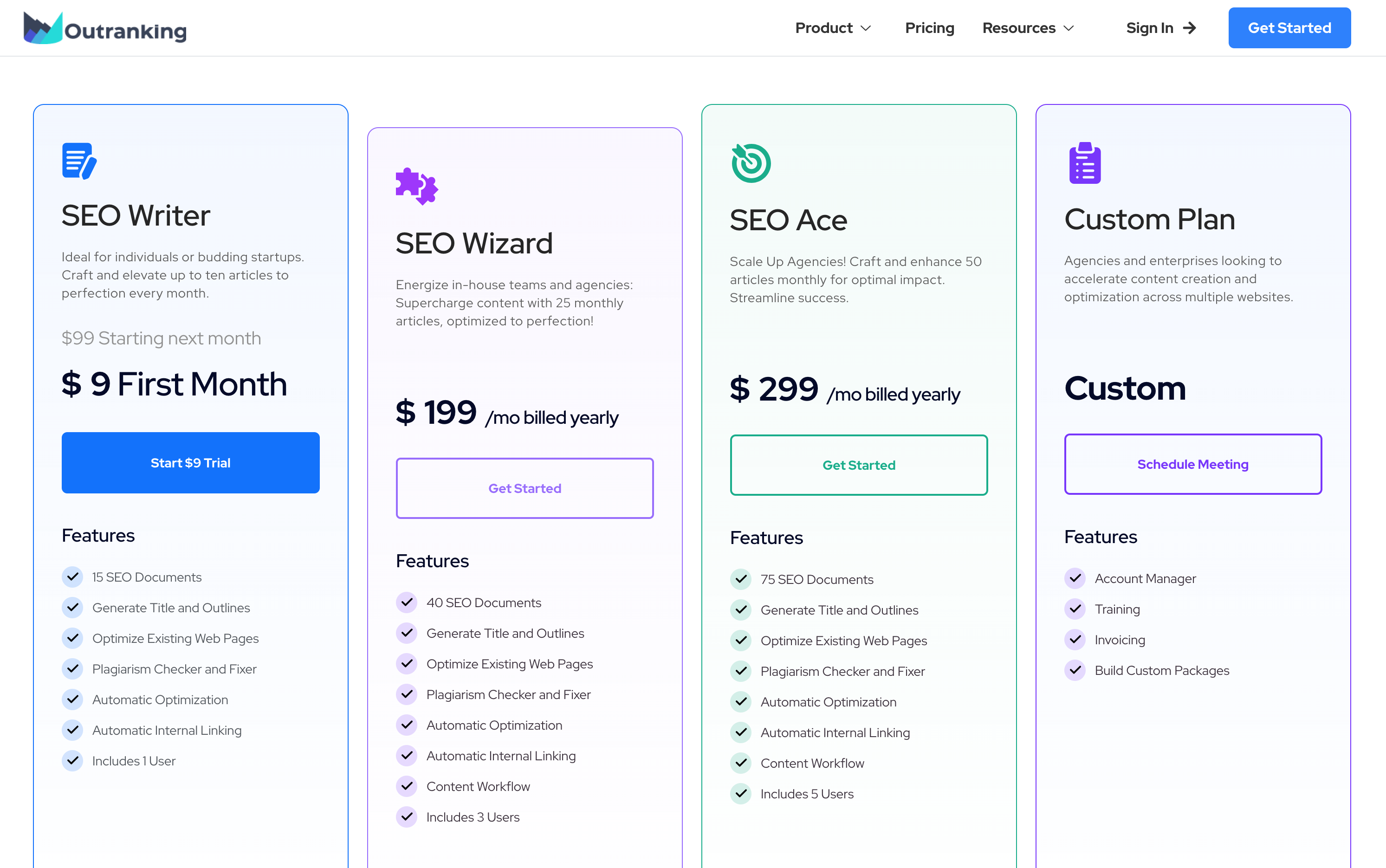
Outranking pricing

So here are the pricing options for Outranking that I ended up looking at and kinda comparing:

  • SEO Writer - Ideal for individuals or budding startups and it starts from $99/month
  • SEO Wizard - Perfect for in-house teams and agencies and this one starts from $199 /mo.

Pros of Using Outranking:

  • AI-Driven Content Optimization: The AI-driven insights provided by Outranking really helped me. It made it a lot easier to create content that felt properly optimized without me overthinking every little thing.
  • Thorough SERP and Keyword Research: This feature let me check what strategies were actually working for my competitors, then kinda borrow those ideas and apply them to my own content.
  • User-Friendly: With the guided workflows and all that, even as a beginner I could find my way around the platform pretty easily. It didn’t feel super confusing or anything.

Cons of Using Outranking:

  • Less Comprehensive SEO Data: Compared to Surfer SEO, I felt like Outranking just didn’t give the same level of detailed data related to SEO metrics. It’s there, but not as deep as I wanted sometimes.
  • Reliance on AI Suggestions: The AI suggestions are helpful, for sure, but you can’t just blindly follow them. They really shouldn’t replace human judgment and real SEO experience, so you still have to think things through yourself.

Is Outranking Better for You Than Surfer?

So, from using both tools for a while, I felt like Outranking had a simpler and more straightforward way of doing content optimization. It just felt easier to follow. But if you’re the type of person who really wants super detailed SEO metrics and lots of numbers to dig into, then you might like Surfer SEO more.

In the world of SEO optimization tools, I honestly consider Outranking an innovative player. It kind of opens the door for pretty much anyone to create search engine optimized content without too much struggle. Like, whether you’re already an experienced SEO expert or you’re just starting out like me and figuring stuff out as you go, this AI-driven tool can definitely help you improve your content creation process.

Even with all that, I did end up going with Junia AI as my main tool in the end. But I still see Outranking as a really strong alternative to Surfer SEO, and I’d still recommend checking it out.

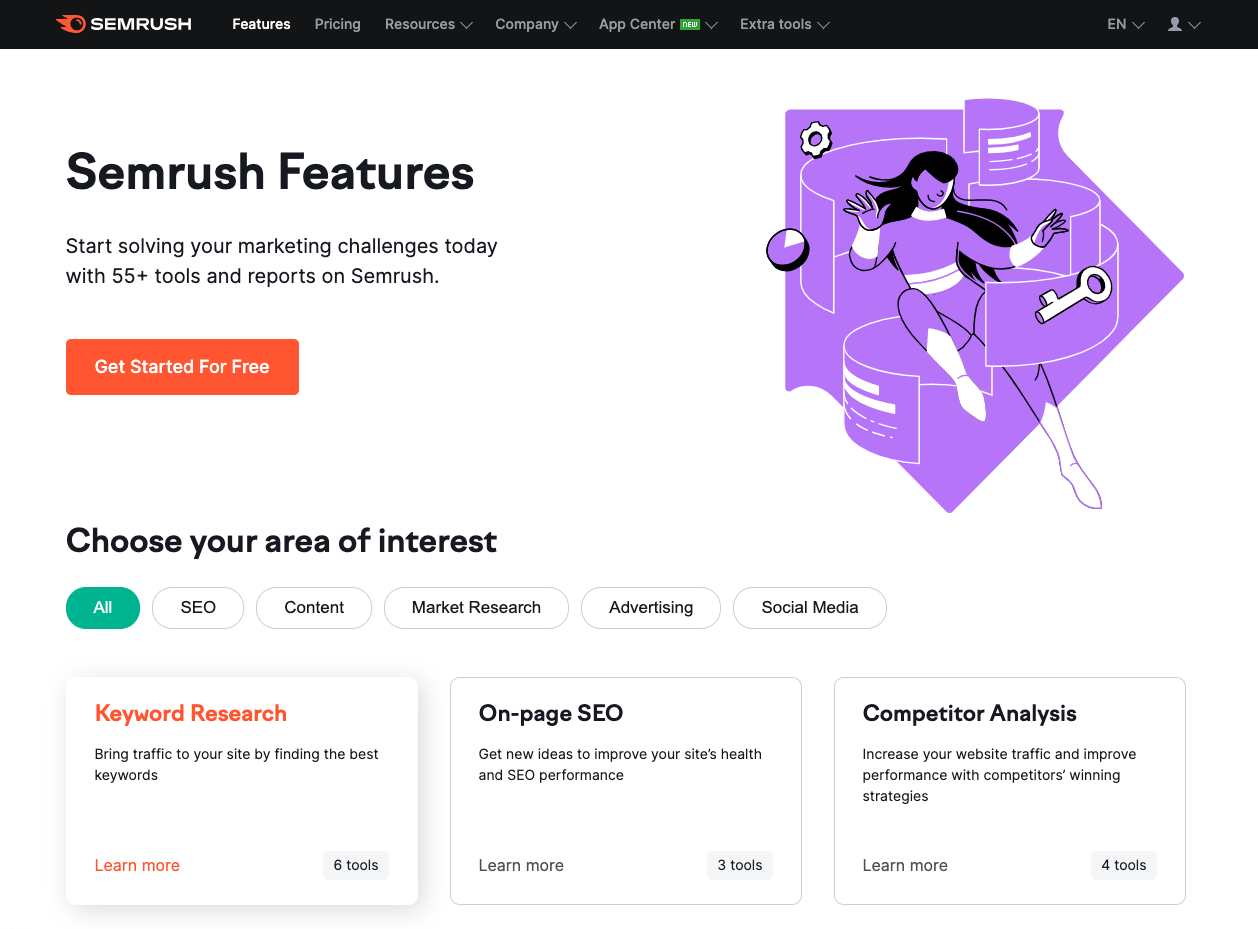
5. Semrush

Semrush as a Surfer SEO Alternative

Semrush is a pretty solid and well known SEO tool that I've actually used myself as an alternative to Surfer SEO. It’s kind of an all in one platform, you get a whole bunch of tools in one place for different SEO stuff. Things like keyword research, checking your competitors, and doing site audits and all that. So yeah, if you want something more complete, Semrush is a comprehensive platform that covers a lot of those SEO tasks, from keyword research to site audits and more.

Key Features of Semrush

With Semrush, you get a bunch of really useful features to work with, like seriously a lot:

  • AI Writing Assistant: This is made to help you create SEO-friendly content and it gives you helpful tips and recommendations for optimization so you can tweak stuff and make it better.
  • Competitor Analysis: Lets you check out your competitors' websites and their strategies, so you can see what they’re doing and then use those insights to improve your own site.
  • Backlink Tracking: Helps you keep an eye on and analyze the backlinks pointing to your website, which is actually super important for SEO and ranking.
  • In-depth Website Audits: Gives you detailed reports about your website’s health and points out problems or areas that need improvement so you know what to fix.

All of these features, and some others too, really help boost your online visibility and improve your ranking over time.

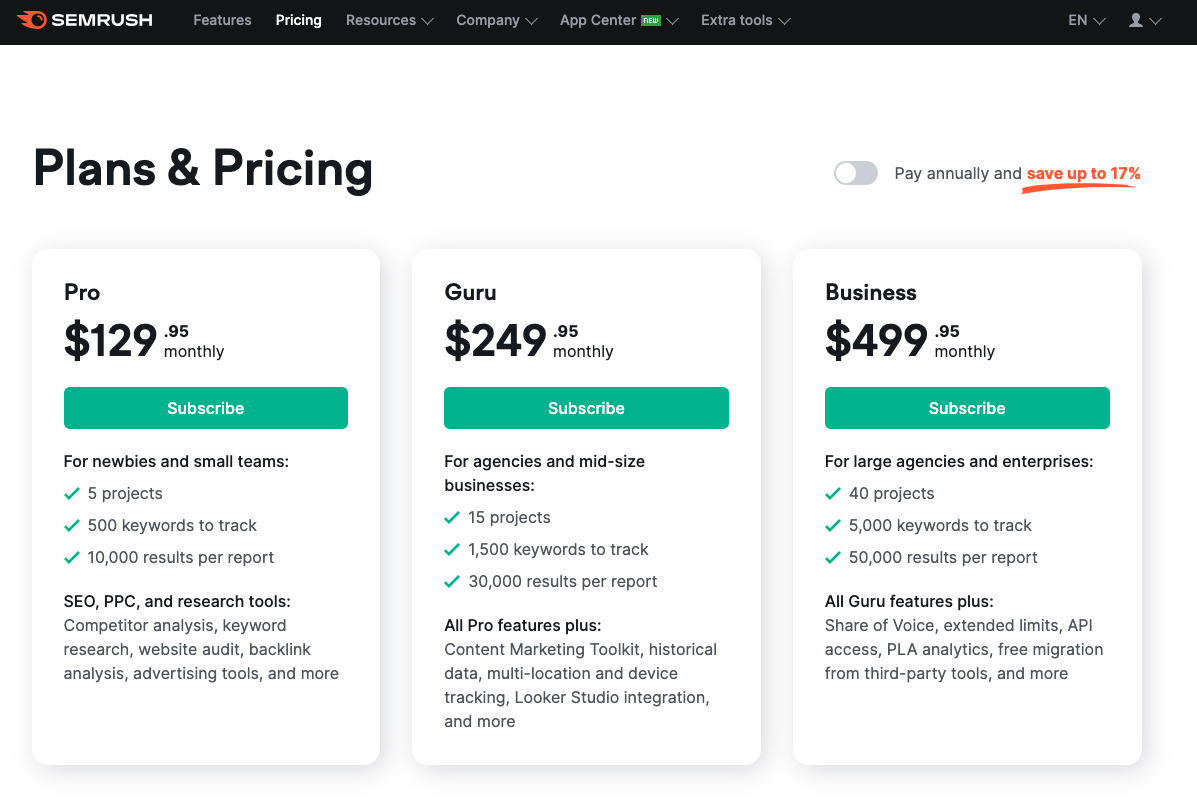
Pricing Options for Semrush

Semrush's pricing plansSemrush has a bunch of different pricing plans, so it kind of works for a lot of people and budgets. It offers options that are good for pretty much everyone, from beginners who are just starting out with SEO and testing things, to more experienced pros who need advanced features and more serious tools. The cheapest plan starts at $129/month.

Pros and Cons of Using Semrush

To really give a full picture, it’s important to look at both the good and the bad sides of using Semrush for SEO purposes. So yeah, let’s break it down a bit.

Pros

  1. Comprehensive SEO Tool: Semrush is a pretty all-encompassing SEO tool that packs a lot of stuff in one place, like keyword research, site audits, competitor analysis, and backlink tracking. So it kind of becomes a one-stop-shop for most of your SEO needs, which is really convenient.
  2. User-Friendly Interface: Even though it has a huge range of tools and features, Semrush still manages to keep a user-friendly interface. It’s fairly easy to click around and figure things out, so beginners can use it, but it still has advanced features that more experienced professionals can dig into.
  3. Detailed Reporting: Semrush gives you detailed reports with a lot of useful insights into how your website is doing. These reports can help you spot what’s working well and what’s not so great, so you can make smarter decisions about your overall SEO strategy.

Cons

  1. Costly for Small Businesses: Even though Semrush has a few different pricing options, the cost can still be a bit much for small businesses or people who are just getting started with SEO. The cheapest plan starts at $129/month, which, honestly, can add up really fast if you’re on a tight budget.
  2. Steep Learning Curve: Even with the user-friendly interface, Semrush still has a pretty steep learning curve because it offers so many different features and tools. It might take a while before you really understand everything and can use all of its capabilities properly.
  3. Limited Number of Projects: Semrush does let you handle multiple projects at the same time, but there is a limit based on the pricing plan you pick. This limit can hold you back if you’re trying to manage a lot of websites or run large campaigns all at once.

My Experience with Semrush

So I got the chance to try out Semrush for a while, and honestly, I was really impressed with how powerful it is and how smoothly it handles different SEO tasks. It felt super professional and kind of, like, packed with tools. But even with all that, I ended up preferring Junia AI more, mostly because it’s just simpler to use and more affordable too. Still, Semrush is definitely a strong alternative to Surfer SEO, especially with all its wide-ranging features and the solid reputation it has in the industry.

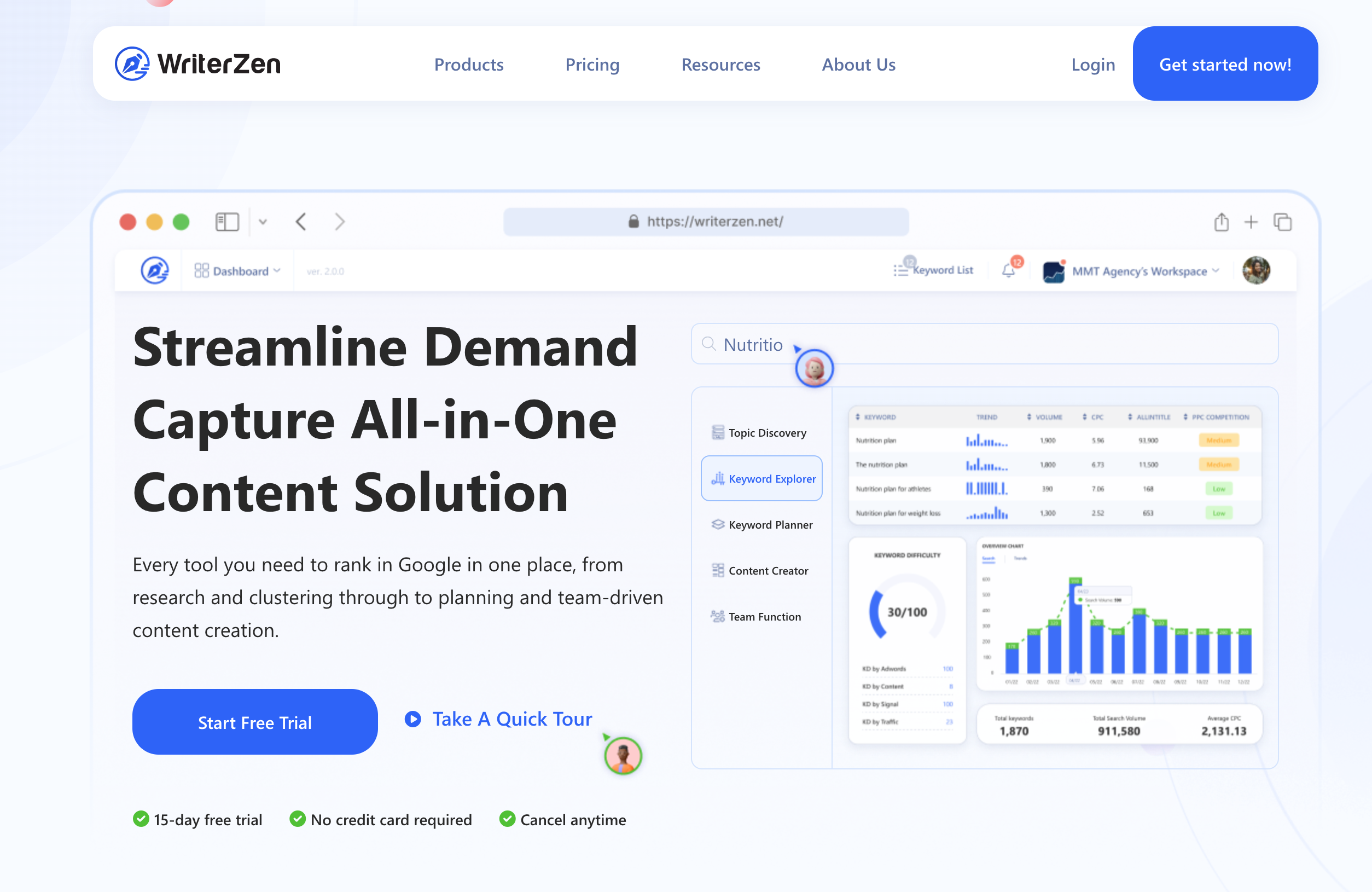
6. WriterZen

WriterZen

So as a content creator, I've honestly found WriterZen to be a really solid all-in-one tool for what I need. It’s not just another random alternative to Surfer SEO or whatever, it actually feels like a full platform. It pulls a bunch of different SEO tools together in one place, so it kind of turns into this one-stop shop for digital marketers and SEO fans like me. And yeah, it just makes things easier.

Key Features of WriterZen

With WriterZen, you can do quite a lot actually:

  • Run really in-depth keyword research, where you look at the competition and find potentially profitable keywords that can push your content up to the top of search engine results pages. The tool gives you data like keyword volume and difficulty, and also suggests related long-tail keyword ideas. So you’re not just guessing.
  • Get really good at search intent analysis too. This feature basically helps you understand why people are searching for certain keywords and what kind of content they expect to see. When you match your content to that user intent, it becomes more relevant and has a better chance of ranking higher. It just fits what they want, you know.
  • Use the strong content optimization tools in WriterZen. It gives you real-time tips on how to improve your text based on SEO best practices. You get clear, practical advice on where to put keywords, how long sections should be, and a bunch of other details that can boost how well your content performs.
  • Make use of the AI writer for creating SEO outlines. This feature helps you build structured articles and also makes sure they’re optimized for search engines right from the beginning, so you’re starting off in a good place instead of fixing everything later.

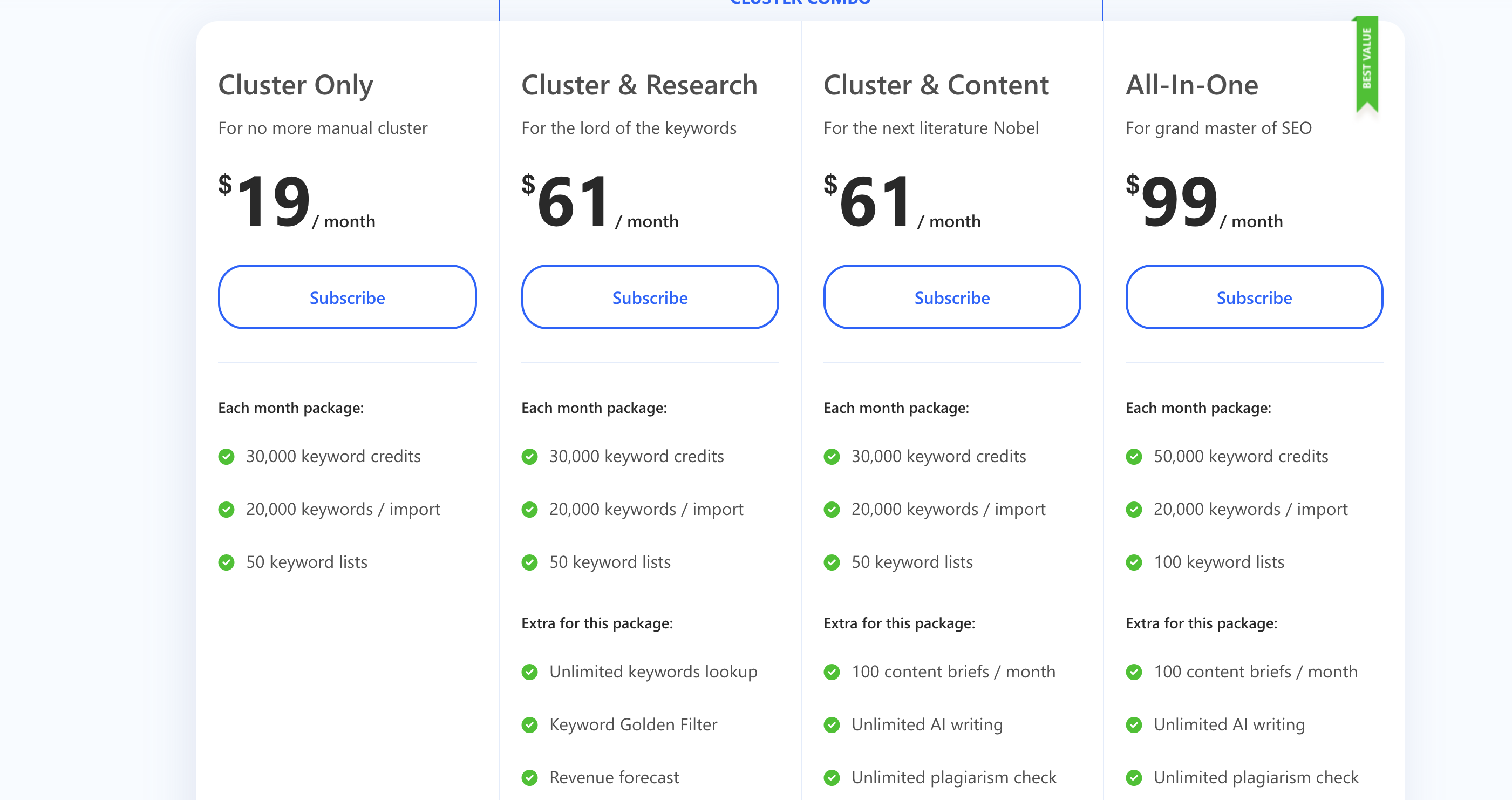
Pricing:

WriterZen pricing

So yeah, you can pick from a couple of pricing options, kind of simple actually:

  1. Cluster Only: if you’re tired of doing manual cluster stuff, this one starts from $19/ month
  2. Cluster & Research: for the lord of the keywords vibe, this plan starts from $61/ month

Pros and Cons

So yeah, just like any tool out there, WriterZen has its own strengths and also a few weak spots. Here’s kind of a quick rundown of how I see it:

Pros:

  • Really solid, comprehensive suite of SEO tools all in one platform.
  • Very extensive keyword research capabilities, like you can dig pretty deep.
  • Pretty effective search intent analysis, helps you figure out what people actually want.
  • Real-time content optimization recommendations while you’re writing.
  • AI writer for SEO outlines, which saves a lot of time honestly.

Cons:

  • The platform might feel a bit overwhelming for beginners because it has so many features.
  • It can be more expensive compared to some other alternatives, depending on your budget and all that.

Is WriterZen Better for You Than Surfer?

From my experience with WriterZen, I feel like it’s actually a pretty strong tool and has a lot going on. It’s really good if you want an all-in-one SEO solution and don’t want to jump between a bunch of different tools. It does take a bit of time to get used to though, because there are so many features and it can feel a little overwhelming at first.

Compared to Surfer SEO, WriterZen gives you a more complete approach to SEO and content strategy. While Surfer SEO is mostly focused on content optimization and keyword research, WriterZen comes with more tools and more features that help you build a full content strategy from start to finish. So yeah, if you want something more all-around, WriterZen might fit you better.

7. Frase

Frase as an alternative to Surfer SEO

When I was looking deeper into different Surfer SEO alternatives, I kinda randomly came across Frase. This AI-driven tool really grabbed my attention, honestly, with how it claims to totally change the way we handle content creation and optimization. It just sounded like it could really shake things up.

Key Features

1. AI-Powered Content Briefs

It honestly feels like having a personal assistant sitting next to me who prepares detailed briefs for me. These briefs are packed with topic ideas, relevant keywords, and useful sources that kind of guide my writing toward SEO success. It saves a lot of time, and also, it keeps me focused on what actually matters.

2. Competitor Analysis

Frase makes it super easy for me to see what my competitors are doing right. I can look into their top-performing content and, from that, I get really helpful insights about what works in my niche. Then I can figure out how to improve my own content and maybe even beat them a bit.

3. Question Discovery Feature

This dynamic feature helps me find out what questions my target audience is actually asking online. When I add these questions into my content strategy, it’s helped boost engagement and also improve my SEO performance. It’s kind of cool because you start writing exactly what people are already curious about.

4. Automatic Content Optimization

I get real-time suggestions from Frase for optimizing my content based on best SEO practices. So while I’m writing, it keeps helping me tweak things and make sure it’s set up for maximum visibility on search engines. It feels like a quiet little coach reminding me what to fix.

5. Custom Tool

The flexibility to create a custom tool using Frase's existing features adds this extra layer of personalization to the toolkit. I can sort of shape it to match my workflow, which makes it feel more like my own setup than just another tool I’m forced to use.

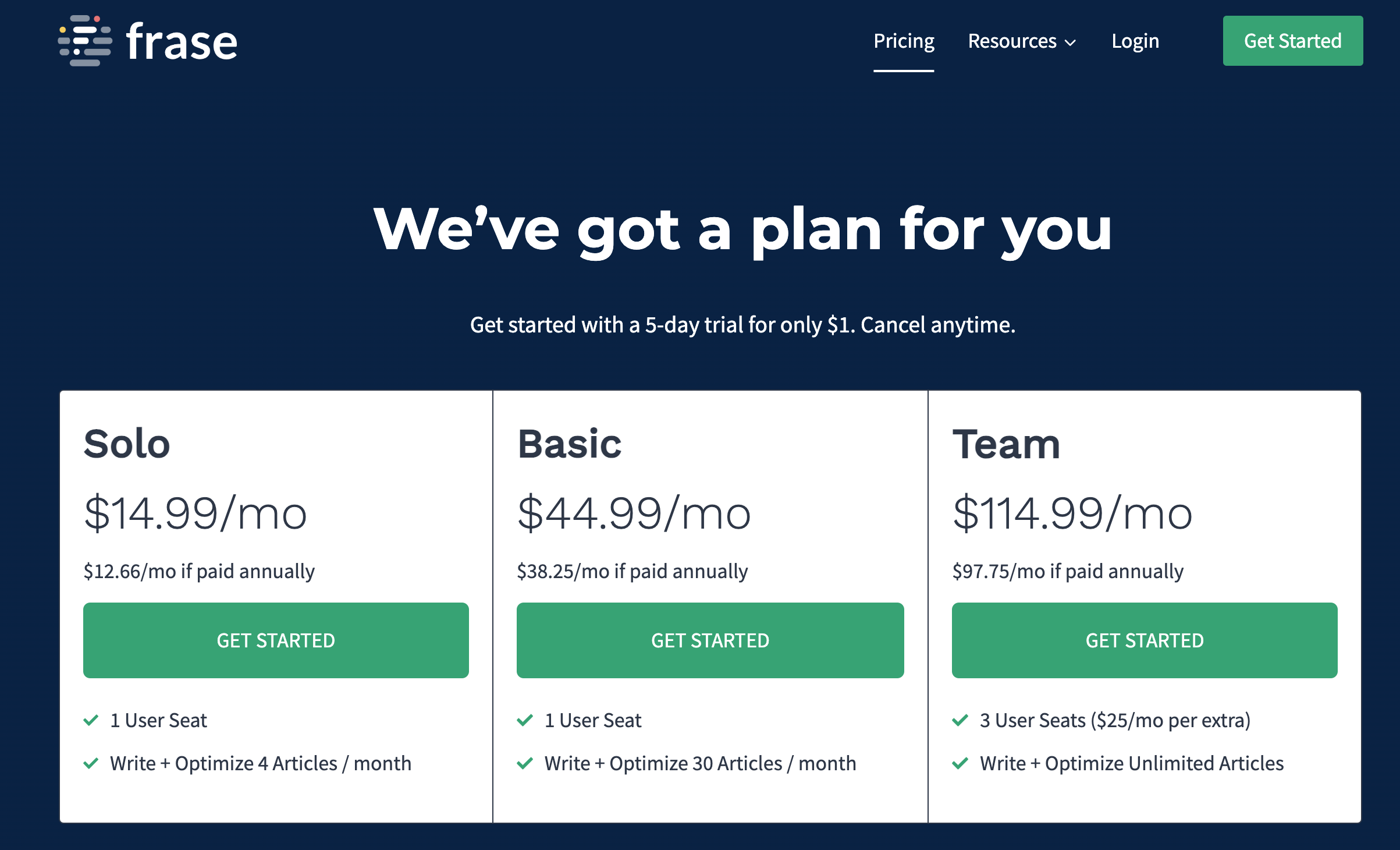
Frase Pricing

Frase's pricing compared to Surfer SEO's

Frase's pricing is actually pretty simple and kind of flexible for different people and teams:

  • Solo: $14.99/mo, you can write + Optimize 4 Articles / month, so this one is more for light users or just starting out
  • Basic: $44.99/mo, write + Optimize 30 Articles / month, better if you’re doing content more regularly and need a bit more room
  • Team: $114.99/mo, write + Optimize unlimited Articles / month, this one is really for bigger teams or if you just publish a lot and don’t want to worry about limits

Pros and Cons of Using Frase

So from my experience so far, here are some of the main strengths and weaknesses of Frase:

Pros:

  • Pretty efficient content creation with AI assistance, it saves a lot of time
  • Gives detailed competitor analysis so you can see what others are doing
  • Has a unique question discovery tool, which is actually really helpful for finding content ideas
  • Real-time SEO suggestions while you write, which is nice so you don’t forget stuff

Cons:

  • The user interface can be a bit confusing at first for beginners, kind of takes a minute to get used to
  • There are occasional glitches with the AI tools, not super often but enough to be a little annoying

When I compare Frase to Surfer SEO, Frase stands out more with its targeted AI-powered tools and insights. Surfer SEO feels like it has a broader range of features for overall SEO management, but Frase is more focused, if that makes sense.

Is Frase Better for You Than Surfer?

So, I’ve used both Frase and Surfer SEO for quite a while in my career, and here’s kind of my personal breakdown of how they compare:

Frase

The AI-Powered Content Briefs from Frase honestly changed the way I create content. It gave me really detailed insights and suggestions that helped me put together content that was actually SEO-aligned and not just random guessing.

The Competitor Analysis feature was another big plus for me. It helped me spot gaps in my content and plan better strategies to fill them. The Question Discovery feature though, was sort of hit-or-miss. Sometimes it was super helpful, other times the questions felt kind of off or not really relevant.

It did take me a little while to get comfortable with the user interface, and I ran into a few issues with their AI tools here and there, nothing totally deal-breaking but still a bit annoying.

Surfer SEO

Surfer SEO scored pretty high for me when it came to its clean, streamlined user interface and its full set of SEO management tools. It’s easy to move around in and manage different parts of your SEO. But it just doesn’t really have the same AI-powered insights that made Frase feel special to me.

If you want an SEO tool with lots of features and simple navigation, Surfer SEO might be the one you go with. But if you’re more interested in using AI for content creation and optimization, then Frase’s unique functionalities are definitely worth checking out.

8. Clearscope

Clearscope is the second last Surfer SEO alternative on our curated list, kind of near the end but still important to talk about. It comes with a bunch of features that really do make it worth checking out and maybe trying for yourself. But yeah, like pretty much every tool out there, it has its own strengths and weaknesses, so it’s not totally perfect or anything.

Key Features

Here are some key features of Clearscope, just to give you a quick idea of what it can do:

  • Keyword Discovery Tool: Helps you find new keyword opportunities for your content strategy, so you’re not just guessing what to write about all the time.
  • SEO Auditing: Lets you check the SEO health of your existing content and see what’s working and what kinda needs fixing.
  • Simultaneous Reporting: Lets you run multiple reports at once, which is pretty nice if you don’t want to sit around waiting for each one, one by one.
  • Platform Compatibility: Works smoothly with WordPress and Google Docs, so you can move between platforms without it feeling like a big hassle.
  • Clean User Interface (UI): Has a simple, user-friendly design that’s pretty easy to understand, even if you’re just starting out.
  • Long-form Content Creation Support: Especially helpful if you’re interested in creating longer content and you want it to still be good for SEO and, you know, actually readable.

Pricing

Clearscope has two main pricing tiers you can pick from:

  1. Essentials Plan: This one costs $170/month and it’s usually good for small businesses or solo entrepreneurs just getting serious about content.
  2. Professional Plan: This plan is priced at $350/month, and it’s more for bigger teams or businesses that have, like, more complex or extensive needs.

Cons

Even though Clearscope has some really cool features, it still comes with a few downsides:

  • Language Support: It only supports 5 languages, while Junia supports over 30 languages and Surfer supports 7 languages, so yeah, that’s a pretty big difference.
  • Pricing: Clearscope's plans are more expensive than Junia's, but they actually offer fewer features, which feels kind of backward honestly.

Is Clearscope a Better Fit Than Surfer SEO?

Choosing between Clearscope and Surfer SEO kinda just comes down to what you actually need. So yeah, here’s my honest take after using both of them for a while:

  • If you're looking for more AI-powered insights and tools that are really focused on content creation and optimization, then Surfer SEO might honestly be the better choice for you.
  • On the other hand, if you want more of a general SEO tool where you can run multiple reports and you like having a really clean UI to work with, then Clearscope could be a better fit.

At the end of the day, the best tool is the one that actually matches your own workflow and habits. So try to spend a bit of time messing around in each platform, since most of them offer free trials or demos anyway, and just see which one feels more natural and actually helpful for you.

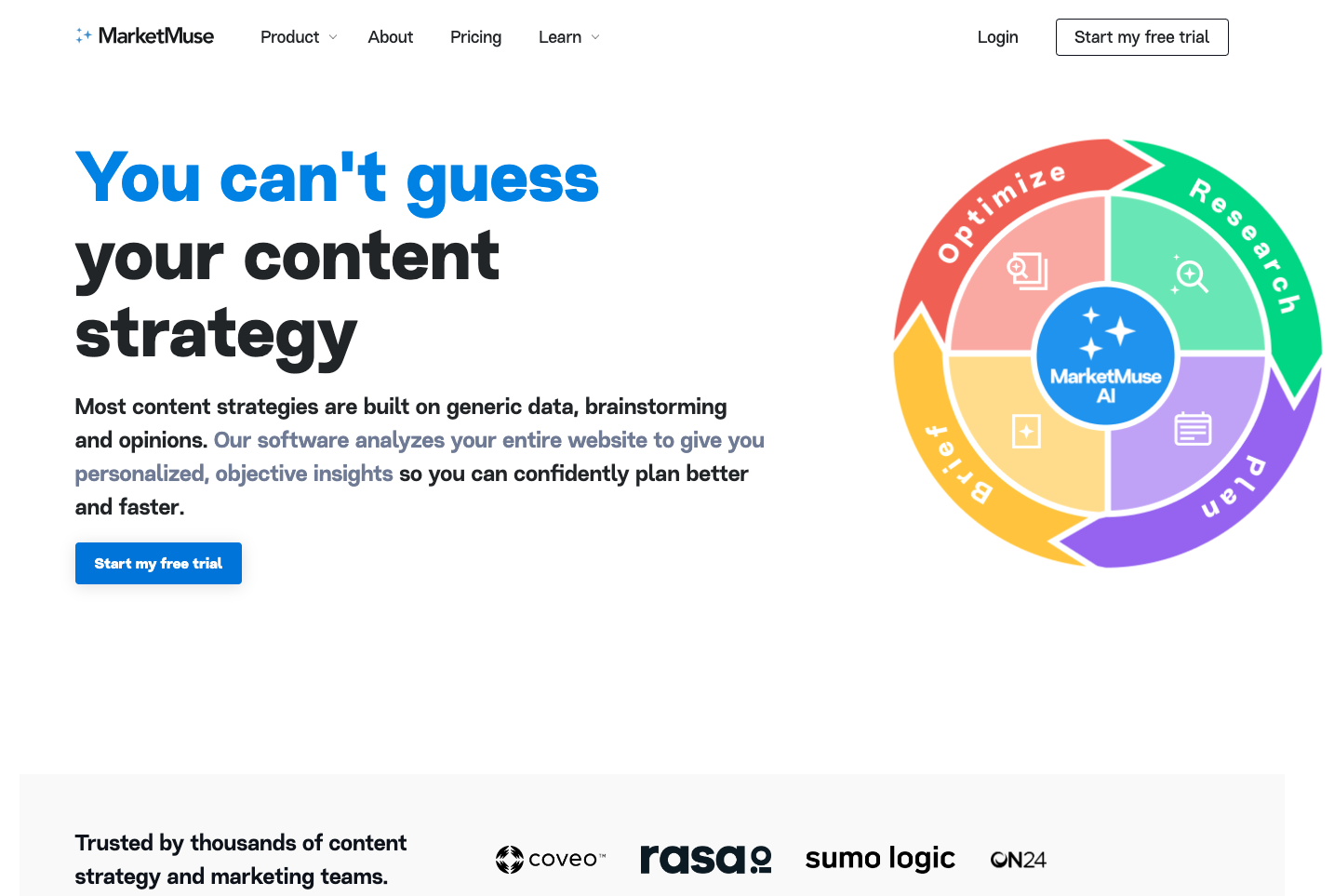
9. MarketMuse

MarketMuse as an the last alternative to considered for Surfer SEO

So yeah as I’m wrapping up my list of Surfer SEO alternatives, I want to quickly talk about MarketMuse. It’s kind of the last one on the list, but still pretty interesting. This tool uses artificial intelligence to help me put together content that shows up nicely in search engines and still actually makes sense and feels useful for my target readers. Basically it tries to balance both things at the same time, which is pretty helpful when you’re stuck staring at a blank page.

Key Features of MarketMuse

MarketMuse has several unique features that really stand out from other tools, and honestly, it’s kinda cool:

  • Content Strategy and Planning: With MarketMuse, I can build a pretty detailed content strategy by finding gaps in my existing content that I didn’t even notice before.
  • AI-Powered Content Briefs: The AI on this platform creates these super detailed outlines for my content, suggesting topics, sections, and keywords, so I don’t have to start totally from scratch.
  • Competitive Analysis: It compares my content with the top-ranking articles for a specific keyword and shows me exactly where I could improve or add more info.
  • Content Optimization Score: Every piece of my content gets a score that shows how well it’s optimized for SEO, which makes it easier to see what needs fixing or updating.

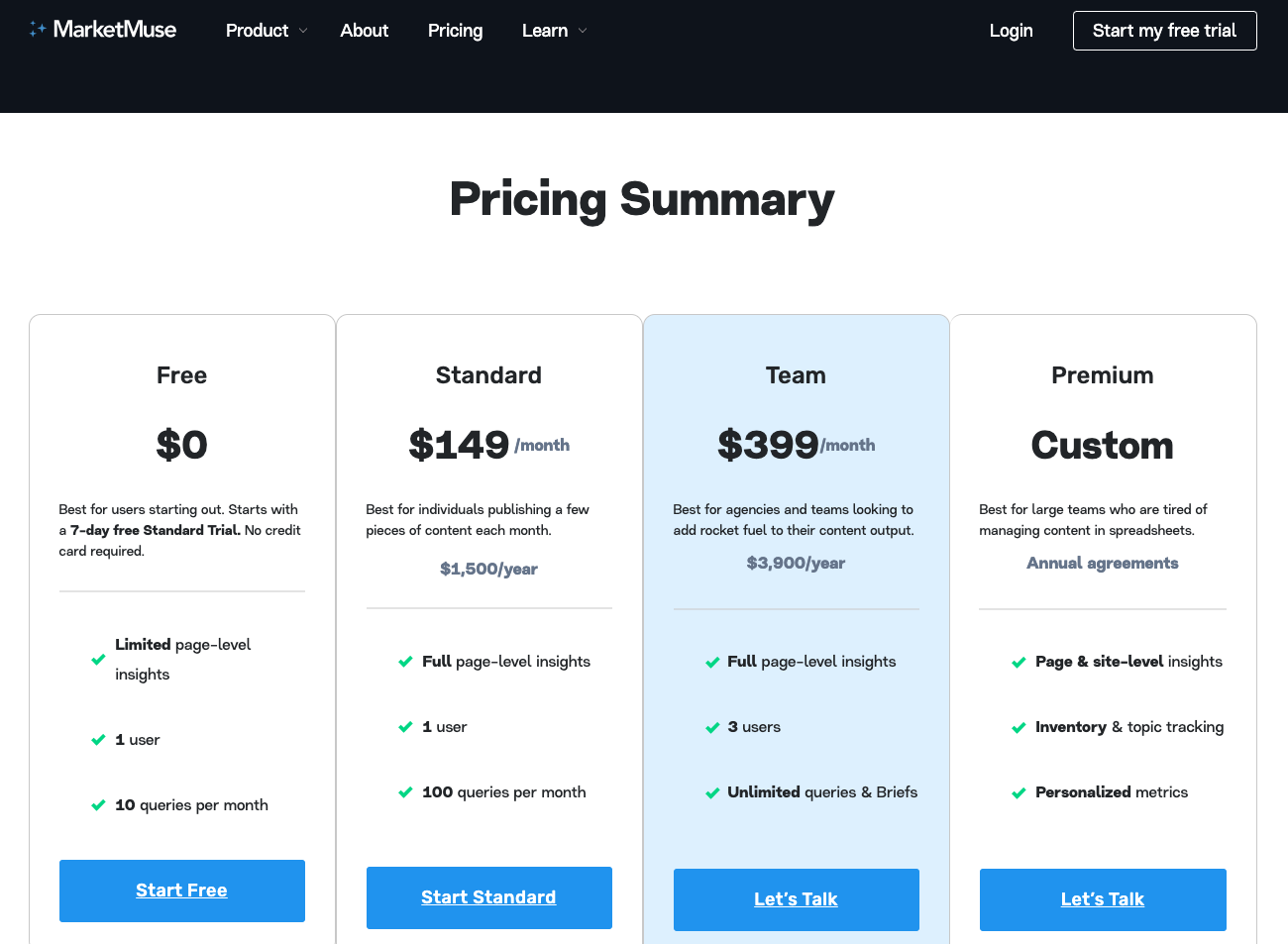
Pricing

MarketMuse pricing

Standard

  • Price: $149 /month
  • Best for: people who just publish a few pieces of content each month. Like if you’re working solo or just getting started and don’t need a huge setup yet.

Team

  • Price: $399/month
  • Best for: agencies and teams that really want to push their content output a lot. Basically if you’re trying to move fast and publish a ton of stuff, this plan fits better.

Pros of Using MarketMuse

There are quite a few good things about using MarketMuse, actually:

  1. Improved Content Quality: The AI-powered recommendations from MarketMuse can really help you level up your content and make it sound better and more complete.
  2. Efficient Content Planning: You can quickly see which topics you’re missing or need to work on more in your content strategy, so you’re not just guessing all the time.
  3. Enhanced SEO Performance: When you follow the optimization suggestions from MarketMuse, you can seriously improve your chances of ranking higher on search engine results pages (SERPs), which is kinda the whole point for a lot of people.

Cons of Using MarketMuse

Still, there are a few possible downsides you should think about when using MarketMuse:

  • Higher Price Point: MarketMuse's pricing plans can feel pretty expensive, especially when you compare them to Surfer SEO and other similar tools out there.
  • Steep Learning Curve: Some users say it takes a while to really get used to the platform and figure out how to use all the features properly.

Choosing Between Surfer SEO and MarketMuse

Picking between Surfer SEO and MarketMuse really just comes down to what you personally need and, honestly, what your budget looks like. Here are a few things to think about while you’re deciding:

  • Content Strategy Focus: If you care a lot about content strategy and want more advanced, AI-driven insights, then MarketMuse might be the better choice for you.
  • Budget Considerations: If your budget is kind of tight and you want something with a simpler, more straightforward interface, Surfer SEO may be more suitable.
  • User-Friendliness: Also, it’s good to remember that both tools usually have free trials or demos, so you can try them out first and see which one actually fits your workflow and what you expect from an SEO tool.

In the end, picking the right SEO tool is really important for optimizing your content and boosting your search engine visibility. Whether you go with Surfer SEO or MarketMuse, both of them can give you useful insights and help you move closer to your SEO goals.

Criteria For Choosing The Best Surfer SEO Alternatives

So, from my own experience using these tools, here are the main criteria I think you should look at when you’re comparing Surfer SEO with other SEO tools to figure out the best alternatives to Surfer SEO for you.

Keeping these criteria in mind will really help make sure the tool you finally pick actually fits your own needs and personal preferences, not just what looks good on paper.

1. Functionality

The functionality of an SEO tool is super important, honestly. It really needs to have features that match what you’re actually trying to do. Like, for example, I usually look for a few extra things, not just the basics:

  • Keyword research: A function that helps me find high-performing keywords that people are actually searching for.
  • Content optimization: A feature that suggests how to improve my content's SEO performance, you know, so it ranks better.
  • Backlink analysis: Something that shows me who's linking to my website and how relevant those sites are.

I’d really suggest taking some time and doing good, like really thorough, research on the functionality of each tool before you decide on one.

2. User Interface

The user interface of an SEO tool can really change how easy it is to use. From what I’ve seen, when the interface is well-designed and feels intuitive, it makes optimizing websites so much easier and honestly a lot more efficient too.

  • Ease of navigation: The tool should be simple to move around in, with clearly labeled features and a layout that actually makes sense.
  • Visual appeal: This isn’t as important as how it works, but having a nice looking interface does make using the tool more enjoyable, for real.

Just keep in mind, if the user interface is too complicated or badly designed, it can really slow you down and hurt your productivity.

3. Pricing

The pricing of an SEO tool is another really important thing to think about. From what I’ve seen, it matters a lot to look at whether the cost of the tool actually gives you enough value for money, you know, based on what it can do and all its features and capabilities.

  • Budget considerations: Figure out how much you’re willing to spend on an SEO tool, like set a real budget, and then look for options that fit inside that range.
  • Return on Investment (ROI): Think about whether the possible increase in traffic and conversions you might get from using the tool really makes the price worth it.

Note: A lot of tools offer free trials or demos, and honestly those have been super helpful for me when trying to check their value before actually paying or making any financial commitment.

4. Customer Support

From what I’ve seen, good customer support can honestly be a lifesaver when you’re stuck with some technical issue or just trying to figure out how a certain feature even works.

  • Availability: Try to pick tools that have 24/7 customer support, or at least support during the hours your business actually runs.
  • Response time: Look at reviews and see if the tool's customer support is actually responsive and, you know, genuinely helpful.

Interestingly, a survey by HubSpot found that 90% of customers say an "immediate" response is important or very important when they have a customer service question. And “immediate” here basically means 10 minutes or less, which is pretty fast when you think about it.

By keeping these things in mind while you’re checking out Surfer SEO alternatives, I really think you can find a tool that actually helps you out with your SEO efforts in a useful way.

Conclusion

Honestly, looking for the perfect Surfer SEO alternative can kind of feel like wandering around in a really dense forest. Every path you pick has its own cool things and also some annoying problems. And yeah, it’s super important to keep in mind that each alternative has its unique strengths and weaknesses. So you really have to slow down a bit and think about which tool actually fits your own needs and what you personally like to work with.

Exploring Surfer SEO Alternatives

  1. Junia AI: This is pretty much the best Surfer SEO alternative for SEO-optimized content creation. If you're looking for an AI-powered content creation tool with SEO optimization features that also gives you competitor analytics so you can actually outrank your competitors, Junia AI is probably your best choice.
  2. Scalenut: Go for this one if what you really want is a more comprehensive SEO tool.
  3. SE Ranking: A good pick if you want a bunch of SEO tools with SERP analysis right there at your fingertips.
  4. Outranking: This one makes sense if AI-centric content optimization is basically the main thing you care about.
  5. Semrush: Choose this if you're looking for an all-in-one digital marketing platform with a really wide range of SEO features.
  6. Writerzen: Better for you if what you’re after is a comprehensive content strategy tool, not just something basic.
  7. Frase: A solid option if you want a versatile SEO tool with AI-powered insights plus content creation features built in.
  8. Clearscope: Go with this if you’re looking for a user-friendly platform that still has strong keyword analysis and content optimization capabilities.
  9. Marketmuse: This is for you if you need an AI-driven content strategy tool with advanced SEO capabilities and really deep topic analysis.

By exploring these Surfer SEO alternatives, you open up a lot more possibilities. You’ll probably find the tool that actually fits your budget, matches what you need, and helps you get really strong SEO results.

Finding the Right Surfer SEO Alternative

Each tool kinda brings something different to the table. At the end of the day, it’s really about finding the right fit for your needs, not someone else’s. Like, maybe you really want an all-in-one SEO tool that does pretty much everything for you. Or maybe right now content optimization is the main thing on your mind, and that’s what you care about most.

That said, a pretty clear standout among these alternatives is definitely Junia AI. It really leans into AI-powered content optimization and has strong keyword research stuff too, so it’s a pretty solid package overall. It honestly feels like something that can give Surfer SEO a real run for its money.

So yeah, in the end, the best Surfer SEO alternative really depends on where you are in your whole SEO journey and what you actually need from your tools. Try to think about what matters most to you, whether that’s more budget-friendly options, super comprehensive SEO tools, or more AI-driven capabilities, and then pick based on that. Your perfect tool is out there somewhere, and with this guide, hopefully you’re at least one step closer to finding it.

Frequently asked questions
  • While Surfer SEO is a pretty solid and reliable SEO tool, some people might still look for other options for a few reasons. Stuff like it not having certain tailored features they really need, or the pricing being kinda expensive, or the AI taking longer to generate things. Also, some users find it harder to use because of the steep learning curve, or feel the content output quality isn’t as good as they expected, and the integration options with other platforms are kinda limited too.
  • Junia AI really stands out as the best Surfer SEO alternative, basically because it gives you better AI writing tools that make content creation way easier and more effective. It also has more complete content optimization and keyword research, which is super helpful if you care about ranking. Plus, it comes with powerful integrations with popular content management systems, and even has this unique ability to rewrite competitors' articles, which is kind of wild but useful. On top of that, it offers better multilingual support, and yeah, all of this at a more affordable price point.
  • Scalenut pretty much matches Surfer SEO when it comes to smarter content optimization, and it actually adds its own unique twist to keyword research too. It has this really simple, easy to use dashboard that shows important metrics at a glance, and there’s an AI history feature that Surfer SEO doesn’t have at all. Scalenut works well for individual creators and consultants, especially with its basic but solid essential pricing plan. Overall, it’s a pretty capable all-in-one SEO tool, with strengths and weaknesses that are kind of similar to Surfer SEO, just with a few things it does differently.
  • SE Ranking gives you a pretty big set of tools to work with, like SERP analysis, an extensive database feature, strong content optimization, competitive research capabilities, a convenient report builder, and backlink checking tools too. The user interface can feel a bit overwhelming sometimes just because there’s so many features packed in there and it’s a lot to look at at first. But overall, SE Ranking still offers really solid, comprehensive functionality that can work well for freelancers, newbies, and agencies alike.
  • WriterZen gives you a pretty big set of SEO tools, like really thorough keyword research and cluster analysis, that help you build complete content strategies from scratch. Unlike Surfer SEO, which mainly focuses on content optimization and keyword research, WriterZen puts a bunch of different features together in one single platform. It can feel a bit overwhelming at first, especially for beginners, just because there’s so many features to click through. But for advanced users who want serious, more complete SEO solutions, it’s actually a really powerful tool.
  • When you’re trying to pick a Surfer SEO alternative, you kinda want to look at a few important things. Stuff like, does it have features that actually fit your SEO strategy, are the pricing plans okay for your budget, and is the tool easy enough to use without a huge learning curve. You should also pay attention to the quality of the content it puts out, and how well it connects or integrates with other platforms you’re already using. If you take time to check all these things, it really helps make sure the tool actually fits your workflow and your goals, instead of just looking cool on the surface.
  • Alternatives like Junia AI use advanced AI writing tools that help you make content way faster, and honestly, it does more than that. It can rewrite competitor articles, which is kind of wild, and it also supports multiple languages too. So yeah, these features make the whole content creation process feel more dynamic and a lot more efficient when you compare it to Surfer SEO's standard offerings.
  • Surfer SEO can be a bit harder to learn at first, honestly. It has a steeper learning curve because it really focuses on content optimization and keyword research, but without those guided workflows or super intuitive dashboards that some other tools have. Tools like Outranking, for example, give you guided workflows and in-document commenting, which kind of walk you through what to do. That stuff makes it easier to use, especially for beginners or anyone just wanting more simple, streamlined processes.