
Steal This Brand-Voice Prompt: Make AI Sound Like You

Yi
SEO Expert & AI Consultant

Most AI writing does not sound off-brand because the model is bad.
It sounds off-brand because the prompt is asking for the wrong thing.
If you tell an AI tool to "write in a friendly brand voice," it has to guess what friendly means. It may write warmer copy, but it will still default to the average version of internet marketing copy: polished, vague, and a little too smooth.
To make AI sound like your company, you need to give it the same things you would give a new writer: examples, rules, boundaries, context, and feedback.
Here is the short version:
To train AI on your brand voice, collect 3-5 strong writing samples, define the patterns that make them work, list the words and tones to avoid, then use those rules in a reusable prompt or saved AI workspace. The output still needs human review, but the first draft should already sound much closer to your brand.
Below is a copy/paste prompt you can use first, followed by the workflow for making it more reliable.
The Copy/Paste Brand-Voice Prompt
Use this when you already have a few examples of content that sound like your brand.
You are my brand voice writing assistant.

Your job is to write in our brand voice, not in a generic AI style.

Brand context:
- Brand:
- Audience:
- Product/service:
- Main customer problem:
- Desired reader feeling:

Voice profile:
- Tone:
- Level of formality:
- Sentence rhythm:
- Vocabulary:
- Point of view:
- Phrases we often use:
- Phrases we never use:
- Topics or claims to avoid:

Writing samples:
I will paste 3-5 examples below. Analyze them before writing. Pay attention to sentence length, word choice, paragraph rhythm, how we open, how we explain ideas, how direct we are, and what we never say.

Task:
Write [content type] about [topic] for [audience].

Requirements:
- Match the style and rhythm of the samples.
- Keep the message clear and useful.
- Avoid hype, vague claims, and corporate filler.
- Use concrete examples where helpful.
- Do not invent facts, statistics, quotes, product features, or case studies.
- If something needs verification, mark it clearly instead of guessing.
- After the draft, list 3 places where the copy may still need a human edit.
This prompt works because it gives the model more than tone adjectives. It gives it context, examples, constraints, and a review step.
For a faster setup, Junia's brand voice feature can help you store voice preferences instead of rebuilding the same prompt every time. If you are still shaping the instructions manually, a prompt generator is useful for turning loose preferences into a reusable prompt with role, context, constraints, and output format already defined.
What AI Needs Before It Can Sound Like You
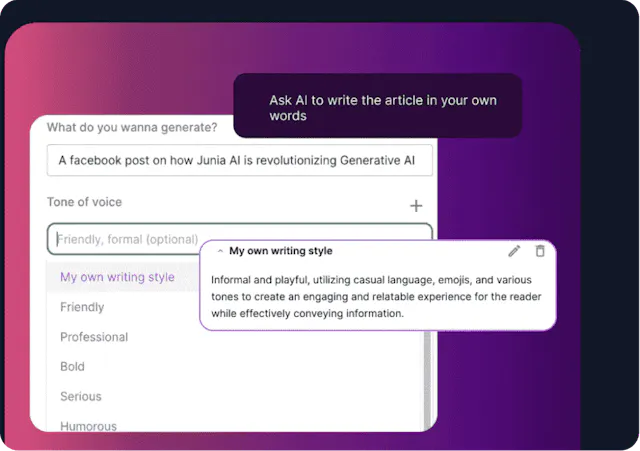
A brand voice is the way your company sounds across website copy, emails, support replies, social posts, ads, product pages, and thought leadership.
It is not just tone. Tone changes by situation. A refund email, a launch post, and an About Us page should not all sound identical.
Your brand voice is the underlying pattern that stays recognizable.
| Voice element | What to define | Example |
|---|---|---|
| Tone | The emotional posture of the writing | Calm, direct, optimistic, skeptical, warm |
| Rhythm | How sentences and paragraphs move | Short and punchy, detailed and explanatory, conversational |
| Vocabulary | Words you prefer or avoid | "Customers" instead of "users"; "clear" instead of "frictionless" |
| Point of view | Who is speaking and how close they feel | Founder-led, expert advisor, peer-to-peer, support specialist |
| Boundaries | What the brand never does | No hype, no jokes in serious contexts, no unverified claims |
| Examples | Copy that already sounds right | Blog intros, product pages, social posts, emails |
This is where many teams go wrong. They define brand voice as three adjectives, then expect the AI to infer everything else.
"Helpful, bold, and human" is not enough. A model needs to know what helpful sounds like in your market, what bold does not mean, and what a good draft looks like.
If you are still defining the emotional range, Junia's guide to different types of tone in writing can help separate tone choices like friendly, urgent, formal, playful, and authoritative before you turn them into AI instructions.
Build a Brand Voice Blueprint
Before you train the AI, create a simple voice blueprint. Do not make this complicated. One page is enough for most teams.
Brand voice blueprint

1. We sound:
- Clear
- Practical
- Calmly confident
- Slightly conversational

2. We do not sound:
- Hypey
- Corporate
- Cute
- Overly formal

3. We prefer:
- Plain English
- Specific examples
- Short paragraphs
- Direct advice
- Claims we can prove

4. We avoid:
- "Revolutionize"
- "Unlock your potential"
- "Game-changing"
- "Seamless solution"
- Fake urgency

5. Good sample:
[Paste an on-brand paragraph.]

6. Bad sample:
[Paste an off-brand paragraph and explain why it fails.]
The bad sample matters more than most people think. It teaches the model where the boundary is.
For example, a B2B SaaS company might say:
| Instead of this | Use this |
|---|---|
| "Unlock game-changing productivity with our revolutionary platform." | "Keep projects moving without chasing updates across five tools." |
| "Our solution empowers teams to streamline workflows." | "Your team can assign work, track blockers, and see what changed in one place." |
| "Transform customer engagement at scale." | "Send customers useful updates without rewriting the same message every week." |
The second column gives the AI something concrete to imitate: simpler verbs, specific situations, and less inflated language.
Train AI on Your Brand Voice in 5 Steps
1. Collect 3-5 strong writing samples
Start with content that already sounds like you.
Good samples include:
- A homepage section that explains your product clearly
- A founder email that got strong replies
- A blog introduction that sounds natural
- A customer support reply that handled nuance well
- A social post that felt recognizably on-brand
Use quality over quantity. Five excellent samples are better than 40 random documents.
For each sample, explain why it is good:
- "This intro is direct and avoids hype."
- "This paragraph explains a technical idea in plain English."
- "This email feels warm but not overly casual."
- "This post has our usual rhythm: short hook, specific example, practical takeaway."
That explanation is part of the training. AI learns faster when you name the pattern instead of only pasting examples.
2. Ask the AI to analyze the samples first
Before asking for new content, make the AI identify your voice patterns.
Use this prompt:
Analyze these writing samples and create a brand voice profile.

Look for:
- Sentence length and rhythm
- Paragraph length
- Tone and level of formality
- Common words or phrases
- Words or styles we avoid
- How the writing opens and closes
- How examples are used
- How direct or cautious the writer is

Then summarize the voice as reusable instructions for future AI writing.
Review the answer carefully. If the AI says your voice is "innovative, dynamic, and inspiring," push it harder. Those words are too broad.
Ask for observable details:
Make this more specific. Replace vague adjectives with visible writing patterns from the samples. Quote short phrases only when needed. Focus on what a writer could actually copy.
3. Turn the analysis into rules and guardrails
AI performs better when the rules are explicit.
Your rules should cover what to do and what to avoid:
| Rule type | Example instruction |
|---|---|
| Tone | "Write like a practical advisor, not a motivational speaker." |
| Structure | "Open with the real problem before defining the concept." |
| Language | "Use plain verbs. Avoid words like leverage, unlock, and revolutionary." |
| Evidence | "Support factual claims with examples or reputable sources." |
| Boundaries | "Do not write crisis, legal, medical, or sensitive customer messages without human review." |
| Editing | "After drafting, identify any line that sounds generic or overclaimed." |
This is also where a ChatGPT persona instructions generator can help. The goal is not to make the AI pretend to be a mascot. It is to give it a role, audience, tone, constraints, and decision rules that stay stable across drafts.
4. Save the instructions where your AI tool can reuse them
Most serious AI writing workflows should not depend on pasting a giant prompt every time.
Use the personalization features your tool already provides:
- OpenAI says ChatGPT custom instructions let you share details you want considered in responses, and ChatGPT Projects can group chats, reference files, and custom instructions for repeated work.
- Anthropic describes Claude Projects as workspaces with their own chat histories and knowledge bases, with project instructions that apply inside the project.
- Google documents Gems as custom Gemini assistants where you name the Gem, write instructions, preview the behavior, and save it for reuse.
Those features do not guarantee perfect brand voice, but they do give you a more stable place to store your examples, rules, and preferred output style.
If your team uses several tools, keep the master voice blueprint in one shared document. Then adapt it for ChatGPT, Claude, Gemini, Junia, or any other AI writing tool your team uses.
5. Create a feedback loop
AI brand voice gets better when feedback is specific.
Bad feedback:
Make it sound more like us.
Better feedback:
This is too polished and abstract. Our writing usually opens with the reader's actual problem, uses shorter paragraphs, and avoids phrases like "unlock growth." Rewrite it with a more direct hook and one concrete example.
Keep a small swipe file of good AI outputs and corrected outputs. Over time, this becomes a practical training set for your team.
A Brand-Voice Prompt for Blog Posts, Emails, and Social
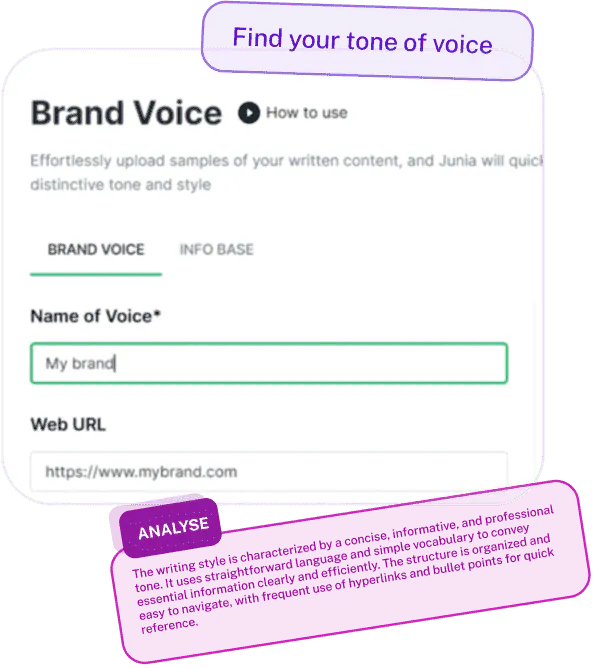
Once the voice profile is ready, use a task-specific prompt. The content type matters because the same brand may sound slightly different in a blog post, product page, email, and support reply.
Use our brand voice profile and writing samples to create the following:

Content type: [blog post / email / landing page / LinkedIn post / product description]
Audience: [who this is for]
Goal: [what the reader should understand or do]
Key message: [main point]
Supporting points:
- [point 1]
- [point 2]
- [point 3]

Voice requirements:
- Match our usual tone, rhythm, and vocabulary.
- Keep the writing useful even if the reader does not click anything.
- Use examples from the reader's world.
- Avoid generic AI phrases, hype, and unsupported claims.

Output requirements:
- Draft the content.
- Then give me a short brand-voice QA table with:
  - What sounds on-brand
  - What may need human review
  - Any claims that need verification
That last QA table is important. It stops the workflow from pretending the first output is finished.
For long-form SEO content, combine this with a strong brief. AI can help write blog articles, but it still needs the search intent, target reader, internal links, product angle, proof points, and examples before the draft will be useful.
How to Check Whether the Output Actually Matches Your Brand
Brand voice is not "I like it" or "I don't like it." You need a repeatable review.
| Signal | Keep | Kill |
|---|---|---|
| Vocabulary | Product nouns you actually use | “Leverage,” “delve,” “in today’s landscape” |
| Rhythm | Short openers + concrete examples | Uniform medium-length AI paragraphs |
| Claims | What you can prove | Invented stats and fake customer stories |
| Channel | Blog vs email vs social constraints | One voice dump pasted everywhere |
Don’t outsource judgment. Voice rules make drafts closer. They do not make unsupported claims true.
How to Keep AI True to Your Brand Voice
Use this checklist:
| Check | What to look for |
|---|---|
| Recognition | Would a regular reader believe this came from your company? |
| Clarity | Is the point obvious without rereading? |
| Specificity | Are there concrete examples, not just broad promises? |
| Vocabulary | Are preferred terms used naturally and banned phrases avoided? |
| Rhythm | Does the sentence and paragraph structure match your usual style? |
| Channel fit | Does the tone match the situation, not just the brand in general? |
| Accuracy | Are claims, features, quotes, and stats verified? |
| Human judgment | Would this be risky to publish without a person reviewing it? |
If a draft fails the checklist, do not only ask for another version. Tell the AI exactly what failed.
Brand voice QA:
- The structure is right, but the tone is too corporate.
- Remove "unlock," "transform," and "seamless."
- Add one concrete example from a marketing team's weekly workflow.
- Make the intro more direct. Our posts usually start with the problem, not a definition.
This is also where a text tone analyzer can be useful as a second pass. It will not replace editorial judgment, but it can help spot tone drift across a batch of drafts.
What to Let AI Write and What to Keep Human
AI is useful for scaling repeatable writing. It is weaker when the message depends on deep context, emotional nuance, legal risk, or original point of view.
| Good AI use case | Keep a human close |
|---|---|
| First drafts of blog sections | Founder stories and personal opinions |
| Social post variations | Crisis communication |
| Product description variants | Legal, medical, or financial claims |
| Email subject line options | Sensitive customer complaints |
| Tone QA across many drafts | Brand positioning decisions |
| Repurposing one approved message across channels | Final approval before publishing |
Personally, I would use AI heavily for first drafts, rewrites, summaries, tone checks, and channel adaptation. I would not let it define the brand's actual point of view.
That part still needs people who understand the market, the customer, the product, and the moments where saying less is smarter than saying more.
Add a Human Touch Before Publishing
The fastest way to improve AI-generated brand copy is to edit the first 10% yourself.
Rewrite the hook. Add the real example. Cut the sentence that sounds too polished. Replace generic claims with something your team would actually say.
Then send the edited version back to the AI:
Here is my edited version of your opening. Study the changes I made. Now revise the rest of the draft to match this style: more direct, less polished, more specific, and closer to our actual brand voice.
This turns your edit into training data.
For content that already sounds too generic, Junia's humanizer can help soften stiff phrasing, but use it as an editing aid, not a substitute for judgment. The better habit is to learn how to add a human touch to AI-generated content: add lived examples, remove vague claims, check facts, and make the copy sound like someone with a real point of view wrote it.
Common Mistakes When Training AI on Brand Voice
Using only adjectives
"Professional but friendly" is too vague. Add examples, banned phrases, sentence rhythm, and sample rewrites.
Uploading too much content
If you upload every blog post, old sales deck, and random newsletter, the AI may learn the average of your content, not the best version of your voice.
Use the strongest examples first.
Forgetting channel context
Your brand voice should stay recognizable, but a support email should not sound like a launch announcement.
Tell the AI what channel it is writing for and how the tone should shift.
Skipping fact-checking
Brand voice does not fix accuracy. If the draft mentions features, customer results, statistics, or industry claims, verify them before publishing.
Treating voice as permanent
Your voice changes as your product, audience, and market mature. Refresh your examples every few months, especially after a rebrand, product pivot, or audience shift.
A Simple Team Workflow
If more than one person creates content, turn your AI brand voice setup into a shared process.
- Create one source-of-truth brand voice document.
- Add 3-5 approved writing samples.
- Add a list of words and phrases to avoid.
- Save the instructions inside your AI writing tool or project workspace.
- Require a brand-voice QA pass before publishing.
- Save strong outputs and human-edited examples back into the training file.
This prevents every teammate from inventing their own version of the brand voice.
It also makes AI more useful. Instead of spending 20 minutes rewriting every generic draft, your team starts from copy that is already close enough to edit.
Final Takeaway
AI can match your brand voice, but it cannot guess it from a few adjectives.
Give it real examples. Explain why those examples work. Set boundaries. Save the instructions. Review the output like an editor, not like someone hoping the model gets it right on the first try.
The goal is not to make AI replace your voice.
The goal is to stop AI from flattening it.