
AI SEO for Photographers: Rank for “Wedding Photographer + Your City” (Step-by-Step)

Thu
AI SEO Specialist, Full Stack Developer

If you want to rank for searches like "wedding photographer in Chicago" or "engagement photographer in Austin," you need more than a beautiful portfolio. You need pages that match local search intent, a site Google can understand, and a repeatable way to publish useful content.
That is where AI SEO can help. Used well, AI does not replace your voice or brand. It helps you research keywords faster, spot on-page gaps, improve image SEO, and scale location-focused content without turning your site into generic fluff. Older portfolio shots are worth a look too. If they are soft or low resolution, an AI image restorer can recover detail before you re-upload them with better file names and alt text.
For photographers, that matters because strong SEO can help you:
- Get found by local buyers: Show up for high-intent searches tied to your city, venue type, and services.
- Compete beyond referrals: Referrals are great, but search gives you another steady source of inquiries.
- Build trust before the first call: A strong local presence, useful pages, and a polished profile make you look established fast.
This guide focuses on the pages that actually get inquiries:
- City + service queries, and how to map them to real pages.
- Portfolio and service pages that match those queries.
- Google Business Profile for photographers.
- What to skip: parasite SEO, future-trends filler, and thin city clones.
- Technical cleanup, then a short tool list.
By the end, you should have a clearer workflow for ranking your photography site, improving local visibility, and turning more searches into inquiries.
Quick AI SEO plan for photographers
Use this as a simple checklist before you start expanding service pages, blog posts, or location pages.
| Goal | What to do | Why it matters |
|---|---|---|
| Rank locally | Build pages around service + city keywords | Matches how couples actually search |
| Improve visibility | Optimize titles, headings, images, and internal links | Helps search engines understand your pages |
| Convert more visitors | Keep pricing, reviews, FAQs, and contact details easy to find | Turns traffic into inquiries |
| Scale content | Use AI to research topics and draft outlines faster | Saves time without sacrificing quality |
Rank for city + service queries
Broad terms like "photographer" are a waste of a homepage. Couples search "wedding photographer in Denver," "elopement photographer in Sedona," or "NYC engagement photo locations." Those queries have a city, a service, and a next step. Rank for those.
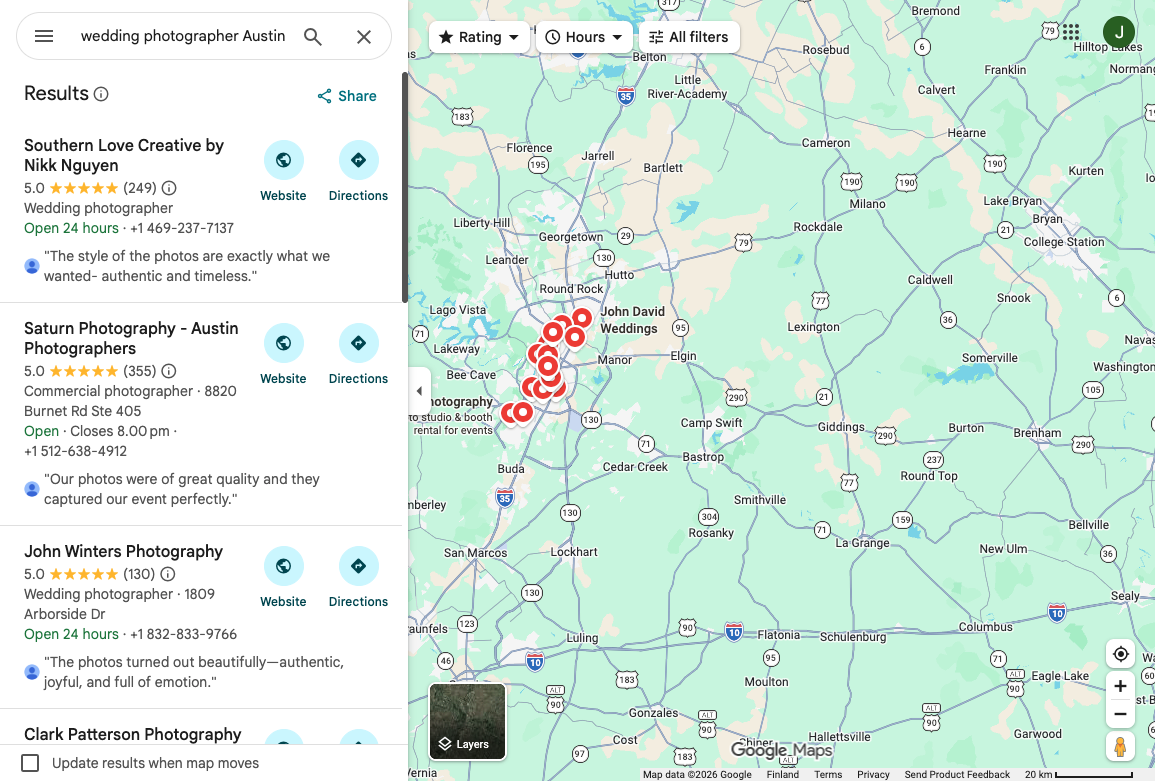
The map pack is often the real SERP. If you are not in it, a 3,000-word blog post about "finding your photography style" will not save the inquiry.
Keyword research for wedding photographers
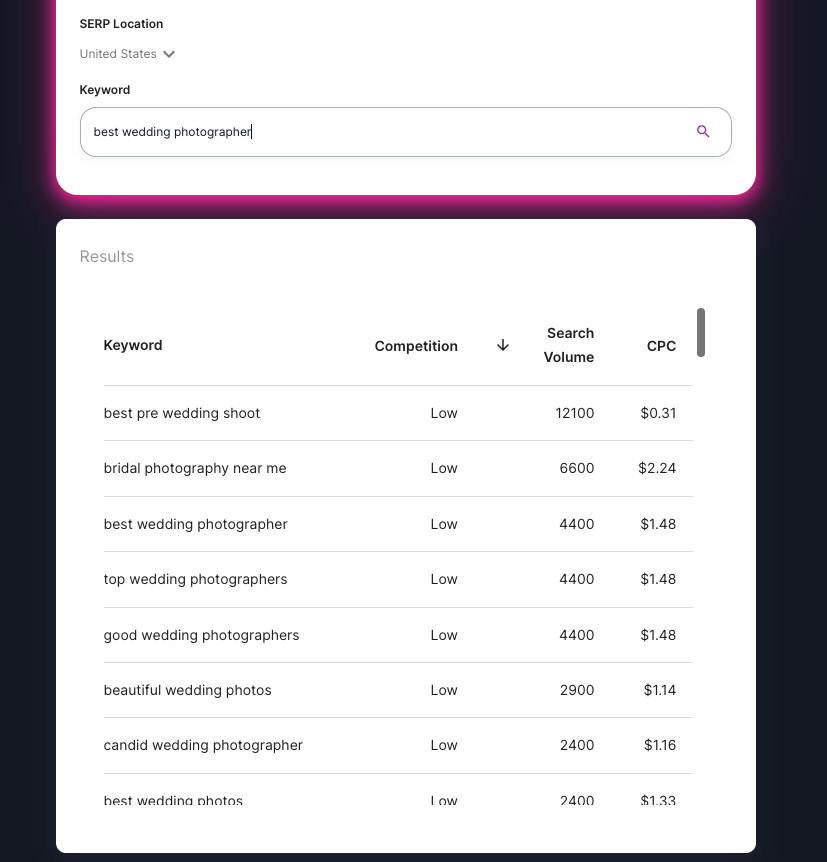
The job is to find the phrases couples type when they are ready to compare photographers, check pricing, or look for a venue-specific shoot. Keyword research helps, but only if you map each term to a page type:
- Core service terms on service pages.
- City modifiers on local landing pages.
- Long-tail questions in blog posts or FAQs.
If you shoot weddings in New York City, the useful set looks like:
- "best wedding photographer in New York City"
- "wedding photography packages in NYC"
- "wedding photo locations in NYC"
Do not clone a page for every synonym. If two queries would land on the same SERP, keep one URL. Location pages for SEO only help when the city page has venues, travel notes, and galleries from that market, not a swapped H1.
Google Business Profile for photographers
A Google Business Profile is the fastest local ranking lever most photographers still underuse. Categories, service-area setup, photos, and reviews matter more than posting a weekly "happy Monday" update.
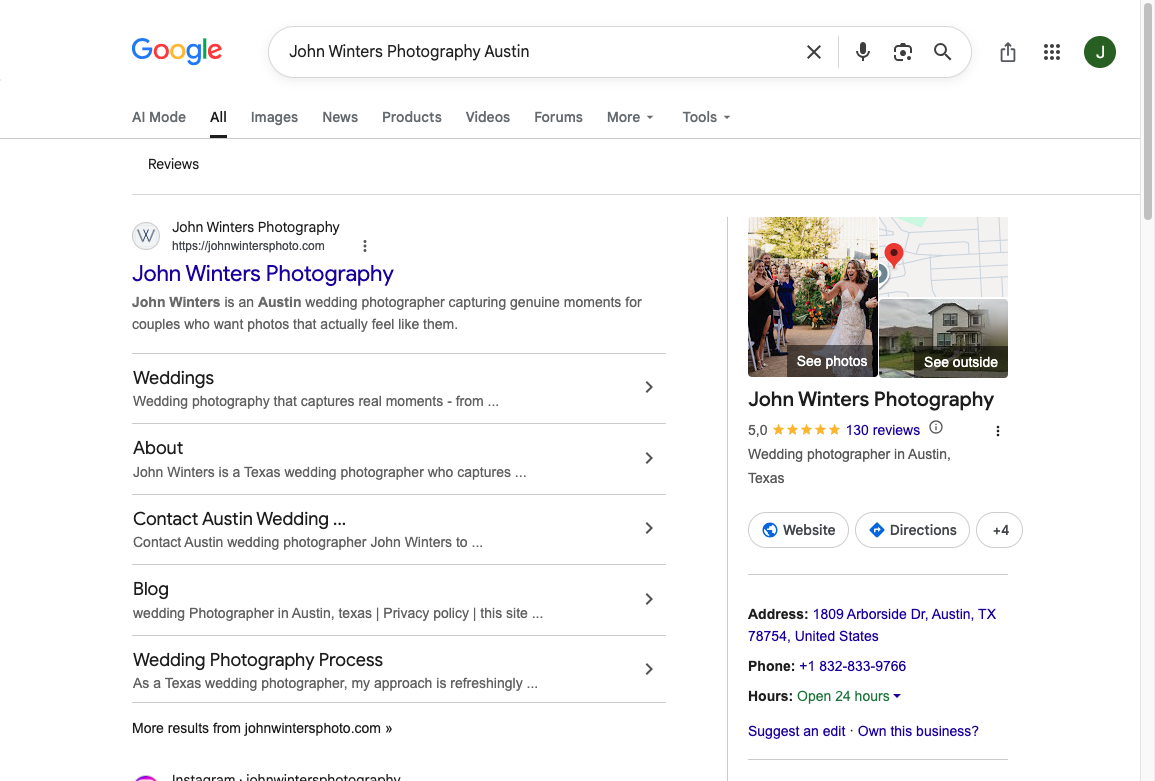
That panel is what a couple sees when they search your name, and it is what Google uses when they search "wedding photographer" plus your city. Keep the name, address, and phone identical to the website. If you are service-area only, set it that way instead of inventing a storefront.
To set the profile up:
- Sign in to Google and open Google Business Profile.
- Add the business name, category (Wedding photographer, Portrait photographer, or the closest match), and address or service area.
- Verify the listing.
- Add real galleries, not stock. Recent wedding photos outperform a logo tile.
- Fill services, a short description, hours, and a booking or contact link.
GBP photos can help or hurt. Blurry, watermarked, or off-category images are a local ranking problem, not a branding flourish. Sterling Sky's walkthrough is the useful version of that warning.
Sterling Sky: how a photo can tank local SEO rankings
NAP still matters for photographers. Studio address, cell number, and the number on The Knot should be the same public number. Tracking numbers belong in ads, not on the listing.
Portfolio pages that match the query
.png?token=eyJhbGciOiJIUzI1NiIsInR5cCI6IkpXVCJ9.eyJ1cmwiOiJ1c2VyLWdlbmVyYXRlZC1pbWFnZXMvMThkMzIyMTQtYWZlNC00YmVjLTg2NTItOGU2ZDFiMDYyZTE5L1NjcmVlbnNob3QgMjAyMy0xMi0xNiBhdCAyMi4yMi40MCAoMSkucG5nIiwiaWF0IjoxNzA5OTM3Njk3LCJleHAiOjIwMjUyOTc2OTd9.V9spkeavAfypOiKCQ_5ohOfTYiC3flLPKA9oSgyHd5k)
The money pages are service pages and galleries, not a blog calendar. A wedding photography page should show the city, the package shape, a few real weddings, and how to inquire. A venue gallery should name the venue. A blog post can support a long-tail question. It should not replace the page a couple actually needs.
Keep the writing simple:
- Put the city and service in the title and H1 only when that is what the page is about.
- Lead with proof: galleries, reviews, and what you actually shoot.
- Break the page up so a tired couple can skim. Headings and short blocks help more than a readability improver score.
- Write real alt text that names the couple, venue, or city. "Image1.jpg" is not a strategy.
I would skip parasite SEO until the site and Google Business Profile are clean. Posting on someone else's domain does not fix a thin wedding page.
Vendor links still help. Ask planners, florists, and venues to link the real wedding you shot. Guest posts on local wedding blogs are useful when you bring a gallery, not a generic "10 tips" article. Directory listings (Google, Yelp, The Knot, WeddingWire) only work if the NAP matches.
On the technical side, compress images, keep the site crawlable, and add structured data for LocalBusiness or Photograph where it fits. Photographers lose rankings on page speed more often than on missing blog posts.
AI Tools and Technologies for Photographers
Use AI on editing and on the page, not as a substitute for the shoot. Topaz, Lightroom, and Photoshop help the files. AI writers help the service-page draft. Do not generate fake portfolio images and call it SEO. Here are the tools that actually show up in a photographer workflow:
1. Topaz AI Tools
Topaz has a whole bunch of AI-powered tools that a lot of people in the photography community really like. Their tools come with stuff like upscaling, getting rid of noise, and fixing blur or focus problems. With Topaz AI tools, photographers can bring out more detail in their images and end up with really amazing, kind of stunning results.
2. Adobe Lightroom and Photoshop
Adobe's main editing software, Lightroom and Photoshop, are pretty much must-have tools for photographers now. These applications use AI algorithms to make photo editing a lot easier and quicker, and they also include advanced features like background removal and stuff like that. Lightroom and Photoshop give you a really wide range of editing options that work well for both total beginners and more experienced professionals.
3. Dalle-2 (OpenAI)
Dalle-2 is a really impressive AI model made by OpenAI, and it basically lets photographers create unique artwork just from text prompts. You just type in a description or some kind of prompt, and Dalle-2 will generate these super realistic images for you that you can use for all sorts of creative stuff. It kind of opens up a lot of new and exciting options for photographers, especially if they want to try out new artistic directions or just experiment a bit.
4. 10Web
10Web is a platform that lets photographers turn their CSS/HTML websites into simple drag and drop interfaces. So basically, it makes building a website a lot easier, especially if you don’t really want to mess with a bunch of code. This tool helps photographers put their work online in a clean way, without needing a ton of technical skills. With 10Web, photographers can quickly customize their websites and create a more engaging user experience that actually feels nice to use.
5. Junia AI
Junia AI is built for the page work: service pages, location copy, and metadata around the keywords you already chose. Use it to draft, then put your real galleries and prices back in.
What to skip
Skip the history lesson. Keyword stuffing, TF-IDF trivia, and "the future of voice search" will not book a Saturday wedding.
Skip these, specifically:
- Thin city clones that only swap the town name.
- Blog posts that restate your service page.
- Generated images pretending to be your portfolio.
- Parasite posts on forums while the Google Business Profile is incomplete.
- Chasing every algorithm rumor instead of checking Search Console.
Keep these:
- One strong page per service you actually sell.
- City pages only when you have galleries and venues from that city.
- A complete Google Business Profile with real photos.
- Fast image files and clear alt text.
- Reviews that mention the city, venue, or type of shoot.
If Google updates rankings, recover by checking what actually moved, not by rewriting every page. Algorithm updates punish thin, interchangeable sites. A specific wedding page with local proof is harder to knock down.
The same local pattern shows up in other service businesses. AI SEO for dentists is the medical version of this: map pack first, service pages second, blogs last.
Recommended SEO Resources for Photographers
When it comes to figuring out SEO for photographers, having the right stuff to learn from honestly makes a huge difference. Like, whether you’re totally new to this or you’ve been at it a while and just want to tweak and improve your SEO strategies a bit, these recommended resources can really help. They’ll give you useful tips, new ideas, and some solid support to keep you moving in the right direction.
1. Fuel Your Photos Facebook Group for community support
Being part of a group of other photographers who care about the same stuff as you can really help a lot, especially when you’re trying to figure out SEO and all that. Fuel Your Photos is a Facebook group made just for photographers who want to improve their online presence and show up better in search engine rankings. It’s a spot where you can hang out with other photographers, talk about what’s working or not, share your own experiences, and get really helpful advice from people who actually know the industry pretty well.
2. Moz Beginners Guide to SEO for comprehensive learning
Moz is a really well known authority in the field of SEO, and their Beginners Guide to SEO is honestly an excellent resource for photographers who want to dive deep into the world of search engine optimization. This comprehensive guide walks you through everything from keyword research to on-page optimization, technical SEO, link building, and a bunch more stuff. It gives you practical tips and clear, actionable strategies you can actually use to improve your website's visibility and attract more clients to your photography business.
3. Ahrefs Blog for insights from a popular SEO tool
Ahrefs is a pretty powerful SEO tool that a lot of professionals all around the world use. Their blog is packed with helpful articles, case studies, and tutorials that talk about all kinds of different parts of SEO. From understanding keyword research techniques, to looking at backlink profiles, and doing competitor analysis too, the Ahrefs Blog gives you a lot of valuable insights that can really help you stay ahead of the game, or at least not fall behind.
4. Other valuable SEO resources and citation references
Besides the stuff already mentioned above, there are a few other really useful SEO tools and references you should probably check out. Some of the more well known ones are:
- Google Search Console: This free tool from Google lets you keep an eye on how your website is doing in search results. You can submit sitemaps, spot crawling errors, and see helpful data about your website visitors and how they find you.
- Yoast SEO Plugin: If you’re using WordPress for your photography website, Yoast SEO plugin is honestly kind of a must-have. It helps you optimize your content for search engines with real-time analysis of your pages and posts, and gives suggestions on what you can tweak or improve.
- SEMrush: This is another popular SEO tool that gives you in-depth keyword research, competitor analysis, backlink auditing, rank tracking, and a bunch of other features.
- Google Trends: This tool lets you see how popular different search terms are over time. It’s really helpful for finding trending topics and shaping your content strategy to fit what people are actually searching for.
All of these resources together can give you the knowledge and tools you need to push your photography business to a higher level in online visibility and client bookings. Just try to stay updated with the latest trends in SEO, since everything in this space keeps changing all the time. With some consistency, dedication, and just keeping on learning, you’ll be on a solid path toward long-term success in the competitive world of photography.
Do this first, then stop
Pick the highest-value city + service query you can actually deliver. Finish that page. Finish the Google Business Profile. Compress the galleries. Then stop adding URLs until those two assets are specific.
You do not need hundreds of pages. You need the right pages, a listing Google can trust, and a workflow you can keep up with. If you want a broader local playbook after that, use SEO to reach ideal customers instead of inventing more blog topics.
Done consistently, that is what helps your site earn more visibility and more qualified inquiries.