
How To Write Better AI Prompts: A Practical Guide

Thu
AI SEO Specialist, Full Stack Developer

Most people do not get weak AI answers because the model is useless.
They get weak answers because the prompt gives the model too much room to guess. It has to guess the audience, the format, the level of detail, the tone, the context, and what a successful answer should look like.
A better AI prompt removes that guesswork.
I usually treat prompt writing less like finding the perfect phrase and more like briefing a capable but context-starved collaborator. The clearer the brief, the less cleanup you have to do later.
If you want a fast shortcut, use Junia's AI prompt generator to turn rough instructions into a more structured prompt. But it also helps to understand the mechanics yourself, because once you know what belongs in a prompt, you can fix bad outputs much faster.
What Makes an AI Prompt Work?
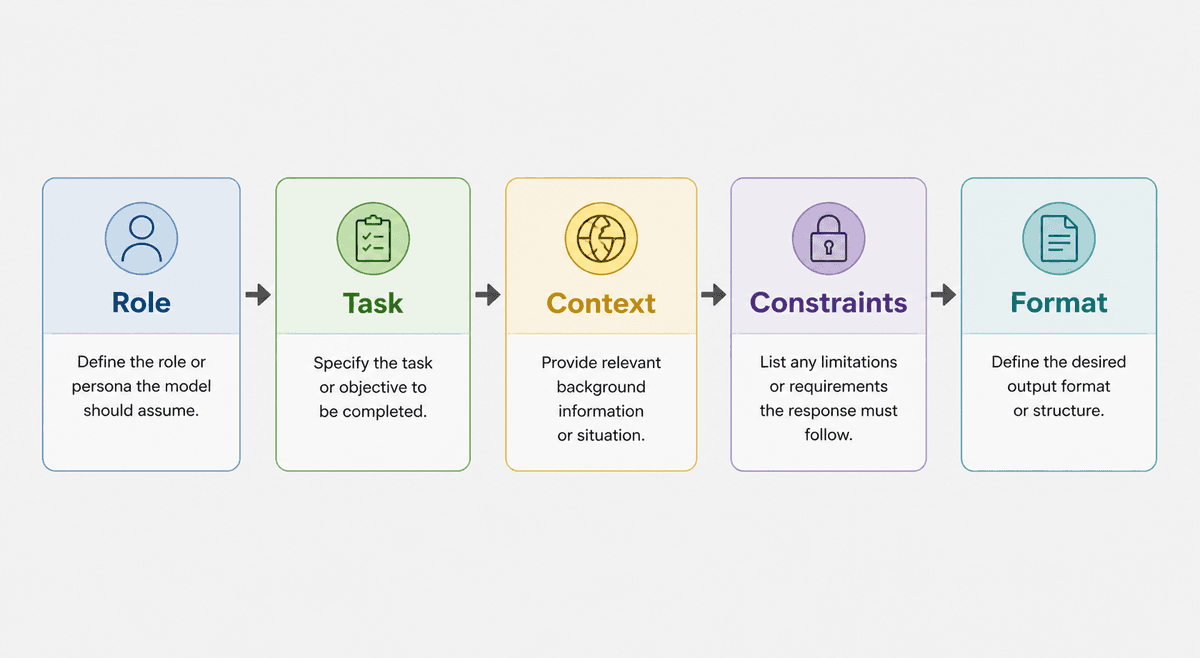
A good prompt tells the AI four things:
- what role it should take
- what task it should complete
- what context matters
- what the final output should look like
That sounds basic, but it changes the answer.
"Write a blog post about email marketing" is a topic, not a prompt. The model can answer it, but it has to invent too many details.
A stronger version would be:
You are a B2B SaaS content strategist. Write a practical blog outline about email marketing automation for early-stage SaaS founders. Focus on onboarding, trial activation, and customer retention. Avoid generic advice. Include H2s, key talking points, example email types, and 5 FAQ ideas.
That prompt gives the model a job, a reader, a topic angle, boundaries, and an output format. It still is not perfect, but it gives the AI something useful to follow. In my experience, this is where most prompt quality comes from: not clever wording, but removing the vague parts that force the model to improvise.
| Prompt part | What it tells the AI | Example detail |
|---|---|---|
| Role | Which priorities to use | B2B SaaS content strategist |
| Task | The exact deliverable | Write a practical blog outline |
| Context | What the answer should account for | Early-stage SaaS founders, onboarding, activation, retention |
| Constraints | What to include or avoid | Avoid generic advice |
| Format | How the answer should be structured | H2s, talking points, examples, FAQs |
Start With the Real Task
Before writing the prompt, name the deliverable. This is the prompt-writing habit I would fix first, because it changes the shape of the answer immediately.
Do you want:
- an outline
- a first draft
- a summary
- a comparison table
- a list of ideas
- a rewrite
- a JSON object
- a checklist
- a step-by-step workflow
This matters because "help me with this" produces broad advice. "Create a checklist" produces something you can use.
For example:
Weak:
Help me with my landing page.
Better:
Review this landing page copy and give me a table with 3 columns: issue, why it hurts conversions, and suggested rewrite.
The second prompt tells the AI exactly how to think and how to respond. It also saves you from a common failure mode: getting advice when what you really needed was usable copy, a table, or a decision.
Add Context a Human Would Need
AI models do not know what you forgot to mention.
If you hired a human editor, strategist, designer, or analyst, you would give them context before asking for useful work. Prompts need the same treatment.
Useful context can include:
- target audience
- product or niche
- reading level
- brand voice
- examples to follow
- examples to avoid
- region or market
- constraints
- source material
- business goal
- current problem
You do not need to include all of these every time. I would avoid stuffing prompts with background just to look thorough. The trick is to include the context that would change the answer.
If you ask for "email ideas," the AI can give you anything. If you say the audience is trial users who signed up but never activated the product, the ideas become much sharper.
Give the AI a Role, But Make It Specific
Role prompting works best when the role changes the model's priorities.
"Act as an expert" is too vague. Expert in what? For whom? What should the expert care about?
Use roles like:
- You are a senior technical editor.
- You are a conversion copywriter for B2B SaaS.
- You are an SEO strategist who writes content briefs.
- You are a product marketer writing for non-technical buyers.
- You are a support lead rewriting help center answers.
The role should match the task. I do not think every prompt needs a dramatic persona, but a precise role helps when the output depends on professional judgment. If you are writing reusable role instructions for repeated ChatGPT workflows, a ChatGPT persona instructions generator can help you define the role, tone, rules, and output format more consistently.
Set Constraints Before You Complain About the Output
A lot of AI writing sounds fluffy because the prompt never says what to avoid.
Add constraints like:
- Avoid cliches and broad claims.
- Do not invent statistics.
- Use short paragraphs.
- Keep the answer under 500 words.
- Ask clarifying questions if key details are missing.
- Use examples from the provided source only.
- Keep the tone practical and direct.
- Do not use emojis.
- Return valid JSON only.
Constraints are not there to make the prompt longer. They are there to prevent predictable problems.
This is one of the places where being slightly opinionated pays off. If you know the output usually becomes too generic, say that. If you know the model tends to over-explain, give it a length limit. If facts matter, tell it not to invent numbers, names, or sources.
Ask for the Format You Actually Need
Format is one of the easiest prompt upgrades.
Instead of asking for an answer and then manually reshaping it, define the structure upfront:
- "Return a table with columns for task, owner, deadline, and risk."
- "Use H2 and H3 headings."
- "Give me 10 options, each under 12 words."
- "Write a 5-step checklist."
- "Return valid JSON with keys for title, summary, tags, and next_steps."
- "Separate the answer into diagnosis, fix, and example."
When the format matters, state it clearly. This is especially useful for content briefs, SEO workflows, product descriptions, prompt libraries, and anything you need to reuse later. I have found that format instructions often do more for productivity than tone instructions, because they reduce the amount of manual reshaping after the answer arrives.
Use Examples to Calibrate the Output
Examples are powerful because they show the model what "good" means.
You can include:
- a paragraph in the tone you want
- a weak example and a stronger rewrite
- a finished output from a past project
- a list of phrases to use or avoid
- a sample format
For tone, examples usually work better than adjectives. "Friendly, clear, and professional" can mean almost anything. A short sample paragraph gives the model a much clearer target.
When I want a model to match a voice, I prefer giving it one strong example over five abstract style words. The example gives it rhythm, density, vocabulary, and boundaries all at once.
You can also study AI prompt examples when you need ready-made patterns for marketing, SEO, writing, research, and productivity tasks.
Build Prompts in Layers
One mistake beginners make is asking AI to do the entire job at once.
For complex work, split the prompt into stages:
- Ask for a plan or outline.
- Review and adjust the structure.
- Ask for one section or deliverable.
- Ask for a critique.
- Ask for a final revision.
This works well for articles, strategy documents, scripts, long emails, technical explanations, and anything where accuracy or voice matters. I use this approach whenever the first draft would be expensive to untangle if the structure is wrong.
For example, do not start with "write a complete SEO article." Start with:
Create an outline for an article targeting {keyword}. Include search intent, reader pain points, H2s, and what each section must answer. Do not write the article yet.
Then refine the outline before drafting. You get more control and fewer generic sections.
Turn Good Prompts Into Templates
When a prompt works, do not leave it as a one-off.
Replace the specific parts with placeholders:
You are a {ROLE}.
Task: {TASK}.
Audience: {AUDIENCE}.
Context: {CONTEXT}.
Constraints: {CONSTRAINTS}.
Output format: {FORMAT}.
Now you have a reusable prompt template. In my view, this is the difference between casual prompting and a real AI workflow. A good one-off prompt helps once. A good template keeps paying you back.
This is where prompt engineering templates are useful. Templates give you repeatable formulas for common tasks, so you are not rebuilding the same prompt every time.
Practical Prompt Formula
Use this when you do not know where to start:
| Weak prompt | Stronger layer to add |
|---|---|
| “Write a blog about X” | Task + audience + angle |
| “Make it better” | Constraints + examples of good/bad |
| “Be professional” | Voice rules + banned phrases |
If you can’t brief a junior writer in one paragraph, the model doesn’t have enough either.
Master the Perfect ChatGPT Prompt Formula (in just 8 minutes)!
You are a {specific role}.

Complete this task: {specific deliverable}.

Audience: {who the output is for}.

Context: {details the AI needs to avoid guessing}.

Requirements:
- {must include}
- {must include}
- {must avoid}

Output format: {table/checklist/outline/paragraphs/JSON/etc.}

Before answering, ask up to 3 clarifying questions if the task is impossible without more information.
Here is the same formula filled in:
You are a senior content editor.

Complete this task: rewrite the introduction below so it is clearer, more direct, and more useful for beginners.

Audience: small business owners learning SEO.

Context: the article explains how to choose keywords for a service page.

Requirements:
- keep the meaning accurate
- avoid hype
- use short paragraphs
- do not add statistics

Output format: revised intro only.
That prompt is not complicated. It is just specific. I like this kind of prompt because every line has a job; there is no ceremonial language, just the information the model needs to do useful work.
How to Fix a Bad AI Answer
If the first answer is weak, do not always start over. Diagnose what went wrong. A bad answer is often a useful signal: it shows you which part of the prompt was missing, vague, or too easy to misread.
Common fixes:
| Problem in the AI answer | Prompt repair | Example instruction to add |
|---|---|---|
| Too generic | Add audience, examples, and constraints | "Write this for first-time SaaS founders and avoid beginner SEO advice." |
| Too long | Set a length or format limit | "Keep it under 300 words and use bullets only." |
| Wrong tone | Paste a tone sample | "Match the direct, practical tone of this paragraph." |
| Wrong format | Define the structure | "Return a table with columns for issue, fix, and example." |
| Invented facts | Restrict the source material | "Use only the notes below. Do not add outside statistics." |
| Missed the goal | Restate the deliverable | "The goal is a rewrite, not feedback." |
| Too shallow | Ask for depth | "Include tradeoffs, edge cases, and one concrete example." |
You can also ask the model to critique the prompt itself:
Before answering, identify what is ambiguous in my prompt and suggest a tighter version.
That turns prompting into a feedback loop instead of a guessing game. In practice, the best prompt writers I have seen are not trying to write flawless prompts on the first try. They are good at noticing what failed and tightening the next instruction.
Final Checklist for Better AI Prompts
Before you send the prompt, check:
- Did I name the exact deliverable?
- Did I include the audience?
- Did I add context that changes the answer?
- Did I define the format?
- Did I say what to avoid?
- Did I include examples if tone or style matters?
- Did I split the task if it is complex?
Better prompts are not about magic words. They are about making the task easier to understand. I would rather send a plain, specific prompt than a polished-sounding prompt that hides the actual request.
Once the AI knows the job, the reader, the constraints, and the format, the output becomes much easier to use.