
Prompt Engineering Templates: Reusable Formulas for Better AI Outputs

Thu
AI SEO Specialist, Full Stack Developer

Prompt engineering gets easier when you stop writing every prompt from scratch. I say that as someone who has watched plenty of decent AI workflows fall apart because every task started with a blank chat box and a vague instruction.
Most useful prompts follow repeatable formulas. You define the role, task, context, constraints, and output format. Then you swap in the details for the project in front of you.
That is what prompt engineering templates are for. They give you a reusable structure so your AI outputs become more consistent, especially when you write content, build SEO workflows, create marketing assets, summarize research, or design repeatable ChatGPT tasks. My bias is simple: a plain, reusable template beats a clever one-off prompt almost every time.
If you want a finished prompt without building the formula yourself, use Junia's AI prompt maker. If you want to understand the strategy behind the template, start with this AI prompt writing guide.
That pattern-based mindset shows up in practitioner communities too: people organize prompt ideas as reusable structures such as template, persona, recipe, and output-format patterns instead of treating every prompt as a blank page.
What Is a Prompt Engineering Template?
A prompt engineering template is a reusable prompt structure with placeholders.
Instead of writing:
Write a blog post about project management.
You use a structure like:
You are a {ROLE}.

Create a {DELIVERABLE} about {TOPIC} for {AUDIENCE}.

Context:
{CONTEXT}

Requirements:
- {REQUIREMENT 1}
- {REQUIREMENT 2}
- {REQUIREMENT 3}

Output format:
{FORMAT}
The template is not the final prompt. It is the frame. The quality comes from filling the placeholders with specific details. When templates fail, I usually find the problem is not the structure; it is the thin, generic information people put inside it.
The Core Prompt Formula
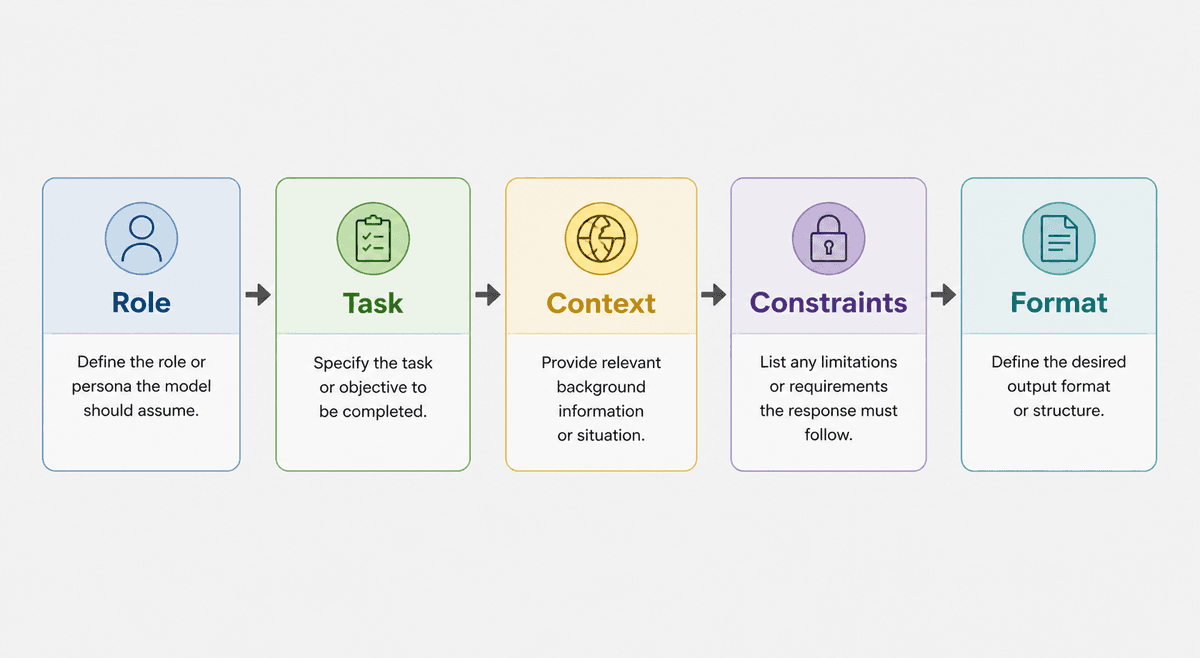
Use this as your default formula:
| Template field | If missing… |
|---|---|
| Task | Model invents the wrong job |
| Constraints | Generic filler returns |
| Format | You rewrite the shape by hand |
| Example | Tone drifts every run |
Templates beat one-off prompts when the job repeats. Keep the variables; lock the structure.
Master the Perfect ChatGPT Prompt Formula (in just 8 minutes)!
Role + Task + Context + Constraints + Format
Each part has a job:
- Role: tells the AI how to prioritize the answer
- Task: defines the exact deliverable
- Context: gives the details a human would need
- Constraints: prevents predictable problems
- Format: makes the output easier to use
If a prompt fails, one of these pieces is usually missing or too vague.
In my experience, context and constraints do the heaviest lifting. A role can help, but a role without concrete background is mostly decoration.
| Prompt part | What to fill in | Strong example | Weak version to avoid |
|---|---|---|---|
| Role | The perspective the AI should use | "You are a senior SaaS onboarding strategist." | "You are an expert." |
| Task | The exact deliverable | "Create a 5-email activation sequence." | "Help with emails." |
| Context | The facts that shape the answer | Product, audience, funnel stage, current offer, known objections | "Here is my business." |
| Constraints | Boundaries, exclusions, and quality rules | "Do not invent pricing. Keep each email under 120 words." | "Make it good." |
| Format | The structure you want back | Table with subject line, email angle, body, CTA, and test idea | "Give me ideas." |
Template 1: General AI Task Prompt
Use this for everyday ChatGPT tasks: planning, summarizing, drafting, brainstorming, comparing, and explaining.
This is the template I would keep pinned for general work. It is not fancy, but it forces the minimum useful information into the prompt before the AI starts guessing.
You are a {ROLE}.

Task: {EXACT_TASK}.

Audience: {AUDIENCE}.

Context:
{CONTEXT}

Requirements:
- {MUST_INCLUDE}
- {MUST_INCLUDE}
- {MUST_AVOID}

Output format:
{FORMAT}

If important information is missing, ask up to 3 clarifying questions before answering.
Example:
You are a product marketing strategist.

Task: create a messaging brief for a new invoicing feature.

Audience: freelancers who send recurring invoices.

Context:
The feature automatically creates monthly invoices, sends reminders, and tracks payment status.

Requirements:
- focus on time saved and fewer missed payments
- include 3 positioning angles
- avoid exaggerated claims

Output format:
short sections with bullets.
Template 2: SEO Content Brief
Use this when you need structure before writing an article.
I prefer using this before drafting, not after. Once a weak article exists, people tend to edit around its shape instead of questioning whether the structure was right in the first place.
You are an SEO content strategist.

Create a content brief for the keyword: {PRIMARY_KEYWORD}.

Audience: {AUDIENCE}.
Search intent: {INTENT}.
Business context: {BUSINESS_CONTEXT}.

Include:
- working title
- reader problem
- H2/H3 outline
- key points for each section
- examples to include
- internal link opportunities
- FAQ ideas
- metadata suggestions

Constraints:
- do not invent search volume
- avoid keyword stuffing
- focus on usefulness before optimization
For a faster workflow, Junia's SEO content brief generator can create the brief directly from your topic and search intent.
Template 3: Blog Post Draft
Use this after you already have a brief or outline.
This is where I would be careful. Asking for a full article too early usually produces smooth but shallow prose. Smaller section drafts are easier to review, redirect, and improve.
You are a practical blog writer.

Write a draft section for this article:

Article topic: {TOPIC}
Section heading: {SECTION}
Audience: {AUDIENCE}
Search intent: {INTENT}

Key points to cover:
- {POINT 1}
- {POINT 2}
- {POINT 3}

Style rules:
- short paragraphs
- concrete examples
- no filler
- no unsupported statistics

Output only the section draft.
If you mostly write blog content, these ChatGPT prompt examples include more ready-made structures for outlines, intros, SEO edits, and final reviews.
Template 4: Rewrite and Editing Prompt
Use this when the draft exists but needs a cleaner human edit.
You are a senior editor.

Rewrite the text below for {AUDIENCE}.

Goal:
{EDITING_GOAL}

Rules:
- preserve the original meaning
- remove filler
- improve flow
- keep important terms
- do not add new claims
- keep the length within {LENGTH_RULE}

Output:
1. revised version
2. short list of what changed

Text:
{PASTE_TEXT}
This template works well for intros, product copy, email drafts, article sections, and support replies.
One opinion I hold strongly: editing prompts should be more restrictive than writing prompts. If the source text matters, tell the AI what not to change before you ask it to make the prose better.
Template 5: Persona or System Prompt
Use this when you want ChatGPT or another assistant to behave consistently across repeated tasks.
You are {ROLE}.

Your primary goal is:
{GOAL}

You help:
{AUDIENCE}

You should:
- {BEHAVIOR}
- {BEHAVIOR}
- {BEHAVIOR}

You should avoid:
- {AVOID}
- {AVOID}

When information is missing:
{CLARIFICATION_RULE}

Preferred output style:
{FORMAT_AND_TONE}

Quality checks before responding:
- {CHECK}
- {CHECK}
For this specific use case, a custom instructions generator is useful because persona prompts need rules, boundaries, tone, and review behavior, not just a role name.
I have seen persona prompts go wrong when they only describe a character. The useful version defines judgment: what the assistant should prioritize, what it should refuse to guess, and how it should handle missing information.
Template 6: Marketing Copy Prompt
Use this for landing pages, product descriptions, ads, email sections, and campaign ideas.
You are a conversion copywriter.

Write {COPY_TYPE} for {PRODUCT}.

Audience: {AUDIENCE}.
Reader problem: {PROBLEM}.
Main benefit: {BENEFIT}.
Proof points: {PROOF_POINTS}.
Offer or CTA: {CTA}.

Requirements:
- lead with the reader's problem
- make the benefit concrete
- include objections or concerns
- avoid hype and vague claims

Output format:
{FORMAT}
This works best when you include real product details. If you leave the proof points blank, the AI may invent benefits that sound polished but do not match the offer.
That is a real risk with marketing prompts. The model can make weak proof sound confident, which is exactly the kind of copy that looks fine in a draft and then collapses under review.
Template 7: Research Summary Prompt
Use this when summarizing notes, transcripts, reports, or source material.
You are a research analyst.

Summarize the source material below for {AUDIENCE}.

Focus on:
- {FOCUS_AREA}
- {FOCUS_AREA}
- {FOCUS_AREA}

Return:
- executive summary
- key points
- important quotes
- uncertainties
- questions to verify
- recommended next steps

Rules:
- use only the provided source
- do not invent facts
- clearly mark anything uncertain

Source:
{PASTE_SOURCE}
This template is especially useful when accuracy matters. The rule "use only the provided source" keeps the model from blending outside assumptions into the summary.
I use this kind of prompt most when I want a cleaner read on messy notes without losing the uncertainty. A good research summary should make gaps more visible, not hide them behind tidy wording.
Template 8: Structured JSON Output
Use this when you need predictable output for a workflow, spreadsheet, script, or app.
Return valid JSON only.

Task:
{TASK}

Input:
{INPUT}

JSON schema:
{
  "title": "string",
  "summary": "string",
  "tags": ["string"],
  "priority": "low | medium | high",
  "next_steps": ["string"]
}

Rules:
- use double quotes
- do not include markdown
- do not include comments
- do not include trailing commas
- if a field is unknown, use null
JSON prompts should be strict. If the output will be parsed by software, tell the model exactly what valid output means.
I would not rely on politeness here. For structured output, be blunt: valid JSON only, no markdown, no commentary, no trailing commas. The stricter prompt is usually the kinder prompt for anyone maintaining the workflow later.
How to Choose the Right Template
Choose the template based on the output, not the topic. This is the simplest rule I know for avoiding template overload.
If you need an article plan, use the SEO brief template. If you need a reusable assistant behavior, use the persona template. If you need clean data, use the JSON template. If you need a better draft, use the editing template.
| Goal | Best template to start with | Use it when | Avoid it when |
|---|---|---|---|
| Plan content before writing | SEO content brief | You need structure, search intent, internal links, and FAQ ideas | You already have a strong outline and only need prose |
| Produce publishable text | Blog post draft | You have a brief, audience, and key points ready | You still need research or fact-checking |
| Improve existing copy | Rewrite and editing prompt | The source text is usable but rough | The meaning is unclear or the source is incomplete |
| Reuse an assistant behavior | Persona or system prompt | You want the same tone, rules, and review behavior across tasks | You only need a one-off answer |
| Parse or automate output | Structured JSON output | A script, spreadsheet, or app needs predictable fields | A human will read and edit the response manually |
The same topic can use several templates in sequence:
- research summary
- SEO content brief
- blog section draft
- editing prompt
- metadata prompt
That layered workflow usually produces better results than one giant prompt asking for everything at once.
I like layered workflows because each step gives you a chance to catch a bad assumption early. One massive prompt can work, but when it fails, it is harder to see whether the problem was research, structure, tone, or formatting.
How to Make Templates Better Over Time
Do not keep a prompt template just because it looks neat.
Test it on real tasks and revise it when the output fails.
This is where prompt engineering becomes less glamorous and more useful. The best template is the one you have repaired after seeing how it behaves on actual work.
Common upgrades:
- Add a clearer audience.
- Replace vague tone words with examples.
- Add "do not invent facts."
- Add a required output structure.
- Add an example of a good answer.
- Add a review step before the final answer.
- Remove unnecessary instructions that distract from the task.
| If the output is... | Improve this part of the template | Practical fix |
|---|---|---|
| Generic | Context and audience | Add the reader's situation, pain point, skill level, and desired outcome. |
| Too long | Format and constraints | Set a word count, section limit, or table structure. |
| Factually loose | Accuracy rules | Require the model to use only supplied source material or mark uncertainty. |
| Off-brand | Role and style rules | Replace vague tone words with a short sample or specific writing rules. |
| Hard to reuse | Placeholders | Turn one-off details into fields such as {AUDIENCE}, {SOURCE}, and {FORMAT}. |
Prompt templates are working documents. The best ones become simpler and more specific over time.
Final Template You Can Reuse Anywhere
When in doubt, start here:
You are a {ROLE}.

Task: {EXACT_DELIVERABLE}.

Audience: {AUDIENCE}.

Context:
{WHAT THE AI NEEDS TO KNOW}

Requirements:
- {MUST INCLUDE}
- {MUST INCLUDE}
- {MUST AVOID}

Output format:
{FORMAT}

Quality bar:
Be specific, practical, and accurate. Do not invent facts. If the task is unclear, ask clarifying questions before answering.
Prompt engineering is mostly clear communication. Templates make that communication repeatable, so each new prompt starts from a stronger place. I would rather have a simple template that consistently produces usable drafts than a sophisticated prompt that only works when the task is perfectly framed.