
AI SEO: What Actually Works (and What to Avoid)

Yi
SEO Expert & AI Consultant

AI SEO is not just "use ChatGPT to write blog posts."
That is the easiest way to misunderstand it.
In practice, AI SEO means using artificial intelligence to research search intent, build better content briefs, refresh existing pages, improve internal linking, catch technical problems, and understand how search behavior is changing as Google Search, AI Overviews, AI Mode, ChatGPT, Perplexity, Bing Copilot, and other answer systems become part of the discovery journey.
The important part is this: AI does not remove the need for SEO judgment. It makes weak SEO easier to scale, and that can hurt you faster.
The brands that benefit from AI SEO are usually not the ones publishing the most AI-generated pages. They are the ones using AI to find gaps, structure expertise, improve pages, and create content that still has a real point of view. If the goal is actually getting in front of the right people, use SEO to reach ideal customers before you ask a model to write another roundup.
Google's own guidance is clear on this. Its generative AI search optimization guide says traditional SEO fundamentals still matter because AI features in Google Search rely on the core Search index, ranking systems, and quality systems. Google's guidance on generative AI content also says AI can help with research and structure, but scaled content created mainly to manipulate rankings can violate spam policies.
So the real question is not whether AI SEO works.
It does.
The better question is where it works, where it fails, and how to use it without turning your site into a pile of generic pages.
The Short Version
AI SEO works best when you use it for:
| AI SEO task | Good use | Risky use |
|---|---|---|
| Keyword research | Grouping queries by intent, finding long-tail variants, spotting SERP patterns | Chasing every keyword variation with a separate page |
| Content briefs | Turning search intent, competitor gaps, and source material into a useful outline | Copying top-ranking headings and producing a lookalike article |
| Content writing | Drafting sections from real inputs, examples, and expert notes | Publishing untouched AI text at scale |
| Content optimization | Improving structure, coverage, internal links, metadata, and clarity | Stuffing entities, keywords, FAQs, or schema because a tool suggested it |
| Technical SEO | Finding crawl, indexation, duplicate, schema, and page-speed issues faster | Assuming the tool's fix is correct without checking the site context |
| AI search visibility | Creating useful, quotable, well-sourced pages that answer real questions | Trying to "hack" AI Overviews with fake mentions, tiny chunks, or special markup |
If you want the practical rule: use AI to reduce research and production friction, but keep humans responsible for strategy, claims, examples, sources, and final editorial judgment.
People-first still beats prompt-first. I would rather ship one page with a real example, a dated claim, and a clear next step than ten AI drafts that all answer "what is AI SEO" in slightly different words. Google's quality systems still start with usefulness. Volume is the easy part.
What AI SEO Actually Means
AI SEO is the use of AI systems to improve organic search visibility. That can include classic search results, featured snippets, image results, video results, local results, AI Overviews, AI Mode, answer engines, and other AI-assisted discovery surfaces.
In a normal workflow, AI SEO can help with:
- Finding keywords and grouping them by search intent.
- Analyzing competitors and identifying content gaps.
- Building briefs and outlines from SERP research.
- Generating first drafts from approved inputs.
- Improving old pages for clarity, completeness, and freshness.
- Creating metadata and title variants.
- Suggesting internal links.
- Summarizing Search Console, analytics, crawl, and ranking data.
- Producing schema drafts, redirects maps, alt text, and QA checklists.
That sounds broad because it is. AI is not one SEO tactic. It is a layer across the SEO workflow.
The danger is treating that layer as the strategy itself.
AI can tell you that people search for "AI SEO tools," "AI for SEO," and "how to optimize for AI Overviews." It can cluster those terms. It can draft an article. But it cannot automatically decide whether your brand should create a tool roundup, a strategic guide, a product page, a case study, or a technical documentation page. That decision still depends on your business model, authority, product, audience, and existing site structure.
For example, if you already have a strong guide to AI SEO tools, this page should not duplicate that work. It should explain the operating model: what to automate, what to review, and how to avoid the bad habits that AI makes easier.
How Search Engines Use AI Now
Search engines have used machine learning for years. RankBrain, neural matching, spam systems, product understanding, natural language processing, image recognition, and recommendation systems all rely on AI in different ways.
What changed recently is that search results are becoming more answer-like.
Google's AI Overviews and AI Mode can summarize information from multiple sources. Bing Copilot, Perplexity, ChatGPT, and other answer engines can also synthesize answers instead of just listing links. That changes SEO because users may get part of the answer before they click.

This does not mean old SEO is dead. It means shallow SEO is weaker.
Google's guide for generative AI features says the same basic foundations still matter:
- Create helpful, reliable, people-first content.
- Make pages crawlable and indexable.
- Use clear page structure.
- Add high-quality images and video when useful.
- Avoid thin, duplicated, or scaled pages made for search manipulation.
- Do not chase AI-specific hacks like special AI text files, artificial "chunking," or inauthentic mentions.
Google Search Central's walkthrough of how generative AI sits on top of Search is the useful version of this, not another "best AI SEO tools" recap. The ranking systems still decide what is worth summarizing.
Google Search Central: Integrating generative AI in Google Search
That last point matters. "AEO," "GEO," and "LLM optimization" are useful labels when they help teams talk about visibility in AI-generated answers. They become dangerous when they turn into fake tactics detached from the user's actual search task.
Where AI SEO Helps Most
1. Keyword Research and Intent Clustering
Traditional keyword research can become a spreadsheet exercise very quickly. AI helps by turning large lists of terms into patterns you can actually use.
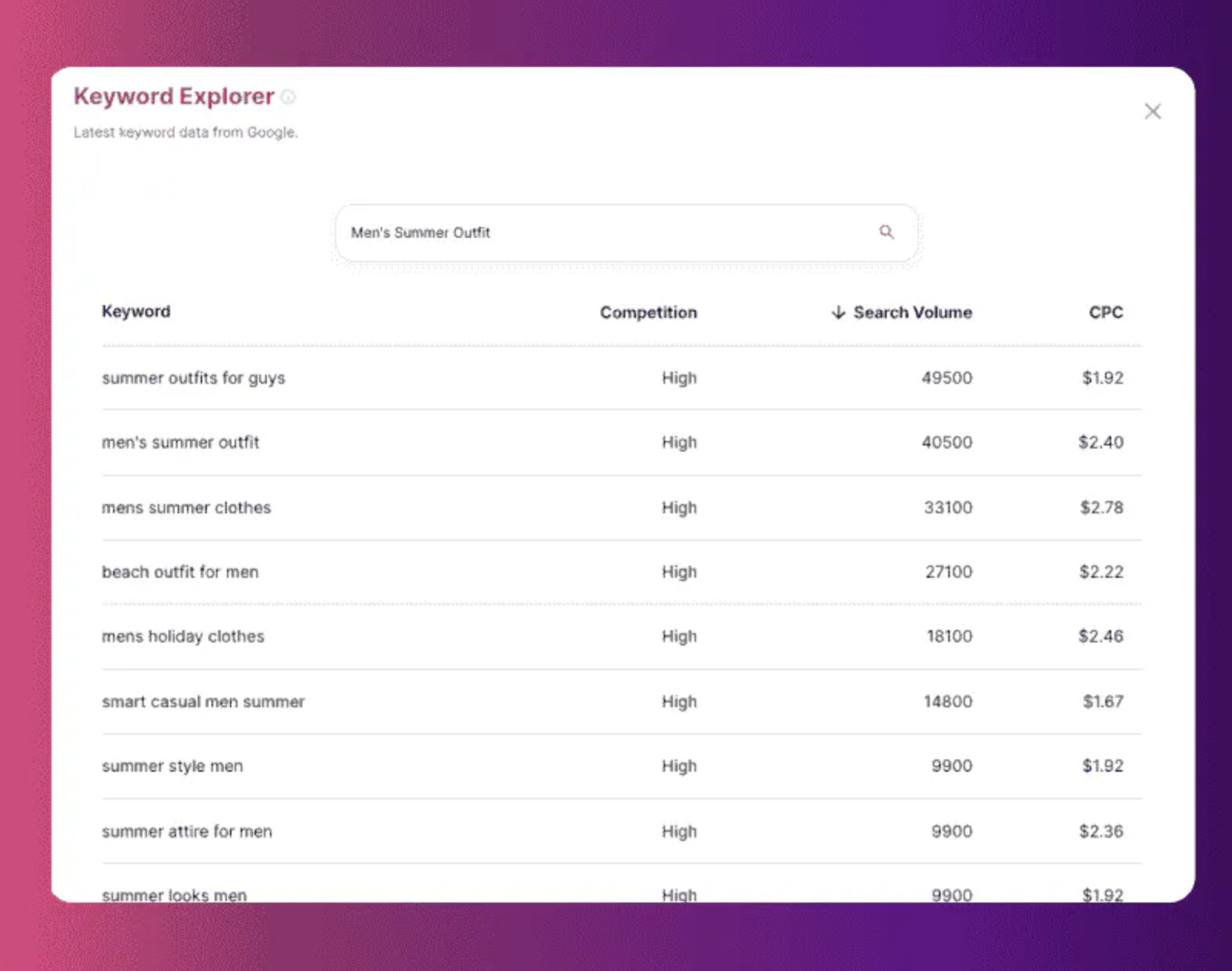
Instead of asking an AI tool for "keywords about AI SEO," use it to answer sharper questions:
- Which queries show beginner intent?
- Which queries imply tool comparison?
- Which queries need a workflow, not a definition?
- Which topics belong on the same page?
- Which topics deserve separate pages because the search intent is different?
That last question is the one many sites get wrong.
AI makes it tempting to create a page for every keyword variation. But Google's spam policy on scaled content abuse focuses on large amounts of unoriginal content created primarily to manipulate search rankings, no matter how it was produced. If ten AI-generated pages answer the same thing with slightly different phrasing, they are not an SEO asset. They are site bloat.
For a cleaner workflow, start with an AI keyword research pass, then manually decide the page type: guide, comparison, product page, template, glossary entry, case study, or refresh.
2. Content Briefs That Are Harder to Misread
AI is excellent at turning messy inputs into a useful brief.
Give it the target query, ranking pages, Search Console data, your product notes, audience, internal links, and sources. Then ask it for:
- The dominant intent.
- The subtopics competitors cover.
- The subtopics competitors miss.
- Claims that need citations.
- Examples the page should include.
- Existing pages that should be internally linked.
- Sections that would be redundant.
.png?token=eyJhbGciOiJIUzI1NiIsInR5cCI6IkpXVCJ9.eyJ1cmwiOiJ1c2VyLWdlbmVyYXRlZC1pbWFnZXMvZjJmOThkNWUtNjNjNC00MTJiLTkyY2QtZjgyNDI5NTE3YWRkL3VubmFtZWQgKDEpLnBuZyIsImlhdCI6MTY5ODEyNDMyMywiZXhwIjoxODU1ODA0MzIzfQ.HYLzPTZyc6zZDecPnzq-ldzzpwQIKuQXj-YmiZvaEoo)
The brief should not be a copied outline from the top results. It should be a decision document.
For this topic, the strongest competitor patterns are obvious: Google focuses on official guidance for AI search visibility, Salesforce covers workflow use cases, Search Engine Land focuses on how AI changes discovery and click behavior, and Digital Marketing Institute brings in adoption, AI Overviews, and practical SEO tasks. The gap worth filling is a more practical synthesis: what to automate, what to keep human, and what to avoid.
That is the kind of brief AI can help create, as long as the editor decides the angle.
3. Content Creation, But Only With Real Inputs
AI can speed up content production, but "speed" is not the same as "quality."
The best AI-assisted SEO content usually starts with real material:
- Your product knowledge.
- Customer questions.
- Sales objections.
- Search Console queries.
- Support tickets.
- Original examples.
- Screenshots.
- Expert notes.
- Competitor gaps.
- Source-backed claims.
Then AI helps organize and draft from those inputs.
If you skip the inputs, you usually get commodity content: smooth, correct-sounding, and forgettable. Google's AI optimization guide explicitly pushes site owners toward non-commodity content with unique perspective, first-hand experience, and value beyond common knowledge.
This is also why AI content still needs a human pass. If a draft sounds generic, vague, or padded, use a humanizing pass to add examples, remove fake certainty, tighten claims, and make the page sound like it came from someone who has actually done the work.
4. On-Page Optimization and Refreshes
AI is often more useful on existing pages than brand-new ones.
An old page already has signals: impressions, clicks, rankings, backlinks, internal links, conversion data, and maybe featured snippet history. AI can compare that data against the current SERP and suggest what changed.
.png?token=eyJhbGciOiJIUzI1NiIsInR5cCI6IkpXVCJ9.eyJ1cmwiOiJ1c2VyLWdlbmVyYXRlZC1pbWFnZXMvZjJmOThkNWUtNjNjNC00MTJiLTkyY2QtZjgyNDI5NTE3YWRkL3VubmFtZWQgKDIpLnBuZyIsImlhdCI6MTY5ODEyNDQ0MCwiZXhwIjoxODU1ODA0NDQwfQ.BdfoDZ37oRX8MirFhKimrqjR25uc4ixtQm_z8hPHgUE)
A strong refresh prompt might ask:
Compare this page against the current intent. Which sections are outdated, duplicated, too thin, unsupported, or missing a direct answer? Which existing rankings could improve if the article were clearer?
The fix may be a new section, but often it is smaller:
- Rewrite the intro so it answers the query faster.
- Add a table that compares options.
- Replace a vague claim with a source.
- Add internal links to deeper supporting pages.
- Cut five paragraphs that repeat the same point.
- Update examples that no longer match the current search experience.
For product-led sites, tools like Junia's SEO improver can help identify weak sections, but the editor should still decide whether the page needs a surgical refresh or a full rewrite.
5. Internal Linking and Site Architecture
Internal linking is one of the easiest AI SEO wins because the work is repetitive but still context-sensitive.
AI can scan your site, understand page topics, and suggest links where two pages naturally support each other. That helps search engines discover related pages and helps readers move from a broad guide into a more specific next step.
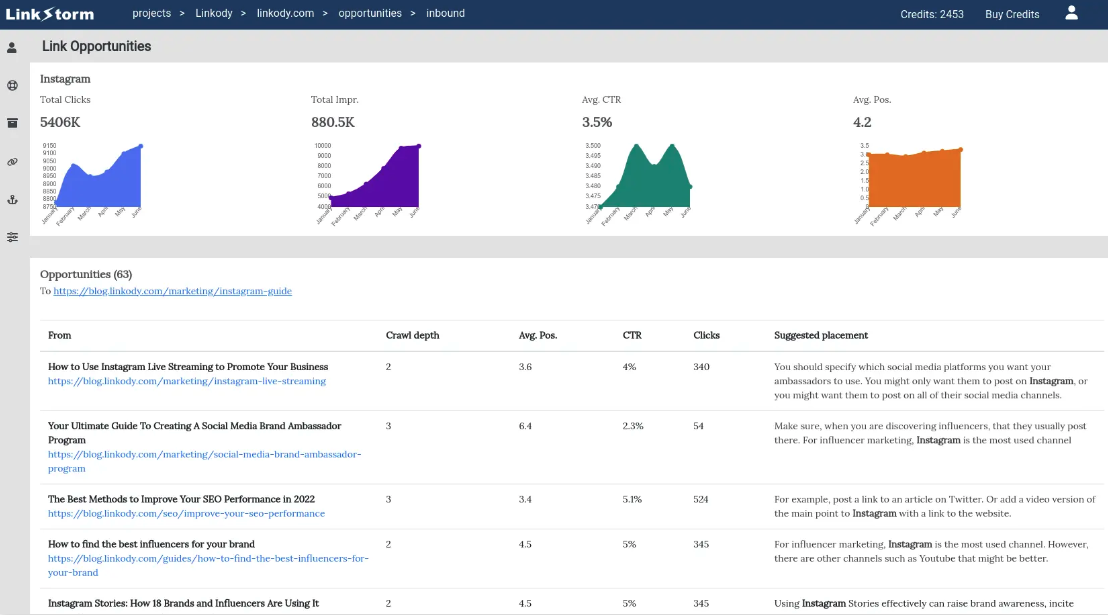
The mistake is accepting every suggestion.
Good internal links should feel like part of the explanation. If a paragraph only exists to introduce a related article, the link is probably not earned. A better approach is to explain the reader's next decision, then link the phrase that naturally names it.
If a page explains how AI SEO tools find topical gaps, it is natural to mention AI-driven content clustering. The clustering decision is the useful one. Whether those clusters become ten pages or one is an editorial call, not a tool output.
An AI internal linking tool can speed up discovery, but final anchor text still needs editorial judgment.
6. Technical SEO and Page Experience
AI can help technical SEO teams move faster by summarizing crawl data, identifying patterns, and turning issues into fix lists.
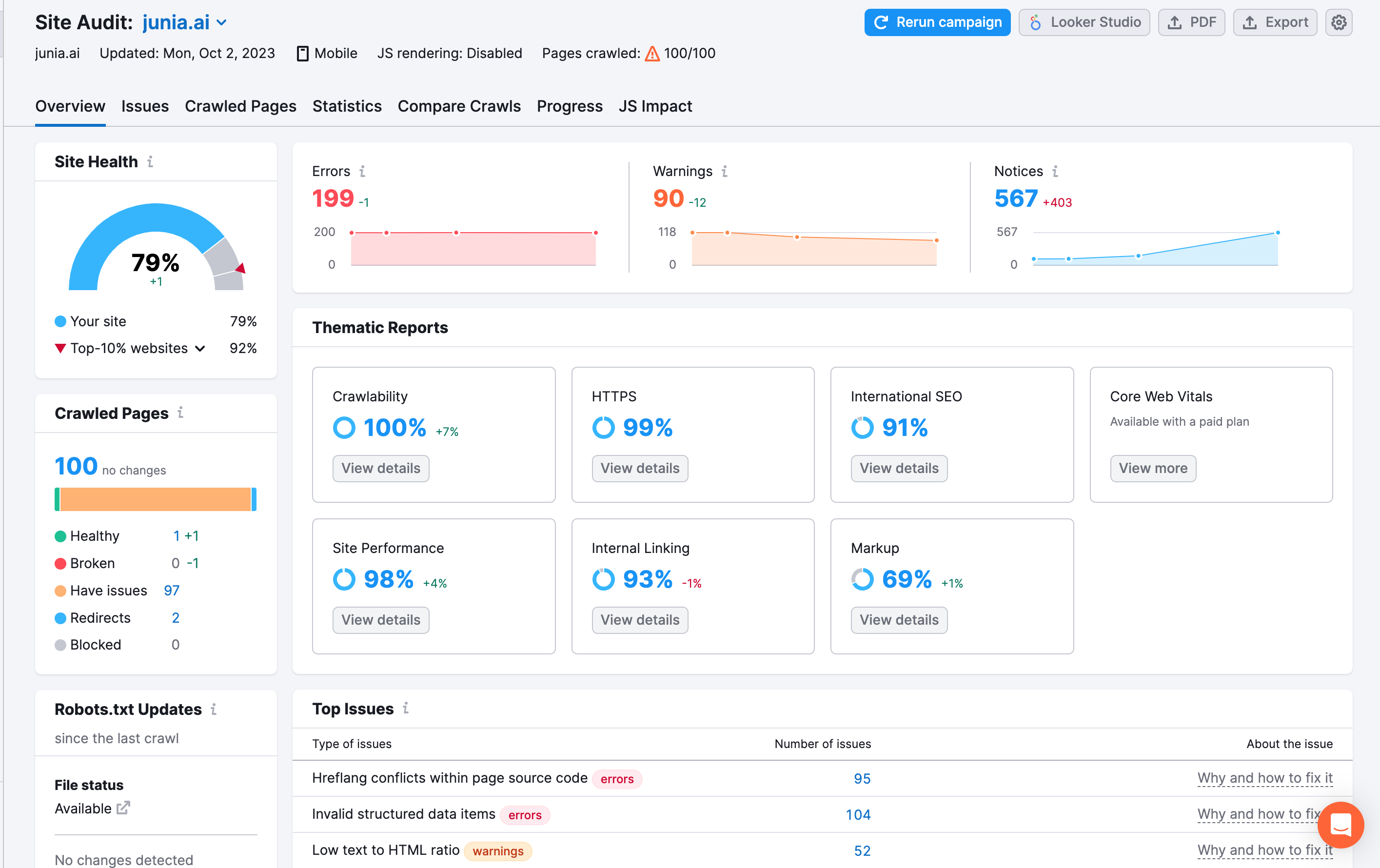
It can help with:
- Duplicate title and meta patterns.
- Indexation anomalies.
- Redirect chains.
- Canonical conflicts.
- Thin template pages.
- JavaScript rendering risks.
- Schema validation issues.
Structured data is one of those technical jobs AI can draft quickly. Validate it. Conflicting JSON-LD is worse than no markup.
- Core Web Vitals investigation.
- Missing alt text at scale.
But technical SEO is full of site-specific tradeoffs. A tool can flag duplicate content, but a human has to decide whether the duplicate is harmful, intentional, canonicalized, paginated, faceted, localized, or part of a product variant system.
Use AI for detection and prioritization. Use technical judgment for fixes.
7. Image, Video, and Voice Search Optimization
AI can also improve assets that many SEO teams neglect.

For images, AI can draft alt text, identify visual subjects, suggest filenames, and find pages where screenshots would clarify a point. For video, it can produce transcripts, chapters, summaries, schema drafts, and short clips. For voice search, it can help turn stiff keyword lists into natural questions and short answers.
The standard is still usefulness.
Do not add an image because "multimedia helps SEO." Add it because it explains the workflow, proves the product, shows the interface, or helps a reader understand the concept faster.
Google's AI optimization guidance says high-quality images and video can create more opportunities to appear across Search, including generative AI experiences. That is a practical reason to improve media, not a reason to decorate every section.
A Practical AI SEO Workflow
Here is a simple workflow I would use for most content teams.
Step 1: Start With Search Intent, Not a Prompt
Before opening an AI tool, write one sentence:
The reader wants to understand whether AI SEO is useful, what tasks it can handle, and how to avoid tactics that could hurt rankings.
That sentence should guide the page.
If you cannot write the intent clearly, the AI output will probably wander. It may still sound polished, but it will not make the page more useful.
Step 2: Pull the Right Inputs
AI works better when the inputs are specific.
For an AI SEO article, useful inputs include:
- Top-ranking pages.
- Google Search Central guidance.
- Existing Junia pages on AI SEO tools, AI content, E-E-A-T, internal linking, and bulk publishing.
- Search Console queries for the target URL.
- Product capabilities from Junia.
- Current SERP features.
- Competitor gaps.
If you are creating pages at scale, this input discipline is even more important. A programmatic SEO workflow needs unique data, templates that serve different intents, and QA rules that prevent near-duplicate pages from going live.
Step 3: Build the Brief
Ask AI for a brief, not a final article.
The brief should include the target reader, search intent, recommended structure, claims needing evidence, internal links, examples, and sections to avoid. It should also identify what would make the page different from the current results.
For this article, the differentiator is not another list of AI SEO benefits. It is the distinction between useful automation and dangerous overproduction.
Step 4: Draft, Then Edit Against Reality
AI can produce a first draft quickly. The real work starts after that.
During the edit, check:
- Does the intro answer the query quickly?
- Are the claims supported?
- Does each section give a reader a decision rule?
- Are the examples specific?
- Are internal links natural?
- Is anything included only because competitors included it?
- Does the article explain what to avoid?
If the page includes AI-generated sections, review them against Google's helpful content guidance. The point is not to hide that AI helped. The point is to make sure the final page is useful, reliable, and created for people.
Step 5: Optimize for Being Cited, Not Just Clicked
AI search systems tend to reward content that is easy to understand, summarize, and cite.
That does not mean you should write robotic snippets. It means your page should include:
- Clear definitions.
- Direct answers.
- Tables where comparison helps.
- Specific examples.
- Source-backed claims.
- Original observations.
- Concise headings.
- Media that clarifies the page.
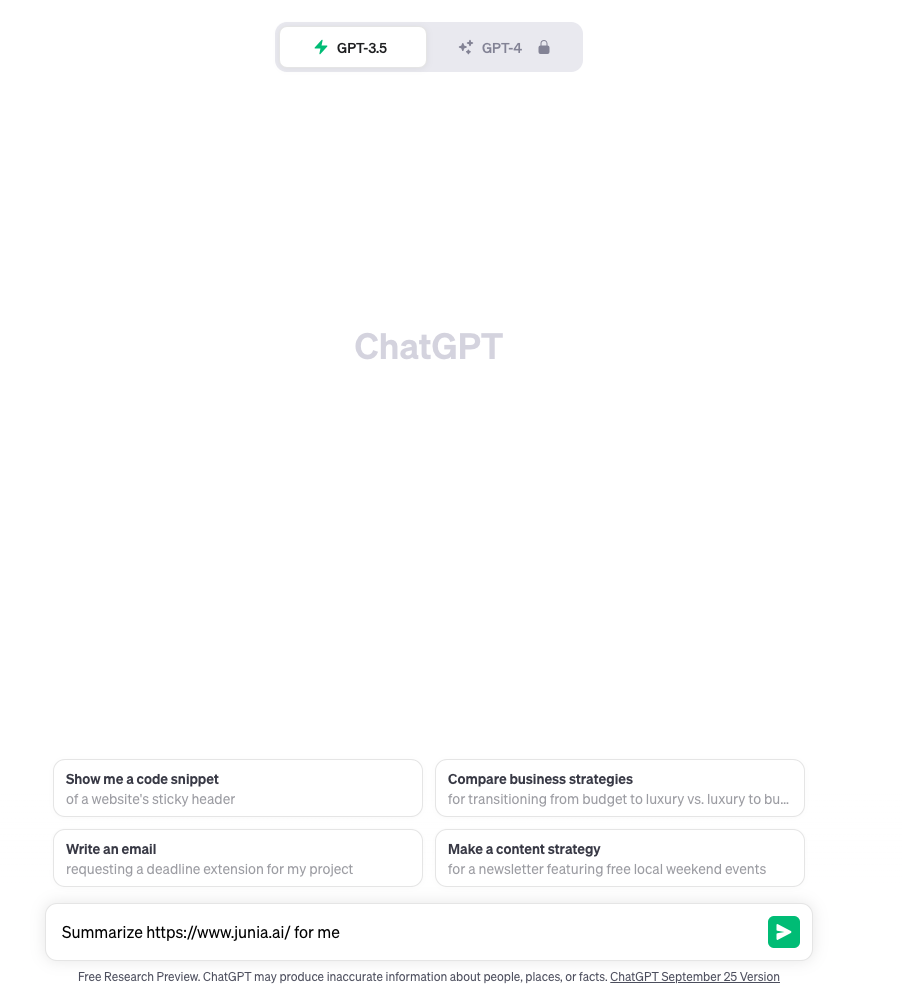
A good test is simple: could someone quote one paragraph from your page and still preserve the meaning? If not, the page may be too vague.
Best AI SEO Use Cases
Here are the AI SEO use cases that usually create value without creating unnecessary risk.
| Use case | Why it works | Human review needed |
|---|---|---|
| SERP analysis | Finds repeated intent patterns and missing angles faster | Decide the unique page angle |
| Brief generation | Turns research into a structure writers can follow | Remove copied competitor logic |
| Content refreshes | Compares old content against current SERPs and queries | Check facts, examples, and claims |
| Internal linking | Finds relevant pages and anchor opportunities | Approve placement and anchor text |
| Metadata variants | Produces title and description options quickly | Pick the version that matches the page promise |
| Technical issue grouping | Summarizes crawl and indexation patterns | Validate before changing templates |
| Content QA | Checks for unsupported claims, repetition, and weak sections | Make editorial decisions |
| Bulk page workflows | Speeds up pages with structured, unique data | Prevent duplicate or low-value pages |
The pattern is the same across those jobs: AI speeds up the first pass. A human still decides whether the page should exist. If you want examples of where that split actually pays off, the best use cases for AI content in SEO are the ones with a distinct query, not a new URL for every synonym.
AI SEO Tools Worth Considering
There are many AI SEO tools, but they usually fall into a few categories.
Junia AI
Junia AI is built for SEO content workflows: keyword research, content generation, optimization, internal linking, brand voice, and AI-assisted editing. It is most useful when you want one workflow that moves from search research to publish-ready content instead of stitching together several disconnected tools.
For teams that want more automation around planning and execution, an AI SEO agent can help coordinate research, drafting, optimization, and QA steps. I would still keep a human editor in the loop for claims, examples, links, and final publishing decisions.
An agent is only useful if you already know what "done" looks like. If you do not, what an AI SEO agent is matters more than a feature comparison.
ChatGPT, Claude, and Gemini
General-purpose AI assistants are useful for brainstorming, outlining, summarizing sources, rewriting sections, creating title variants, and stress-testing arguments.
They are not SEO tools by default. You have to provide the search intent, sources, examples, brand context, and quality bar.
Semrush, Ahrefs, Surfer, and Similar Platforms
Traditional SEO platforms now include AI features for SERP analysis, content scoring, intent detection, metadata generation, and keyword suggestions. These are useful for competitive research and optimization, especially when paired with human judgment.
The risk is over-optimizing to a score. A content score can tell you that competitors mention a topic. It cannot always tell you whether your reader needs that topic on this page.
Internal Linking and Technical SEO Tools
Tools like LinkStorm, Screaming Frog integrations, site crawlers, and AI-assisted audit tools can help find structural problems faster.

For link building, AI can help identify prospects, summarize a site's relevance, draft outreach, and personalize emails. But it cannot make a weak pitch valuable. Outreach still needs a real reason for the recipient to care.
What to Avoid With AI SEO
Publishing Generic AI Pages at Scale
This is the obvious risk.
AI makes it cheap to publish hundreds of pages. That does not mean those pages deserve to exist. If each page is just a recombined version of information already available everywhere, it is unlikely to build trust or durable search visibility.
This is where many sites confuse production volume with SEO momentum. More pages can help only when each page satisfies a distinct need better than the existing alternatives. Publishing hundreds of near-identical AI pages is how bulk content generation ruins a site, not how you build topical authority.
Treating AI Detectors as a Quality Standard
AI detectors are not a reliable editorial standard. A page can pass a detector and still be useless. A page can be AI-assisted and still be excellent.
If you use an AI text detector, treat it as one weak signal, not as the decision-maker. The better review questions are: Is the article accurate? Is it specific? Does it show real expertise? Would a reader trust it? Does it add anything competitors do not?
Over-Optimizing for AEO and GEO Hacks
Some AI search advice sounds precise but has little grounding.
Be careful with claims like:
- "Add llms.txt and Google will cite you."
- "Break every answer into tiny chunks."
- "Rewrite pages for LLMs instead of humans."
- "Create fake brand mentions around the web."
- "Use special schema to rank in AI Overviews."
Google's AI optimization guidance says these are not requirements for visibility in Google Search's generative AI features. Structured data is still useful for eligible rich results, but there is no special schema that guarantees AI Overview inclusion.
Letting Tools Flatten Your Point of View
AI often pushes content toward the average.
That is useful for summarizing a topic, but bad for standing out. If every page says "AI can automate keyword research, content creation, and link building," nobody has a reason to cite yours.
Add the thing competitors cannot easily copy: your data, examples, product screenshots, customer objections, strong opinions, templates, workflows, or first-hand lessons.
Ignoring E-E-A-T
AI can help organize expertise, but it cannot manufacture it.
If you publish YMYL content, product recommendations, technical advice, or strategic guidance, readers and search systems need trust signals: author experience, sources, examples, dates, clear limitations, and a reason to believe the advice.
Treat E-E-A-T with AI writing tools as a QA lens, not as a section you paste onto the page. If the article cannot name who did the work, what they tested, and what they would not claim, no schema fix will save it.
How to Optimize for AI Overviews and Answer Engines
You cannot force a page into an AI Overview. You can make the page easier to understand, trust, and cite.
Focus on these fundamentals:
| Optimization | Why it helps |
|---|---|
| Answer the main question early | AI systems and readers can identify the page's purpose quickly |
| Use clear headings | The page is easier to parse and summarize |
| Include tables for comparisons | Structured information is easier to extract |
| Support important claims | Citations reduce ambiguity and improve trust |
| Add original examples | Unique material makes the page less interchangeable |
| Keep pages crawlable and indexable | AI search features depend on accessible indexed content |
| Use helpful images and video | Search can surface media beyond normal blue links |
| Build topical authority | Strong clusters give systems more context around your expertise |
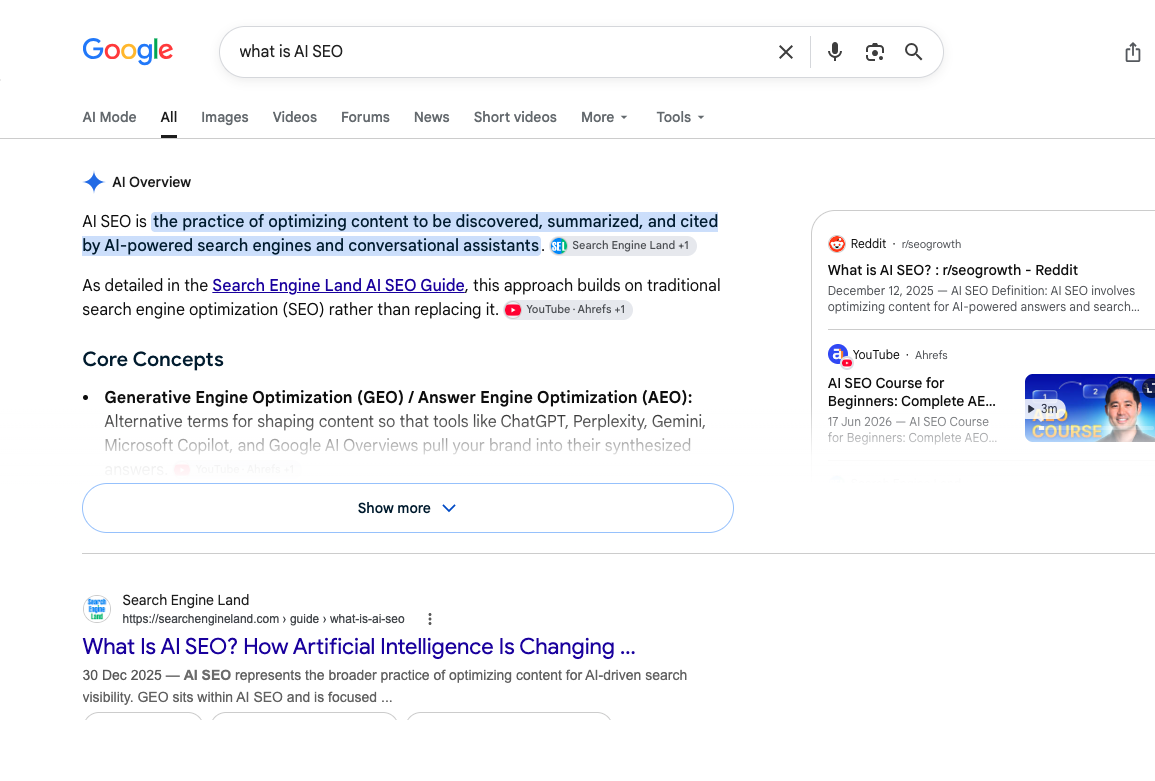
That Overview is the job now: a short answer, a cited source, then the blue links. If your page does not give Google a clean definition and a reason to trust it, you are competing for leftover clicks.

Predictive analysis can help here, but do not overstate it. AI can spot rising topics, query shifts, and traffic anomalies. It cannot guarantee where Google will place an AI Overview or which sources it will cite.
The practical move is to build pages that are worth citing even if AI search never cites them.
The Best AI SEO Strategy for 2026
If I had to reduce AI SEO to one strategy, it would be this:
Use AI to scale the research and production process, not to lower the quality bar.
That means:
- Fewer generic pages.
- Better briefs.
- Stronger refreshes.
- Cleaner internal links.
- More source-backed claims.
- More original examples.
- Better media.
- Clearer decisions about what not to publish.
AI can absolutely help with rankings, traffic, and visibility. But it helps most when it supports the fundamentals that already matter: useful content, technical accessibility, topical depth, clean site architecture, and trust.
The worst AI SEO strategy is to publish more because you can.
The best one is to publish better because AI gives you more time to think.