
Best CMS for SEO in 2026 (Choose by Site Type in 2 Minutes)

Thu
AI SEO Specialist, Full Stack Developer

Ask a vendor to change one page’s URL, redirect the old address, and give the new page its own search title. Then ask your editor to repeat those steps. That small exercise reveals more about day-to-day SEO work than a list of built-in features.
The best CMS for SEO gives your team control over the pages it actually publishes: articles, products, location pages, or a mixture of them. It also makes routine changes manageable after launch.
A strong CMS should make it easy to:
- Control meta titles and descriptions at scale
- Create clean, editable URLs
- Add schema markup without heavy workarounds
- Manage image optimization and performance basics
- Generate clean, crawlable code that search engines understand
A clean technical foundation helps search engines access your content and visitors use it. It does not guarantee rankings; the theme, hosting, scripts, and quality of the pages still matter.
This guide breaks down the best CMS options for SEO in 2026 and matches them to the kinds of sites they serve best:
- Small businesses that need simple workflows
- Enterprise teams that need governance and security
- Ecommerce brands that rely on product-page SEO
- Design-led teams that want visual control without losing SEO basics
If you're launching a new site or reconsidering your current stack, the goal is simple: pick the CMS that removes SEO friction for your team instead of adding more of it.
The SEO Controls Your Team Will Use Every Week
A CMS does not need to do everything, but it does need to handle the fundamentals well. A plugin or developer-owned configuration can be perfectly workable. The problem is discovering after launch that nobody owns routine metadata, redirect, or template changes.
Metadata Management
A good CMS should give you direct control over titles, descriptions, canonicals, and social metadata. At minimum, look for the ability to:
- Create unique meta titles for every page
- Write compelling meta descriptions that improve click-through rate
- Apply custom fields or templates across different content types
For WordPress sites, plugins such as Yoast SEO or guides on WordPress SEO with AI can make this easier, but check the actual editor-plus-plugin setup your team will use. Metadata controls are not identical across WordPress installations.
URL Structure Customization
Clean URLs help both users and crawlers understand what a page is about. When comparing platforms, make sure the CMS lets you:
- Create custom URL patterns for different content types
- Edit URL slugs without breaking the publishing workflow
- Handle automatic URL redirection for old links
- Use and support hierarchical URL structures
- Use built-in tools for dealing with URL parameters
Auto-generated XML sitemaps and reliable redirect handling matter here too. They make it easier to preserve rankings when content moves or site structures change.
Image Optimization
Images affect both rankings and usability, especially on content-heavy and ecommerce sites. Look for:
- Image compression with acceptable visual quality
- Built-in alt text management
- Lazy loading capabilities for faster page speeds
- Responsive image handling
- Image format conversion (WebP support)
- Bulk image optimization tools
The best CMS platforms also support technical SEO essentials such as:
- Schema markup implementation
- XML sitemap generation
- Robots.txt file management
- Mobile optimization controls
- Page speed optimization tools
- Internal linking suggestions
These features create the technical foundation that strong content needs. If your team also relies on automation, pairing the CMS with AI SEO tools can speed up optimization without weakening editorial control.
Bring one ordinary page to the demo
Use a sample service page, such as “Boiler servicing in Leeds,” with a photograph and a short FAQ. Ask the person who will maintain the site to complete these tasks in a trial or staging site:
| Task | What a usable implementation looks like | Warning sign |
|---|---|---|
| Change the search title without changing the H1 | Both fields can be managed deliberately | One edit unexpectedly changes every page |
Change /boiler-service-leeds to /services/boiler-servicing-leeds | The old URL redirects directly to the new equivalent | The old URL becomes a 404 or redirects to the homepage |
| Add another service page from the same template | It receives its own title, description, and canonical URL | It inherits the first page’s metadata |
| Add and replace the photograph | Alt text is editable and the delivered image is appropriately sized | The mobile page loads the original oversized upload |
| Check the published result | The intended page is crawlable and the metadata is in the rendered page | The editor preview looks right but the public page differs |
For an existing site, run this on staging rather than experimenting with a ranking URL. Record which tasks need an administrator, paid add-on, or developer. Those dependencies belong in the cost comparison.
Top CMS Platforms with Strong SEO Capabilities
Different CMS platforms solve different SEO problems. Some are strongest for content production, others for ecommerce, governance, or headless delivery.
| CMS | Best for | Main SEO strength | Main tradeoff |
|---|---|---|---|
| Junia AI | Content-led teams | AI-assisted creation plus built-in SEO workflows | Less relevant if you only need a traditional CMS |
| WordPress | Blogs and publishers | Huge plugin ecosystem and flexible SEO control | Plugin bloat can hurt performance |
| Drupal | Enterprise and complex sites | Security, permissions, and technical control | Higher implementation complexity |
| Shopify | Ecommerce brands | Strong product-page SEO defaults | Limited URL flexibility |
| HubSpot CMS | Marketing teams | Integrated analytics and content strategy | Higher cost and setup depth |
| Webflow | Design-led teams | Clean code and strong visual control | Not ideal for very complex content models |
| Wix | Small businesses | Easy setup with solid SEO basics | Less technical flexibility |
1. Junia AI
Junia AI stands out because it combines content creation, optimization, and publishing in one workflow. For teams that publish SEO content frequently, that reduces a lot of the friction that usually appears when writing, editing, and publishing happen across separate tools.
Its strength is not just AI writing. It is the ability to move from keyword to draft to published page while keeping SEO checks close to the editorial workflow.
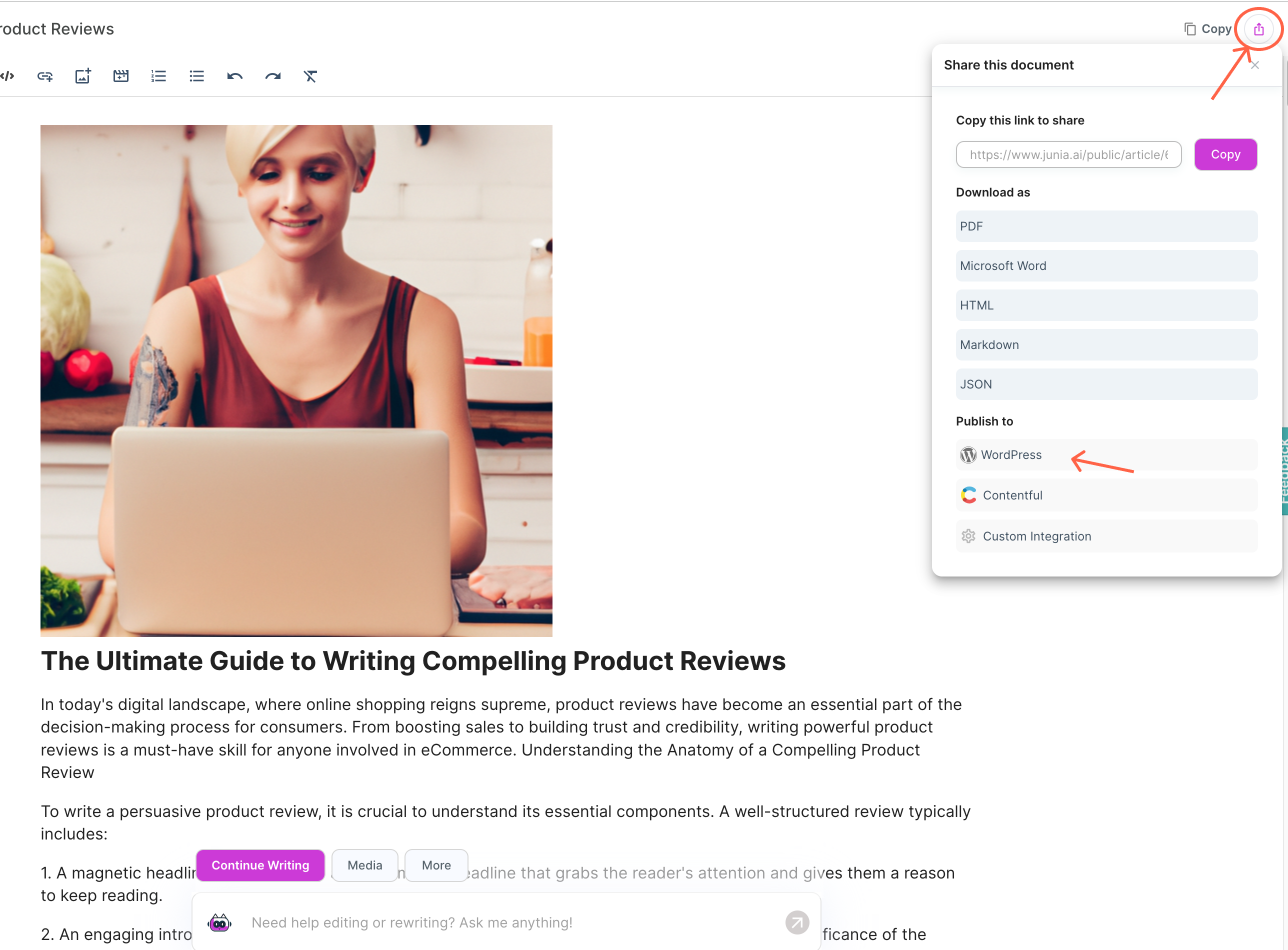
Junia’s publishing guide shows the handoff from the editor to a connected site. Check the destination and draft settings before enabling automatic publishing.
Junia is the content production and publishing layer in this setup. Your connected CMS or custom frontend still handles the public site’s templates, routing, and technical configuration. Test both sides of that handoff.
Key features and benefits:
- AI-assisted content generation: Create blog posts, landing pages, and product copy quickly, then refine them inside the same workflow.
- Direct publishing flow: Publish without extra copy-paste steps that often introduce formatting issues or version drift.
- API-first delivery: Push content to custom frontends while keeping editorial control in one place.
- Built-in optimization support: Review internal linking, metadata, readability, and on-page suggestions before publishing.
- Flexible for developers: Works well with modern frontend stacks when you want a headless-style setup.
For teams comparing AI-first platforms, it also helps to review adjacent workflows such as SEO for landing pages and SaaS technical SEO, since publishing speed only matters if the underlying pages are indexable and well structured.
Keep a review checkpoint. A successful publish action confirms that content reached the site. It does not confirm that the title, canonical URL, image layout, or internal links are correct. Inspect the resulting page before increasing publishing volume.
2. WordPress
WordPress remains the default choice for content-heavy sites because it balances flexibility, familiarity, and SEO depth. If you run a blog, publisher site, or service business site, WordPress gives you the most room to grow without forcing an enterprise rebuild later.
Key WordPress SEO advantages:
- Mature SEO plugin ecosystem, including tools like Yoast SEO
- Flexible permalink, taxonomy, and template control
- Large theme and developer ecosystem
- Straightforward editorial workflow for teams publishing often
- Easy integrations with analytics, schema, and optimization tools
Capabilities to configure in your WordPress stack:
- XML sitemap generation and configurable permalinks in WordPress core
- SEO analysis, readability checks, social metadata, and expanded schema through plugins such as Yoast
- Responsive layouts through your chosen theme
- Caching, compression, and delivery optimization through hosting and a carefully selected plugin stack
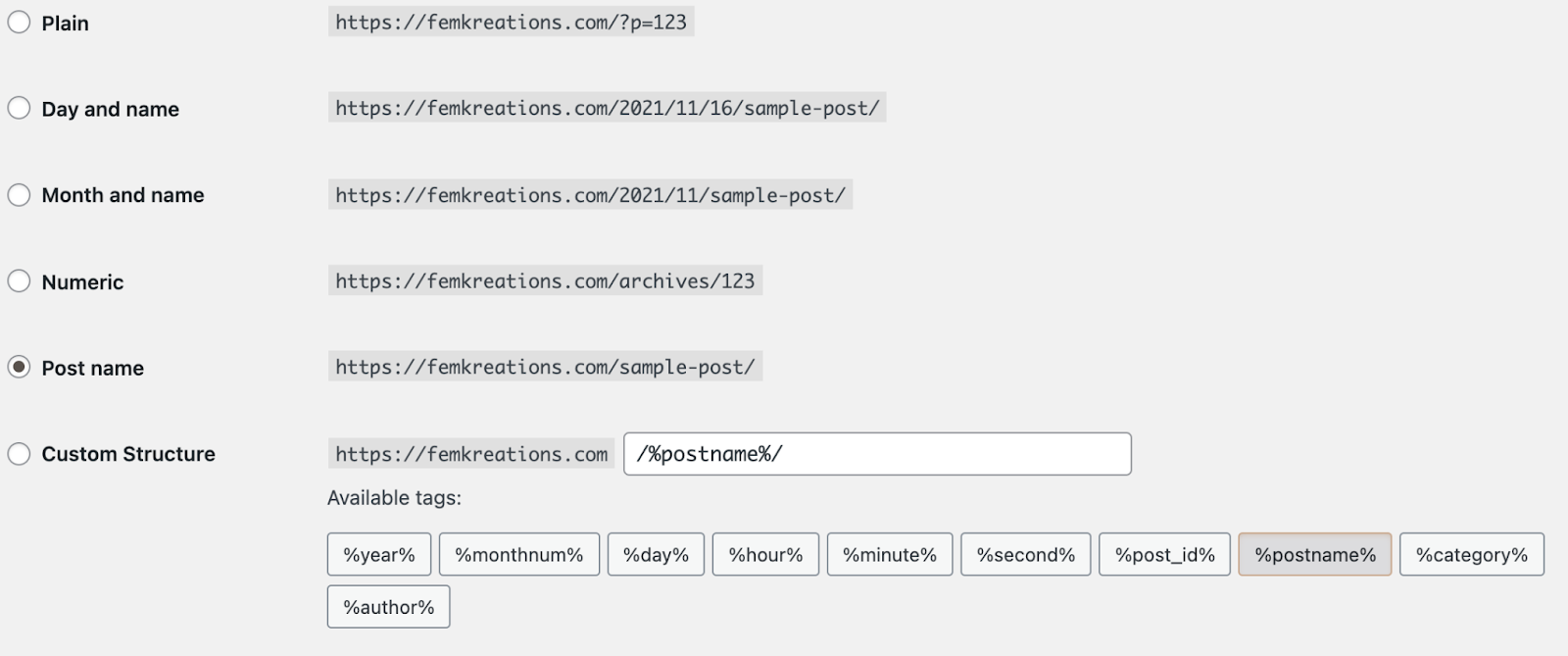
WordPress documents these options under Settings → Permalinks. “Post name” keeps article URLs simple, but changing an established structure requires a redirect plan.
The main tradeoff is maintenance. Plugin sprawl, inconsistent theme quality, and weak hosting can turn a strong SEO setup into a slow one. Teams using WordPress usually get the best results when they keep the stack lean and follow a clear WordPress SEO with AI workflow instead of piling on overlapping tools.
If your team wants more automation in the editorial workflow, these AI SEO tools for WordPress can help with briefs, optimization, and publishing support without changing the CMS itself.
3. Drupal
Drupal is the strongest fit here for enterprise teams with complex governance, large content models, and strict security requirements. It is not the easiest platform to run, but it gives technical teams a high level of control over architecture, permissions, multilingual content, and structured publishing.
Key Benefits for Enterprises:
- Granular permissions and workflow controls
- Strong multilingual support
- Flexible content modeling
- API support for complex integrations
- Mature fit for regulated or high-governance environments
Drupal works best when your SEO program depends on structured content, reusable templates, and deeper technical customization. Large organizations often choose it because they can shape the CMS around the business, rather than shaping the business around the CMS.
Security responsibilities to budget for:
- Keep Drupal core and contributed modules on supported, updated versions.
- Configure roles and publishing permissions around the team’s real responsibilities.
- Plan backups, monitoring, and incident ownership with your hosting or development team.
- Treat two-factor authentication and encryption requirements as implementation checks, not automatic consequences of choosing Drupal.
Drupal’s security and updates guide is a useful starting point. A platform with strong controls still needs someone to maintain them.
The cost is complexity. Drupal usually needs experienced developers, stronger QA, and more deliberate implementation than WordPress or Shopify. If your team can support that, the upside is a CMS with much better long-term control over technical SEO and scale.
4. Shopify: The Best CMS for SEO in 2026
Shopify is one of the safest choices for ecommerce SEO because many of the basics are already in place. Shopify generates sitemaps and canonical tags, while supported themes provide product structured data. Those defaults reduce setup work, but a customized theme or app can still change the final output. Check a live product page against Shopify’s documented SEO features.
Key SEO strengths:
- Automated XML sitemap generation
- Product structured data supplied by supported themes
- Built-in 301 redirects management
- Customizable product meta descriptions
- Mobile-optimized themes
The platform is especially strong on product-page execution. You can edit image alt text, write custom metadata, and manage redirects without needing a heavy technical setup. If your team publishes a lot of category and product content, pairing Shopify with dedicated SEO tools for Shopify can fill in some of the gaps around keyword tracking and bulk optimization.
Notable limitations:
- Restricted URL structure modifications
- Limited blog functionality compared to WordPress
- International URL and language setup that needs to be planned alongside Markets
- Basic canonical URL controls
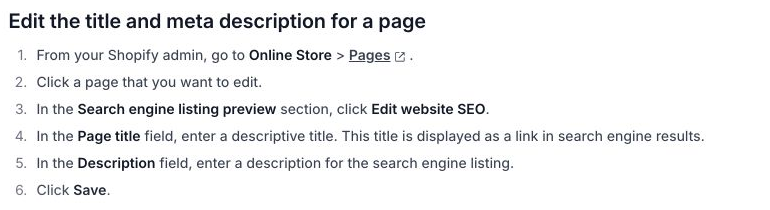
The practical check is whether an editor can change the search listing without altering the product or page name used elsewhere. Shopify’s page metadata instructions separate the search title and description from the page’s main content.
Shopify's app ecosystem can extend the platform further with bulk optimization, richer schema support, and merchandising-focused SEO automation.
For multilingual stores, Shopify Markets supports subfolders, subdomains, or separate domains and can generate hreflang tags. Implementation still needs care, especially if an app also adds tags. If international SEO is part of your roadmap, this guide to hreflang for multilingual websites is worth reviewing before rollout.
5. HubSpot CMS: Advanced SEO Capabilities
HubSpot’s CMS, offered within Content Hub, works best for marketing teams that want content, CRM data, analytics, and lead generation in one system. Its SEO strength is less about raw flexibility and more about workflow efficiency: strategy, publishing, reporting, and attribution all live in the same environment.
Key SEO advantages include:
- Built-in SEO recommendations
- Integrated analytics and conversion tracking
- Topic-cluster style content planning
- Native connection to the broader HubSpot marketing stack
- Strong fit for campaign-driven content teams
The tradeoff is cost and complexity. HubSpot CMS is easier to justify when SEO is tightly connected to pipeline, lead nurturing, and lifecycle reporting. For smaller teams that only need publishing plus basic optimization, it can be more platform than necessary.
6. Webflow
Webflow is a strong option for design-led teams that care about layout control but still want clean technical foundations. It gives marketers and designers more control than typical site builders while avoiding much of the plugin overhead that comes with WordPress.
Key Design Features:
- Visual breakpoint management
- Flexible layout controls with Grid and Flexbox
- Animation and interaction support
- Clean front-end output compared with many drag-and-drop builders
Built-in SEO Capabilities:
- Custom meta titles and descriptions
- Auto-generated XML sitemaps
- Clean URL structures
- Image optimization support
- Custom schema implementation
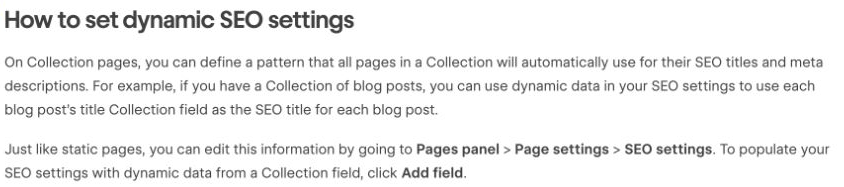
For a blog, bind the title and description to item-specific fields rather than typing the same metadata into the Collection template. Webflow’s dynamic SEO settings use Add field for that connection. Preview two different posts before accepting the template.
Webflow is especially appealing when SEO and brand presentation both matter. If your team also wants AI-assisted drafting around that workflow, these best AI writing tools for Webflow are a more relevant next step than generic writing tools.
7. Wix
Wix is now a credible SEO choice for small businesses that want a low-friction setup. It will not satisfy every technical requirement, but for local businesses, portfolios, and simple service sites, it covers more of the basics than it used to.
Key SEO features include:
- Custom meta titles and descriptions
- Structured data support
- Automated sitemap generation
- Mobile optimization
- SSL by default
- Guided setup through the SEO Setup Checklist
Wix is strongest when ease of use matters more than deep customization. If your priority is launching quickly with minimal technical debt, Wix is often enough. If the site needs unusual content relationships or custom routing, test those requirements first. A small service site does not need to migrate just because its traffic grows.
When a Headless CMS Is Worth the Extra Work
Headless CMS platforms are best when you need structured content delivered across multiple frontends, not when you simply want a faster blog editor. The SEO upside comes from control: developers can tune performance, schema, routing, and rendering more precisely than in most traditional CMS setups.
Key Benefits of Headless CMS for SEO:
- API-first architecture: Reuse structured content across web, app, and other channels
- Performance flexibility: Pair the CMS with fast frontends and edge delivery
- Granular metadata control: Handle canonicals, schema, and templates in code
- Structured content models: Build cleaner internal relationships between pages and entities
The main constraint is resourcing. A headless stack usually needs developers who can manage the frontend, content modeling, deployment, and technical SEO implementation. For teams already working in modern frameworks, this tradeoff is often worth it. For lean marketing teams, it often is not.
If you want a simpler editorial layer on top of a modern publishing stack, tools with Ghost integration can be a practical middle ground.
Test the Templates Your Visitors Will Load
Performance is not a side issue. A CMS affects how much unnecessary code your site ships, how well images are handled, how easy caching is to configure, and how fast your team can fix technical issues when rankings slip.
Loading Speed Impact
Look closely at whether the platform supports:
- Efficient image handling and modern formats
- Clean theme output with limited script bloat
- CDN compatibility
- Caching and minification controls
- Strong mobile rendering by default
Key Performance Metrics
Use the current Core Web Vitals rather than a vague promise of “fast loading”:
| Metric | What it measures | Good threshold |
|---|---|---|
| Largest Contentful Paint (LCP) | Loading of the main visible content | 2.5 seconds or less |
| Interaction to Next Paint (INP) | Responsiveness to user interactions | 200 milliseconds or less |
| Cumulative Layout Shift (CLS) | Unexpected movement in the layout | 0.1 or less |
These thresholds apply at the 75th percentile of real visits, assessed separately for mobile and desktop. FCP is a useful diagnostic, but it is not one of the three Core Web Vitals.
Test an article, category page, and product or service page with your actual images and scripts. A clean demo homepage is not representative of a store with reviews, chat, and analytics loaded. Where field data is unavailable, use lab tests to diagnose issues, then collect real-user data after launch.
If indexing and crawl efficiency are recurring problems, website indexing tools can help with diagnosis. They do not fix a slow template or guarantee indexing.
Mobile Responsiveness Requirements
Because Google indexes mobile versions first, your CMS should make responsive templates, touch-friendly navigation, and mobile media handling the default rather than an afterthought.
Performance Testing Tools Integration
Whichever CMS you choose, test real templates with:
- Google PageSpeed Insights
- Lighthouse
- WebPageTest
- GTmetrix
That matters more than feature lists on vendor pages. A platform is only SEO-friendly if it performs well after your actual theme, plugins, apps, and content are live.
User-Friendly Solutions for Smaller Businesses
For smaller teams, the best CMS is usually the one that makes routine SEO work easy enough to do consistently. That usually means clear page settings, simple editing, fast publishing, and fewer ways to accidentally break something.
Popular user-friendly CMS options:
- Wix for easy setup and guided SEO basics
- Squarespace for polished design with light technical needs
- Shopify for stores that need strong ecommerce defaults
- WordPress for teams that want room to grow
These platforms all cover the basics:
- Sitemap generation
- Mobile-friendly templates
- Editable titles and descriptions
- Alt text fields
- SSL support
- Basic analytics integrations
The real question is how much control you need later. If you want the simplest possible launch, start with a builder. If you expect a larger content operation, WordPress is usually safer. If you want to move even faster, modern AI website builders can be worth comparing before you commit.
Switching CMS? Map the URLs Before the Design Work
A new CMS can improve your workflow while still creating a difficult migration. Before choosing it, export your existing URLs and check whether the destination can preserve them. Where a URL must change, map it to the closest equivalent page.
A simple example:
- Old article:
/2024/06/boiler-servicing-leeds/ - New equivalent:
/guides/boiler-servicing-leeds/ - Required path: the old address returns a permanent redirect directly to the new article; internal links and the sitemap use the new address.
Sending every retired URL to the homepage loses the page-by-page relationship. Google’s site-move guidance recommends a URL map, updated internal links, and permanent redirects to the appropriate destinations. Keep redirects for at least a year, and longer where users still rely on old links.
Budget for the migration, too. Include URL mapping, redirect testing, image URLs, analytics, and post-launch monitoring in the proposal. The subscription is only one part of switching costs.
Google’s Site Migrations: SEO Mythbusting discusses traffic changes and common migration mistakes. The discussion beginning at 18:16 is particularly relevant when deciding how much to change at once.
Site Migrations: SEO Mythbusting — Google Search Central
Choose the Best CMS With a Real Publishing Test
Picking the best CMS for SEO in 2026 comes down to fit, not hype. The right platform is the one that supports your content model, technical requirements, and team workflow without turning routine SEO work into a maintenance project.
Your decision should come down to a few practical questions:
- How much technical help your team has
- Whether the site is content-led, ecommerce, enterprise, or headless
- How much customization you actually need
- Whether performance and international SEO are priorities
- How easily the platform supports ongoing optimization
If your workflow depends on publishing content quickly, Junia AI is the strongest fit in this list. If you need plugin depth, WordPress still leads. If you need ecommerce defaults, Shopify is hard to beat. If ease of use matters more than flexibility, Wix and similar builders remain practical options, especially alongside modern AI website builders.
A good SEO-friendly CMS should help you:
- Publish clean, crawlable pages consistently
- Manage metadata and redirects without friction
- Support performance improvements over time
- Scale your content operation without losing control
Shortlist two platforms, then run the service-page exercise above in both. Have your editor do the publishing and your developer check the resulting URLs, metadata, and performance. Choose the best CMS for the work your team can maintain after launch.